If you are experiencing Amazon payment problems today, the most common causes include expired credit card information, insufficient funds, or security flags from your bank. To resolve these, visit the "Your Payments" section in your account settings to update your card details or select a different payment method for the pending order to trigger a re-authorization.
Payment failures on a platform as massive as Amazon can be incredibly frustrating, especially when you are trying to secure a time-sensitive deal or a necessary household item. In 2026, the complexity of digital transactions has increased with more robust security protocols, such as updated 3D Secure 2.0 standards and multi-factor authentication (MFA) requirements from banking institutions. Understanding why a payment fails requires looking at both the Amazon interface and the underlying financial infrastructure.
Understanding Why Your Amazon Payment Failed
When you click "Place your order," a complex sequence of events occurs in seconds. Amazon sends an authorization request to your bank. The bank checks for available funds and verifies that the transaction doesn't look like fraud. If any part of this digital handshake fails, you receive a "Payment Revision Needed" notification.
Common Reasons for Declined Transactions
The most frequent culprit is stale data. Credit cards expire, and even if you have received a new physical card, the "Expired" date in your Amazon Wallet may still reflect the old one. Additionally, many users forget to update their billing address when they move. If the ZIP code associated with your Amazon account does not match the one on file with your bank, the transaction will likely be flagged and blocked to prevent unauthorized use.
Another major factor in 2026 is Strong Customer Authentication (SCA). To combat rising digital fraud, banks now frequently require a "handshake" via their mobile app or a text-message code before they release funds to a merchant. If you missed this prompt—perhaps because your phone was on "Do Not Disturb" or you have a poor signal—the transaction will hang in a "Pending" state and eventually fail.
The Role of Authorization Holds
It is important to distinguish between an actual charge and an authorization hold. When you place an order, Amazon typically requests an authorization from your bank to ensure the funds are there. Amazon does not actually take the money until the item ships (unless it is a digital product or a subscription). If you see a "pending" charge on your bank statement but a "payment failed" message on Amazon, this is usually an authorization hold that hasn't been released yet. This can be confusing and lead users to believe they have been charged twice, but the hold usually drops off within 3 to 5 business days depending on your bank's policy.
Immediate Steps to Fix Your Payment Method
If you have received an email or a notification stating "Action Required: Payment Revision Needed," do not panic. Following these steps systematically will resolve the vast majority of issues.
1. Verify and Update Your Wallet
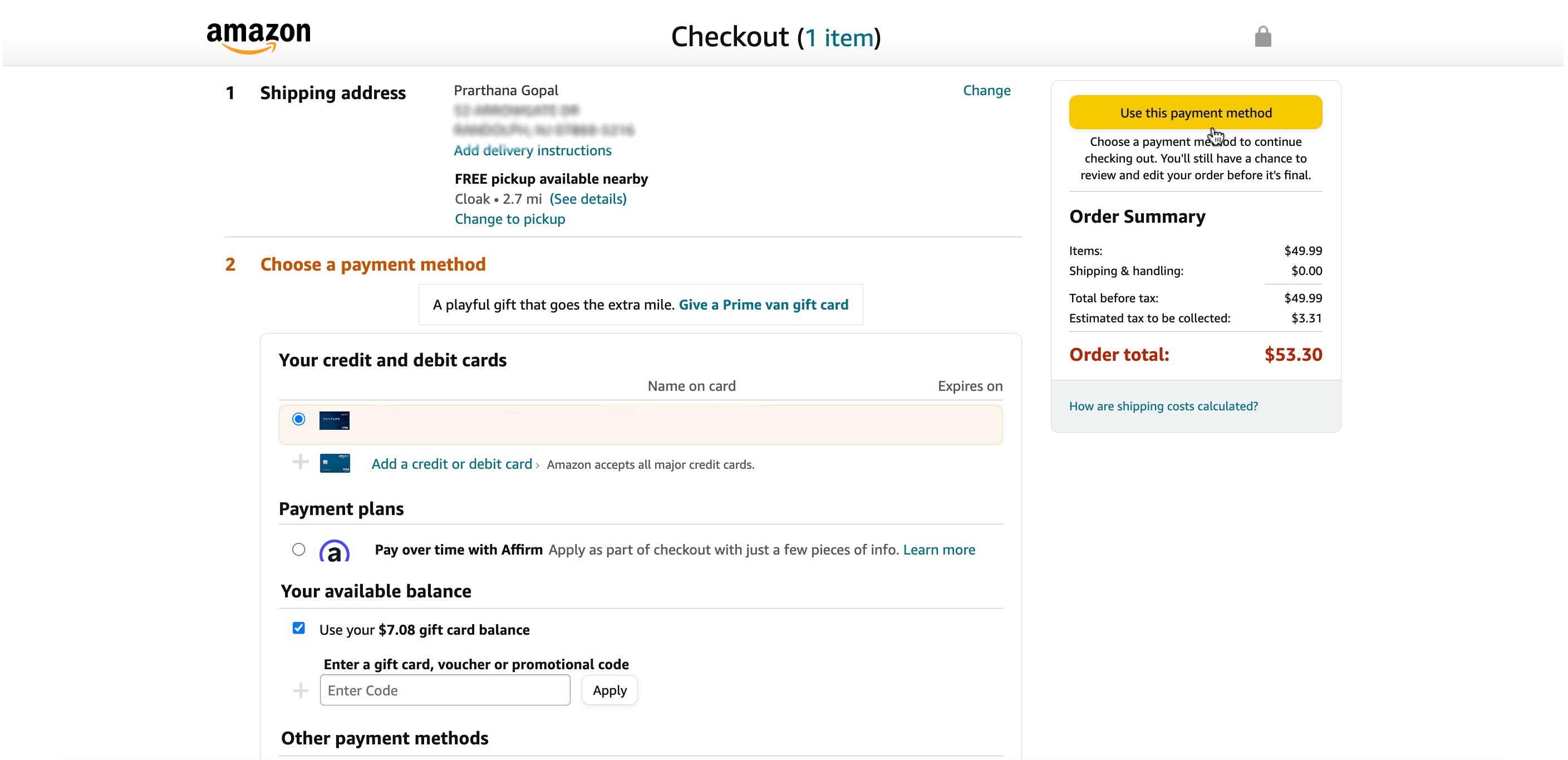
Navigate to "Your Account" and select Your Payments. Here, you will see a list of all cards and accounts linked to your Amazon profile.
- Check Expiration Dates: Look for any cards highlighted in red or showing an "Expired" tag. Even if the card number hasn't changed, the CVV (the three-digit code on the back) and the expiration date must be current.
- Update Billing Addresses: Click "Edit" on your primary card. Ensure the billing address matches the one where your bank sends your statements. Small discrepancies, like "Avenue" vs. "Ave," rarely matter, but a wrong ZIP code is a definitive deal-breaker.
- Remove Old Cards: A cluttered wallet can lead to mistakes during checkout. Remove any cards you no longer use to streamline the process.
2. Manual Re-Authorization
Once you have updated your information, you must tell Amazon to try the payment again. Amazon does not always automatically retry a failed payment the moment you update your card.
Go to Your Orders. Find the order that is currently stuck. Click on the button labeled Retry Payment Method or Change Payment Method. If you have updated your card, select it again from the list. This forces a fresh communication between Amazon’s servers and your bank, often resolving the issue instantly.
3. Contacting Your Financial Institution
If your information is correct and the payment still fails, the problem is likely on the bank’s side. In 2026, automated fraud detection systems are more aggressive than ever. A large purchase, a purchase from an unusual location, or a rapid series of small transactions can trigger a "soft block."
Call the number on the back of your card and ask specifically if there are any blocked authorizations for Amazon. Once you verify that the purchase is legitimate, the bank can whitelist the transaction, allowing you to retry the payment on the Amazon site successfully.
Technical Glitches and Platform Issues
Sometimes, the problem isn't your card or your bank; it's a technical hiccup within the Amazon ecosystem itself. While Amazon boasts incredible uptime, local server glitches or app bugs can interfere with the checkout process.
Browser and App Troubleshooting
If you are using the Amazon app and keep getting a spinning wheel or a generic "Error 500," try switching to a desktop browser. Conversely, if you are on a computer, try the app.
- Clear Cache and Cookies: Stale session data can prevent the payment gateway from loading correctly. Clearing your browser cache forces the site to load the most recent, secure version of the payment portal.
- Disable VPNs: Using a Virtual Private Network (VPN) can make it look like you are purchasing from a different country. For security reasons, Amazon’s payment processors often block transactions where the IP address location significantly differs from the billing address location.
- Update the App: Ensure you are running the latest version of the Amazon Shopping app. Updates often include critical security patches for payment processing.
Amazon Server Status
In rare cases, Amazon’s payment processing backbone may experience a regional outage. You can check third-party status monitors like Downdetector to see if other users are reporting similar issues "today." If thousands of reports are flooding in simultaneously, the best course of action is simply to wait an hour and try again once the service is restored.
Troubleshooting Specific Order Types
Payment problems can vary depending on what you are trying to buy. Amazon treats physical goods, digital content, and subscriptions differently in its backend system.
| Issue Type | Primary Cause | Solution |
|---|---|---|
| Physical Goods | Expired card or ZIP code mismatch. | Update card in "Your Payments" and retry via "Your Orders." |
| Kindle/Digital Books | 1-Click settings are outdated. | Update "1-Click" settings specifically in the "Manage Your Content and Devices" section. |
| Prime Membership | Primary card declined; no backup set. | Set up a "Backup Payment Method" in Prime membership settings. |
| AWS / Business | Credit limit reached or department block. | Contact your account administrator or check the AWS Billing Dashboard. |
| Amazon Pay (3rd Party) | Merchant-specific security flag. | Verify the merchant's status or use a different card directly on the merchant's site. |
Problems with Prime and Subscriptions
Amazon Prime memberships and "Subscribe & Save" orders often fail because they are recurring. If your card was replaced due to fraud or expiration between billing cycles, the automatic renewal will fail. Amazon usually provides a grace period, but if the payment isn't resolved, your Prime benefits (like Video or Free Shipping) may be suspended. To fix this, you must go to Account > Prime and update the payment method specifically for the membership, as this is often managed separately from your general shopping wallet.
1-Click Settings for Digital Content
One of the most confusing aspects of Amazon is that 1-Click settings for digital purchases (Kindle books, Prime Video rentals, Audible) are often independent of your default shopping cart payment method. If you can buy a toaster but can't buy an eBook, your 1-Click settings are likely the culprit. You must navigate to Content & Devices > Preferences > Payment Method to ensure your digital purchase pipeline is correctly configured.
Refund and Transaction Timing
A common source of perceived "payment problems" is the delay in refunds. If you cancelled an order because of a payment issue and are waiting for your money to return so you can try again, keep in mind the banking timelines of 2026.
- Amazon Gift Card Balance: Refunds to your Amazon balance are usually nearly instantaneous (within 2-4 hours).
- Credit/Debit Cards: These typically take 3 to 5 business days. This is not an Amazon delay; it is the time required for the banking network to process the "reversal" message and reflect it in your available balance.
- Bank Transfers: Can take up to 7-10 days depending on the institution.
If you are in a rush, it is always better to update the payment method on an existing order rather than cancelling and re-ordering, as the latter ties up your funds for several days while the original authorization hold clears.
Security and Fraud Prevention in 2026
With the advancement of AI-driven fraud, Amazon has implemented stricter checks today than in previous years. If your account is relatively new or if you are making a high-value purchase (like a high-end laptop or jewelry), Amazon may put a temporary hold on the order for manual verification.
You might receive an email asking you to verify your identity or provide proof of the billing address. Be cautious: Always ensure these emails are actually from @amazon.com. The safest way to provide this information is to log in directly to your Amazon account through a browser you know is safe—never click links in an email if you are suspicious.
FAQ: Frequently Asked Questions
Why does Amazon say "Payment Revision Needed" even though I have money?
Even with a sufficient balance, your bank may block the transaction due to a security flag, an incorrect CVV, or a mismatch in the billing ZIP code. Additionally, some banks have daily spending limits for online transactions that are lower than your total available balance. Contact your bank to confirm if they are blocking the specific request from Amazon.
Can I use multiple payment methods for one order?
Amazon allows you to split payments between an Amazon Gift Card (or account balance) and one other credit or debit card. However, you generally cannot split a single order across two different credit cards. If your primary card is declined, you must provide a single alternative card that can cover the remaining balance.
Why was I charged for an order that was cancelled?
You likely haven't been "charged," but are seeing an authorization hold. This is a temporary freeze placed on the funds by your bank to ensure the money is available when Amazon ships the item. When an order is cancelled, Amazon sends a notification to the bank to release the hold, but banks can take several business days to update your statement.
Does Amazon accept cryptocurrency or Buy Now Pay Later (BNPL) options today?
As of 2026, Amazon supports various BNPL options like Affirm and its own "Monthly Payments" on eligible items. While Amazon does not directly accept cryptocurrency (like Bitcoin), you can often use crypto-backed debit cards from providers like Coinbase or BitPay, which process through the Visa/Mastercard networks just like a traditional bank card.
What should I do if my payment was successful but the order hasn't shipped?
A successful payment (authorization) does not mean the item has shipped. Amazon typically charges the card only when the item enters the shipping process. If your order status is "Preparing for Shipment" for a long time, it usually indicates a logistics delay rather than a payment problem. Check the "Arriving by" date for the most accurate information.
Final Recommendation
If you are stuck in a loop of payment failures, the fastest solution today is to delete the current payment method from your Amazon Wallet entirely and re-add it as a "New" card. This clears out any legacy data or hidden processing errors associated with that specific card entry. If that fails, using a different card or topping up your Amazon Balance with a gift card are reliable workarounds to complete your purchase without further delay.
For persistent issues that seem account-related rather than card-related, contact Amazon Customer Service directly to ensure there are no internal "security holds" on your account that are preventing new transactions.