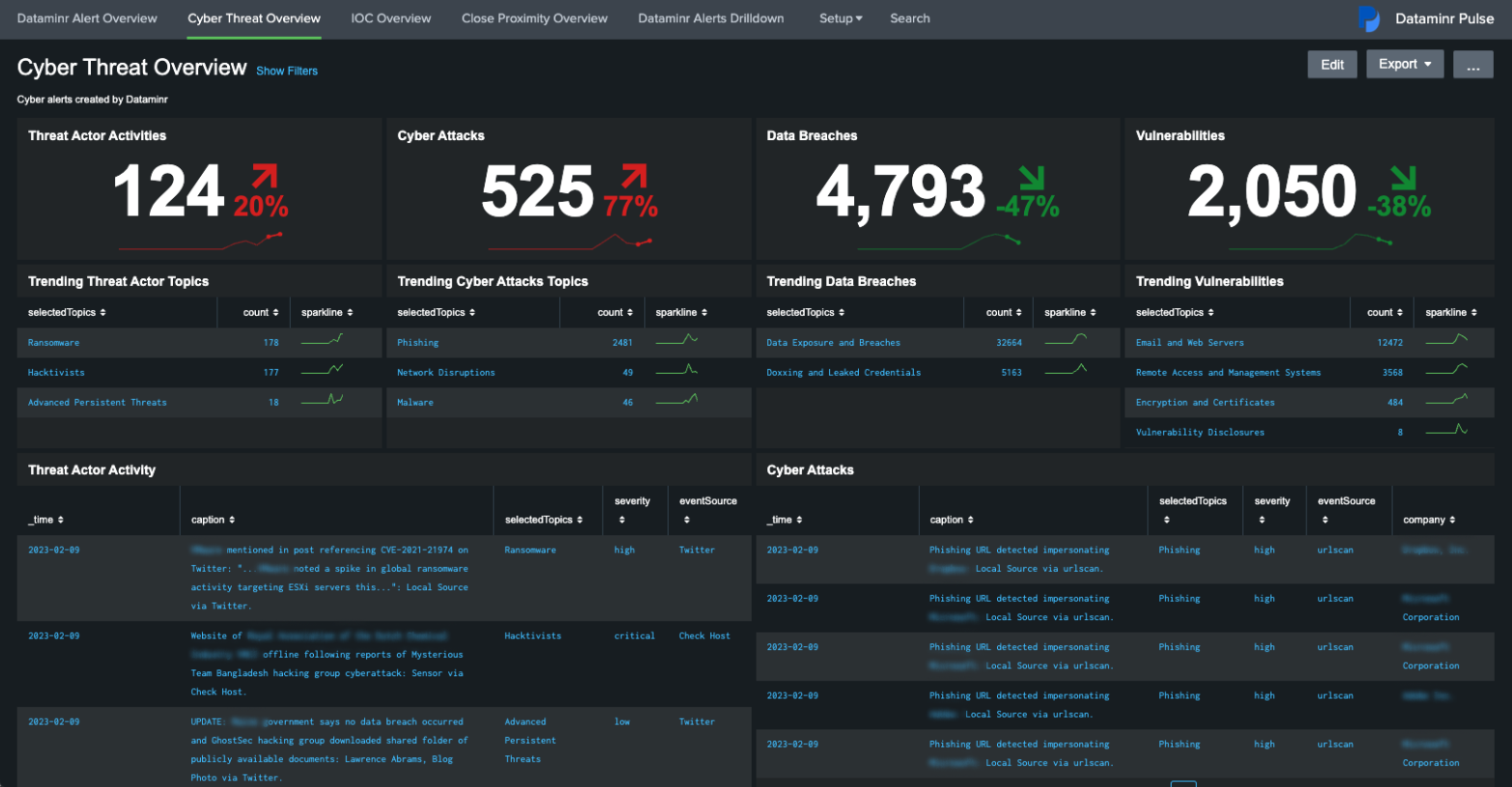
Splunk remains the premier "Data-to-Everything" platform for searching, monitoring, and analyzing machine-generated data. In 2026, it serves as a critical pillar for both massive enterprise security operations and individual developers through its tiered licensing, offering a robust Enterprise version for scale and a restricted Free version for localized testing and learning.
Understanding the Splunk Ecosystem
Splunk is a horizontal technology used for application management, security and compliance, as well as business and web analytics. Unlike traditional databases that require data to be structured before it is stored (schema-on-write), Splunk utilizes a schema-on-read architecture. This allows organizations to ingest massive amounts of raw, unstructured data and apply structure only when a search query is executed. This flexibility is what has maintained Splunk’s dominance in the market for over two decades.
The platform operates through three main functional tiers:
- Data Ingestion (Forwarders): Lightweight agents that collect data from various sources (servers, sensors, cloud buckets) and send it to the central system.
- Data Indexing (Indexers): The engine that transforms raw data into events, stores them on disk, and manages the metadata for fast retrieval.
- Data Search and Visualization (Search Heads): The user interface where Search Processing Language (SPL) is used to generate reports, dashboards, and alerts.
As of 2026, the integration with Cisco has further solidified Splunk’s position, particularly in the realm of Full-Stack Observability (FSO) and converged security operations. However, for many users, the choice between the high-cost Enterprise tier and the limited Free tier remains the most significant decision point.
Splunk Enterprise: The Standard for Modern Infrastructure
Splunk Enterprise is designed for organizations that require high availability, massive scalability, and advanced security features. It is the version that powers Global 2000 companies, providing the infrastructure necessary to ingest terabytes of data per day across distributed environments.
Scalability and High Availability
The Enterprise version is built for horizontal scaling. Through Indexer Clustering and Search Head Clustering, Splunk ensures that data is replicated across multiple nodes. If one server fails, the data remains searchable, and the system continues to ingest logs without interruption. This level of redundancy is absent in the lower tiers and is a non-negotiable requirement for mission-critical IT operations.
Advanced Security and RBAC
Security is perhaps the strongest argument for the Enterprise tier. It includes robust Role-Based Access Control (RBAC), allowing administrators to define exactly which users can see which data. For instance, a HR manager might be able to see login logs for their department, while a security analyst can see system-level kernel logs. In 2026, Enterprise also integrates deeply with Splunk Enterprise Security (ES), a premium SIEM (Security Information and Event Management) platform that uses machine learning to detect advanced persistent threats.
Alerting and Automation
Enterprise users have access to real-time alerting. When a specific condition is met—such as a 502 error spike or a brute-force login attempt—Splunk can trigger emails, execute scripts, or send webhooks to platforms like Slack or ServiceNow. This proactive stance transforms Splunk from a forensic tool into an active monitoring solution.
Splunk Free: The Gateway for Developers and Home Labs
Splunk Free is a perpetual license that allows users to index up to 500MB of data per day. While it shares the same core engine as the Enterprise version, it is intentionally limited to prevent it from being used for large-scale production environments.
Ideal Use Cases for the Free Version
The Free version is best suited for:
- Learning SPL: Students and IT professionals can practice the Search Processing Language without incurring costs.
- Home Labs: Monitoring a single home server, a network storage device (NAS), or personal web projects.
- Proof of Concept (PoC): Developers can use it to test how a specific application's logs will look and behave within Splunk before proposing a full-scale deployment.
Critical Limitations to Consider
The most significant hurdle in the Free version is the lack of User Authentication. In the Free tier, there is no login screen; anyone who can reach the IP address of the Splunk instance has full administrative access. Furthermore, it does not support alerting or distributed search. Once you hit the 500MB daily limit, Splunk will continue to allow searches, but it will stop indexing new data after several violations, effectively "locking" the ingest until the next 24-hour cycle begins.
Detailed Feature Comparison: Enterprise vs. Free
The following table outlines the technical and operational differences between the two primary Splunk offerings as they stand in 2026.
| Feature | Splunk Enterprise | Splunk Free |
|---|---|---|
| Daily Ingestion Limit | Determined by license (GB/TB/Workload) | Hard cap at 500MB/day |
| User Authentication | Multi-factor (SAML, LDAP, Active Directory) | None (No login required) |
| Alerting and Monitoring | Real-time alerts via Email, Webhooks, SMS | Not Available |
| Distributed Search | Supported (Scale to thousands of nodes) | Single Instance Only |
| Indexing Redundancy | Indexer Clustering supported | Not Available |
| Premium Apps | Supports ES, ITSI, and UBA | Most premium apps are incompatible |
| Technical Support | 24/7 Global Support via Splunk/Cisco | Community Support Only |
| Search Head Clustering | Supported | Not Available |
Technical Depth: Search Processing Language (SPL) and Data Models
Regardless of the version used, the heart of Splunk is SPL. In 2026, SPL has evolved to be more intuitive, incorporating AI-assisted "natural language to SPL" features that help junior analysts write complex queries.
A typical search command might look like this:
index=web_logs status=500 | stats count by clientip | sort - count
This simple string scans millions of rows of data to identify which IP addresses are experiencing the most server errors. Splunk’s power lies in its ability to perform this calculation in seconds because of its specialized indexing format. The software breaks data into "buckets" based on time, which allows the engine to ignore irrelevant data ranges entirely, drastically improving performance compared to traditional SQL databases.
Furthermore, Data Models in Splunk Enterprise allow for the "acceleration" of data. By pre-summarizing common search patterns, Splunk can provide dashboard visualizations for massive datasets almost instantaneously. This is a feature heavily utilized in Enterprise environments but often unnecessary for the small data volumes handled by the Free version.
Deployment and Infrastructure Requirements
Deploying Splunk requires a clear understanding of hardware IOPS (Input/Output Operations Per Second). Splunk is an IO-intensive application; the speed at which it can write and read from disk determines the overall user experience.
Hardware Prerequisites
For a standard Enterprise Indexer in 2026, the following specifications are generally recommended:
- CPU: 16 to 48 cores (Intel Xeon or AMD EPYC).
- RAM: 64GB to 128GB.
- Storage: NVMe SSDs are highly recommended for the "Hot" and "Warm" buckets where active searching occurs.
- Network: 10Gbps or higher for data replication between nodes.
In contrast, Splunk Free can run comfortably on a modern laptop, a Raspberry Pi 5 (with sufficient RAM), or a small Virtual Private Server (VPS) with 4GB of RAM and 2 CPU cores.
Cloud vs. On-Premise
Splunk Enterprise is available as Splunk Cloud, a managed SaaS (Software as a Service) offering. This removes the burden of managing underlying hardware and provides an "always-on" environment. Splunk Free is only available as a standalone software installation (on-premise or your own cloud instance) and is not offered as a managed service by Splunk.
Pricing Structures in 2026
Splunk's pricing has historically been complex. In 2026, the company primarily uses two models:
- Workload Pricing: This model charges based on the amount of "Compute Capacity" consumed by your searches rather than the raw volume of data ingested. This is often preferred by organizations with high data volumes but infrequent search requirements.
- Ingest Pricing: The traditional model where you pay for the number of Gigabytes indexed per day. This remains popular for security use cases where every log must be searchable at all times.
Splunk Free, of course, remains at a $0 price point, but users should be wary of the hidden costs: the time spent managing the instance without official support and the hardware costs of the server running the software.
Troubleshooting Common Issues
Whether using the Enterprise or Free version, users often encounter similar roadblocks.
- License Master Failures: In Enterprise environments, if the License Master goes offline, the entire cluster may eventually stop indexing. Administrators must ensure the License Master is highly available.
- Bucket Rolling Issues: If storage fills up, Splunk will stop indexing. In the Free version, this is usually caused by failing to set a "frozen" path for old data.
- Search Concurrency: If too many users run heavy searches at once, the Search Head can become unresponsive. Enterprise users can resolve this by adding more Search Heads to a cluster; Free users are limited to optimizing their SPL to be more efficient.
Comparing Splunk to Alternatives
While Splunk is a leader, it is not the only player in 2026.
- ELK Stack (Elasticsearch, Logstash, Kibana): Often seen as the primary competitor. ELK is open-source (in its basic form) and can be more cost-effective for companies with massive engineering teams who can manage the complexity of the stack.
- Datadog: A strong contender in the cloud-native observability space. Datadog is often easier to set up for APM (Application Performance Monitoring) but lacks the deep "historical log" forensic capabilities that Splunk provides.
- Grafana Loki: A newer approach that focuses on cost-efficiency by not indexing the full text of logs, only metadata. This is excellent for high-volume logs where you only need to search by labels.
Frequently Asked Questions
Can I use Splunk Free for a small business?
Technically, yes, but it is not recommended. The lack of user authentication means any employee on the network could potentially access or delete data. Additionally, the 500MB limit is reached very quickly—even a few active web servers can exceed this in hours.
Does Splunk Free ever expire?
The Splunk Free license is perpetual. However, it starts as a 60-day Enterprise Trial. Once the trial expires, you must manually switch the license to "Free" in the settings. You will lose the Enterprise features, but the 500MB daily indexing capability remains indefinitely.
How does the Cisco acquisition affect Splunk in 2026?
The acquisition has led to deeper integration between Splunk and Cisco's networking hardware. We now see "Native Telemetry" where Cisco switches send data directly to Splunk without the need for intermediate forwarders, making enterprise deployments faster and more efficient.
Can I upgrade from Splunk Free to Enterprise without losing data?
Yes. Upgrading is a simple matter of installing a new license key. All the data previously indexed under the Free license will remain in the buckets and become accessible via the new Enterprise features like alerting and RBAC.
What happens if I go over the 500MB limit on the Free version?
Splunk provides a "grace period" or a certain number of "violations" (typically five within a 30-day window). If you exceed the limit too many times, the search capability remains, but indexing is blocked until you resolve the license status or the rolling window resets.
Is SPL difficult to learn for beginners?
SPL has a learning curve, but it follows a logical pipe-delimited structure similar to Unix/Linux commands. For those familiar with SQL, the transition is straightforward, and the AI-assisted tools available in 2026 have significantly lowered the barrier to entry for new users.
Final Recommendation
For organizations requiring a "single pane of glass" for security and operations, Splunk Enterprise is the only viable choice. Its ability to scale, provide high-availability clusters, and secure data via RBAC makes it worth the significant investment.
For individual researchers, students, or home-lab enthusiasts, Splunk Free remains an excellent educational tool. While the limitations are strict, they provide a sufficient environment to master the search language and understand the power of machine data analytics. The best next step for any potential user is to download the trial version, ingest a small local dataset, and experiment with SPL to see if the platform's insights justify the eventual move to a paid tier.