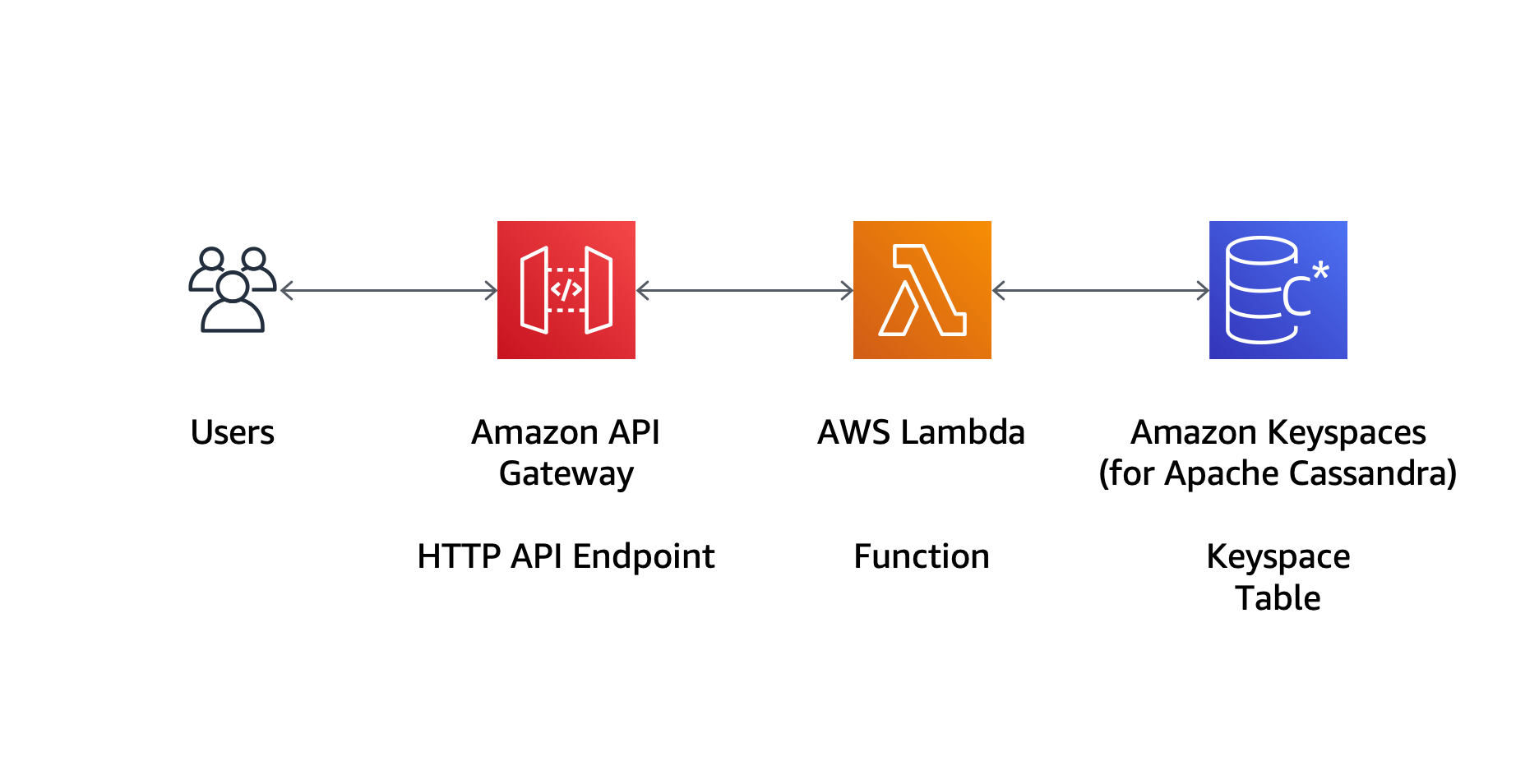
The relationship between Amazon and Cassandra involves two primary paths: running the open-source Apache Cassandra database on Amazon EC2 instances or using Amazon Keyspaces (for Apache Cassandra), a fully managed, serverless database service. Selecting the right approach requires balancing the need for granular control over database internals against the operational efficiency of a serverless environment that automates scaling and maintenance.
Apache Cassandra remains one of the most resilient NoSQL databases available, prized for its linear scalability and high availability. When deployed within the Amazon Web Services (AWS) ecosystem in 2026, it serves as a cornerstone for global-scale applications. However, the architectural "fork in the road" between self-managing your clusters and utilizing a managed service is the most consequential decision a lead architect will make.
Navigating the Two Paths: EC2 vs. Amazon Keyspaces
To understand how to integrate Cassandra with Amazon's infrastructure, one must first distinguish between the Infrastructure-as-a-Service (IaaS) model and the Platform-as-a-Service (PaaS) model.
Self-Managed Cassandra on Amazon EC2
Running Apache Cassandra on Amazon Elastic Compute Cloud (EC2) provides the highest level of flexibility. You are responsible for choosing the instance types, configuring the operating system, tuning the Java Virtual Machine (JVM), and managing the compaction strategies. This path is ideal for organizations with dedicated Database Reliability Engineers (DBREs) who require specific Cassandra versions, custom plugins, or deeply optimized storage configurations that managed services do not support.
Amazon Keyspaces (for Apache Cassandra)
Amazon Keyspaces is a scalable, highly available, and managed Apache Cassandra–compatible database service. It is "serverless," meaning you do not provision servers, patch software, or worry about re-partitioning data as it grows. It uses the Cassandra Query Language (CQL) API, allowing you to use existing drivers and tools. This is the preferred route for teams that want to minimize "undifferentiated heavy lifting" and focus on application development rather than cluster health.
Technical Deep Dive: Self-Managed Cassandra on EC2
Deploying Cassandra on EC2 in 2026 demands a sophisticated understanding of AWS hardware. Cassandra’s performance is heavily dependent on disk I/O and memory.
Instance Selection and Storage Architecture
For production Cassandra workloads, the i4i and i5 instance families are the gold standard. These instances feature local NVMe storage, which provides the low-latency, high-throughput I/O that Cassandra’s Log-Structured Merge-tree (LSM) storage engine requires.
- Ephemeral vs. Persistent Storage: While local NVMe (Instance Store) is incredibly fast, it is ephemeral. If the instance is stopped or fails, the data is lost. Therefore, you must rely on Cassandra's native replication (typically a Replication Factor of 3) to ensure durability.
- EBS Volumes: For workloads where instance-store volatility is a concern, Amazon EBS gp3 or io2 Block Express volumes are used. In 2026, gp3 provides a cost-effective balance, while io2 is reserved for mission-critical nodes requiring sub-millisecond latency and guaranteed IOPS.
Networking and Multi-AZ Deployment
Cassandra is designed to be rack-aware. Within AWS, this translates to Availability Zone (AZ) awareness. By using the GossipingPropertyFileSnitch, you can map Cassandra "racks" to AWS AZs. This ensures that even if an entire AWS data center goes offline, your data remains available from nodes in other AZs.
The Role of AWS Graviton
By 2026, AWS Graviton processors (ARM-based) have become the preferred choice for Cassandra clusters. Running Cassandra on Graviton-based instances (like the R8g series) typically offers up to 40% better price-performance compared to traditional x86 instances, largely due to how the JVM handles multi-threading on ARM architecture.
Understanding Amazon Keyspaces: The Managed Alternative
Amazon Keyspaces abstracts the underlying infrastructure, providing a CQL-compatible interface that behaves like Cassandra but operates on top of Amazon’s internal distributed storage systems.
Core Benefits of Keyspaces
- Serverless Scaling: Unlike a traditional Cassandra cluster where you must add nodes and "rebalance" the ring (a process that can take days for large datasets), Keyspaces scales throughput up or down automatically.
- Point-in-Time Recovery (PITR): Keyspaces offers integrated backup solutions that allow you to restore data to any second within the last 35 days. Implementing this manually on EC2 requires complex scripting with tools like Cassandra Reaper or Medusa.
- IAM Integration: While open-source Cassandra uses its own internal role-based access control (RBAC), Keyspaces integrates directly with AWS Identity and Access Management (IAM). This allows for unified security policies across your entire AWS stack.
Operational Constraints
It is vital to recognize that Keyspaces is compatible with Cassandra, but it is not identical to it.
- Version Lag: Keyspaces typically supports specific versions of the CQL API (e.g., 3.11 or 4.0). If your application relies on bleeding-edge features of Apache Cassandra 5.x (such as Storage Attached Indexing or specific vector search capabilities), you must verify Keyspaces support for those specific features.
- No "Tunable" Compaction: In a self-managed environment, you can choose between SizeTiered, Leveled, or TimeWindowCompactionStrategy. In Keyspaces, Amazon manages the storage layout entirely; you lose the ability to tune compaction for specific write/read patterns.
Comparative Analysis: Costs and Capabilities
Choosing between these two "Amazon and Cassandra" implementations often comes down to the total cost of ownership (TCO).
| Feature | Self-Managed (EC2) | Amazon Keyspaces |
|---|---|---|
| Operational Effort | High (Patching, Tuning, Backups) | Very Low (Fully Managed) |
| Scalability | Manual / Scripted Node Addition | Automatic & Serverless |
| Cost Model | Hourly Instance Rate + EBS | Pay-per-request or Provisioned |
| Customization | Full control over cassandra.yaml |
Limited to CQL-level configs |
| Recovery | Manual Snapshots/Reaper | Native Point-in-Time Recovery |
| Max Throughput | Limited by Instance Type | Virtually Unlimited |
| Encryption | Manual (LUKS/Application Level) | Always encrypted at rest (KMS) |
Architecture and Data Modeling Best Practices
Regardless of whether you choose EC2 or Keyspaces, the fundamentals of Cassandra data modeling remain the same. Cassandra is a query-first database. Unlike relational databases where you normalize data, in Cassandra, you design your tables specifically to satisfy your application’s queries.
The Partition Key is King
In the AWS environment, an imbalanced partition key leads to "hot spots." On EC2, this results in one instance reaching 100% CPU while others sit idle. In Keyspaces, this can lead to throughput throttling. You must ensure that your partition keys have high cardinality to distribute data evenly across the underlying physical storage.
Consistency Levels and Latency
AWS provides various networking tiers. To achieve the lowest latency:
- Use LOCAL_QUORUM: This ensures strong consistency within a single AWS Region while avoiding the high latency of cross-region round-trips.
- VPC Endpoints: For Amazon Keyspaces, always use Interface VPC Endpoints (powered by AWS PrivateLink). This keeps your database traffic within the Amazon network, reducing exposure to the public internet and lowering latency.
Migration Strategies: Moving to Amazon
If you are currently running Cassandra on-premises and wish to move to Amazon, the transition path depends on your target.
Migrating to EC2
The most common method is the "Lift and Shift" approach. By setting up a hybrid cluster where AWS nodes are part of the same Cassandra ring as your on-prem nodes, you can stream data using Cassandra's native gossip protocol. Once the AWS nodes are synchronized, you can decommission the on-prem nodes. This results in zero downtime.
Migrating to Keyspaces
Migrating to Keyspaces is more complex because you cannot simply "add" Keyspaces to an existing gossip-based ring.
- Offline Migration: Use the Amazon Keyspaces Helper or the
cqlshCOPY command for smaller datasets. - Online Migration: This requires a dual-write architecture. Your application writes to both your legacy Cassandra cluster and Amazon Keyspaces simultaneously. You then perform a one-time backfill of historical data using a tool like AWS Glue or Apache Spark.
Performance Tuning and Monitoring
In 2026, monitoring is no longer just about "is the node up?" It is about observability into the storage engine performance.
- CloudWatch Integration: For Keyspaces, metrics like
ConsumedReadCapacityUnitsandThrottledEventsare available natively. For EC2, you should install the CloudWatch Agent to collect JMX metrics from the Cassandra process. - Compaction Debt: On EC2, keep a close eye on compaction debt. If your
PendingTasksmetric spikes, your read latency will degrade as Cassandra is forced to check too many SSTables for a single query. - Java Garbage Collection: For self-managed clusters, the Z Garbage Collector (ZGC) or G1GC are standard in 2026. Tuning the
-Xmxand-Xmssettings to match your EC2 instance's RAM (typically leaving 50% for the OS page cache) is critical for stability.
Security Considerations
Security in the Amazon and Cassandra ecosystem is a shared responsibility.
- Encryption in Transit: Always use TLS/SSL for client-to-node and node-to-node communication. For Keyspaces, this is mandatory. For EC2, you must generate and manage your own certificates (often using AWS Certificate Manager Private CA).
- Encryption at Rest: Use AWS Key Management Service (KMS). On EC2, you can use encrypted EBS volumes. In Keyspaces, encryption is integrated by default.
- VPC Security Groups: Limit access to the Cassandra ports (7000 for inter-node, 9042 for CQL) to specific CIDR blocks or security group IDs. Never leave port 9042 open to the world.
Frequently Asked Questions
Is Amazon Keyspaces 100% compatible with Apache Cassandra?
No. Amazon Keyspaces supports the most commonly used CQL 3.11 and 4.0 features, but it does not support certain advanced features like User-Defined Functions (UDFs), User-Defined Types (UDTs) in some regions, or certain older compaction-specific commands. It is essential to test your specific schema against the service before committing to a migration.
How do I handle backups for Cassandra on EC2?
The industry standard in 2026 is to use EBS Snapshots in combination with a tool like Cassandra Reaper. You should take a snapshot of all nodes simultaneously (or as close as possible). To restore, you would provision new instances from those snapshots and perform a "refresh" of the data to rebuild the ring state.
Which is cheaper: EC2 or Keyspaces?
EC2 is generally cheaper for high-volume, steady-state workloads where you can utilize Reserved Instances or Savings Plans and have the staff to manage it. Keyspaces is more cost-effective for unpredictable or low-to-medium volume workloads where the cost of human operations (DBA time) outweighs the premium paid for the serverless abstraction.
Can I run Cassandra on Amazon EKS (Kubernetes)?
Yes. Many organizations in 2026 use the k8ssandra-operator to run Cassandra on Amazon Elastic Kubernetes Service (EKS). This provides a middle ground: you still manage the database internals, but Kubernetes handles the orchestration, automated restarts, and scaling of the underlying pods.
Does Amazon offer a "Managed Cassandra" that isn't serverless?
No. Amazon's only first-party managed service for Cassandra is Keyspaces. If you want a managed but non-serverless experience, you would need to look at third-party providers on the AWS Marketplace, such as DataStax Astra DB or Aiven.
Final Recommendation
For organizations starting a new project in 2026, Amazon Keyspaces should be the default choice. The speed to market and lack of operational overhead provide a massive advantage for most modern application development cycles.
However, if your application requires sub-millisecond tail latency, uses custom Cassandra extensions, or processes petabytes of data with a very predictable read/write pattern, the cost and performance optimizations available through a self-managed cluster on i4i/i5 EC2 instances remain unparalleled. In these cases, investing in a robust automation framework (like Ansible or Terraform) to manage your EC2-based Cassandra nodes is the best path forward.