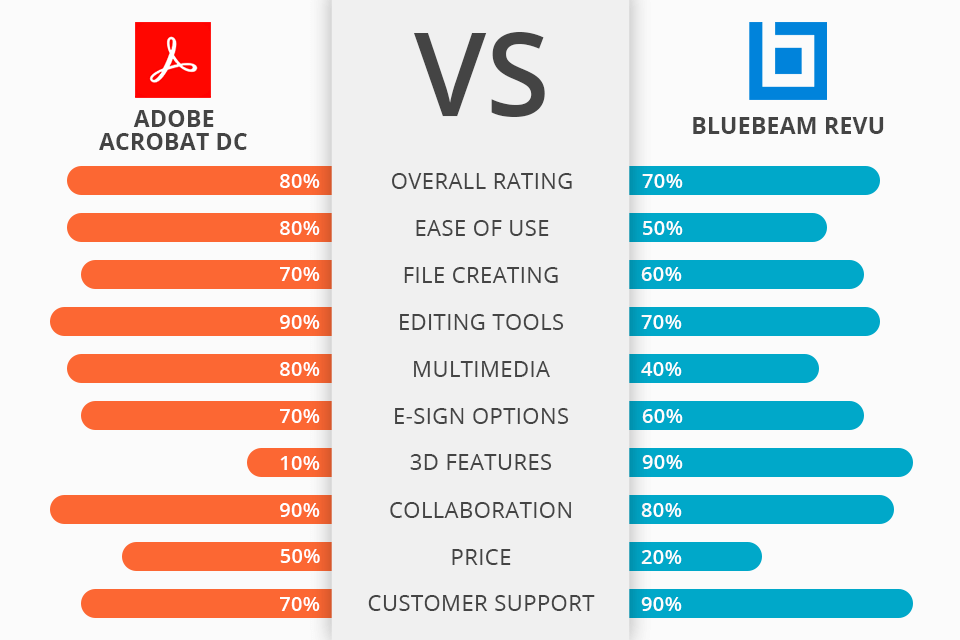
Choosing between Adobe Acrobat and Bluebeam depends primarily on your industry and specific technical requirements. Adobe Acrobat is the premier solution for general business, legal, and administrative PDF management, emphasizing document security and accessibility. Conversely, Bluebeam Revu is a specialized powerhouse designed for the architecture, engineering, and construction (AEC) industries, focusing on design reviews, quantity takeoffs, and technical markups.
In the landscape of 2026, the reliance on digital documentation has moved beyond simple viewing to complex, collaborative environments. While both Adobe Acrobat and Bluebeam Revu function as PDF editors, their underlying philosophies differ significantly. One is built for the global workforce, and the other is precision-engineered for the technical drafting table. Understanding the nuances of their feature sets is essential for organizations looking to optimize their software spend and operational efficiency.
The Core Philosophy: Universal Design vs. Industry Specialization
Adobe Acrobat is the progenitor of the PDF format. Its development has always focused on universality and compatibility. Whether you are a legal professional preparing a discovery motion or a marketing executive finalizing a brochure, Acrobat provides a standardized environment. Its primary objective is to ensure that a document looks and behaves the same way on every device, while offering robust tools for OCR (Optical Character Recognition), digital signatures, and accessibility compliance (WCAG).
Bluebeam Revu, owned by the Nemetschek Group, targets a specific niche: the AEC sector. It treats the PDF not just as a document, but as a digital representation of a physical blueprint or drawing. Bluebeam’s strength lies in its ability to handle large-scale technical drawings with precision. It allows users to calibrate scales, perform measurements directly on the document, and manage thousands of comments through a metadata-rich markup list. For a project manager or a civil engineer, Bluebeam is less of a word processor and more of a technical workstation.
Feature Set Comparison: Markup and Editing Capabilities
Adobe Acrobat: The King of Document Flow
Acrobat Pro excels in text-based editing and document assembly. If you need to modify a typo in a finalized report, rearrange pages in a 500-page manual, or redact sensitive information from a legal filing, Acrobat is remarkably intuitive.
- Advanced OCR: Adobe’s OCR engine remains a benchmark for converting scanned images into searchable, editable text. This is critical for archival purposes and data extraction in legal and medical fields.
- Forms and Signatures: With native integration into Adobe Acrobat Sign, the software manages complex e-signature workflows, including tracking, reminders, and legal verification.
- Accessibility Tools: Acrobat provides a comprehensive suite of tools to ensure PDFs are accessible to people with disabilities, a requirement for many government and educational contracts.
Bluebeam Revu: Precision for Technical Professionals
Bluebeam’s markup tools are fundamentally different because they are metadata-driven. Every line, cloud, or callout placed on a drawing carries information such as the author, date, and—most importantly—scale.
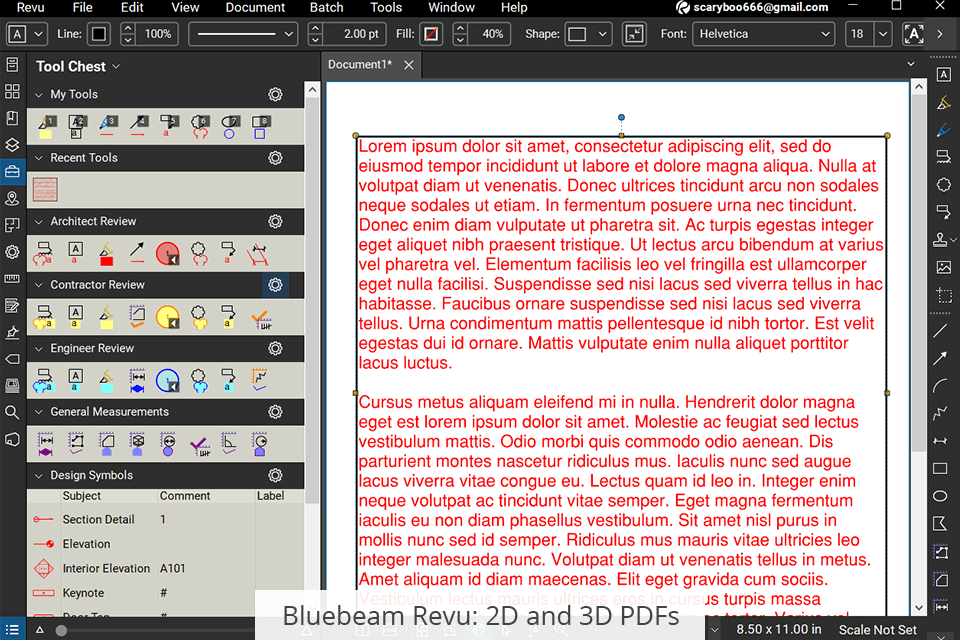
- The Tool Chest: This is Bluebeam’s standout feature. Users can save custom markups and symbols into a "Tool Chest" and share them across an entire team. This ensures that every architect and contractor uses the exact same symbols for "Electrical" or "HVAC," maintaining consistency across project phases.
- Measurement and Takeoffs: Bluebeam allows users to calibrate a drawing to a specific scale (e.g., 1/4" = 1'). Once calibrated, you can measure lengths, areas, and volumes. This data can then be exported to Excel for cost estimation, a process known as "quantity takeoff."
- VisualSearch: Unlike standard text search, Bluebeam can search for visual symbols throughout a document set. If you need to find every instance of a specific light fixture symbol across 200 blueprints, VisualSearch can identify them automatically.
Collaboration Environments: Adobe Cloud vs. Bluebeam Studio
In 2026, real-time collaboration is no longer a luxury; it is a requirement. Both platforms have evolved their cloud ecosystems to facilitate remote work.
Adobe Acrobat’s "Share for Review"
Adobe utilizes a web-based review system. A host can share a link with stakeholders who can then comment on the PDF via a browser without needing to own a copy of Acrobat. This is ideal for asynchronous collaboration where speed and ease of access are prioritized. The feedback is centralized, allowing the document owner to resolve comments in real-time within the desktop application.
Bluebeam Studio: Real-Time Project Sessions
Bluebeam Studio is a more robust environment designed for synchronous collaboration. It is divided into "Projects" (document management) and "Sessions" (real-time collaboration). In a Studio Session, multiple team members can open the same document simultaneously and see each other's markups as they are being drawn. A permanent record of every action is kept in a transcript, which is invaluable for accountability in complex construction projects. Bluebeam Studio is often cited as the decisive factor for engineering firms that must coordinate between office-based designers and field-based contractors.
Performance and Technical Specifications
When handling large files, the performance of the software is critical. Technical drawings (especially those exported from CAD software like AutoCAD or Revit) can contain thousands of vector elements.
- Rendering Engines: Bluebeam utilizes a high-performance rendering engine specifically optimized for vector graphics. This means that zooming into a complex architectural detail in Bluebeam is often smoother than in Acrobat, which may experience "checkerboarding" or lag when reloading complex layers.
- File Sizes: Adobe Acrobat is generally better at file optimization. Its "PDF Optimizer" allows for granular control over image downsampling and font embedding, which is essential for documents intended for web distribution or email. Bluebeam files can become quite heavy due to the amount of metadata attached to markups.
Pricing and Licensing Models in 2026
Both companies have transitioned to subscription-only models. This shift, which began several years prior to 2026, ensures that users always have access to the latest security updates and cloud features.
| Feature | Adobe Acrobat Pro | Bluebeam Revu (Core/Complete) |
|---|---|---|
| Primary Industry | General Business, Legal, HR | AEC (Arch., Eng., Construction) |
| Markup Logic | Basic text and drawing | Metadata-rich, scale-aware |
| Measurement Tools | Basic distance/perimeter | Advanced Area, Volume, Takeoffs |
| OCR Technology | High-precision, multi-language | Standard technical OCR |
| Real-time Collab | Web-based Share for Review | Bluebeam Studio (Sessions) |
| E-Signatures | Acrobat Sign (Full Workflow) | Basic Signatures (Digital IDs) |
| OS Compatibility | Windows, macOS, Mobile, Web | Windows (Optimized), iPad |
| 3D PDF Support | Standard viewing/measuring | Advanced 3D interaction |
Note: Pricing as of 2026 typically follows a tiered monthly or annual per-user structure. Bluebeam Revu is generally positioned at a higher price point for its "Complete" tier due to the advanced takeoff and automation features.
User Interface and Learning Curve
Adobe Acrobat benefits from a familiar interface that aligns with the rest of the Adobe Creative Cloud. Most users can become proficient in Acrobat within a few hours. The layout is clean, with tools tucked away in a right-hand pane, leaving plenty of room for the document itself.
Bluebeam Revu has a significantly steeper learning curve. The interface is dense, filled with icons, panels, and tabs. However, this density is intentional. For a power user, having the Markups List, the Tool Chest, and the Properties panel all visible at once is a major productivity booster. It is a "command center" approach rather than a "minimalist" one. Firms adopting Bluebeam often require dedicated training sessions to ensure staff are utilizing the automation features correctly.
Document Security and Compliance
Security is a cornerstone of both platforms, but they focus on different aspects of protection.
- Adobe Acrobat: Offers industry-leading redaction tools. It doesn't just "black out" text; it removes the underlying metadata and pixel data entirely. It also supports password protection, 256-bit AES encryption, and sophisticated permission sets (preventing printing or copying).
- Bluebeam Revu: Focuses on document integrity. It uses Digital IDs and "Certify" features to ensure that once a drawing is approved, it cannot be altered without breaking the digital seal. This is crucial for engineering stamps and municipal plan submittals.
Which Should You Choose?
The decision between Adobe Acrobat and Bluebeam Revu should be based on the nature of your content rather than just the price.
Choose Adobe Acrobat if:
- Your primary work involves text-heavy documents, forms, and contracts.
- You require high-end OCR for archival or legal discovery.
- You need a tool that works seamlessly across Windows and macOS.
- Your organization relies heavily on standardized e-signature workflows (Acrobat Sign).
- You provide documents to the public and must meet strict accessibility (ADA/WCAG) standards.
Choose Bluebeam Revu if:
- You work with blueprints, CAD exports, or technical drawings.
- You perform quantity takeoffs or need to calculate materials (area, volume, etc.).
- You require a collaborative environment where multiple people mark up the same drawing at the same time.
- You want to standardize markups and symbols across a large project team.
- You manage complex document sets where "Batch Link" or "VisualSearch" can save hours of manual navigation.
Frequently Asked Questions
Can I use Bluebeam on a Mac in 2026?
As of 2026, Bluebeam Revu remains primarily optimized for Windows. While Bluebeam has expanded its browser-based "Bluebeam Cloud" features to allow Mac users to view and mark up documents, the full-featured desktop application is not natively available for macOS. Mac users in the AEC space often use Parallels or similar virtualization software, or they opt for Adobe Acrobat if specialized AEC tools are not the priority.
Is Bluebeam Revu compatible with Adobe Acrobat?
Yes. Both applications adhere to the ISO 32000-2 standard for PDF files. You can open a PDF created in Acrobat using Bluebeam and vice versa. However, specialized features like Bluebeam’s "Tool Chest" symbols or Acrobat’s interactive form fields may behave differently or become "flat" if the specific software features aren't supported by the other application.
Does Adobe Acrobat have measurement tools?
Yes, Adobe Acrobat Pro includes a "Measure" tool that can calculate distance, perimeter, and area. However, it lacks the advanced "calibration" and "scaling" features of Bluebeam. For example, Acrobat cannot automatically compensate for different scales on the same page or link measurement data to a live cost-estimation spreadsheet as effectively as Bluebeam.
Which software is better for legal professionals?
Adobe Acrobat is the clear winner for the legal industry. Its Bates Numbering feature, robust redaction capabilities, and integration with legal document management systems make it the industry standard. Bluebeam’s AEC-centric tools offer little benefit for the typical legal workflow.
Can I buy a perpetual license for either software?
By 2026, both Adobe and Bluebeam have fully embraced the SaaS (Software as a Service) model. Perpetual licenses (one-time purchases) are no longer available for current versions of Adobe Acrobat Pro or Bluebeam Revu. Access is granted through monthly or annual subscriptions, which include cloud storage and regular feature updates.
Final Recommendation
For most general business users, Adobe Acrobat Pro remains the most logical and cost-effective choice. Its ubiquity ensures that your documents and forms will work for everyone, everywhere. However, if your professional life revolves around "the plan set," Bluebeam Revu is not just an alternative; it is an essential tool. The time saved through its Tool Chest and Studio Sessions usually pays for the subscription cost within the first few weeks of a major project.