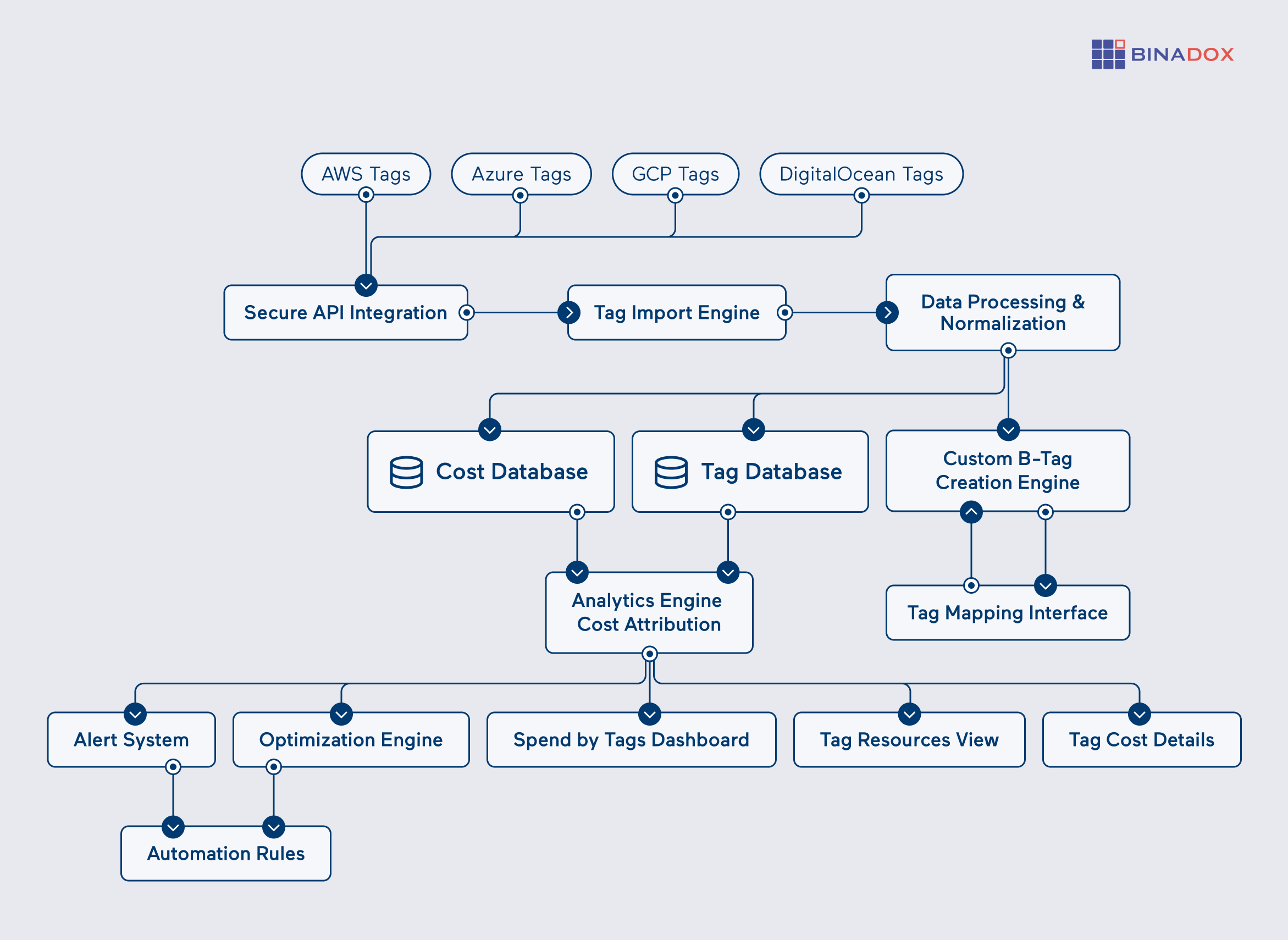
Asset tagging in the cloud is the systematic practice of attaching metadata labels to cloud-based resources—such as virtual machines, storage buckets, databases, and networking components—to categorize them by ownership, environment, cost center, security level, or operational status. This practice forms the bedrock of modern cloud governance, cost management, and security posture enforcement.
Managing infrastructure in dynamic, scalable cloud environments presents challenges that traditional, on-premises asset management methods cannot solve. When organizations spin up hundreds or thousands of temporary workloads daily, manual tracking becomes impossible. Cloud asset tagging bridges this visibility gap by transforming raw infrastructure into organized, queryable portfolios. By embedding descriptive key-value pairs directly into cloud resources, organizations can automate cost allocation, streamline compliance audits, optimize resource utilization, and enforce security policies at scale across multi-cloud and hybrid architectures.
Understanding the Fundamentals of Cloud Asset Tags
At its core, a cloud asset tag is a simple metadata label consisting of a key and a value (for example, Environment: Production or Owner: Data-Science-Team). Despite their structural simplicity, these tags carry immense operational weight. Major cloud service providers (CSPs) like Amazon Web Services (AWS), Microsoft Azure, and Google Cloud Platform (GCP) provide native mechanisms to apply, manage, and audit these tags across their respective ecosystems.
The primary function of asset tagging is to introduce context to infrastructure. Without tags, a cloud environment is merely a collection of anonymous IP addresses, resource IDs, and storage volumes. Adding context enables cloud financial management (FinOps) teams to attribute cloud spend to specific business units, allows security analysts to quickly isolate assets handling sensitive data, and helps DevOps engineers identify which workloads are safe to terminate during maintenance windows.
Key-Value Architecture
Cloud providers implement tagging through key-value pairs, though specific syntax rules and limitations vary by platform:
- Keys: The category or attribute name (e.g.,
CostCenter,Project,DataClassification). Keys are generally case-insensitive in some platforms and case-sensitive in others, requiring strict naming conventions. - Values: The specific assignment within that category (e.g.,
CC-8492,Project-Athena,Confidential). Values provide the granular detail needed for filtering and automation.
Understanding how CSPs handle these pairs under the hood is critical. For instance, AWS allows up to 50 tags per resource by default, whereas Azure permits up to 50 tags per resource and resource group combination, with strict character limits on both keys and values.
Core Benefits and Business Value
Implementing a disciplined cloud asset tagging strategy yields compounding returns across financial, operational, and security domains. Organizations that transition from ad-hoc labeling to enterprise-grade tagging governance typically experience immediate improvements in operational efficiency.
Cloud Financial Management (FinOps) and Cost Allocation
In legacy data centers, IT infrastructure costs were largely static, tied to capital expenditures (CapEx) for hardware. Cloud computing operates on an operational expenditure (OpEx) model, where costs fluctuate continuously based on usage. Without proper tagging, finance teams receive monolithic monthly bills from cloud providers with no clear way to determine which department, product line, or feature generated specific expenses.
Asset tagging enables accurate chargeback and showback accounting. By tagging resources with cost centers and business units, organizations can:
- Identify idle, underutilized, or forgotten resources that continue to incur costs.
- Allocate shared infrastructure costs proportionally based on consumption tags.
- Generate granular cost-visibility dashboards using native tools like AWS Cost Explorer, Azure Cost Management, or GCP Billing Reports.
Security, Compliance, and Risk Mitigation
Security teams rely heavily on asset context to prioritize vulnerabilities and respond to incidents. If a critical zero-day vulnerability affects a specific database engine, security engineers must immediately know every instance running that engine across the entire cloud estate.
With appropriate tags denoting data classification and compliance scope (e.g., Compliance: GDPR, DataSensitivity: PII), organizations can:
- Automate vulnerability scanning routines to prioritize high-risk workloads holding regulated data.
- Restrict access permissions using attribute-based access control (ABAC) policies tied to resource tags.
- Ensure that backup and disaster recovery policies automatically apply to critical production assets while excluding transient development environments.
Developing a Standardized Tagging Taxonomy
A chaotic tagging strategy is often worse than no tagging at all. If one team uses Environment: Prod, another uses env: production, and a third uses EnvironmentName: P, automated systems will fail to parse the data correctly, leading to broken billing reports and security blind spots. Establishing a mandatory, organization-wide taxonomy resolves this friction.
Mandatory vs. Optional Tags
An effective tagging taxonomy categorizes metadata into distinct tiers. Not every tag needs to be mandatory for every resource, but core administrative tags must be enforced at creation.
- Mandatory Operational Tags: Required for every resource created in the cloud environment. Examples include
Environment(Dev, Test, Staging, Prod),Owner(Email or Slack handle of the responsible team), andCostCenter(Internal financial tracking code). - Mandatory Security Tags: Required for resources handling data. Examples include
DataClassification(Public, Internal, Confidential, Restricted) andComplianceScope(PCI, HIPAA, SOC2). - Optional Descriptive Tags: Useful for ad-hoc troubleshooting or project tracking. Examples include
TicketNumber(Jira ID for a temporary migration task) orApplicationName.
Naming Conventions and Standardization Rules
Consistency requires strict adherence to formatting rules. When designing a tagging taxonomy, engineering leaders should define:
- Case Sensitivity: Decide whether keys and values will be strictly lowercase (recommended to avoid human error) or capitalized.
- Special Characters: Restrict allowable characters to alphanumeric strings, hyphens, and underscores, avoiding spaces or punctuation that can break API queries and scripting tools.
- Value Enumeration: Limit allowable values for critical keys. For instance, the
Environmentkey should only accept a predefined list:dev,staging,prod.
| Tag Key | Purpose | Allowed Values | Enforcement Level |
|---|---|---|---|
Environment |
Identifies the deployment lifecycle stage | dev, test, staging, prod |
Mandatory |
CostCenter |
Maps resources to internal financial accounting | Standardized alphanumeric codes (e.g., CC-1042) |
Mandatory |
Owner |
Designates the responsible engineering team | Valid internal team alias or email prefix | Mandatory |
DataClassification |
Defines data sensitivity and regulatory scope | public, internal, confidential, restricted |
Mandatory for storage/DBs |
BackupPolicy |
Determines snapshot and retention frequency | none, daily-7day, weekly-30day |
Optional |
Implementation Strategies Across Major Cloud Platforms
Applying and maintaining tags manually is prone to human error and unsustainable at scale. Modern cloud environments require automated, programmatic enforcement mechanisms. Organizations must leverage native platform tools and Infrastructure as Code (IaC) frameworks to bake tagging into the resource lifecycle from inception.
Infrastructure as Code (IaC) Integration
The most reliable way to ensure cloud assets are tagged correctly is to define the tags within the infrastructure code before provisioning occurs. Tools such as Terraform, OpenTofu, AWS CloudFormation, and Azure Resource Manager (ARM) templates allow engineers to declare tags alongside compute and storage definitions.
For example, in Terraform, enforcing default tags can be streamlined using provider-level default tags or module-level variables:
provider "aws" { region = "us-east-1" default_tags { tags = { ManagedBy = "Terraform" Organization = "Engineering" } } }
By embedding tagging requirements directly into CI/CD pipelines and pull request review gates, platform teams can reject any code deployment that lacks required metadata fields.
Cloud-Native Enforcement and Remediation
Because developers can sometimes provision resources outside of approved IaC pipelines (via cloud consoles or CLI scripts), reactive and proactive governance tools are necessary.
- AWS: Use AWS Organizations Tag Policies to define mandatory tag keys and allowed values across all member accounts. Combine this with AWS Config rules to detect non-compliant resources and AWS Systems Manager Automation or AWS Lambda to auto-remediate missing tags.
- Azure: Utilize Azure Policy to audit or automatically apply tags to resource groups and subscriptions upon creation using
modifyorappendeffect rules. - GCP: Implement Organization Policy Service constraints and Cloud Asset Inventory combined with Cloud Functions or Cloud Workflows to monitor and enforce consistent labeling.
Common Pitfalls and Troubleshooting Tagging Strategies
Organizations frequently encounter operational friction when scaling their tagging initiatives. Recognizing these challenges helps prevent wasted engineering effort and administrative overhead.
Tag Sprawl and Uncontrolled Proliferation
Without governance, teams often create redundant or overlapping tags over time (e.g., Owner, Team, ManagedBy, and ContactPerson all serving similar functions). This "tag sprawl" confuses users and fragments reporting.
- Solution: Establish a centralized Cloud Center of Excellence (CCoE) or FinOps team responsible for maintaining a single source of truth for the tagging dictionary. Regularly audit existing tags, deprecate redundant keys, and consolidate values.
Character Limits and Case Insensitivity Issues
Different cloud providers impose rigid technical limitations on tag schemas. For example, AWS keys have a maximum length of 128 characters and values have a maximum of 256 characters, while certain characters are universally forbidden. Furthermore, mixing uppercase and lowercase letters can result in duplicate cost line items in billing systems that treat Production and production as distinct values.
- Solution: Write validation scripts and CI/CD linters that test tag keys and values against strict regex patterns before deployment.
Propagation and Inheritance Gaps
A common misconception is that tagging a resource group or parent container automatically applies those tags to all child resources within it. While some cloud platforms support tag inheritance for specific services, many child resources (such as EBS volumes attached to an EC2 instance, or specific network interfaces) do not automatically inherit tags from their parent.
- Solution: Explicitly define tags on all dependent and child resources within templates, or deploy event-driven automation (such as EventBridge rules triggering Lambda functions) to propagate parent tags down to newly created child assets instantly.
Frequently Asked Questions
What is the difference between a cloud tag and a cloud label?
While often used interchangeably, different cloud providers use distinct terminology for metadata key-value pairs. AWS and Azure officially refer to them as "tags," whereas Google Cloud Platform (GCP) traditionally refers to key-value metadata as "labels" (though GCP also supports organizational tags for IAM policies). Functionally, they serve the exact same purpose: adding organizational context to cloud resources.
Can cloud asset tags be applied retroactively?
Yes, cloud asset tags can be added, modified, or deleted at any time after a resource has been provisioned, either manually through the cloud console, via CLI commands, or programmatically using SDKs and IaC tools. However, cost allocation reports typically apply tags prospectively rather than retroactively, meaning historical billing data before the tag was applied will usually remain untagged.
How many tags can be applied to a single cloud resource?
Limits vary depending on the cloud provider. AWS allows a maximum of 50 user-defined tags per resource. Azure allows up to 50 tags per resource and per resource group. GCP generally allows up to 64 labels per resource. Exceeding these limits requires organizations to be strategic about tag consolidation rather than creating new keys for every minor attribute.
What are tag policies, and how do they work?
Tag policies are governance controls provided by cloud platforms (such as AWS Organizations Tag Policies) that allow administrators to define standard naming conventions, allowed values, and mandatory keys at the organization or account level. They can operate in an audit mode (flagging non-compliance) or an enforcement mode (preventing the creation of resources that lack required tags).
How do tags assist in cloud security incident response?
When a security alert triggers, SOC analysts must immediately identify the owner, environment, and potential blast radius of the compromised asset. Standardized tags like Environment: Production, DataClassification: Restricted, and Owner: SecOps allow automated security tooling to isolate the resource, alert the correct engineering team, and assess compliance exposure within seconds rather than hours.
Conclusion and Next Actions
Asset tagging in the cloud is not merely an administrative housekeeping task; it is a critical operational discipline that underpins cost accountability, security posture, and automation velocity. Organizations that treat tagging as an afterthought struggle with runaway cloud bills and security blind spots, while those that enforce a disciplined, automated taxonomy gain complete visibility and control over their digital infrastructure.
To begin optimizing your cloud asset tagging strategy today:
- Audit Your Current Estate: Run a discovery script or cloud-native reporting tool to assess your current tag coverage and identify non-compliant resources.
- Define a Minimal Viable Taxonomy: Agree upon 4 to 6 mandatory core tags (such as environment, owner, and cost center) across your engineering and finance stakeholders.
- Implement Enforcement: Codify your tagging standards into your Infrastructure as Code modules and deploy cloud-native policy guardrails to prevent untagged resource creation moving forward.