Choosing a single e-learning authoring tool that seamlessly serves both high-volume enterprise organizations and individual freelancers is a complex challenge, but industry standards point decisively to Articulate Storyline 360 (part of Articulate 360). It balances advanced interactivity and robust team collaboration features for large corporations with an intuitive, PowerPoint-like interface and flexible licensing options that independent instructional designers can manage effectively.
Understanding the Landscape of E-Learning Authoring Tools
The market for digital learning creation software is broad, catering to everyone from corporate compliance teams to independent instructional designers. Selecting a platform requires understanding the distinct operational needs of large organizations versus solopreneurs. While enterprise buyers prioritize multi-user management, enterprise-grade security, translation workflows, and compliance with technical standards like SCORM and xAPI, freelancers value rapid client turnover, cost predictability, shallow learning curves, and standalone portability.
When organizations and independent creators search for the absolute best tool, they are usually attempting to solve a central tension: finding software powerful enough to build complex simulations and custom branching scenarios without requiring a dedicated software development team. The ideal application bridges the gap between rapid authoring and deep customization. Resolving this tension dictates looking at how software handles assets, interaction design, publishing standards, and licensing structures across different economic models.
Defining Enterprise Requirements
Enterprise e-learning development demands scalability. Large organizations operate across multiple geographies, requiring built-in localization features that export text for translation and re-import it without breaking course logic. Furthermore, enterprise infrastructure requires rigorous security protocols, single sign-on (SSO) integration, and seamless data tracking through Learning Management Systems (LMS) or Learning Record Stores (LRS).
Collaboration is another pillar of enterprise authoring. Multiple stakeholders—subject matter experts (SMEs), instructional designers, and compliance officers—must review, comment on, and edit modules concurrently. A tool fit for enterprise deployment cannot rely on siloed desktop files; it must offer cloud-enabled collaboration workspaces that streamline review cycles and maintain version control.
Defining Freelancer Requirements
Freelancers and independent contractors operate under vastly different constraints. Cost efficiency is paramount; a monthly software subscription must pay for itself through billable client projects. Solopreneurs cannot afford steep infrastructure costs or bloated enterprise packages that charge hidden fees for additional seats or storage.
Additionally, speed-to-delivery dictates a freelancer’s profitability. Tools that require extensive coding or tedious asset management eat into billable hours. Freelancers need rapid prototyping capabilities, extensive asset libraries (such as built-in icons, character templates, and stock audio), and reliable output formats that play flawlessly across any client-provided LMS. Portable publishing options and manageable file sizes are also critical when transferring deliverables to external clients.
Why Articulate Storyline 360 Dominates Both Sectors
Articulate Storyline 360 earns its reputation as the premier solution for both enterprise teams and freelancers by offering a dual-layered approach to design: a familiar, surface-level authoring environment combined with a powerful, trigger-and-variable backend engine.
For freelancers, Storyline 360 provides an immediate on-ramp. Its user interface mirrors Microsoft PowerPoint, allowing instructional designers to spin up basic slide decks and convert them into engaging interactive experiences within hours. The accompanying Content Library 360 supplies millions of royalty-free stock assets, eliminating the need to purchase separate subscriptions for photography, characters, and templates.
For enterprises, Storyline 360 scales effortlessly through Articulate 360 Teams. This tier provides centralized billing, user management, and shared team slides, allowing distributed corporate instructional design teams to maintain brand consistency and resource pooling. Its robust support for JavaScript triggers, custom variables, and conditional logic satisfies the rigorous demands of technical training, medical simulations, and financial compliance modules.
Feature Comparison: Enterprise vs. Freelancer Priorities
| Feature Category | Enterprise Focus | Freelancer Focus | How Articulate Storyline 360 Addresses Both |
|---|---|---|---|
| Licensing & Cost | Volume licensing, SSO, centralized administration. | Predictable individual subscription, low overhead. | Offers individual plans for solopreneurs and multi-seat Teams plans with centralized billing. |
| Collaboration | Multi-user review cycles, version history, SME feedback collection. | Direct client feedback loops, minimal administrative layers. | Includes Review 360, a web-based app for gathering time-stamped stakeholder feedback in one place. |
| Asset Libraries | Brand-compliant template locking, centralized asset repositories. | Ready-to-go templates, rapid prototyping assets. | Integrates Content Library 360 with millions of slide templates, characters, and icons. |
| Technical Output | SCORM 1.2/2004, xAPI (Tin Can), AICC, WCAG compliance. | Universal LMS compatibility, web publishing options. | Publishes to all major e-learning standards and HTML5 for direct browser playback. |
| Customization | Complex branching logic, custom JavaScript integration, data passing. | Fast drag-and-drop interactions, standard quiz templates. | Provides built-in triggers and variables for deep logic alongside simple form-based interactions. |
Evaluating Alternatives for Specific Use Cases
While Articulate Storyline 360 stands out as the most versatile choice, niche requirements sometimes lead enterprises or freelancers toward alternative platforms. Examining these options clarifies when and why an alternative might supersede the top pick.
Adobe Captiva
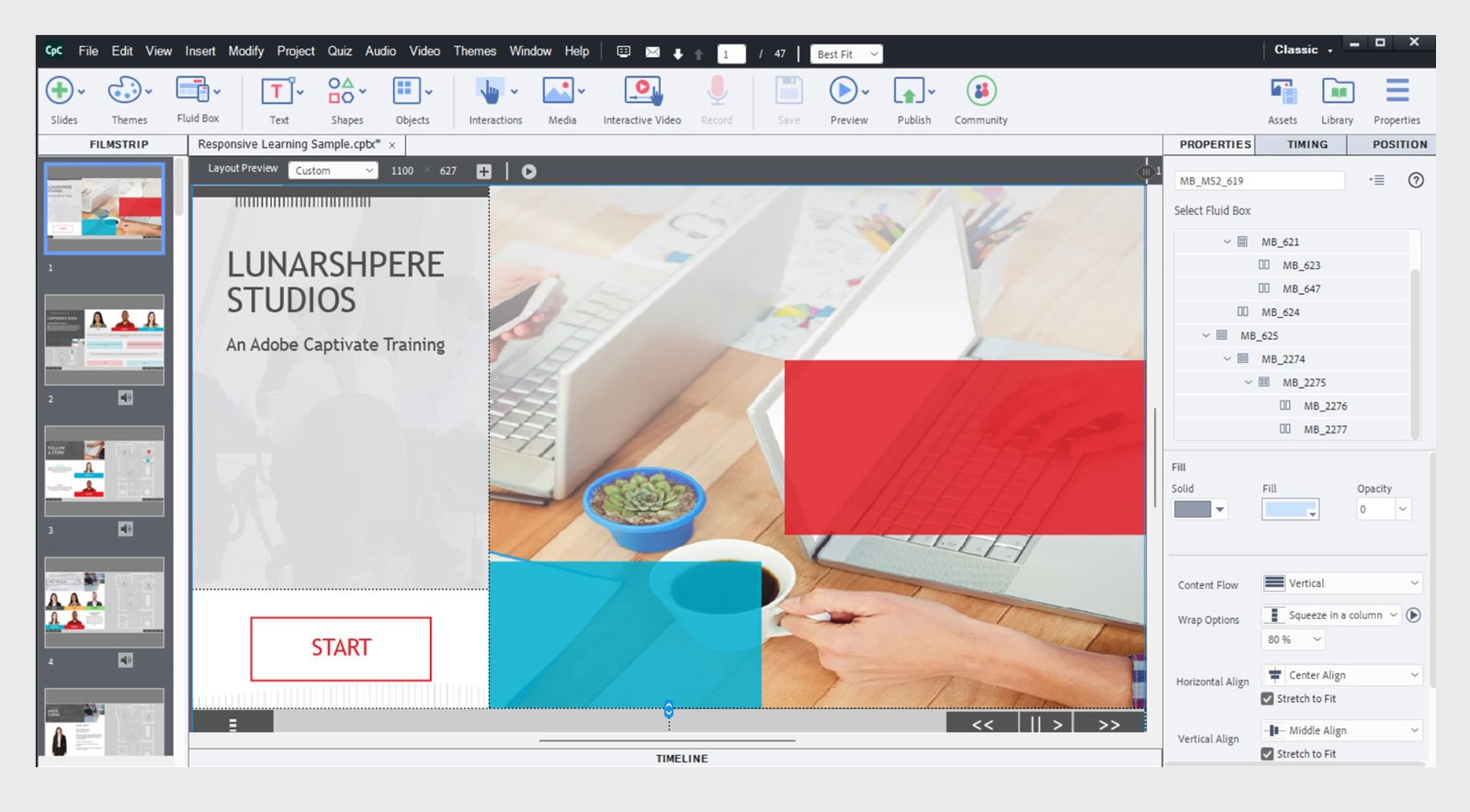
Adobe Captive is a long-standing competitor heavily favored by enterprises requiring advanced software simulations, screen recording capabilities, and automated responsive design. Captivate automatically transforms desktop recordings into interactive software walkthroughs, making it ideal for IT training. However, its steep learning curve and clunky user interface make it less accessible for many freelancers who bill by the hour and cannot afford lengthy onboarding periods.
Adobe Learning Manager and Cloud Ecosystem
For enterprises deeply integrated into the Adobe Creative Cloud ecosystem, Captivate connects smoothly with native vector graphics and multimedia editing tools. Yet, for general instructional design, its community support and asset ecosystem trail behind Articulate, leading many enterprise buyers to utilize Adobe tools strictly for graphic assets while authoring courses in Storyline.
Rise 360 (The Rapid Authoring Companion)
Included alongside Storyline 360 within the Articulate 360 subscription is Rise 360, a web-based responsive authoring tool. Rise 360 deserves specific mention because it solves a massive pain point for both enterprises and freelancers: mobile-first, rapid content creation.
- For Freelancers: Rise 360 allows rapid assembly of text, video, and simple knowledge checks, letting creators deliver clean, modern microlearning courses in a fraction of the time it takes to build a custom course from scratch.
- For Enterprises: Large organizations use Rise 360 to scale simple policy updates, onboarding guides, and standard operating procedures without burdening senior instructional designers with custom coding tasks.
Elucidat and Lectora
Elucidat targets enterprise organizations that require cloud-first, collaborative authoring at scale, particularly for teams distributed across continents. It excels in governance and brand compliance controls. Lectora, meanwhile, appeals to legacy enterprise teams and technical developers who need absolute control over accessibility (WCAG compliance) and heavy document imports. Despite these strengths, their pricing models and rigid workflows often price out independent freelancers.
Technical Specifications and Publishing Standards
A critical factor in selecting an e-learning authoring tool is how it packages and delivers content. An authoring tool is only as good as its ability to communicate data back to a hosting environment.
LMS Integration and Data Tracking
Modern enterprise environments rely heavily on Learning Management Systems (such as Cornerstone, Docebo, or Workday) to track employee completion rates, quiz scores, and time spent on modules. The top tool must support industry standards natively:
- SCORM 1.2 and SCORM 2004: The bedrock standards for tracking course completion and basic assessment data.
- xAPI (Experience API) / Tin Can API: Essential for modern enterprise learning analytics, allowing tracking of offline learning, mobile app usage, and granular user interactions outside the traditional LMS environment.
- AICC: Older aviation and corporate standard still utilized by legacy enterprise infrastructure.
Accessibility and Compliance
Enterprise training must adhere to strict legal guidelines regarding accessibility, such as Section 508 and WCAG (Web Content Accessibility Guidelines) AA standards. Articulate Storyline 360 features robust accessibility controls, enabling developers to customize the tab order of slide elements, add alternative text to images, provide closed captions for audio and video, and build fully keyboard-navigable courses. Freelancers working with higher education or government clients also benefit directly from these built-in accessibility checkers.
Cost Considerations and Return on Investment
Financial planning differs significantly between enterprise buyers and freelancers, yet both must evaluate Total Cost of Ownership (TCO).
For freelancers, the barrier to entry is upfront subscription costs. Articulate 360 operates on an annual subscription model. While this requires a committed initial outlay, solopreneurs typically recoup this cost within their first one to two client projects due to the time saved utilizing pre-built templates, built-in assets, and the rapid client review process facilitated by Review 360.
For enterprises, TCO includes license management, IT deployment overhead, and training costs. Buying multi-seat enterprise plans provides centralized administration, ensuring that when staff turnover occurs, software licenses can be reassigned instantly without purchasing new seats. Furthermore, the reduction in course development hours yields substantial corporate training ROI, cutting production timelines compared to legacy coding methods.
Common Mistakes When Choosing an Authoring Tool
Selecting an e-learning authoring tool involves navigating several pitfalls that can derail project budgets and delivery timelines.
- Overbuying for Complexity: Enterprises frequently purchase heavy, specialized engineering tools that their instructional design teams never fully utilize, while freelancers sometimes buy enterprise bundles they cannot monetize. Match the tool's complexity to the actual instructional strategy required.
- Ignoring Mobile Responsiveness: Choosing a tool that only outputs fixed-size desktop resolutions results in broken layouts on tablets and smartphones. Always verify how a tool handles responsive design across screen sizes.
- Overlooking Stakeholder Review Workflows: Neglecting how clients or corporate SMEs review courses leads to chaotic email chains and untracked PDF feedback. Tools featuring integrated cloud review portals prevent version control errors.
- Failing to Test LMS Compatibility: Assuming a course will track properly simply because it publishes to SCORM is a frequent error. Always run pilot packages through the target LMS before launching production.
Practical Next Steps for Buyers
To determine whether the industry-standard Articulate Storyline 360 fits your specific workflow, follow a structured evaluation process:
- Audit Your Project Requirements: List the three most complex interaction types you need to build (e.g., software simulation, branching scenario, simple text scroll).
- Test the Free Trial: Leverage the fully functional 30-day free trials offered by major authoring tool vendors to build a sample module mirroring your actual work.
- Run an LMS Pilot: Export your sample module in the specific SCORM or xAPI format required by your hosting platform and verify that completion data records accurately.
- Evaluate Collaboration Workflows: Test how easy it is to share drafts with external clients or internal stakeholders for feedback.
By balancing robust enterprise scalability with accessible, rapid-development features for solopreneurs, choosing the right unified authoring ecosystem eliminates technical friction and allows instructional designers to focus on what matters most: driving learner engagement and knowledge retention.