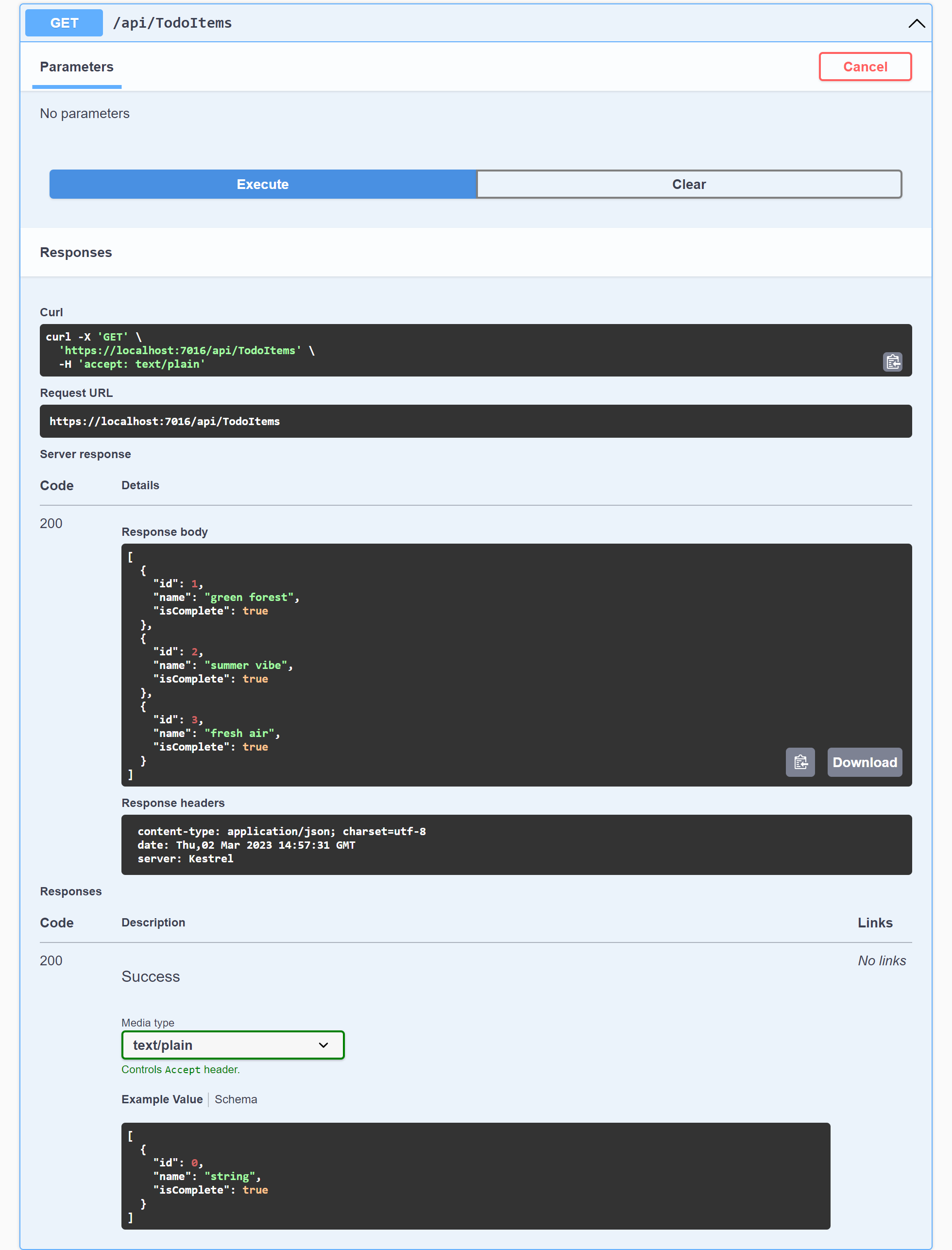
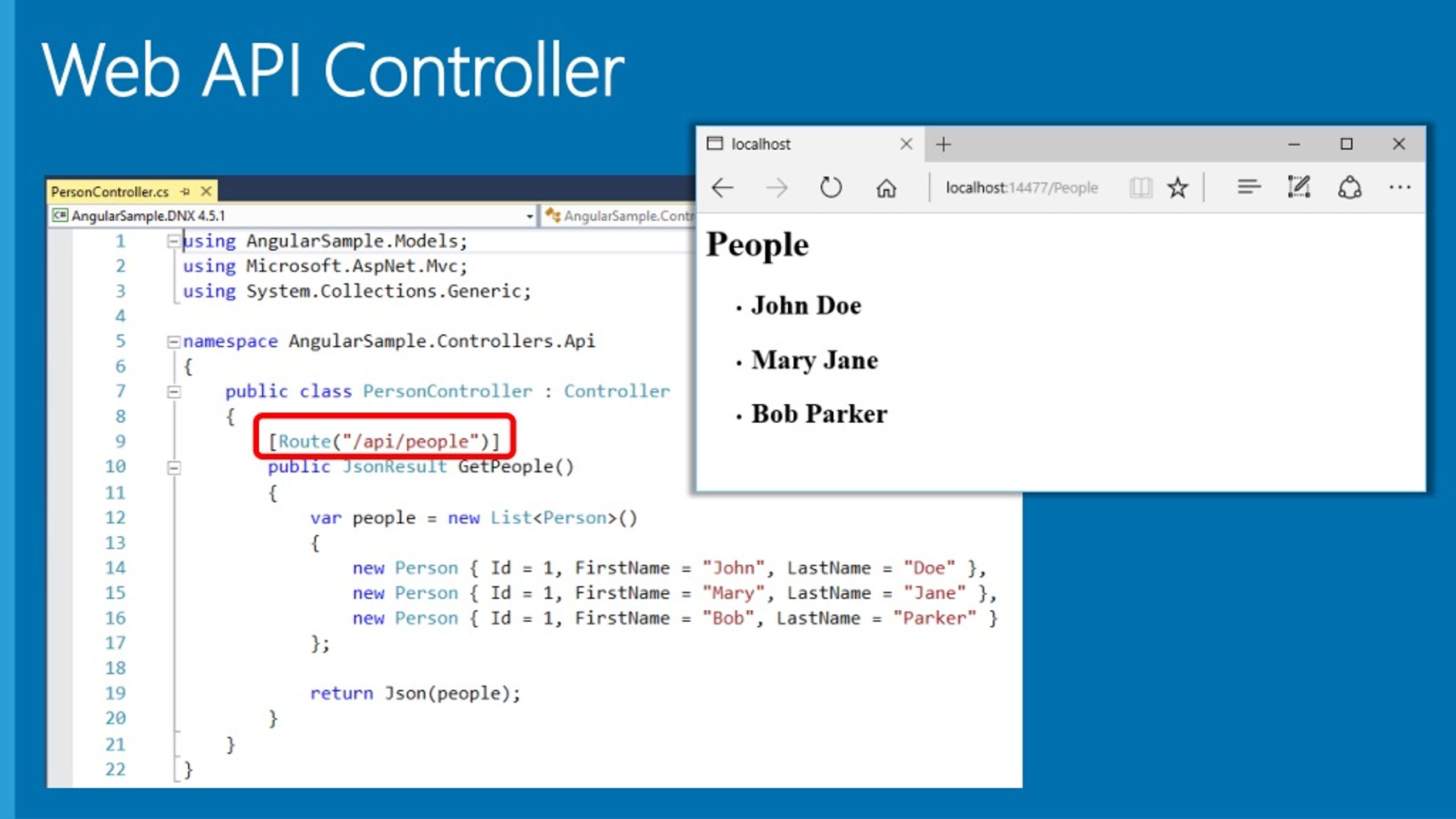
An API controller in ASP.NET Core is a C# class derived from ControllerBase that processes incoming HTTP requests, executes business logic, and returns structured HTTP responses. Decorated with the [ApiController] attribute, it provides automated model validation, parameter source inference, attribute routing, and standardized HTTP status code formatting for building modern, RESTful web services.
1. Core Architecture of ASP.NET Core API Controllers
In ASP.NET Core, an API controller acts as the entry point for HTTP requests routed to your backend application. Unlike traditional Model-View-Controller (MVC) architectures designed to render HTML web pages, API controllers serve raw data, typically serialized in JSON or XML formats, to single-page applications (SPAs), mobile apps, or third-party microservices.
ControllerBase vs. Controller
When constructing Web APIs, your controller classes should inherit from Microsoft.AspNetCore.Mvc.ControllerBase rather than Microsoft.AspNetCore.Mvc.Controller.
ControllerBase: Provides core API capabilities, including HTTP response helpers (Ok(),NotFound(),BadRequest()), user identity context, model state properties, and request handling utilities. It excludes overhead required for server-side HTML rendering.Controller: Inherits fromControllerBaseand adds support for Razor views,ViewData,ViewBag, andPartialViewResult. Using this class in a pure API application unnecessarily includes view engine dependencies and methods that are irrelevant to Web API development.
The Role of the [ApiController] Attribute
Applying the [ApiController] attribute to a controller class enables several essential features that streamline API development:
- Attribute Routing Requirement: Enforces explicit route definitions using attributes (such as
[Route("api/[controller]")]). Direct route mapping prevents ambiguous endpoint declarations across the application. - Automatic 400 Bad Request Responses: Eliminates the need to manually check
ModelState.IsValidinside every action method. If incoming request payloads fail data validation rules, ASP.NET Core automatically short-circuits the pipeline and returns an HTTP 400 response containing the validation errors. - Binding Source Inference: Automatically infers the source of request parameters based on target types and HTTP methods. Complex parameters default to body binding (
[FromBody]), primitive types default to query parameters ([FromQuery]), and route tokens bind from route data ([FromRoute]). - Multipart/Form-Data Inferences: Automatically assumes
[FromForm]binding when accepting parameters of typeIFormFileorIFormFileCollection. - Standardized Error Details: Formats validation and execution errors according to the IETF RFC 7807 Problem Details specification, creating consistent structured error payloads for API clients.
2. Structural Anatomy of an API Controller
An API controller consists of decorated action methods mapped to specific HTTP verbs and route templates.
Action Methods and HTTP Verbs
Action methods handle specific operations matching the REST architectural style. ASP.NET Core provides HTTP verb attributes that declare which protocol method triggers a given C# method:
[HttpGet]: Retrieves resources from the server without modifying state. Supports single resource fetching via route parameters (e.g.,[HttpGet("{id}")]) or list fetching with query filters.[HttpPost]: Creates a new resource. The incoming payload is typically bound from the HTTP request body.[HttpPut]: Replaces an existing resource entirely or creates it if idempotent creation is supported.[HttpPatch]: Applies partial updates to a resource, modifying only specified properties.[HttpDelete]: Removes a resource specified by an identifier.
Understanding Action Return Types
ASP.NET Core supports three primary return types for controller actions, each suited to different scenarios:
- Specific Type (
TorIEnumerable): Returns domain models or Data Transfer Objects (DTOs) directly. While concise, direct types limit your ability to return multiple HTTP status codes (such as returning404 Not Foundwhen a record missing check fails). IActionResult: Provides maximum flexibility by allowing methods to return various types implementingIActionResult(e.g.,Ok(),NotFound(),BadRequest(),CreatedAtAction()). However, becauseIActionResultdoes not declare the expected payload data type, automated documentation tools like OpenAPI (Swagger) require explicit[ProducesResponseType]annotations.ActionResult: The recommended modern pattern. Combines strong typing with HTTP status code flexibility. It allows returning either an instance ofT(which automatically maps to200 OK) or anyActionResultderived response, while preserving type clarity for OpenAPI specification generation.
3. Dependency Injection and Service Scoping
ASP.NET Core features built-in Dependency Injection (DI) that integrates directly with API controllers. Controllers participate in the inversion of control container, allowing services registered in the application builder stage to be injected cleanly into controller instances.
Constructor Injection
The primary pattern for consuming application dependencies is constructor injection. Dependencies declared as interfaces or concrete types in the controller constructor are automatically instantiated and injected by the framework runtime per HTTP request.
Key guidelines for controller constructor injection include:
- Dependencies should be defined using interfaces (e.g.,
IProductService,ILogger) to facilitate unit testing and loose coupling. - Injected services must align with appropriate DI lifetimes:
Transient(created every time requested),Scoped(created once per HTTP request context), orSingleton(created once for the lifetime of the application). - Never inject
Scopedservices intoSingletonsingletons. However, because API controllers are instantiated per request (scoped lifetime equivalent), injectingScopedorTransientservices into controllers is safe.
Action Parameter Injection with [FromServices]
When a complex dependency is required by only a single action method within a controller, injecting it via the constructor forces all other actions to incur setup overhead. ASP.NET Core allows injecting dependencies directly into method signatures using the [FromServices] attribute, isolating heavy processing dependencies strictly to the endpoint requiring them.
4. Model Binding, Parameter Sources, and Data Validation
Model binding automatically maps data from incoming HTTP requests to C# action method parameters. The ASP.NET Core model binding subsystem searches routes, query strings, headers, form data, and request bodies in a defined sequence.
Parameter Binding Source Attributes
To prevent ambiguity and ensure security, explicitly annotate controller parameters using parameter source attributes:
[FromBody]: Binds parameters from the HTTP request body via JSON or XML formatters.[FromQuery]: Binds parameters from query string keys in the URL (e.g.,?page=1&pageSize=20).[FromRoute]: Binds parameters directly from defined route tokens (e.g.,[HttpGet("{id}")]).[FromHeader]: Binds parameters from specific HTTP request headers.[FromForm]: Binds posted form fields or uploaded files (IFormFile).
Data Validation Rules and DTO Design
Domain entities should never be exposed directly through API controller inputs or outputs. Exposing internal database entities creates security vulnerabilities, such as over-posting (mass assignment), and tightens coupling between your database layer and public client contracts.
Instead, define dedicated Data Transfer Objects (DTOs) for requests and responses. Input DTOs can be validated using declarative data annotations from the System.ComponentModel.DataAnnotations namespace:
[Required]: Ensures a field is present in the payload.[StringLength]: Constraints minimum and maximum character lengths.[Range]: Enforces numeric minimums and maximums.[EmailAddress],[Url],[Phone]: Validates specific string format rules.
When the [ApiController] attribute is applied, any request failing these validation metadata constraints triggers an automated 400 Bad Request response populated with details of the validation failure before action code executes.
For advanced business validation logic spanning multiple properties, integrate specialized libraries like FluentValidation, which plug directly into ASP.NET Core model validation filters.
5. Asynchronous Execution and Performance Tuning
Under heavy request volume, Web API performance relies heavily on effective thread management. ASP.NET Core uses a managed thread pool to process requests. Synchronous I/O operations (such as database queries, external API calls, or disk read/writes) block thread pool threads while waiting for responses, quickly causing thread starvation under load.
Asynchronous Action Methods
All I/O-bound action methods in API controllers should be implemented using async and await keywords, returning Task or Task>.
Key asynchronous execution practices include:
- Await asynchronous database methods provided by Entity Framework Core (e.g.,
ToListAsync(),FirstOrDefaultAsync()) rather than invoking synchronous equivalents (ToList(),FirstOrDefault()). - Never call
.Resultor.Wait()on asynchronous tasks inside controllers. This practice (known as sync-over-async) blocks the execution thread and frequently leads to thread pool exhaustion and deadlocks.
Graceful Cancellation via CancellationToken
When a client cancels an HTTP request (for example, by navigating away from a web page or dropping a mobile connection), processing the request server-side wastes CPU, memory, and database resources.
ASP.NET Core automatically passes request cancellation signals through a CancellationToken parameter. By accepting a CancellationToken in your controller action and passing it down to asynchronous operations (such as database context queries or HTTP client calls), long-running backend tasks abort immediately when the client disconnects.
6. Exception Handling and Standardized Problem Details
Uncaught exceptions inside API controllers should never bubble up raw system details, stack traces, or framework exceptions to public clients, as doing so leaks security details.
Standardized RFC 7807 Error Responses
ASP.NET Core natively integrates the RFC 7807 standard for reporting errors in Web APIs. The standard defines a consistent JSON structure containing machine-readable properties:
- type: A URI reference identifying the error type.
- title: A short, human-readable summary of the problem type.
- status: The HTTP status code generated by the server.
- detail: A detailed explanation specific to this occurrence of the problem.
- instance: A URI reference identifying the specific occurrence of the problem (such as a correlation ID).
Global Exception Interception vs. Controller Try-Catch
Wrapping every individual controller action in manual try-catch blocks duplicates code and makes controller maintenance difficult. Instead, implement a centralized global exception handling strategy using built-in ASP.NET Core features:
IExceptionHandlerMiddleware: Modern ASP.NET Core applications register global exception handlers implementingIExceptionHandler. This middleware intercepts unhandled exceptions thrown anywhere in the controller execution pipeline, logs the error details, and formats an RFC 7807ProblemDetailsresponse.[ProducesResponseType]Annotations: Decorate controller actions with explicit response types ([ProducesResponseType(StatusCodes.Status500InternalServerError)]) to inform OpenAPI documentation tools about potential error responses.
For more information on configuring routing and handling middleware pipelines, refer to the official ASP.NET Core Routing Documentation.
7. Security, Authentication, and Rate Limiting
Securing API controllers requires protecting endpoints against unauthorized access, enforcing data privacy, and guarding against denial-of-service attempts.
Authentication and Authorization Attributes
ASP.NET Core provides declarative attributes to enforce security policies at the controller or action level:
[Authorize]: Restricts access to authenticated users. Applied at the controller class level, it secures all actions within that controller by default.[AllowAnonymous]: Overrides class-level[Authorize]restrictions for specific public actions (such as login or registration endpoints).[Authorize(Roles = "Admin")]: Enforces Role-Based Access Control (RBAC), allowing access only to users possessing the specified role claim.[Authorize(Policy = "CanEditProducts")]: Enforces custom policy-based authorization rules evaluating complex combinations of user claims, tenant constraints, or environment checks.
Cross-Origin Resource Sharing (CORS) and Rate Limiting
Web APIs consumed by browser-based frontend applications running on different domains must explicitly allow Cross-Origin access. Configure CORS policies in the application builder and apply them globally or directly to controllers via the [EnableCors("PolicyName")] attribute.
Additionally, use ASP.NET Core's built-in Rate Limiting middleware to prevent endpoint abuse. Rate limiting policies (such as fixed window, sliding window, or token bucket algorithms) can be applied directly to controllers using the [EnableRateLimiting("PolicyName")] attribute, ensuring clients do not overwhelm backend services with excessive request volumes.
8. API Controllers vs. Minimal APIs
ASP.NET Core supports two distinct approaches for constructing RESTful services: traditional API Controllers and Lightweight Minimal APIs. Understanding their structural and architectural differences helps software teams choose the proper model for their application architecture.
| Feature / Metric | API Controllers | Minimal APIs |
|---|---|---|
| Architectural Model | Class-based, Object-Oriented structure inheriting from ControllerBase. |
Lambda/Delegate-based functional routing declared directly on endpoint routes. |
| Code Organization | High separation of concerns; ideal for large, enterprise-grade applications with complex controllers. | Single-file or light modular files; ideal for microservices and concise endpoint groups. |
| Model Validation | Automated built-in binding and validation via [ApiController] and Data Annotations. |
Requires manual validation code, endpoint filters, or third-party libraries (e.g., FluentValidation). |
| Dependency Injection | Constructor injection, method parameter injection ([FromServices]), and filter injection. |
Direct parameter binding in lambda signatures; no class constructors needed. |
| Filter Ecosystem | Full access to Action, Resource, Exception, and Result Filters (IActionFilter, etc.). |
Endpoint Filters (IEndpointFilter) executed at the route handler level. |
| Memory & Performance Overhead | Slightly higher startup overhead due to reflection and controller assembly scanning. | Lower memory footprint and slightly faster startup times; ideal for serverless deployments. |
| OpenAPI / Swagger Generation | Automated mapping using class attributes ([ProducesResponseType], [ApiController]). |
Requires explicit .WithOpenApi() and extension methods on endpoints for metadata. |
For enterprise systems, modular monoliths, or applications with extensive cross-cutting filter requirements, API Controllers provide superior structure, readability, and organization. Minimal APIs excel in microservices, serverless functions (such as AWS Lambda or Azure Functions), or performance-critical lightweight services.
9. Common Pitfalls and Troubleshooting
Avoid these frequent mistakes when developing API controllers in ASP.NET Core:
1. Exposing EF Core Entities Directly
Problem: Returning Entity Framework Core domain entities from controller actions leads to circular JSON reference exceptions (due to navigation properties), accidental exposure of sensitive fields (such as password hashes), and over-posting vulnerabilities.
Solution: Map domain entities to explicit response DTOs using mapping libraries like AutoMapper or manual mapping extension methods before returning responses to clients.
2. Blocking Asynchronous Calls (Sync-over-Async)
Problem: Calling .Result, .GetAwaiter().GetResult(), or .Wait() on asynchronous operations within controller actions blocks runtime threads and can cause thread starvation or application deadlocks under load.
Solution: Declare controller actions with async Task and use the await keyword for all asynchronous calls throughout the execution stack.
3. Ambiguous Route Conflicts
Problem: Defining multiple controller actions with overlapping route templates (for example, [HttpGet("{id}")] and [HttpGet("{slug}")] where both accept string parameter inputs) results in an AmbiguousMatchException at runtime when an HTTP GET request arrives.
Solution: Apply route constraints to disambiguate parameters (e.g., [HttpGet("{id:int}")] vs [HttpGet("{slug:alpha}")]) or modify path segments to distinguish endpoints explicitly.
4. Ignoring CancellationToken Parameters
Problem: Long-running GET requests continue executing expensive database queries even after the calling client drops the connection or cancels the HTTP request.
Solution: Accept a CancellationToken parameter in your controller action signature and forward it into all database operations and HTTP requests.
Frequently Asked Questions
What is the primary difference between ControllerBase and Controller in ASP.NET Core?
ControllerBase provides standard API controller functionality, including request management, routing, HTTP response generation, and identity context, but omits support for server-side HTML views. Controller derives from ControllerBase and adds Razor view capabilities, ViewData, and ViewBag. Web API projects should always derive from ControllerBase to avoid unneeded view rendering overhead.
Why should I use ActionResult instead of IActionResult for action return types?
ActionResult combines strong return typing with flexible HTTP status code helpers. It explicitly communicates the returned payload type T to automated OpenAPI documentation generators while allowing you to return status codes like NotFound() or BadRequest(). IActionResult requires explicit [ProducesResponseType] annotations on every method to supply type information to Swagger.
How does the [ApiController] attribute handle model validation?
When applied to a controller class, the [ApiController] attribute automatically monitors model validation state. If a client submits a payload that violates data validation annotations on your DTOs, ASP.NET Core intercepts the request before your action method executes and automatically returns an HTTP 400 Bad Request response containing structured RFC 7807 validation error details.
Can I mix Minimal APIs and API Controllers in the same ASP.NET Core project?
Yes. ASP.NET Core supports mixing both paradigms in the same project. You can register controllers using builder.Services.AddControllers() and map them with app.MapControllers(), while simultaneously defining Minimal API endpoints using app.MapGet() or app.MapPost(). This enables gradual migrations or using Minimal APIs for simple endpoints alongside traditional controllers for complex features.
How do I inject services into an API Controller?
Services registered in the ASP.NET Core Dependency Injection container are typically injected into an API controller via its constructor. The framework automatically instantiates the controller and supplies the requested registered service instances per HTTP request. Alternatively, services used by only a single action can be injected into that specific method using the [FromServices] parameter attribute.
Architectural Recommendations and Next Steps
To build scalable, resilient Web APIs using ASP.NET Core API controllers, follow these established software engineering practices:
- Strictly Enforce Separation of Concerns: Keep API controllers thin. Controllers should handle request binding, basic parameter verification, authorization checks, and HTTP response formatting. Delegate core business logic, domain rules, and data persistence to backend service layers.
- Standardize Error Models: Use global exception handling via
IExceptionHandlerto format all application exceptions into RFC 7807ProblemDetailspayloads. - Optimize for Asynchronous Execution: Ensure all I/O operations are fully asynchronous, and accept
CancellationTokeninstances across all read operations. - Document Endpoints Fully: Annotate controller actions with
[ProducesResponseType]attributes or useActionResultto generate complete OpenAPI specifications for downstream developers.
To deepen your understanding of Web API development, review the official documentation on ASP.NET Core Web APIs and the ApiControllerAttribute Reference.