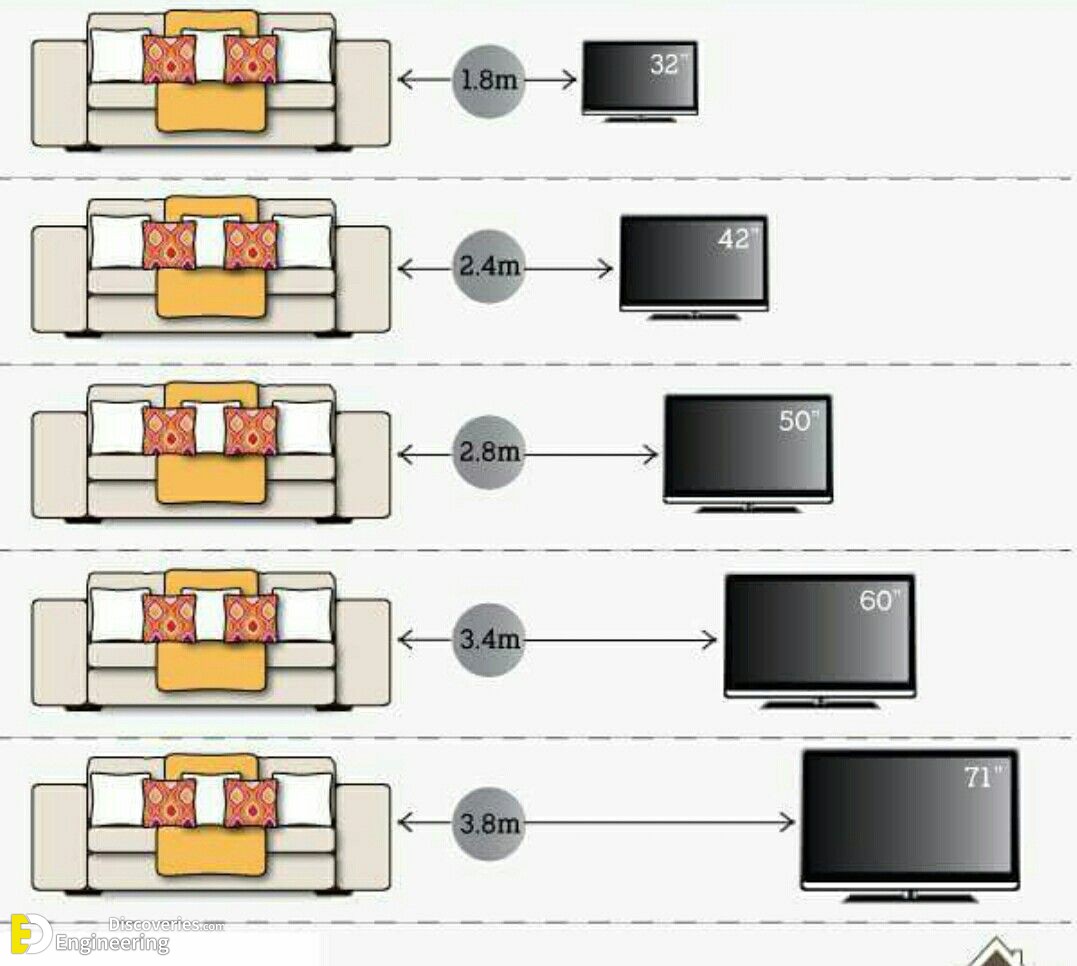
For a 40-inch TV, the ideal viewing distance is generally between 5 and 8.5 feet (1.5 to 2.6 meters). For high-definition 1080p content, sitting approximately 5.5 to 7 feet away provides the best balance between immersion and image clarity, ensuring you cannot see individual pixels while maintaining a comfortable field of view.
Determining the correct placement for a television involves more than just fitting it into an available corner of a room. In 2026, as display technology has matured, the relationship between screen size, resolution, and human biology remains the foundation of a high-quality home entertainment setup. While the "bigger is better" trend has pushed many consumers toward 65-inch or 75-inch panels, the 40-inch category remains a staple for bedrooms, kitchens, home offices, and small apartments. To get the most out of this specific size, you must understand the interplay between visual acuity and the geometry of your living space.
The Science of Visual Acuity and Viewing Angles
To understand viewing distance, we must first look at how the human eye processes information. Two primary factors dictate where you should sit: angular resolution and field of view.
Angular Resolution and Pixel Density
Visual acuity refers to the sharpness of vision, which is typically measured by the eye's ability to distinguish two separate points at a specific distance. For a person with 20/20 vision, the eye can generally resolve details that subtend an angle of 1/60th of a degree.
On a 40-inch television, the "pixel density" or pixels per inch (PPI) depends on the resolution. Most 40-inch models available today are Full HD (1080p). At this size and resolution, sitting too close causes the "screen door effect," where the gaps between pixels become visible, breaking the immersion. Conversely, sitting too far away means your eyes can no longer distinguish the fine details that make high-definition content superior to standard definition.
Field of View (FOV) Standards
Industry organizations like the Society of Motion Picture and Television Engineers (SMPTE) and THX provide guidelines for the optimal field of view.
- SMPTE Recommendation: Suggests a 30-degree field of view for general media consumption. For a 40-inch screen, this places the viewer at approximately 5.5 feet.
- THX Recommendation: For a more "cinematic" experience, THX suggests a 40-degree field of view. This would require sitting closer, around 4 feet, which is often preferred for gaming or immersive movies but can lead to eye fatigue during long sessions of casual viewing.
Calculating Distance Based on Resolution
The "ideal" distance shifts significantly depending on whether your 40-inch screen is 1080p (Full HD) or 4K (Ultra HD). While 4K 40-inch panels are increasingly common in professional monitor setups, most consumer televisions in this size range remain 1080p.
1080p Full HD (1920 x 1080)
For 1080p content, the goal is to sit at a distance where the screen fills your field of vision without making the image look "grainy."
- Minimum Distance: 5 feet (1.5 meters). At this range, the image is sharp, and the detail is maximized.
- Maximum Distance: 8.5 feet (2.6 meters). Beyond this point, the human eye begins to lose the benefit of the 1080p resolution, and the image starts to look indistinguishable from 720p.
4K Ultra HD (3840 x 2160)
If you are using a 40-inch 4K screen—common for high-end desktop setups or specialized small-room displays—you can sit much closer. 4K has four times the pixels of 1080p, meaning the pixels are much smaller and more densely packed.
- Optimal Distance: 3.5 to 5 feet.
- Context: Sitting this close to a 40-inch screen is ideal for gaming or using the TV as a computer monitor, where fine text and intricate textures are a priority.
Physical Dimensions of a 40-Inch Television
When planning your room layout, it is crucial to remember that "40 inches" refers to the diagonal measurement of the screen, not the width. To accurately measure your viewing distance, you should measure from the screen surface to the tip of your nose while in your primary seating position.
| Feature | Measurement (Approximate) |
|---|---|
| Diagonal Screen Size | 40 inches (101.6 cm) |
| Screen Width | 34.9 inches (88.6 cm) |
| Screen Height | 19.6 inches (49.8 cm) |
| Total Surface Area | 684 square inches |
| 1080p Viewing Range | 5.0 - 8.5 feet |
| 4K Viewing Range | 3.5 - 5.0 feet |
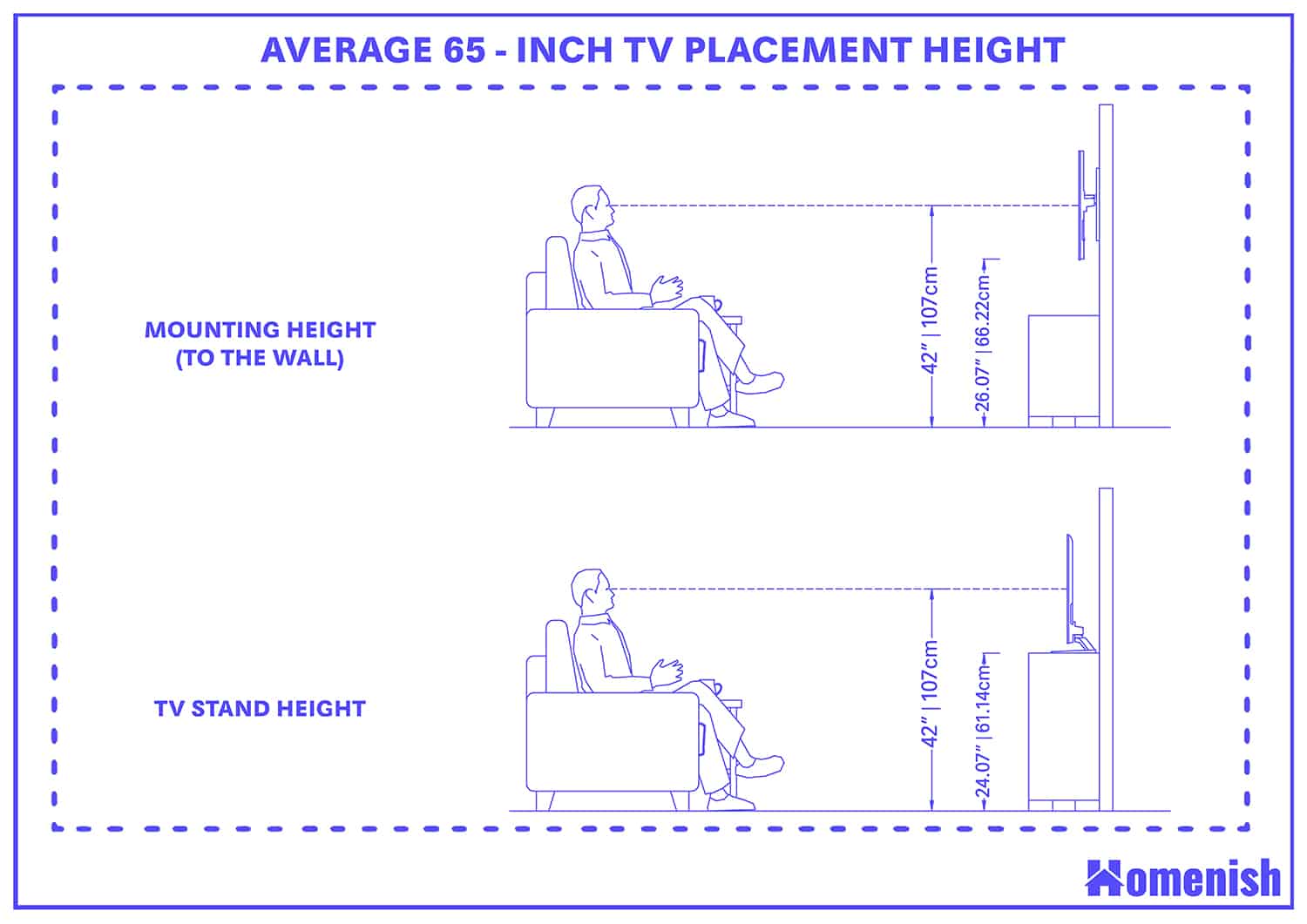
| Recommended Mounting Height | 42 inches to center (eye level) |
Practical Applications for Different Rooms
The "perfect" distance is often a compromise between mathematical ideals and the physical reality of your furniture.
The Bedroom Setup
In a bedroom, a 40-inch TV is a popular choice for mounting on a wall opposite the bed or placing on a dresser. Because viewers are often reclining, the distance tends to be slightly longer—often 7 to 9 feet. While this is at the upper limit of the 1080p resolution benefit, the comfort of viewing from a bed usually outweighs the need for absolute pixel-perfect clarity. If you find yourself at this distance, ensure the TV is mounted slightly higher and tilted downward to maintain a 90-degree line of sight, reducing neck strain.
Small Living Rooms and Dorms
For a small apartment or dorm room, 5 to 6 feet is often the standard distance. This falls right into the "sweet spot" for a 40-inch 1080p display. At 6 feet, the screen is large enough to be engaging for movies and sports but small enough that it doesn't dominate the room's aesthetic.
Using a 40-Inch TV as a Monitor
For many users in 2026, a 40-inch display serves as a massive productivity monitor. In this scenario, the viewing distance is significantly shorter, typically 2.5 to 3.5 feet (an arm's length).
- Resolution Requirement: If you sit this close, 4K is virtually mandatory. A 1080p 40-inch screen at 3 feet will look blurry, and text will have noticeable jagged edges (aliasing).
- Ergonomic Tip: Ensure your desk is deep enough. A standard 24-inch deep desk is often too shallow for a 40-inch screen, causing you to "scan" the screen with your neck rather than just your eyes.
Ergonomics and Eye Health
Regardless of the distance, viewing habits impact long-term health. The American Optometric Association highlights the importance of reducing digital eye strain, often referred to as Computer Vision Syndrome.
- The 20-20-20 Rule: Every 20 minutes, look at something 20 feet away for at least 20 seconds. This helps the ciliary muscles in the eyes relax after focusing on a near object like a TV.
- Viewing Angle: Your eyes should be level with the top third of the screen. Looking "up" at a TV (common with "TV over the fireplace" setups) leads to neck strain and can cause the surface of the eyes to dry out faster because they are opened wider.
- Ambient Lighting: Never watch TV in a completely dark room. Use "bias lighting"—an LED strip behind the TV—to provide a soft glow. This reduces the contrast between the bright screen and the dark wall, which significantly lowers eye fatigue.
Common Mistakes in TV Placement
Sitting Too Far Away
The most common mistake with 40-inch TVs is placing them in a large living room where the seating is 10 or 12 feet away. At this distance, a 40-inch screen looks like a small window, and the immersive quality of modern cinematography is lost. If your room requires you to sit 10 feet away, you should consider upgrading to at least a 55-inch or 65-inch display.
Ignoring the Vertical Angle
Distance is horizontal, but height is vertical. If you mount a 40-inch TV too high (the "r/TVTooHigh" phenomenon), the effective distance between your eyes and the pixels increases, but the viewing angle becomes uncomfortable. The center of the screen should ideally be at eye level when seated.
Overestimating 4K Benefits at Small Sizes
On a 40-inch screen, the difference between 1080p and 4K is nearly impossible to see if you are sitting 8 feet away. Many consumers pay a premium for 4K in small sizes without realizing they would need to sit much closer to actually see the extra pixels. For most 40-inch use cases, a high-quality 1080p panel with good color accuracy and contrast is a better value than a budget 4K panel.
Frequently Asked Questions
Is 40 inches too big for a small bedroom?
No, 40 inches is generally considered the ideal "large" size for a bedroom. It provides a theater-like experience without requiring a massive wall. If you are sitting 6 feet from the foot of the bed, a 40-inch screen fits perfectly within the recommended 30-degree field of view.
Can I use a 40-inch TV as a computer monitor?
Yes, but with caveats. You should ensure the TV supports Chroma 4:4:4 sub-sampling, which ensures that text remains sharp. Additionally, because you will be sitting closer (around 3 feet), a 4K resolution is highly recommended to avoid seeing individual pixels.
How do I measure the viewing distance exactly?
Measure from the front of the screen to where your eyes will be when you are leaning back in your chair or sofa. Do not measure from the wall to the front of the couch, as the depth of the TV stand and the cushions can change the result by up to a foot.
What happens if I sit closer than 5 feet to a 1080p 40-inch TV?
You will likely notice the "screen door effect," where the image looks like it is being viewed through a fine mesh. This is because your eyes are resolving the physical gaps between the pixels. If you must sit closer than 5 feet, consider a smaller screen or a higher resolution.
Does the type of content change the recommended distance?
Yes. For sports or action movies, sitting at the closer end of the spectrum (5-6 feet) is better for tracking fast motion. For news, talk shows, or casual viewing, sitting further back (7-8 feet) is more relaxed and less taxing on the eyes.
Final Recommendation: Finding Your Sweet Spot
To find the absolute best position for your 40-inch TV in 2026, start at a distance of 6 feet (1.8 meters). From this vantage point, evaluate the clarity of the image and your physical comfort. If you find yourself squinting to read subtitles or small UI elements in games, move 6 inches closer. If you feel like you are moving your head back and forth to see the whole screen, or if the brightness feels overwhelming, move back 6 inches.
For most users, 6.5 feet is the "goldilocks zone"—it preserves the detail of 1080p high-definition video while fitting comfortably into the layout of a standard bedroom or small living area. Always prioritize eye level and ambient lighting to ensure that your viewing experience is as healthy as it is entertaining.