The Lenovo ThinkCentre M900 Tiny represents a cornerstone of enterprise-grade compact computing, balancing a small physical footprint with the performance requirements of a professional office environment. This overview provides the essential technical specifications, architectural capabilities, and configuration options required for IT administrators, refurbished hardware enthusiasts, and power users seeking to optimize or deploy this specific unit in 2026.
Understanding the Lenovo M900 Tiny Architecture
The M900 Tiny was released as part of Lenovo’s sixth-generation ThinkCentre series. Its primary design philosophy focuses on maximizing space efficiency without compromising the modularity often associated with larger desktop towers. The system is built around the Intel Q170 chipset, which provides the foundation for Intel’s 6th Generation Core (Skylake) processors.
Unlike typical ultra-compact PCs that utilize soldered components, the M900 Tiny distinguishes itself through a socketed LGA 1151 CPU interface and two SODIMM slots for memory. This design choice makes it a popular subject for long-term maintenance and hardware-level upgrades. Because the system lacks an internal power supply unit—relying instead on an external AC/DC adapter—it manages to dissipate heat effectively within a volume of approximately one liter.
Core Technical Specifications
To effectively manage or purchase the M900 Tiny, one must differentiate between the various factory-shipped configurations. While individual units vary, the following table outlines the hardware thresholds for the platform.
| Component Category | Supported Specifications |
|---|---|
| Processor Socket | LGA 1151 (Intel 6th Gen Skylake) |
| Maximum RAM | 32GB DDR4-2133 MHz (2 x SODIMM slots) |
| Storage Interfaces | 1x 2.5-inch SATA HDD/SSD; 1x M.2 PCIe NVMe slot |
| Graphics | Integrated Intel HD Graphics 530 |
| Networking | Integrated Intel I219-LM Gigabit Ethernet |
| Expansion Slots | 1x M.2 (for Wi-Fi/Bluetooth); 1x M.2 (for storage) |
| Power Supply | 65W or 90W external adapter |
Processor Compatibility
The M900 Tiny supports a range of 35W “T-series” processors. These CPUs are specifically engineered for lower thermal design power (TDP), which is critical in a small-chassis environment. Users upgrading these units should verify that the replacement CPU is a 35W variant, such as the Intel Core i5-6500T or i7-6700T, to ensure the thermal solution remains effective under sustained load. Attempting to run a 65W standard desktop processor is generally discouraged due to thermal throttling and the potential for exceeding the cooling system’s capacity.
Memory and Storage Expansion
The system utilizes DDR4 SODIMM memory. For optimal performance, the dual-channel configuration is recommended, meaning two identical modules should be installed. Regarding storage, the M900 Tiny offers a hybrid approach. It features a traditional 2.5-inch drive bay, which is ideal for high-capacity mechanical drives or affordable SSDs. Crucially, it also includes an M.2 PCIe slot capable of supporting NVMe storage, which significantly reduces boot times and improves system responsiveness compared to the older SATA protocols.
Visualizing the Physical Overview
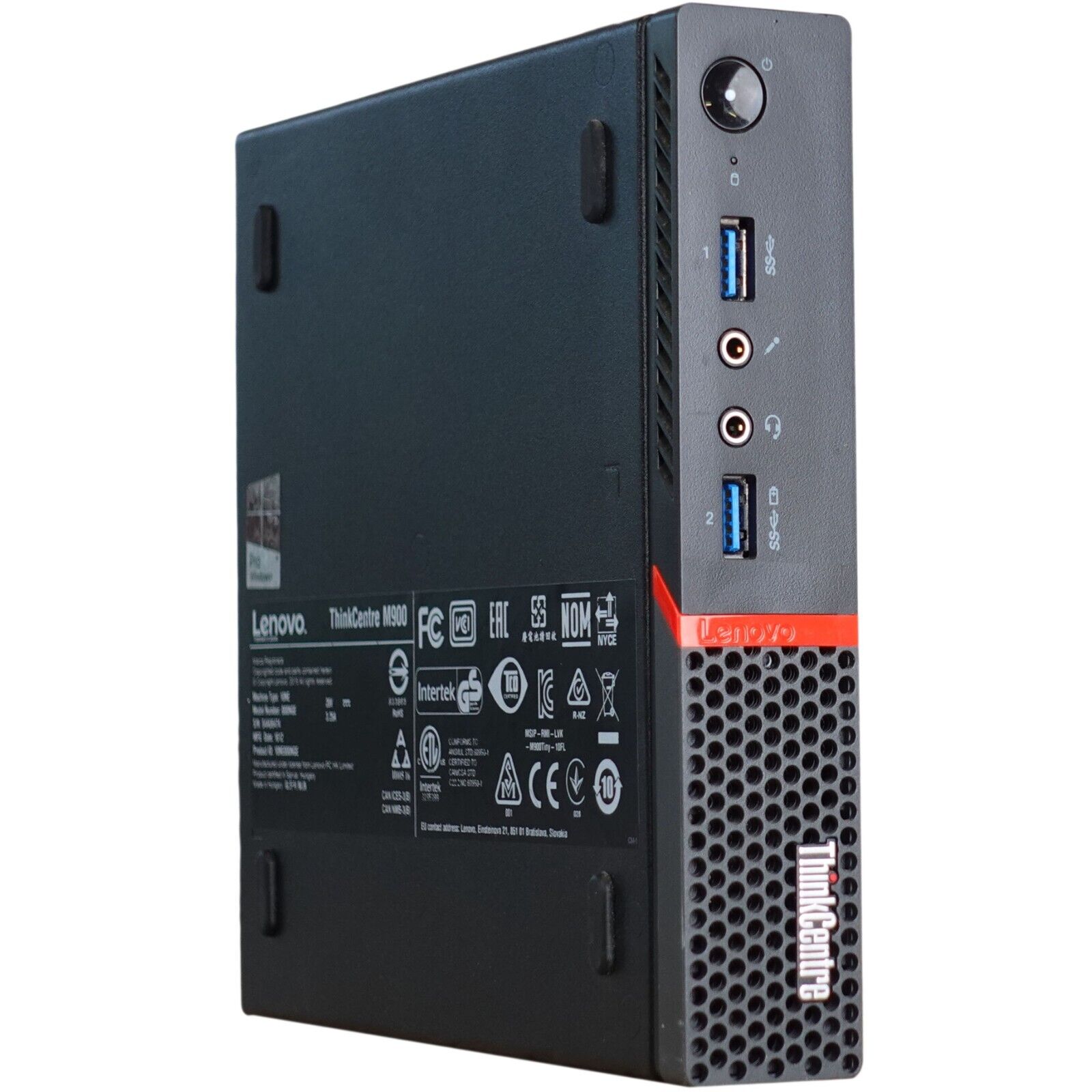
The exterior design of the M900 Tiny follows the industrial aesthetic of the ThinkCentre brand. The chassis measures approximately 179mm x 182mm x 34.5mm. Accessing the interior requires only a single thumbscrew located on the rear of the unit. Once the screw is removed, the top panel slides off to reveal the motherboard, heat sink, and storage bays.
The front interface is optimized for common peripherals:
- Two USB 3.0 ports (one with Always-On charging capability).
- Separate 3.5mm microphone and headphone jacks.
- Internal speaker for system alerts.
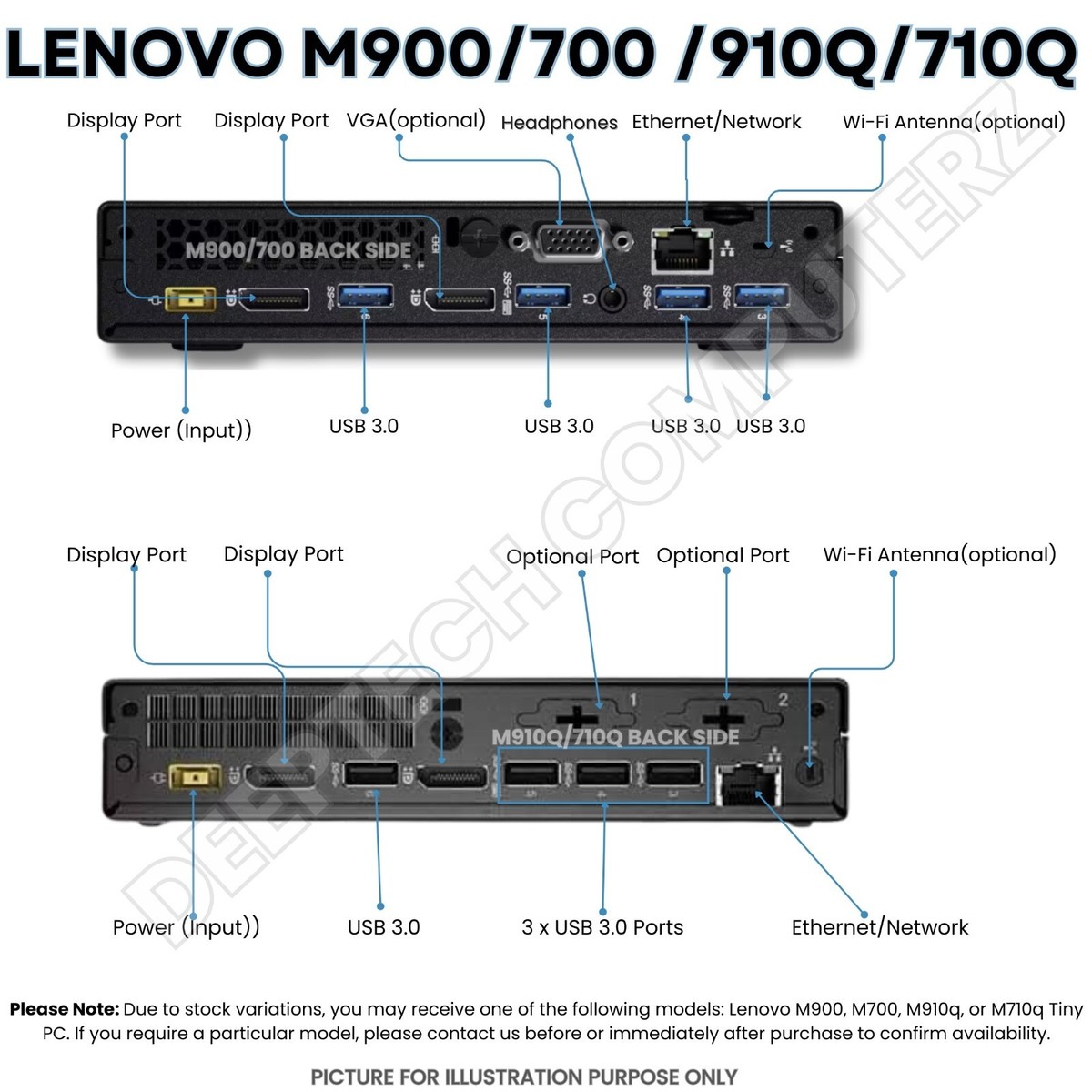
The rear interface provides the necessary connectivity for a workstation:
- Two DisplayPort outputs (supporting multi-monitor setups).
- Additional USB 3.0 ports for mouse, keyboard, and peripheral devices.
- RJ-45 Ethernet port for stable wired networking.
- Kensington lock slot for physical security.
Procurement and Maintenance in 2026
In 2026, the M900 Tiny is primarily sourced through the secondary market. When acquiring these units, verification of the BIOS state is paramount. Many enterprise units are secured with an administrative password. If the BIOS is locked, you may be unable to enable virtualization (VT-x/VT-d), adjust boot orders, or update firmware.
Verification Checklist for Used Units
- BIOS/UEFI Access: Ensure you can enter the BIOS setup without a password prompt.
- Thermal Maintenance: The internal fan is a high-wear component. Since the unit relies on active cooling, inspect the fan for dust accumulation or bearing noise.
- Firmware Status: Download the official Lenovo BIOS updates via the Lenovo support portal using the machine’s serial number. Using legacy firmware can create compatibility issues with modern operating systems.
- Power Adapter Integrity: Always inspect the DC barrel jack on the rear of the chassis. These can become loose over time with repeated insertions, leading to intermittent power failures.
Troubleshooting Common Challenges
Because the M900 Tiny is a specialized piece of hardware, troubleshooting is distinct from standard desktop repairs.
- No Power: If the unit does not turn on, start by testing the external power adapter with a multimeter or a known-working replacement. The internal pins of the power jack are also a common point of failure.
- Thermal Throttling: If the system slows down significantly during tasks, verify that the thermal paste between the CPU and the heat sink has not dried out. Replacing this with modern thermal compound can restore original performance levels.
- NVMe Recognition: Some older BIOS versions for the M900 do not natively support certain high-density NVMe drives. Always ensure the BIOS is updated to the latest available revision before installing newer M.2 SSDs.
- Display Output Issues: If you encounter issues with multiple displays, ensure you are using high-quality DisplayPort cables. The Intel HD 530 graphics support a maximum resolution of 4096x2304 at 60Hz.
Frequently Asked Questions
Can the M900 Tiny support Windows 11? Officially, the Intel 6th Generation processors found in the M900 Tiny do not meet the minimum requirements for Windows 11. While users can bypass these requirements, doing so may impact system stability and future security updates.
What is the maximum amount of RAM I can install? The system supports a maximum of 32GB of RAM, utilizing two 16GB DDR4-2133MHz SODIMM modules. Ensure the modules are non-ECC, as the chipset does not support ECC memory.
Does the M900 Tiny come with built-in Wi-Fi? Wi-Fi was an optional add-on for the M900 Tiny. Many units sold in enterprise environments relied on wired Ethernet. You can identify if your unit has a Wi-Fi card by checking for an antenna connector on the rear and looking for an M.2 Wi-Fi module in the internal slot.
Is it possible to add a dedicated GPU to the M900 Tiny? No, the M900 Tiny does not have a PCIe expansion slot for a traditional graphics card. It is limited to the integrated Intel HD Graphics 530, which is sufficient for productivity tasks, web browsing, and media playback, but unsuitable for modern gaming or heavy 3D rendering.
Where can I find the official specs PDF? The most reliable source is the "Lenovo PSREF" (Product Specifications Reference) website. By entering your specific model number, you can download the original, verified PDF datasheet that corresponds to your hardware configuration.
Practical Recommendations for Deployment
For users looking to utilize the M900 Tiny in 2026, the most effective deployment strategy is to treat the device as a dedicated server or a focused workstation. Given its low power consumption, it functions excellently as a home lab server for virtualization, home automation, or network-attached storage (NAS) purposes.
If you are setting this up as a primary workstation, pair it with a high-speed SATA or NVMe SSD and maximize the RAM to 32GB. This configuration remains highly capable of handling modern office workloads. If you intend to use it for a project, always perform a clean install of your operating system to clear any lingering enterprise policies or legacy software that might impair system performance. Finally, ensure the unit is placed in an area with adequate airflow; despite its small size, the M900 requires consistent cooling to maintain peak clock speeds during extended sessions.