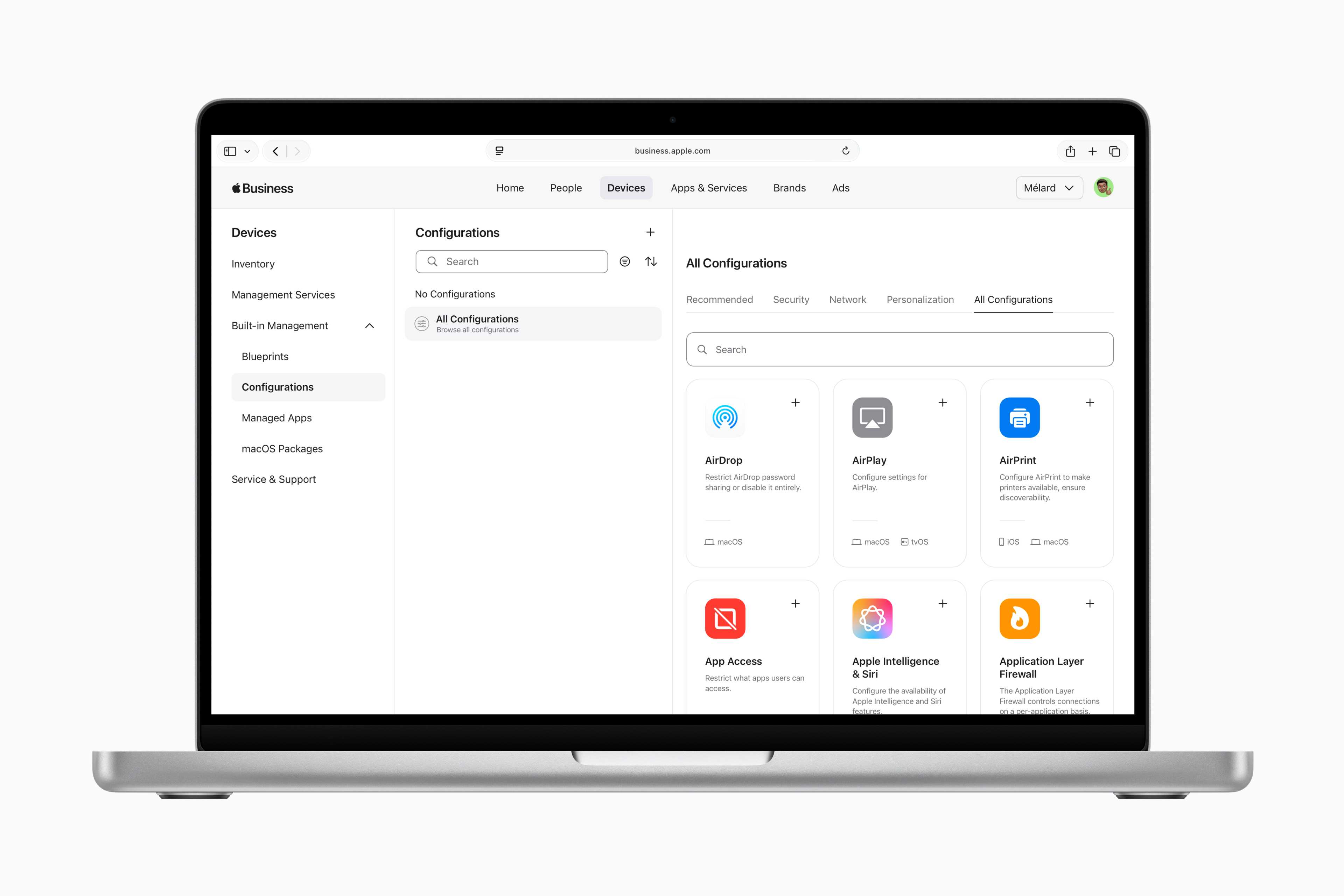
For high-level decision-makers and organizational leaders, Apple’s ecosystem offers a robust suite of services designed to enhance productivity, secure sensitive communications, and streamline device lifecycle management. This list of services encompasses enterprise-grade device deployment, cloud-based collaboration tools, financial management solutions, and professional support tiers tailored to maintain operational continuity in high-stakes environments.
The Ecosystem Advantage for Leadership
Executive efficiency relies on the seamless integration of hardware and software. Unlike consumer-focused offerings, Apple’s services for business are designed with the specific constraints of the corporate environment in mind: security, scalability, and integration with existing enterprise resource planning (ERP) and identity management systems. By leveraging Apple Business Manager (ABM) and associated services, executives can ensure their teams have secure, pre-configured access to proprietary tools while maintaining a strict posture against cyber threats.
Core Management and Deployment Services
The foundation of Apple’s corporate offering is its management architecture. For executives tasked with overseeing large-scale digital transformations or hybrid workforces, these services are non-negotiable.
Apple Business Manager
Apple Business Manager is a web-based portal that serves as the central command center for IT administrators. It allows for the automated deployment of devices, the purchase of apps in volume, and the creation of managed Apple Accounts. For an executive, this means devices can be shipped directly to employees and configured over the air (Zero-Touch Deployment) without ever needing to touch a corporate IT bench.
Apple Business Essentials
For small to mid-sized businesses, Apple Business Essentials integrates device management, 24/7 support, and cloud storage into a single subscription. It provides:
- Device Management: Enforcing security protocols like passcodes and encryption.
- Integrated Storage: iCloud storage dedicated to business data.
- Professional Support: Access to AppleCare+ for Business Essentials, providing rapid hardware repairs and on-site support.
Collaborative and Productivity Services
Modern leadership requires agility. Apple provides a suite of collaborative tools that are deeply integrated into the operating system, reducing the friction often found in third-party software suites.
- iWork Suite (Pages, Numbers, Keynote): While often viewed as consumer software, the real-time collaboration features in Pages and Keynote allow for simultaneous editing of sensitive strategy documents and board presentations.
- Shared Notes and Reminders: These services sync across all Apple hardware, ensuring that executive briefings, meeting notes, and high-priority action items are accessible on an iPhone, iPad, or Mac instantly.
- Business iCloud: This provides managed, secure cloud storage that can be partitioned from personal data, ensuring that sensitive corporate intellectual property remains under company control rather than being tied to a personal Apple ID.
Security and Financial Services
Executive-level security is a primary concern. Apple services prioritize end-to-end encryption and biometric authentication to protect data integrity.
- Apple Business ID: This is a managed identity system that allows employees to sign in to apps and services using their corporate credentials. It integrates with existing identity providers such as Microsoft Entra ID (formerly Azure AD) or Google Workspace.
- Apple Financial Services: While not a software product, Apple’s financial services—specifically through programs like Apple Financial Services (AFS)—provide flexible payment structures for hardware. This allows organizations to manage cash flow while upgrading their executive fleet on a predictable cycle.
Comparative Overview of Service Tiers
The following table summarizes the primary service offerings available for organizational deployment as of 2026.
| Service Name | Primary Focus | Best For | Requirement |
|---|---|---|---|
| Apple Business Manager | Deployment & Enrollment | All business sizes | DUNS number; domain verification |
| Apple Business Essentials | All-in-one Management | Small/Medium Businesses | Apple ID for Business |
| AppleCare for Enterprise | Support & Repair | Large Enterprise | Volume Purchase Agreement |
| Apple Financial Services | Asset Financing | Procurement Officers | Contractual agreement |
Professional Support and Maintenance
When an executive device fails, the cost of downtime is significant. Apple provides specific tiers of support designed to mitigate these risks.
AppleCare for Enterprise
This is the premier support service for large organizations. It provides 24/7 technical support, on-site service options, and direct access to Apple’s enterprise-level engineers. This is critical for organizations that require rapid incident response and hardware replacement to maintain operational continuity.
Hardware Lifecycle Management
Through its partnership with various distributors and internal programs, Apple facilitates the trade-in and recycling of legacy hardware. This serves two purposes for an executive team: it ensures data is securely wiped according to industry standards, and it improves the corporate sustainability report by responsibly managing electronic waste.
Privacy, Compliance, and Security Considerations
A common misconception is that Apple services are "black boxes." In reality, they are built to comply with international standards including ISO/IEC 27001 and 27018. For organizations operating under strict regulatory frameworks (such as GDPR, HIPAA, or SOC2), Apple’s documentation provides the necessary transparency to map these services to compliance mandates.
Executives must ensure that any service implemented is paired with proper Mobile Device Management (MDM) software. While Apple provides the framework for security (such as the Secure Enclave on their silicon), the policy—such as requiring Face ID or enforcing complex alphanumeric passcodes—must be pushed via MDM.
Troubleshooting and Escalation Paths
Despite the reliability of the ecosystem, technical issues are inevitable. The hierarchy of support for executives should follow these steps:
- First Line: Internal IT support leveraging Apple Business Manager logs.
- Second Line: AppleCare for Enterprise priority support phone lines (for organizations with active contracts).
- Third Line: Dedicated Apple Account Executive (for enterprise accounts meeting specific annual spend thresholds).
Common issues often relate to managed Apple ID provisioning or device enrollment failures. Always maintain an updated list of the DUNS number and verified corporate domains, as these are the keys to accessing the administrative portals for all services.
Frequently Asked Questions
What is the difference between an Apple ID and a Managed Apple ID? A personal Apple ID is owned and controlled by the individual. A Managed Apple ID is created and controlled by the organization through Apple Business Manager. It allows the IT department to reset passwords, restrict specific features, and ensure that data is not stored in personal cloud spaces.
Do I need a separate contract for Apple Financial Services? Yes. While Apple provides the hardware and software services, the financial services component involves a separate credit and contract negotiation process. This is usually managed by the procurement or CFO office of an organization.
Can Apple services integrate with Microsoft or Google enterprise suites? Absolutely. Apple services are designed to be interoperable. Managed Apple IDs can be federated with Microsoft Entra ID or Google Workspace, allowing for single sign-on (SSO) across the entire corporate stack.
How does Apple ensure the security of corporate data in the cloud? Apple utilizes end-to-end encryption for most sensitive data types in iCloud. When using Managed Apple IDs, the organization retains the ability to revoke access and wipe data remotely, providing a critical safety net for lost or compromised executive devices.
What is the lead time for setting up Apple Business Manager? The initial verification of a business using a DUNS number typically takes between 3 to 5 business days, provided all documentation is correct. Once verified, enrollment into the portal is instantaneous.
Strategic Next Actions
For executives looking to optimize their organization's tech stack, the first step is to perform an audit of current hardware and software expenditures. If your organization relies on Apple hardware but manages it through ad-hoc, consumer-level methods, the immediate next action should be to register for an Apple Business Manager account. This single step unlocks the ability to manage your fleet with the precision required at the executive level. From there, consult with your procurement team regarding the consolidation of hardware financing through Apple Financial Services to align your tech refresh cycle with your long-term capital expenditure plans.