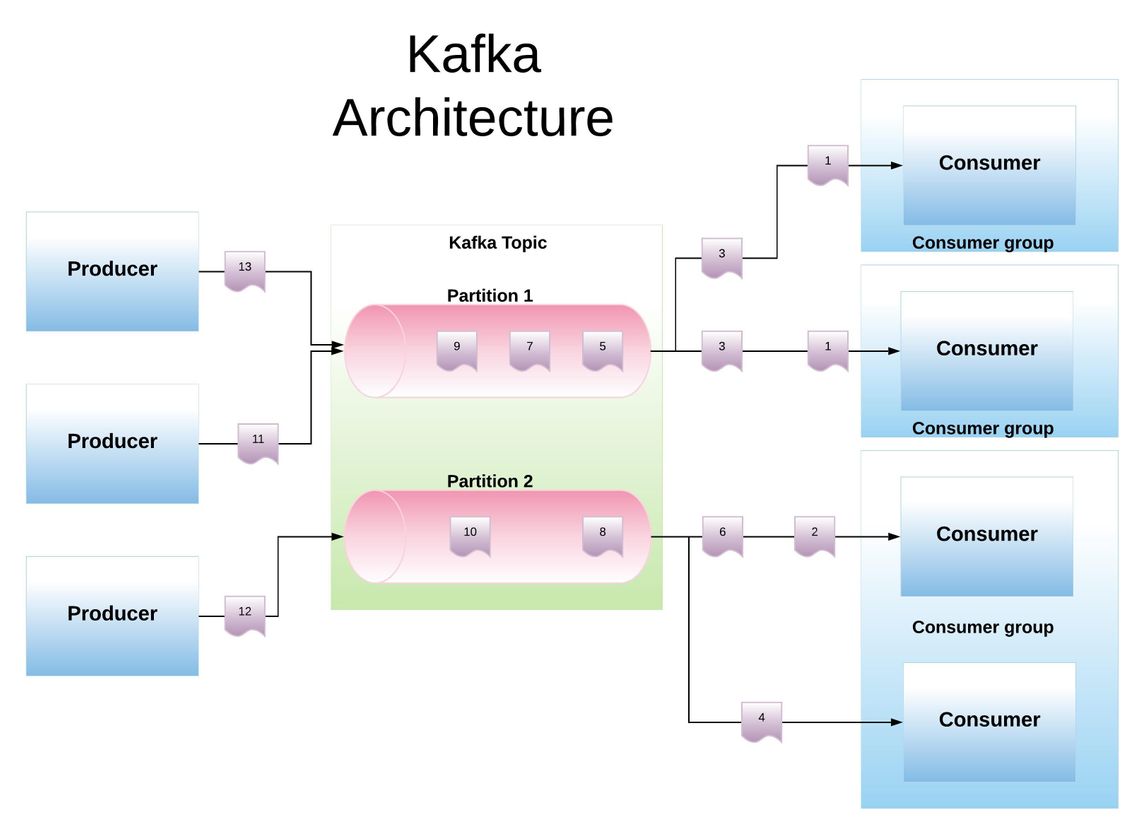
Apache Kafka is an open-source distributed event streaming platform used by thousands of companies for high-performance data pipelines, streaming analytics, and data integration. In 2026, it remains the industry standard for managing real-time data feeds, allowing applications to produce, store, and consume streams of events at a massive scale with high reliability and low latency.
The modern data landscape demands systems that can handle millions of events per second while maintaining strict data integrity. Apache Kafka was originally developed at LinkedIn to solve the challenge of tracking user activity and system metrics across a massive distributed infrastructure. Since its open-sourcing and subsequent graduation to a Top-Level Project at the Apache Software Foundation, it has evolved from a simple message queue into a sophisticated event streaming platform.
For a beginner, the first step to mastering Kafka is moving away from the mindset of traditional request-response databases. Instead of asking a database for the "current state" of an object, Kafka allows you to view the world as a sequence of events—a continuous stream of facts that have happened in the past. This guide provides a comprehensive roadmap for understanding, installing, and operating Kafka in a modern environment.
What is Apache Kafka? Understanding the Event Streaming Paradigm
At its core, Apache Kafka is a distributed commit log. To understand this, imagine a notebook where you can only write at the end of the page, and once something is written, it can never be changed or deleted. This "append-only" nature is what gives Kafka its incredible speed and reliability. In 2026, Kafka is used not just for moving data from point A to point B, but as a central nervous system for microservices and real-time analytics.
The Shift from Messaging to Event Streaming
Traditional messaging systems (like RabbitMQ or ActiveMQ) typically focus on delivering a message to a recipient and then deleting it once it has been processed. Kafka differs in three fundamental ways:
- Persistence: Events are stored on disk for a configurable amount of time (from minutes to years).
- Scalability: It is designed to run as a cluster of multiple servers, allowing it to handle trillions of events per day.
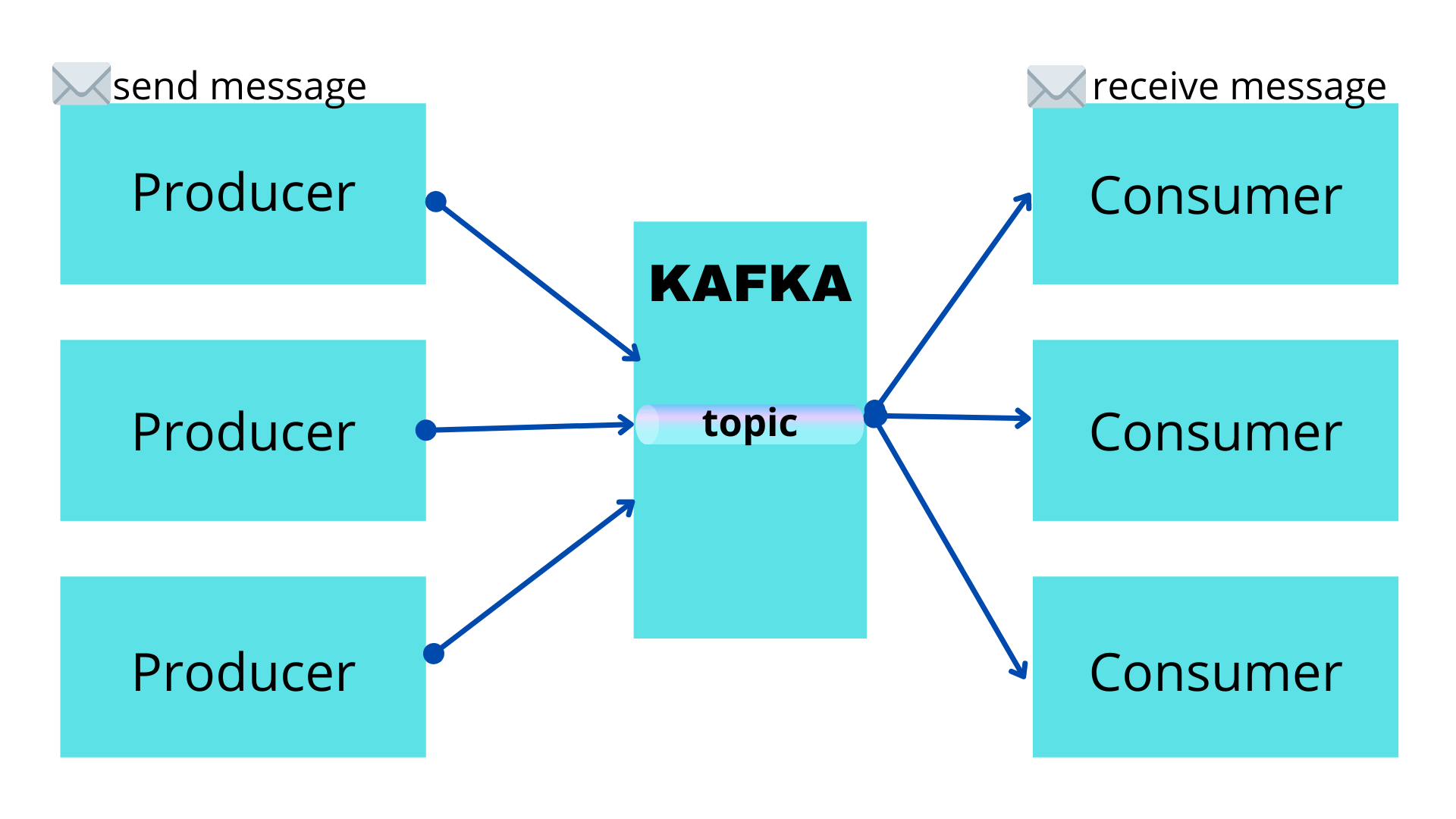
- Multi-Subscriber: A single stream of data can be read by dozens of different applications simultaneously without interfering with each other.
Why Kafka Dominates in 2026
As of 2026, the transition to KRaft (Kafka Raft) mode is complete, marking the full removal of the dependency on Apache ZooKeeper. This has simplified the architecture significantly, making it easier for beginners to set up and manage clusters. Furthermore, the rise of edge computing and IoT has made Kafka’s ability to handle high-throughput, low-latency data more critical than ever before.
Core Architecture and Key Terminology
Before running any commands, you must understand the primary entities within the Kafka ecosystem. These terms form the vocabulary of every data engineer and developer working with streaming data.
1. Events (Messages)
An Event is the smallest unit of data in Kafka. It records the fact that "something happened" in the world or your business. An event consists of a key, a value, a timestamp, and optional metadata headers. For example, a "Payment Processed" event might contain the customer ID as the key and the transaction details as the value.
2. Producers
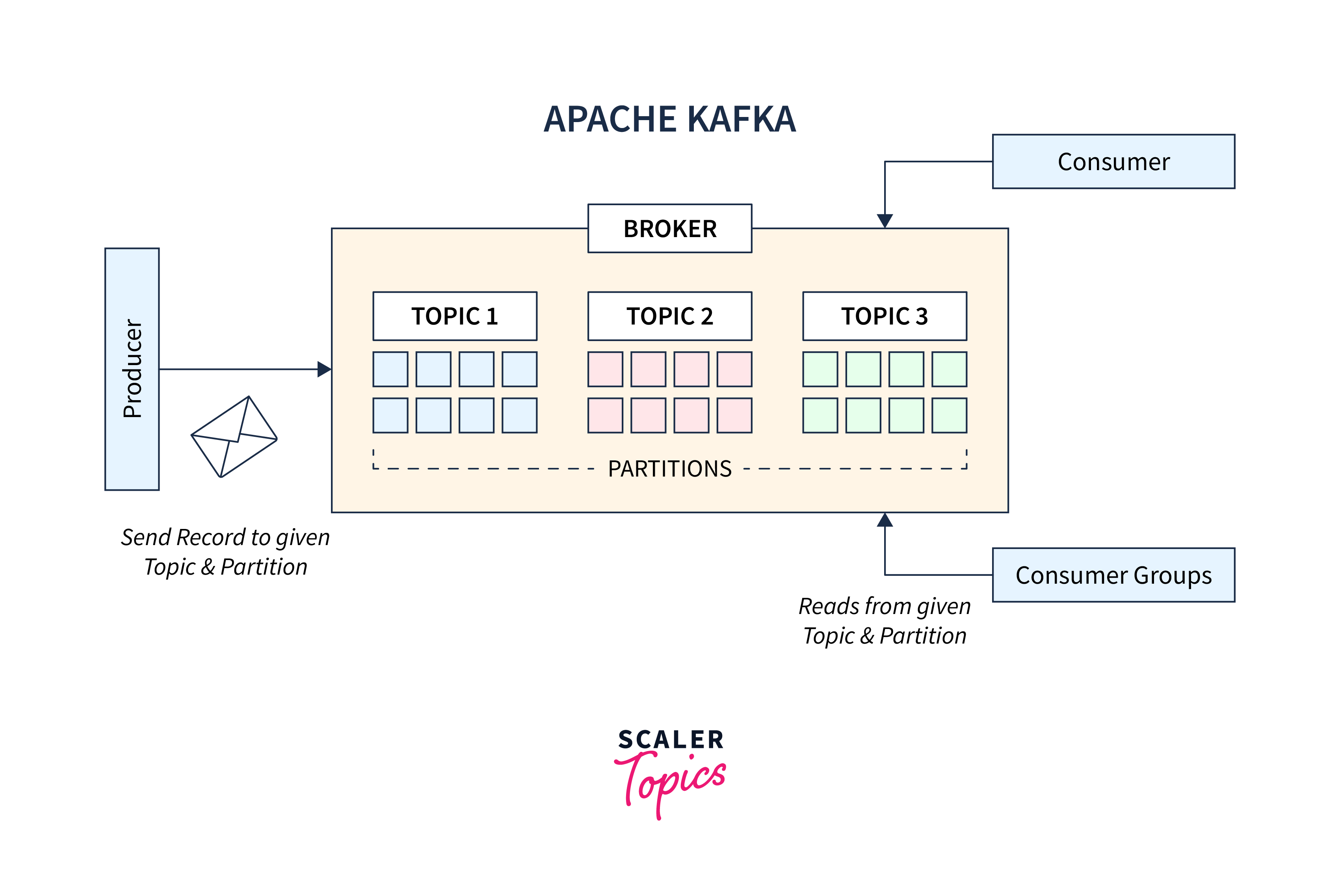
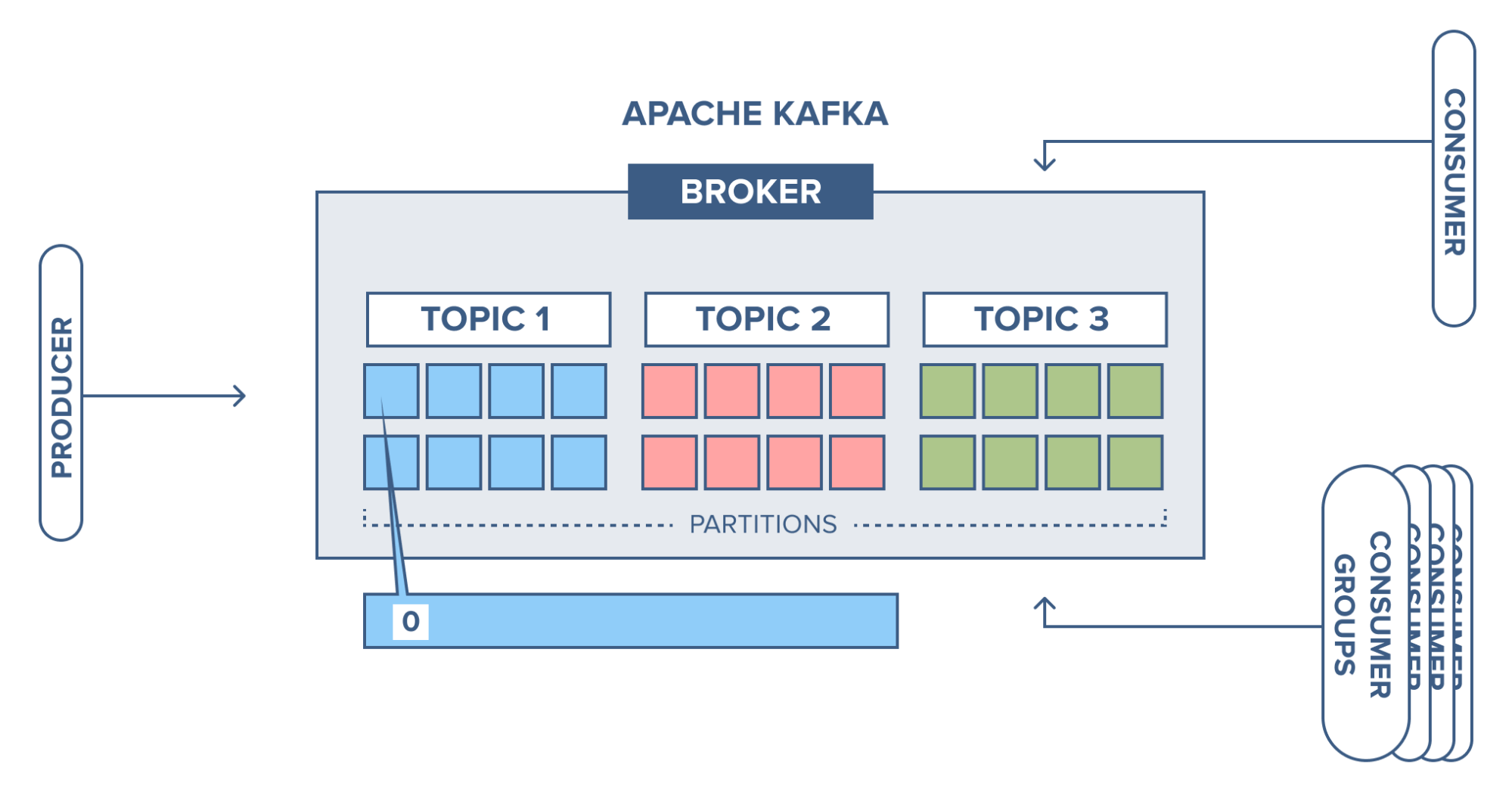
Producers are the client applications that send (publish) events to the Kafka cluster. Producers are responsible for choosing which record to assign to which partition within a topic. This can be done in a round-robin fashion for load balancing or based on a semantic partition key (like a User ID) to ensure all events for a specific user land in the same order.
3. Consumers and Consumer Groups
Consumers are the applications that subscribe to and read those events. Unlike traditional queues, reading a message in Kafka does not delete it. Consumer Groups allow a pool of consumers to divide the work of reading from a topic. If one consumer in a group fails, the remaining members take over its share of the data, ensuring high availability.
4. Topics and Partitions
A Topic is a logical name for a category of events (similar to a table in a database). Topics are divided into Partitions. Partitioning is the secret to Kafka’s scalability. By spreading partitions across multiple servers (Brokers), Kafka allows multiple producers and consumers to read and write data in parallel.
5. Brokers and Clusters
A Broker is a single Kafka server. A collection of brokers working together is called a Cluster. In a production environment, you typically have at least three brokers to ensure that if one fails, the data remains available.
How Kafka Works: The Log-Centric Model
Kafka treats data as a distributed, partitioned, replicated commit log. When a producer sends an event, it is appended to the end of a partition. This event is assigned a unique sequential ID called an Offset.
The offset is a crucial concept for beginners to grasp. It acts as a placeholder. Consumers track their progress by recording the last offset they successfully processed. If a consumer crashes and restarts, it looks at its last committed offset and resumes reading from exactly where it left off. This mechanism provides "at-least-once" or "exactly-once" delivery guarantees, which are vital for financial transactions and sensitive data processing.
Data Replication and Fault Tolerance
To prevent data loss, Kafka replicates each partition across multiple brokers. One broker acts as the Leader for a partition, handling all reads and writes, while others act as Followers, constantly syncing data from the leader. If the leader goes offline, one of the followers is automatically promoted to leader, ensuring the system continues to function without interruption.
Kafka vs. Traditional Databases and Message Queues
Choosing the right tool is essential for system design. While Kafka can store data, it is not a replacement for a relational database like PostgreSQL or a document store like MongoDB.
| Feature | Apache Kafka | Traditional RDBMS | Traditional Message Queue |
|---|---|---|---|
| Data Pattern | Continuous Stream | Static State | Point-to-point Queue |
| Persistence | Long-term (Configurable) | Permanent | Temporary (until read) |
| Scalability | Horizontal (High) | Vertical (Limited) | Variable |
| Consumption | Pull-based (Multiple) | Query-based | Push-based (Usually Single) |
| Primary Use | Event Streaming / ETL | Transactional Storage | Task Distribution |
Setting Up Your First Kafka Environment
In 2026, the easiest way to start with Kafka is using the KRaft mode, which integrates metadata management directly into Kafka itself.
Prerequisites
- Java Runtime Environment (JRE): Kafka is built on the JVM. You will need OpenJDK 17 or higher installed on your machine.
- Operating System: While Kafka runs on Windows via WSL2, a Linux or macOS environment is highly recommended for the best experience.
- Memory: At least 4GB of RAM is recommended for a local single-node cluster.
Installation Steps
- Download: Visit the official Apache Kafka download page and download the latest binary for 2026 (typically version 3.x or 4.x).
- Extract: Unzip the archive to a directory of your choice (e.g.,
~/kafka). - Generate Cluster ID: Use the storage tool to generate a unique ID for your new cluster:
bin/kafka-storage.sh random-uuid - Format Storage: Using the UUID generated, format your log directories:
bin/kafka-storage.sh format -t -c config/kraft/server.properties - Start Broker: Launch the Kafka server:
bin/kafka-server-start.sh config/kraft/server.properties
Practical Exercise: Your First "Hello World" Stream
Once your broker is running, you can interact with it using the Command Line Interface (CLI) tools included in the download. This exercise will walk you through creating a topic, producing a message, and consuming it.
Step 1: Create a Topic
Open a new terminal window and create a topic named "quickstart-events". We will give it one partition and a replication factor of one (since we only have one broker).
bin/kafka-topics.sh --create --topic quickstart-events --bootstrap-server localhost:9092 --partitions 1 --replication-factor 1
Step 2: Produce Events
Now, let's act as a producer. Run the console producer and type a few messages. Every time you press Enter, a new event is sent to Kafka.
bin/kafka-console-producer.sh --topic quickstart-events --bootstrap-server localhost:9092
This is a test message. Learning Kafka in 2026 is fun!
Step 3: Consume Events
Open a third terminal window to act as the consumer.
bin/kafka-console-consumer.sh --topic quickstart-events --from-beginning --bootstrap-server localhost:9092
You will see the messages you typed in the producer window appear here instantly. The --from-beginning flag tells the consumer to read all events in the log, not just the new ones.
Advanced Components: Kafka Connect and Kafka Streams
As you move beyond the basics, you will encounter two powerful frameworks that live within the Kafka ecosystem: Kafka Connect and Kafka Streams.
Kafka Streams
This is a client library for building applications and microservices where the input and output data are stored in Kafka clusters. It allows you to perform complex operations like filtering, mapping, grouping, and joining streams of data in real-time. For example, you could use Kafka Streams to calculate the rolling average of stock prices as they arrive.
Kafka Connect
Kafka Connect is a tool for scalably and reliably streaming data between Apache Kafka and other systems. Instead of writing custom code to move data from a MySQL database to Kafka, or from Kafka to an S3 bucket, you can use pre-built "Connectors." In 2026, the library of available connectors has grown to include almost every modern cloud service and database.
Common Use Cases and Real-World Applications
Why do companies invest so much in Kafka? Its versatility allows it to solve various architectural challenges.
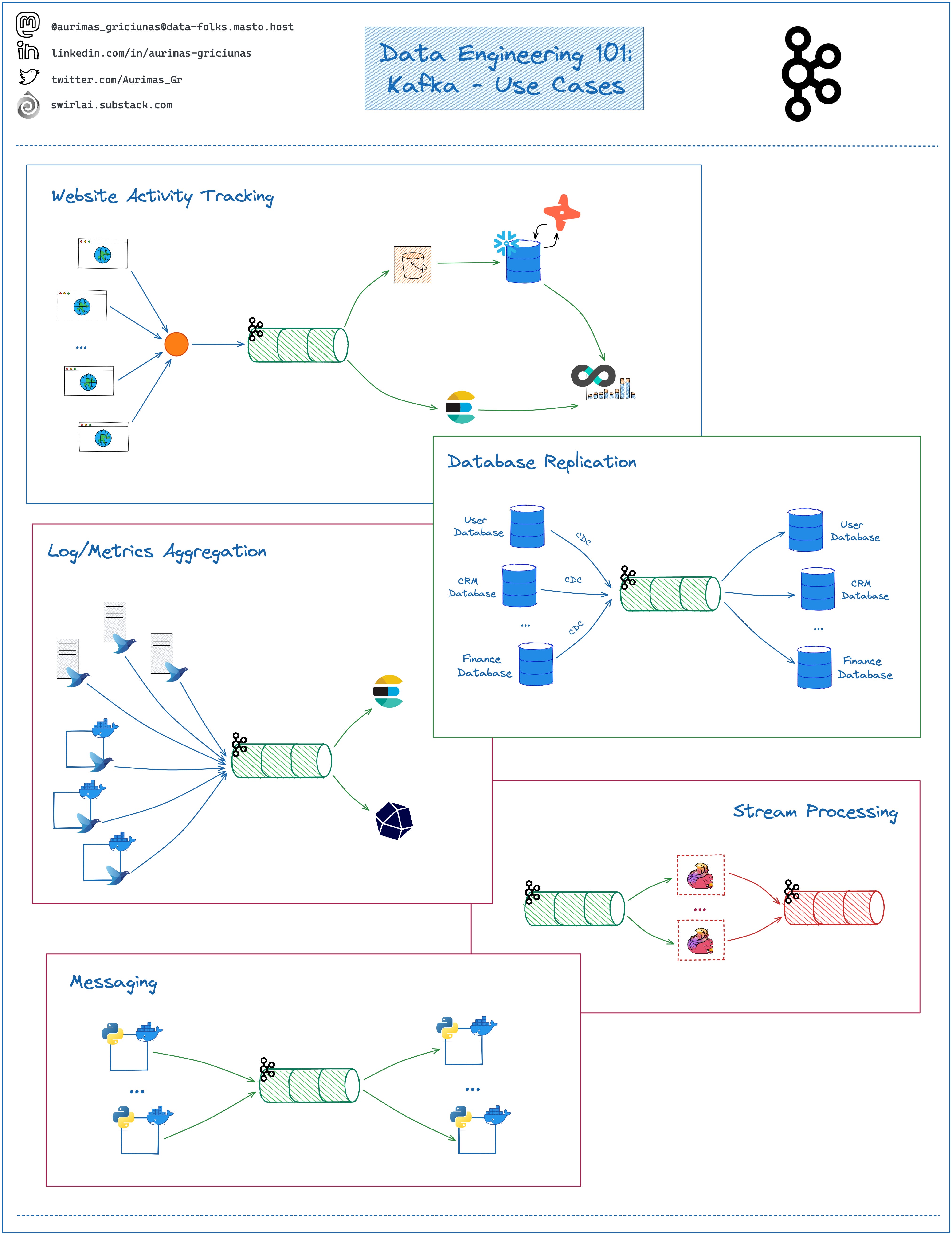
- Log Aggregation: Collecting logs from thousands of different servers and centralizing them for analysis in tools like Elasticsearch or Splunk.
- Metrics and Monitoring: Tracking operational data in real-time to alert engineers of system failures.
- Stream Processing: Deciding in milliseconds whether a credit card transaction is fraudulent by comparing the current event against historical patterns.
- Event Sourcing: A design pattern where state changes are logged as a sequence of events, allowing for "time-travel" debugging and easy auditing.
- Microservices Communication: Using Kafka as a decoupled communication layer between services, ensuring that if Service A is down, Service B can still send messages that will be processed later.
Best Practices and Common Pitfalls for Beginners
- Don't over-partition: While partitions allow for parallelism, having too many partitions on a small cluster can lead to overhead and increased latency. Start small and scale up as needed.
- Monitor Disk Space: Kafka stores data on disk. Always set a retention policy (e.g., 7 days or 50GB) to ensure you don't run out of storage and crash your brokers.
- Use Meaningful Keys: If you need to ensure that events related to the same entity (like a specific Customer ID) are processed in order, make sure that ID is used as the message key.
- Handle Schema Evolution: Data structures change over time. Using a tool like the Confluent Schema Registry helps ensure that producers and consumers can still understand each other when the data format updates.
- Understand Delivery Guarantees: By default, Kafka provides "at-least-once" delivery. If your application cannot handle duplicate messages, you must explore "exactly-once" semantics (EOS) configurations.
Frequently Asked Questions (FAQ)
Is Kafka a database?
Kafka is often called a "streaming database," but it is more accurately described as a distributed event store. While it persists data to disk and allows for queries (via ksqlDB), its primary purpose is handling data in motion rather than serving as a primary store for complex relational queries.
Do I still need Zookeeper in 2026?
No. Since the introduction of KIP-500 and the stabilization of KRaft, Kafka no longer requires a separate Zookeeper ensemble. Metadata is now managed within the Kafka cluster itself, which reduces architectural complexity and improves scalability.
How does Kafka achieve such high performance?
Kafka achieves high performance through three main techniques: utilizing sequential I/O (which is much faster than random disk access), using "Zero Copy" transfer (moving data from the disk buffer directly to the network buffer without copying it into the application space), and aggressive batching of messages to reduce network overhead.
What is the difference between a Topic and a Queue?
In a traditional queue, once a message is read, it is gone. In a Kafka topic, messages remain until the retention period expires. This allows multiple different consumers to read the same data for different purposes at their own pace.
Can I run Kafka on Windows?
Yes, you can run Kafka on Windows for development purposes. However, it is highly recommended to use the Windows Subsystem for Linux (WSL2) or Docker containers to run the Linux version of Kafka, as the native Windows scripts are often less maintained and may exhibit different behaviors than production Linux environments.
Next Steps for Your Kafka Journey
Now that you have successfully set up a broker and passed your first messages, the next step is to explore client libraries for your preferred programming language. Whether you use Java, Python (confluent-kafka-python), or Go, the principles remain the same.
Start by building a small project, such as a real-time weather dashboard or a simple chat application, to practice managing producers and consumers. As you become more comfortable, look into ksqlDB, which allows you to write SQL queries against Kafka streams, making real-time data processing accessible to anyone who knows standard SQL.