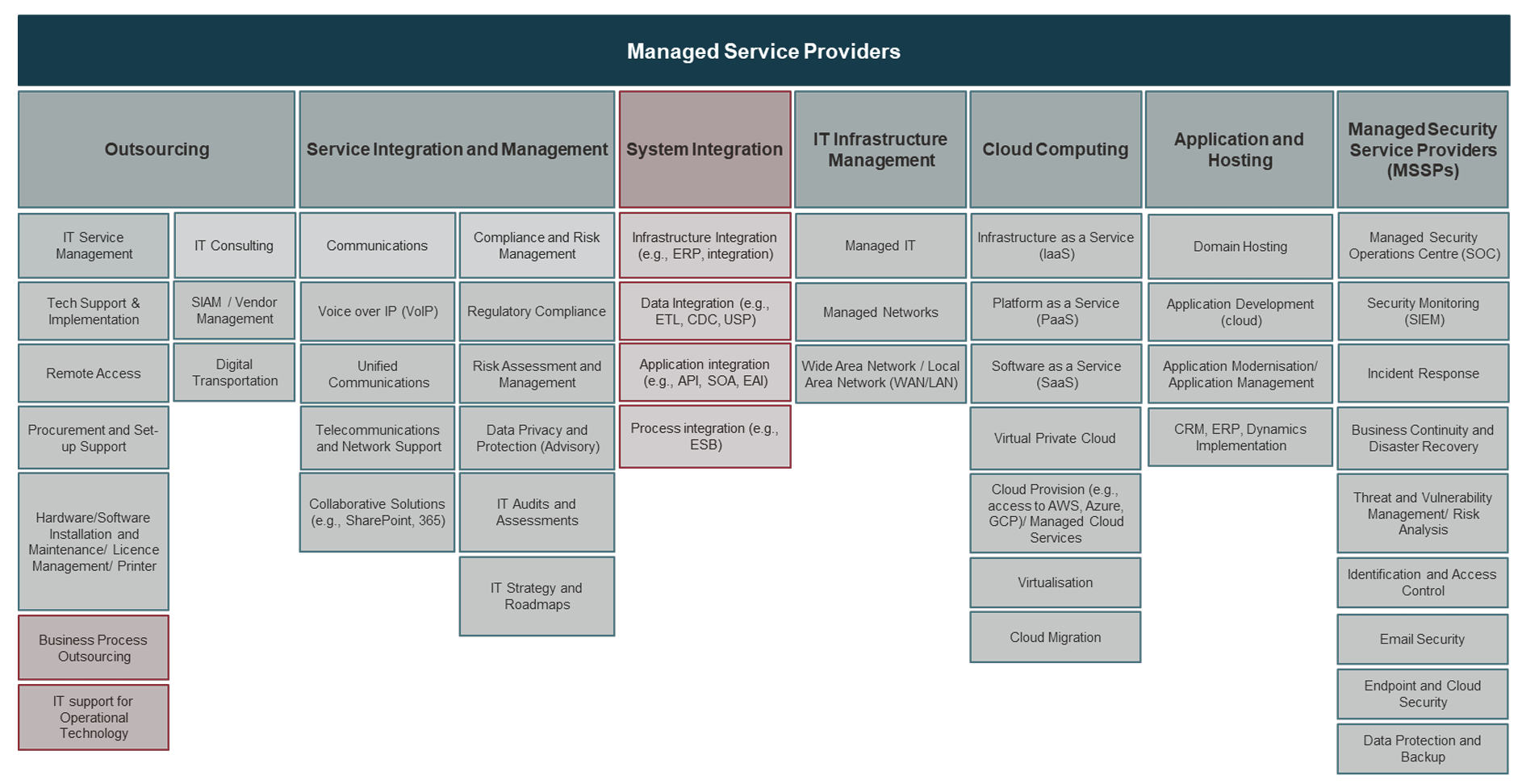
Managed Service Providers (MSPs) use the 1Password MSP edition to centralize the security management of multiple client organizations through a single, multi-tenant dashboard. This specialized edition allows providers to provision user seats, monitor security health, and automate usage-based billing across their entire client base without compromising the zero-knowledge encryption model that protects individual user data.
The evolution of identity and access management (IAM) has moved beyond simple password storage. For modern MSPs operating in 2026, the challenge is no longer just "storing passwords" but managing the entire lifecycle of credentials, secrets, and administrative access across diverse client environments. The 1Password MSP edition was specifically engineered to solve the friction points inherent in the standard Business edition when applied to a service provider model—namely, the lack of centralized visibility and the complexity of disparate billing cycles.
The Architecture of the 1Password MSP Dashboard
At the heart of the MSP experience is the multi-tenant dashboard. Unlike a standard enterprise account where an administrator only sees their own organization, the MSP dashboard acts as a "manager of managers." When an MSP logs in, they are presented with a bird's-eye view of every client they support. This interface is the primary tool for operational efficiency, allowing technicians to jump between client accounts without needing separate sets of credentials for each.
The dashboard provides real-time data on seat usage, which is critical for the "pay-as-you-go" or usage-based billing models that most MSPs employ. Historically, MSPs had to manually audit their client accounts at the end of every month to see how many licenses were active. The new edition automates this, syncing directly with the MSP’s professional services automation (PSA) tools or providing exportable reports that reflect precise consumption.
Furthermore, the MSP edition introduces "delegated administration." This allows the MSP to have administrative rights over the client’s 1Password account to help with recovery and setup, while still adhering to the fundamental security principle that 1Password itself cannot see the data. The MSP can set up policies—such as enforcing Two-Factor Authentication (2FA) or restricting access to specific IP ranges—from this central hub, ensuring that all clients meet a baseline security standard.
Security Infrastructure and the Zero-Knowledge Model
One of the most frequent questions from MSP clients is how the provider can manage their vault without seeing their private passwords. 1Password for MSPs maintains the "Zero-Knowledge" architecture that defined the original product. Every client organization has its own unique Secret Key and Master Password.
When an MSP technician accesses a client’s account through the MSP dashboard, they are not bypassing encryption. Instead, the MSP is granted a specific administrative role within that client’s "team" structure. This role allows the technician to manage users and vaults, but unless the client explicitly shares a vault with the MSP, the technician cannot see the individual items stored within a user’s private vault.
In 2026, this distinction is vital for compliance frameworks like SOC2, HIPAA, and GDPR. MSPs use the Watchtower feature—now aggregated at the MSP level—to identify security risks across their entire portfolio. If a specific client has a high percentage of reused or weak passwords, the MSP sees a red flag in their dashboard. They can then proactively reach out to that client to provide remediation services. This transforms the MSP from a reactive "resetter of passwords" into a proactive security consultant.
Streamlining Onboarding and Client Lifecycle Management
Onboarding a new client into a password management system was historically a manual, time-consuming process. The MSP edition simplifies this through automated provisioning. MSPs can link the client’s 1Password account to their existing Identity Provider (IdP) like Azure Active Directory (now Microsoft Entra ID) or Okta.
Once the integration is live, the process follows a predictable path:
- Account Provisioning: The MSP creates a new "Client" object in their dashboard.
- IdP Sync: The client’s employee list is pulled from their directory.
- Automated Invitations: Employees receive emails to set up their accounts.
- Vault Structure Deployment: The MSP uses templates to create standard vaults (e.g., "Marketing Shared," "Finance Dept," "IT Admin") so the client isn't starting from a blank slate.
The "New Edition" also handles the offboarding process with higher precision. When an employee leaves a client company and is disabled in the directory, 1Password automatically deprovisions their access. For the MSP, this ensures that the client is no longer being billed for that seat and, more importantly, that the former employee no longer has access to sensitive company credentials.
Integrating 1Password into the MSP Tech Stack
Managed Service Providers do not work in a vacuum; they rely on a complex stack of RMM (Remote Monitoring and Management) and PSA tools. The 1Password MSP edition includes an API-first approach that allows these systems to communicate.
By using the 1Password Connect API, MSPs can automate the deployment of the 1Password desktop and browser extensions across thousands of endpoints simultaneously. They can also use "Service Accounts" to manage secrets in their own automation scripts. For example, if an MSP has a script that rotates local admin passwords on client servers, those new passwords can be automatically injected into the client’s 1Password "IT Admin" vault via the API, ensuring the documentation is always up to date without human intervention.
Another significant integration point is the SIEM (Security Information and Event Management) connection. MSPs can stream 1Password audit logs directly into their Security Operations Center (SOC). This allows them to detect suspicious activity, such as an unusual number of failed login attempts or a user accessing a vault from a prohibited geographic location, and trigger an automated response.
Comparing 1Password MSP vs. Standard Business Editions
Understanding the differences between the editions is crucial for MSPs when deciding how to structure their service offerings. While the underlying vault technology is similar, the management layers are vastly different.
| Feature | 1Password Business | 1Password MSP Edition |
|---|---|---|
| Management Focus | Single Organization | Multi-Tenant (Multiple Clients) |
| Billing Model | Annual or Monthly per User | Usage-Based (Aggregated for MSP) |
| Visibility | Internal Org Only | Cross-Client Security Health |
| Provisioning | Manual or IdP Sync | Automated Client + IdP Sync |
| Admin Access | Internal IT Admins | Delegated MSP Admin Rights |
| Integration | Standard API | Advanced Connect API + PSA/RMM |
| Support | Standard Business Support | Dedicated Partner Success Manager |
Monetization and Business Strategy for MSPs
The "New Edition" of 1Password for MSPs isn't just a technical tool; it is a revenue driver. MSPs typically package 1Password as part of a "Security Essentials" bundle. Because the MSP edition uses a consumption-based pricing model, the provider only pays for what their clients actually use, allowing for healthy margins when bundled into a flat-rate per-user-per-month managed service contract.
MSPs also use the platform to offer "Security as a Service" (SECaaS). By managing the vaults, performing quarterly security audits using Watchtower data, and handling the complex task of "Secrets Management" for the client's internal dev teams, the MSP provides high-value consulting that goes far beyond simply reselling software. This stickiness is vital in 2026, where the "commodity" MSP services are being squeezed by automation, and specialized security management remains a premium offering.
Common Implementation Mistakes to Avoid
Even with a powerful tool, deployment failures can occur if the strategy is flawed. One common mistake is failing to enforce the "Master Password" and "Secret Key" backup procedures. While 1Password offers recovery options through the MSP administrative role, if a client’s account is not properly configured with emergency kits, the recovery process can become a bottleneck for the MSP helpdesk.
Another mistake is over-sharing. MSP technicians often fall into the trap of having "Global Admin" access to every client vault. To maintain a "Least Privilege" security posture, MSPs should use the dashboard to assign specific technicians to specific clients. A junior tech supporting Client A should not have the ability to even see the user list for Client B. The MSP edition facilitates this granular permissioning, but it must be configured correctly during the initial setup phase.
Finally, ignoring the "Private Vault" education is a major hurdle. Employees often fear that their employer (or the MSP) can see their personal passwords if they use the "Private" vault. MSPs should proactively communicate that the "Private" vault is exactly that—private—and even the MSP admin cannot access it. This encourages adoption, which in turn secures the client organization more effectively.
Troubleshooting and Maintenance in 2026
As of 2026, the 1Password MSP edition has integrated AI-driven troubleshooting. If a client user is having trouble with SSO (Single Sign-On) authentication, the MSP dashboard can provide a diagnostic trace showing exactly where the handshake failed. This reduces the "time-to-resolution" for helpdesk tickets.
Regular maintenance for the MSP involves reviewing the "Orphaned Vaults" report. Over time, as projects end or departments restructure, vaults can be left with no active members but sensitive data remains. The MSP dashboard highlights these risks, allowing the provider to either archive the data or reassign ownership, ensuring the client's digital footprint remains clean and secure.
FAQ
How does billing work for 1Password MSP? Billing is centralized through the MSP. Instead of each client receiving a separate invoice from 1Password, the MSP receives a single, aggregated bill based on the total number of active seats across all managed organizations. This allows the MSP to invoice the client directly as part of their monthly service fee, often at a margin.
Can an MSP recover a client's account if they lose their Master Password? Yes, the MSP edition supports "Recovery Delegated" permissions. As long as the client organization has enabled this feature (which is the default in the MSP edition), an MSP administrator can initiate a recovery process for a client user. This creates a new Secret Key for the user, allowing them to regain access without losing their data.
Does 1Password for MSPs support integration with PSA tools like ConnectWise or Autotask? Yes, 1Password has built native integrations and robust APIs to connect with major PSA tools. This ensures that when a user is added to 1Password, the seat count is automatically updated in the MSP’s billing system, preventing "billing leak" where services are provided but not charged.
Is it possible to migrate an existing 1Password Business client to the MSP Edition? Yes. 1Password provides a migration path for existing accounts. The MSP can "invite" an existing standalone business account into their MSP dashboard. Once the client accepts, the billing and administrative management transition to the MSP, while the client’s data and vault structure remain completely intact.
Can the MSP see the passwords stored in a client's vault? By default, no. The zero-knowledge encryption ensures that data is encrypted at the device level. An MSP technician can only see the contents of a vault if a client administrator explicitly grants that technician access to a specific vault. The MSP's primary role is managing users and security policies, not viewing private credentials.
Practical Recommendation
For MSPs looking to deploy the 1Password MSP edition in 2026, the first step is to establish a Security Baseline Policy. Before onboarding your first client, define the mandatory settings for all managed organizations: enable Duo or WebAuthn for multi-factor authentication, set a minimum password strength via the platform's policy engine, and configure the Watchtower alerts to notify your helpdesk immediately of any compromised credentials. By standardizing these settings in the MSP dashboard, you ensure a consistent security posture that is easier to manage and defend during a compliance audit.