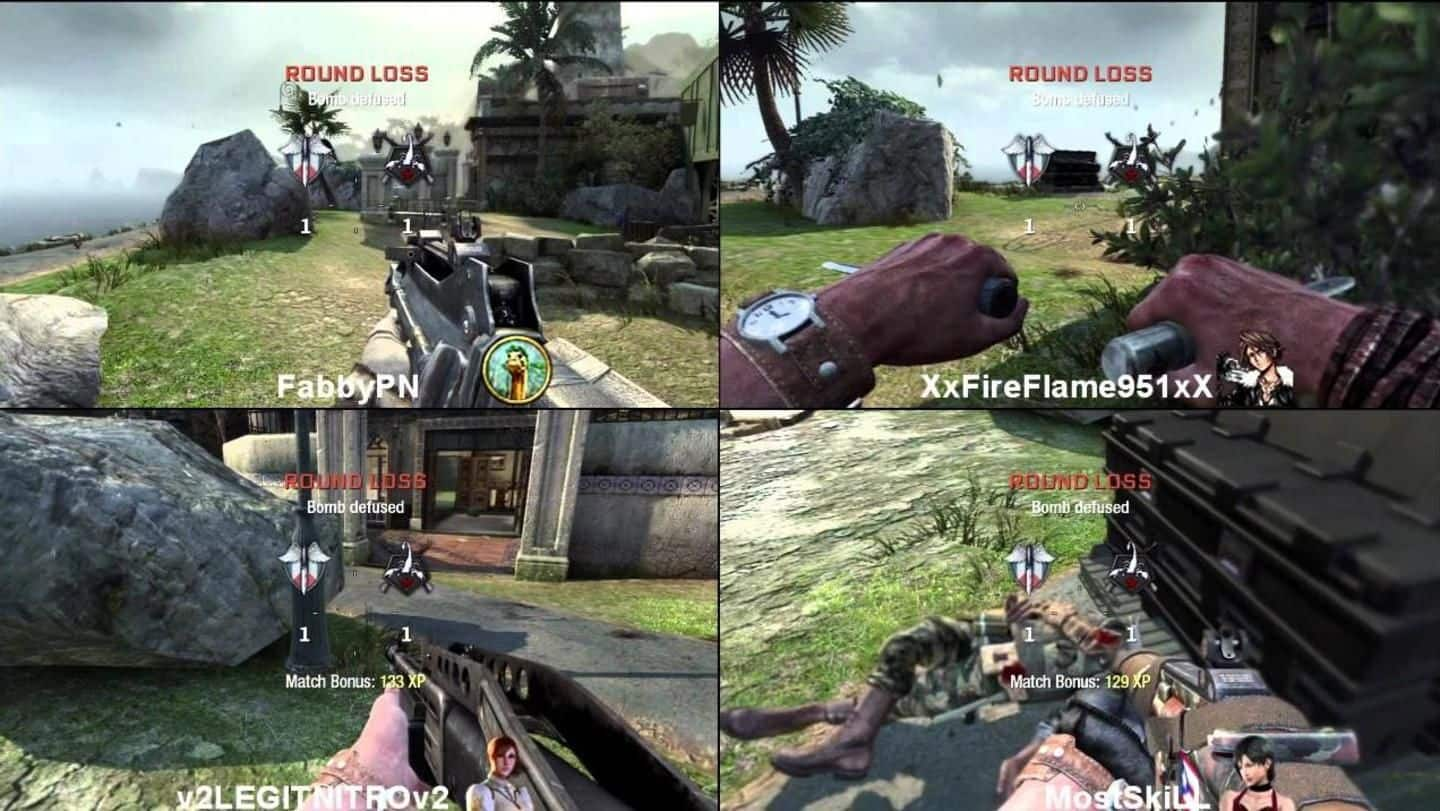
PC gaming offers incredible local multiplayer experiences through titles like Overcooked! All You Can Eat, Rocket League, Minecraft, Stardew Valley, and Screencheat. These games allow four players to share a single monitor, provided you have enough controllers and a system capable of rendering four perspectives simultaneously.
While the PC has historically been viewed as a platform for solo play or online matchmaking, the landscape in 2026 has shifted significantly. With the rise of powerful GPUs and the ubiquity of high-refresh-rate 4K displays, the "couch co-op" experience is no longer exclusive to consoles. In fact, the PC's versatility often makes it the superior choice for local four-player sessions, allowing for higher resolutions and more flexible controller configurations.
The Evolution of PC Local Multiplayer
For decades, PC gamers were tethered to their desks, while console players enjoyed the social atmosphere of the living room. However, the introduction of "Big Picture" modes on various launchers and the seamless integration of wireless controllers have bridged this gap. Split-screen gaming—where the screen is divided into sections to accommodate multiple players—requires substantial hardware overhead, as the computer must essentially render the game world from four different camera angles at once.
In 2026, even mid-range hardware can handle these demands comfortably. Below, we explore five of the best titles that define the four-player split-screen experience on PC, ranging from chaotic cooking simulators to competitive shooters where looking at your opponent's screen is actually the point.
1. Overcooked! All You Can Eat
Overcooked! All You Can Eat is widely considered the gold standard for local co-op. This definitive edition bundles both Overcooked! and Overcooked! 2, along with every piece of downloadable content (DLC) ever released, all remastered in 4K.
Gameplay Dynamics and Chaos
In this game, four players take on the roles of chefs in increasingly absurd kitchens. The objective is simple: prepare, cook, and serve a variety of dishes before the customers leave in a huff. However, the execution is anything but simple. Kitchens are often split across moving trucks, floating islands, or shifting ice floes. Success hinges entirely on communication and the division of labor. One player might be responsible for chopping onions, another for frying burgers, a third for washing dishes, and a fourth for plating and serving.
Why It Excels in 4-Player Split Screen
Unlike traditional split-screen where the view is physically divided, Overcooked! uses a shared-screen approach where all four players occupy the same visual space. However, it is fundamentally a "local multiplayer" title that thrives on the physical proximity of players. The 2026 version includes "Assist Mode," which allows groups of varying skill levels to enjoy the game together by extending round timers and increasing recipe scores.
2. Rocket League
Rocket League remains a powerhouse of competitive local play. It is a high-octane hybrid of arcade-style soccer and vehicular mayhem. While many players compete online, the PC version's ability to support four-player split-screen makes it a staple for any gaming party.
Technical Performance on PC
Running Rocket League in four-way split-screen is demanding. Each player’s viewport requires its own rendering pass. On a high-end PC in 2026, you can maintain a stable 120 FPS even with four players, which is critical for a game that relies so heavily on physics and timing.
The Learning Curve and Competitive Play
The game is easy to pick up—hit the ball into the net—but has a nearly infinite skill ceiling. In a four-player local setting, you can engage in 2v2 matches or join forces as a team of four to take on bots or players online. The social dynamic of sitting next to your teammate as you coordinate a "Fast Aerial" or a goal-line save is an experience that online play cannot replicate.
3. Minecraft: Bedrock Edition
While the original "Java Edition" of Minecraft requires third-party mods for split-screen, the Bedrock Edition for PC supports it natively. This makes it one of the most versatile 4-player games for families and creative groups.
Survival and Creative Collaboration
Four players can jump into a single world to build massive structures, explore deep caverns, or attempt to defeat the Ender Dragon. The split-screen implementation is seamless; players can join or leave the session at any time without interrupting the others.
Resolution and Real Estate
Playing Minecraft with four people on a standard 1080p monitor can feel cramped. However, on a 4K or Ultrawide monitor, each player still receives a crisp, usable area. In 2026, Ray Tracing (RTX) features are more accessible, allowing local groups to experience the game’s world with realistic lighting and reflections, provided the host PC has a modern GPU capable of the heavy lifting required for four simultaneous viewports.
4. Stardew Valley
Stardew Valley introduced 4-player local split-screen in its 1.5 update, transforming a solitary farming experience into a collaborative community project. It is the perfect choice for those who want a slower-paced, high-depth game.
Managing a Shared Farm
In split-screen mode, players share the same farm but have their own separate cabins. You can coordinate who focuses on crops, who goes into the mines for ores, and who handles the fishing. The game’s progression system—unlocking new areas, upgrading tools, and building relationships with NPCs—feels significantly faster and more rewarding with a team of four.
Technical Prerequisites
To enable 4-player split-screen in Stardew Valley, you must first have enough cabins on your farm to house the additional players. This can be done at the start of a new game or by visiting Robin the Carpenter to build new ones. It is one of the few games where four people can play for hundreds of hours and still find new things to do together.
5. Screencheat
Screencheat is a unique first-person shooter that turns the "taboo" of looking at your opponent’s screen into the core mechanic. In this game, every player is completely invisible.
The "Cheat" Mechanic
To find and kill your opponents, you must look at their quadrants of the screen to figure out where they are based on environmental landmarks. This makes it a game specifically designed for four-player split-screen; it is virtually unplayable in any other format.
Variety and Accessibility
The game features a wide array of bizarre weapons, from a blunderbuss to a "Cheebo" (a mechanical frog that explodes). Because the game is stylized and uses bold colors, it is easy to distinguish the different viewpoints, even on smaller screens. It’s a fast-paced, hilarious experience that levels the playing field between seasoned FPS players and newcomers.
Technical Comparison of 4-Player PC Games
The following table summarizes the requirements and genres of these top titles to help you decide which is best for your setup.
| Game Title | Primary Genre | Input Requirement | PC Requirement (Local 4-Player) | Best For |
|---|---|---|---|---|
| Overcooked! AYCE | Action / Puzzle | 4 Controllers | Low-Medium | Casual groups and families |
| Rocket League | Sports / Racing | 4 Controllers | Medium-High | Competitive players |
| Minecraft (Bedrock) | Sandbox / Survival | 4 Controllers | Medium-High | Creative collaboration |
| Stardew Valley | Simulation / RPG | 4 Controllers | Low | Long-term progression |
| Screencheat | FPS | 4 Controllers | Low | Parties and quick rounds |
Essential Hardware for 4-Player PC Gaming
Playing with four people on one computer involves more than just owning the games. You need to ensure your hardware is ready for the logistical challenge of four inputs and four outputs.
1. Controllers and Connectivity
The most common hurdle is connecting four controllers.
- Xbox Controllers: These are the most compatible with Windows. Using an Xbox Wireless Adapter for Windows is recommended over Bluetooth, as it supports up to eight controllers with lower latency.
- PlayStation Controllers: DualShock 4 and DualSense controllers work well but may require software like DS4Windows for games that don't natively support them.
- Wired Connections: If you have a large USB hub, wired controllers are the most reliable way to avoid interference or battery issues during long sessions.
2. Display Considerations
A 27-inch monitor is often too small for four-player split-screen. For the best experience, connect your PC to a 4K Television (55-inch or larger). This ensures that each player's quadrant is roughly the size of a small laptop screen. If you are using a desk setup, an Ultrawide (21:9 or 32:9) monitor can provide extra horizontal real estate, which is particularly beneficial for games like Rocket League.
3. GPU and CPU Overhead
As mentioned, rendering four screens is taxing. If you plan to play at 4K resolution, a GPU from the last two generations (such as an NVIDIA RTX 3070/4070 or AMD RX 6800/7800 series and above) is ideal. Additionally, ensure your CPU has enough cores to handle the input processing for four separate players.
Expanding Your Library with Nucleus Co-op
If the five games listed above aren't enough, you should look into Nucleus Co-op. This is a free, open-source tool that allows you to play games in split-screen that do not natively support it.
Nucleus Co-op works by opening multiple instances of the same game and "hooking" into the controllers to assign one to each instance. It then repositions the windows to create a split-screen effect. This tool has made it possible to play games like Halo: The Master Chief Collection, Borderlands 3, and Left 4 Dead 2 in 4-player local split-screen on PC. It is a more technical solution but is indispensable for a dedicated local multiplayer PC setup.
Common Challenges and Troubleshooting
Controller Conflict (Player 1 controlling everyone)
This is a frequent issue in Windows where the OS misidentifies the primary input device. Ensure that all controllers are turned on and recognized by Windows before launching the game. Using Steam’s "Controller Settings" can help force the game to recognize multiple unique inputs.
Audio Issues
By default, most games will mix the audio from all four players into one output. This can be chaotic in games with directional sound. Some titles allow you to adjust audio settings specifically for split-screen, but generally, you will have to get used to the shared soundscape.
Performance Drops
If you notice stuttering, the first step is to lower the graphical presets. Even if your PC can run a game at "Ultra" for one player, "Medium" or "High" is often necessary for four. Disabling resource-heavy features like Ambient Occlusion and Motion Blur can significantly improve the frame rate in split-screen mode.
Frequently Asked Questions
Do I need four separate accounts to play these games in split-screen?
For most games like Overcooked! and Screencheat, you do not. Additional players usually join as "Guest" profiles or secondary characters within your primary save. However, for Minecraft: Bedrock Edition, additional players may need to sign into Microsoft accounts if they want to save their individual character skins and progress across different sessions.
Can I play split-screen on a laptop?
Yes, provided the laptop has the necessary ports or a USB hub for controllers and is powerful enough to handle the game. Many modern gaming laptops are more than capable of running these titles. For the best experience, connect the laptop to a larger TV via HDMI.
Is it possible to play 4-player split-screen with one keyboard and three controllers?
Technically, yes, many games support this configuration. However, it is not recommended. The person on the keyboard is often at a disadvantage (or advantage, depending on the genre), and some games have difficulty mapping a keyboard and multiple controllers simultaneously without conflict. Four identical controllers provide the most balanced and bug-free experience.
Does Steam Remote Play Together work with 4-player split-screen?
Yes. One of the best features of PC gaming is Steam Remote Play Together, which allows you to take a local split-screen game and stream it to your friends over the internet. Only the host needs to own the game, and the PC treats the remote players as if they were plugged into your computer locally.
Why do some games only support 2 players on PC but 4 on consoles?
This is usually due to optimization and the history of PC gaming as a "single-user" platform. Developers sometimes omit 4-player support on PC to save on development costs or because they assume PC players won't have the hardware for it. However, tools like Nucleus Co-op mentioned above often bridge this gap.
Final Recommendations
To build the ultimate local multiplayer PC setup in 2026, start with Overcooked! All You Can Eat for its sheer accessibility and Rocket League for its competitive depth. If your group enjoys long-term projects, Stardew Valley offers hundreds of hours of shared gameplay.
Always ensure your PC is connected to a large screen and that you have a dedicated USB hub or wireless adapter for your controllers. By moving your PC into the living room or setting up a "couch-ready" environment in your office, you can unlock a social dimension of gaming that remains one of the most rewarding ways to play.