The best free journal apps for Android in 2026 are Journey, Daybook, and DailyBean. These applications provide high-quality reflection tools, including end-to-end encryption, cross-platform synchronization, and multimedia support. Each offers a generous free tier that allows users to maintain a consistent writing habit without the necessity of a monthly subscription.
Digital journaling has evolved significantly by 2026, transitioning from simple text entry to sophisticated personal management systems. For Android users, the landscape is diverse, offering everything from minimalist "micro-journaling" to feature-rich platforms that integrate with health data and location services. Choosing the right tool requires balancing ease of use with data security and portability.
The Evolution of Digital Journaling on Android
By 2026, Android's ecosystem has matured to favor apps that respect user privacy while providing seamless integration across the mobile and tablet experience. Journaling is no longer just about recording events; it is a scientifically backed method for improving mental health, reducing stress, and enhancing cognitive clarity. The transition from paper to digital journals on Android devices has been driven by the convenience of always-on accessibility and the ability to search years of entries in seconds.
The apps selected for this guide have been vetted based on their "free-to-use" viability. While many apps in the Google Play Store claim to be free, they often lock essential features—like cloud backup or photo attachments—behind a paywall. The following three selections represent the most functional, feature-complete versions available to the general public in 2026 without requiring a financial commitment.
1. Journey: The Best for Multimedia and Cross-Platform Sync
Journey has long been a leader in the digital journaling space, and in 2026, it remains the most robust option for users who want a rich, multimedia-heavy experience. It is designed for those who view their journal as a digital scrapbook of their life, capturing not just words but also the environment in which those words were written.
Feature Set and User Experience
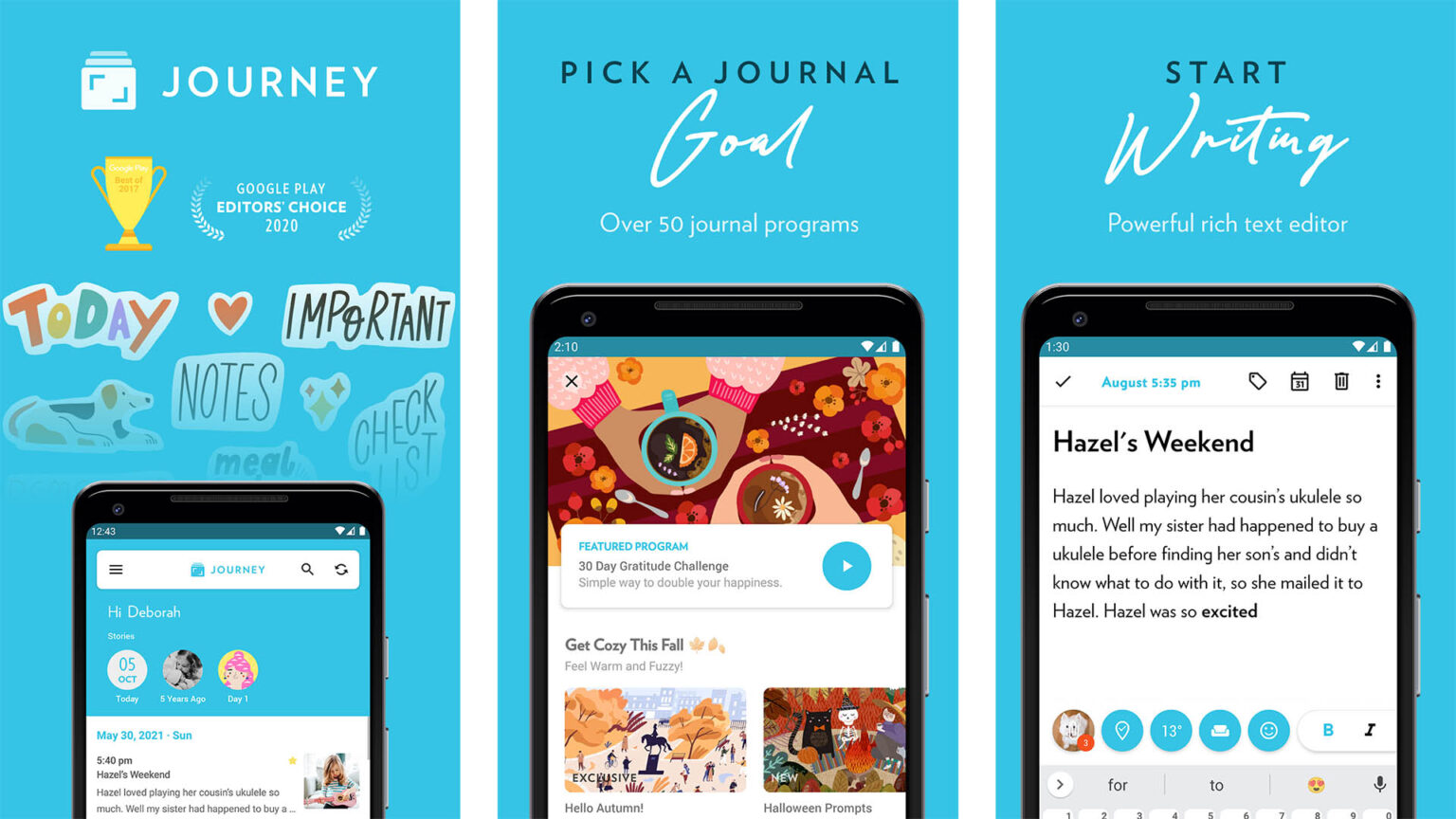
Journey's interface is clean and follows modern Material Design guidelines, making it feel native to the Android environment. The free version allows users to create text entries, add one photo per entry, and automatically tag entries with weather data and location. One of its standout technical features is the ability to sync with Google Drive. By using your own cloud storage, Journey ensures that you retain ownership of your data even in the free tier.
The app supports Markdown, which is essential for users who want to format their text (using bold, italics, or headers) without navigating complex menus. In 2026, Journey has also improved its "On This Day" feature, which resurfaces memories from previous years, fostering a long-term connection with your past self.
Technical Specifications and Security
Journey utilizes AES-256 encryption for local data and relies on Google’s secure infrastructure for cloud synchronization. For users concerned about physical privacy, the app includes a biometric lock (fingerprint or face unlock) and a custom PIN.
Pros:
- Automatic metadata tagging (weather, location, activity).
- Clean, distraction-free writing interface.
- Reliable Google Drive sync ensures data isn't locked in a proprietary silo.
- Calendar view for easy navigation of past entries.
Cons:
- The free version limits the number of images per entry.
- Advanced features like PDF export or email-to-journal require a premium upgrade.
2. Daybook: The Best for Simplicity and Voice Integration
If Journey is the "scrapbook" of Android journals, Daybook is the "classic notebook." It focuses on the core writing experience and is particularly well-suited for users who prefer a minimalist aesthetic. Daybook has gained popularity in 2026 for its high performance on entry-level Android devices and its seamless integration with voice assistants.
Streamlined Workflow
Daybook’s primary appeal is its lack of friction. When you open the app, you are presented with a simple "Add" button that immediately opens a text editor. There are no complex folders or tagging systems to navigate unless you choose to use them. For many, this simplicity is what makes the habit of journaling sustainable.
A unique advantage of Daybook in 2026 is its "Voice Journaling" capability. Leveraging Android’s advanced speech-to-text engines, Daybook allows users to dictate their thoughts while on the go. This is particularly useful for professionals or students who may not have the time to sit and type but want to capture ideas or reflections immediately.
Data Security and Accessibility
Daybook offers a "Passcode Lock" as a standard feature in its free version, which is a critical requirement for anyone documenting private thoughts. It also supports basic cloud backup, ensuring that if you lose your phone, your entries are recoverable. The app is optimized for low-resource consumption, meaning it won't drain your battery or take up significant storage space, even with hundreds of entries.
Pros:
- Extremely lightweight and fast.
- Superior voice-to-text integration for hands-free entry.
- Straightforward backup and restore process.
- Totally free core features with minimal ad interference.
Cons:
- Lacks the deep multimedia capabilities of Journey.
- Formatting options are more limited than its competitors.
3. DailyBean: The Best for Quick Mood Tracking and Visuals
Not everyone wants to write long-form paragraphs. DailyBean caters to the growing "micro-journaling" movement in 2026, which focuses on tracking moods, habits, and small moments through icons and short notes. It is an excellent choice for individuals who find traditional journaling intimidating or time-consuming.
The Micro-Journaling Approach
DailyBean uses a "bean" metaphor for mood tracking. Every day, you select a bean that represents your overall feeling (from ecstatic to miserable). From there, you can tap icons for activities you performed—such as exercise, social outings, or specific hobbies—and add a brief note or a photo.
This visual approach provides immediate data visualization. By the end of a month, the app generates a "Monthly Report" that shows correlations between your activities and your mood. For example, you might discover that your mood is consistently higher on days when you record "Reading" or "Walking."
Customization and Engagement
The free version of DailyBean is surprisingly generous with its customization. Users can choose from various themes and icon sets to make the app feel personal. In 2026, the app's developers have optimized the "Reminder" system, which sends gentle notifications at specific times of the day to encourage consistency, a vital component of successful habit-forming.
Pros:
- Takes less than 60 seconds to complete a daily entry.
- Excellent data visualization and mood analytics.
- Highly customizable visual interface.
- Ideal for habit tracking alongside emotional reflection.
Cons:
- Not suitable for long-form, descriptive writing.
- The icon-based system may feel too "gamified" for some users.
Comparison of the 3 Best Free Journal Apps for Android
The following table summarizes the key technical and functional differences between these three platforms as of 2026.
| Feature | Journey | Daybook | DailyBean |
|---|---|---|---|
| Primary Style | Multimedia/Long-form | Minimalist/Text-heavy | Micro-journaling/Visual |
| Sync Method | Google Drive / Proprietary | Proprietary Cloud | Account-based Sync |
| Security | Biometric / PIN | PIN / Passcode | PIN / Pattern |
| Media Support | Photos, Video, Audio | Photos | Photos & Icons |
| Best For | Travelers & Scrapbookers | Busy Professionals | Habit & Mood Trackers |
| Offline Mode | Yes | Yes | Yes |
| Export Options | PDF, DOCX (Limited) | TXT, PDF | Image, CSV |
Essential Technical Considerations for 2026
When selecting a free journal app on Android, there are three technical "pillars" you must consider to ensure your data remains safe and accessible over the long term.
1. Data Portability and Export
A journal is a long-term project. One of the biggest mistakes users make is choosing an app that makes it impossible to leave. In 2026, look for apps that support JSON or CSV exports. This ensures that if the app developer ever ceases operations, you can take your data and import it into a different platform or a simple text file. Journey and Daybook are particularly strong in this area, offering standard export formats even to free users.
2. Privacy and Encryption
Since a journal contains your most private thoughts, encryption is non-negotiable. Ensure the app you choose explicitly mentions At-Rest Encryption. This means that even if someone gains access to your phone's file system, they cannot read your journal entries without your passcode or biometric key. By 2026, most reputable apps use the Android Keystore system to manage these security certificates safely.
3. Cloud vs. Local Storage
- Local Storage: Your data stays only on your phone. This is the most private option but the most dangerous if you lose or break your device.
- Cloud Storage: Your data is synced to a server. This allows for cross-device access (e.g., writing on your phone and reading on your tablet).
Ideally, choose an app like Journey that allows you to use your own Google Drive for sync. This provides the convenience of the cloud with the security of a service you already trust.
Common Mistakes to Avoid When Starting a Digital Journal
Starting a journal is easy; maintaining it is difficult. Many users abandon their digital journals within the first month due to common pitfalls:
- Over-committing: Do not feel pressured to write pages every day. If you are tired, a single sentence or a single "bean" in DailyBean is enough to keep the habit alive.
- Ignoring Backups: Even if an app has cloud sync, manually export your data once every few months. Technology can fail, and having a secondary copy (like a PDF on your computer) is essential for a "forever" journal.
- Worrying About Perfection: Digital journals are for your eyes only. Do not worry about grammar, spelling, or "correct" formatting. The goal is emotional processing and memory retention, not publication.
Frequently Asked Questions
Can I use these apps offline?
Yes. Journey, Daybook, and DailyBean all support offline entry. Your data is saved locally on your Android device and will automatically sync to the cloud once an internet connection is re-established. This makes them ideal for travelers or those who journal in areas with poor connectivity.
How do I move my entries from a paper journal to an Android app?
The most efficient way in 2026 is to use the "Photo Entry" feature found in Journey or DailyBean. You can take a high-resolution photo of your paper pages and attach them to a daily entry. Alternatively, use Daybook’s voice-to-text feature to read your old entries aloud, effectively "typing" them into the digital format with minimal effort.
Is my data safe from the app developers?
For apps that use end-to-end encryption or sync via your personal Google Drive (like Journey), the developers cannot access your entries. However, always review the privacy policy of any app. If the app is "free" but doesn't explain how it makes money, be cautious about how your metadata might be used for advertising. The three apps listed here have established, transparent business models.
Can I sync my Android journal with my Windows or Mac computer?
Journey offers excellent cross-platform support with dedicated apps for Windows and macOS, as well as a web interface. Daybook also provides a web-based login that allows you to type from a computer keyboard, which is often faster for long-form reflection. DailyBean is primarily mobile-focused and is best used on Android or iOS devices.
What happens if I switch from Android to an iPhone?
If you use Journey or Daybook, your entries will follow you. Both apps have iOS versions, and since they use cloud-based syncing, you simply need to log in to your account on the new device to see your entire history. DailyBean also supports cross-platform accounts, making the transition between operating systems seamless.
Final Recommendation
For the most complete and versatile experience in 2026, Journey is the premier choice due to its multimedia integration and use of Google Drive for storage. If you prefer a faster, no-nonsense writing environment, Daybook is the superior minimalist tool. For those who want to track their mental health and habits with minimal writing, DailyBean offers the best visual and analytical features.
Whichever app you choose, the key to success is consistency. Set a daily reminder on your Android device, choose a time when you are least likely to be interrupted, and start with just a few words. Over time, these digital entries will become a valuable archive of your personal growth and life experiences.