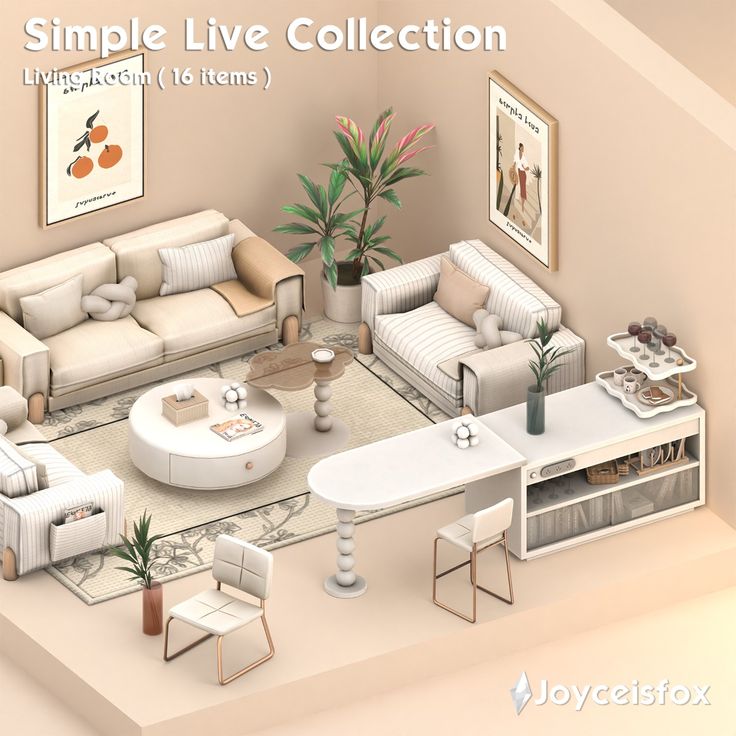
Integrating custom content (CC) furniture into The Sims 4 fundamentally transforms the gameplay experience by expanding aesthetic boundaries, impacting hardware performance, necessitating rigorous file management, introducing technical compatibility risks during game updates, and fostering a specialized creative community. While CC offers unparalleled design freedom, it requires players to balance visual quality against system stability and storage constraints.
1. Radical Expansion of Aesthetic Diversity and Realism
The primary effect of custom content furniture is the immediate removal of the stylistic "ceiling" imposed by Electronic Arts (EA). In the default game, furniture follows a specific "Maxis Match" aesthetic—slightly chunky, vibrant, and simplified to ensure the game runs on lower-end hardware. Custom content splits the community into two distinct visual paths: Maxis Match (MM) and Alpha CC.
The Shift to Hyper-Realism
Alpha CC furniture introduces high-resolution textures, often sourced from real-world photography. This allows players to create interiors that are indistinguishable from architectural digests. Effects include the addition of "clutter" items that look lived-in—stacked mail, realistic kitchen appliances, and intricate textile folds—which the base game lacks. This level of detail changes how players interact with Build Mode, shifting the focus from mere gameplay utility to high-end digital interior design.
Cohesive World-Building
Conversely, Maxis Match CC allows players to expand their catalog while maintaining the game's original art style. The effect here is a more seamless integration; players can find furniture sets that match the specific wood tones or color swatches of existing EA packs. This consistency prevents the "uncanny valley" effect that occurs when hyper-realistic Alpha furniture is placed next to the stylized, "doughy" Sims of the base game.
2. Quantitative Impact on System Performance and Load Times
A significant, often overlooked effect of CC furniture is the physical strain it places on a computer’s hardware, specifically the RAM and Graphics Processing Unit (GPU). This impact is governed by two technical factors: polygon counts and texture resolution.
Understanding Polygon Density
In 3D modeling, every object is made of polygons (triangles). A standard EA chair might consist of 500 to 1,000 polygons. A high-quality Alpha CC chair, however, might contain 20,000 to 50,000 polygons to achieve smooth curves and realistic edges. When a player builds a room filled with high-poly CC, the game engine must render millions of additional triangles. In 2026, even with modern hardware, excessive high-poly furniture can lead to:
- Frame Rate Drops: Significant stuttering when panning the camera over a furnished lot.
- Thermal Throttling: Increased GPU temperatures as the system works harder to render unoptimized meshes.
- Simulation Lag: The "time-dilation" effect where Sims take longer to respond to commands because the CPU is overwhelmed.
Memory Overhead and Load Times
Every piece of CC is a .package file that the game must read during the initial loading screen. As a library of CC furniture grows—often into the tens of gigabytes—the time it takes to reach the Main Menu and load a specific lot increases exponentially. Players using thousands of CC items may see load times jump from seconds to several minutes, changing the "pick up and play" nature of the game into a more committed, time-intensive session.
3. The Requirement for Rigorous Storage and File Management
Using CC furniture introduces a secondary "game" outside of the software: library management. Unlike official DLC, which is managed automatically by the EA app or Steam, CC requires manual intervention.
The "Mod Folder" Bloat
As of 2026, many seasoned players maintain CC libraries exceeding 50GB. This creates a significant storage footprint on Solid State Drives (SSDs). The effect of this "bloat" is a necessity for a hierarchical organization. Players must learn to categorize files (e.g., Furniture > Living Room > Sofas) to ensure that if a specific item causes a crash, it can be located and removed.
Synchronization and Backup Challenges
Players who use cloud storage services like OneDrive or iCloud often face conflicts. The Sims 4 "Electronic Arts" folder is located in the Documents directory by default. Massive CC libraries can trigger constant syncing, leading to bandwidth issues or file corruption. This forces players to learn technical workarounds, such as creating symbolic links (Symlinks) to move their CC to a secondary drive, effectively increasing the player's technical literacy regarding file systems.
4. Vulnerability to Game Updates and Technical Instability
The Sims 4 is a living product, receiving frequent "SDX" (Sims Delivery Express) drops and major patches. A critical effect of CC furniture is its susceptibility to "breaking" when the underlying game code changes.
Script and Tuning Conflicts
While furniture is often more stable than script mods (like MC Command Center), it is not immune to updates. Historical updates—such as the bunk bed update or the introduction of the "clutter" slot system—have rendered thousands of CC items non-functional or visually glitched.
- Broken Slots: Furniture might lose its ability to have items placed on top of it.
- Lighting Overhauls: Changes to the game's engine can cause CC furniture to appear pitch black or neon green.
- Script Errors: If a piece of furniture (like a custom functional fridge) uses custom tuning, a game update can prevent the lot from loading entirely, resulting in the dreaded "Error Code 122."
The Maintenance Cycle
To combat this, players must utilize third-party tools like Sims 4 Studio. The effect is a recurring maintenance cycle where, after every major patch in 2026, players must run "Batch Fixes" to update the code within their CC files. This creates a dependency on the community modding tools to keep a "modded" game functional.
| Effect Category | Primary Impact | Technical Driver | Severity for Users |
|---|---|---|---|
| Visuals | Enhanced realism and style variety | High-res textures & custom meshes | High (Positive) |
| Hardware | Increased lag and longer load times | Polygon counts and file size | Moderate (Negative) |
| Stability | Potential for crashes and "broken" items | Game engine updates/API changes | High (Variable) |
| Storage | SSD space consumption | Accumulation of .package files |
Moderate (Neutral) |
| Creativity | Unlimited interior design options | Unrestricted asset creation | High (Positive) |
5. Cultivation of a Specialized Creative and Social Ecosystem
The final effect of CC furniture is social. It integrates the player into a massive, global ecosystem of creators and curators. This shifts the game from a solitary experience to a community-driven one.
The Rise of the "Builder" Identity
Custom furniture has birthed a specific class of player known as the "Sims Builder." These players may rarely actually "play" the simulation, instead spending hundreds of hours creating lots specifically to showcase CC. This has led to the rise of platforms like CurseForge, The Sims Resource, and Patreon, where creators release monthly furniture collections (often called "CC Sets" or "Collabs").
The Economics of Custom Content
In 2026, the "Early Access" model for CC is the industry standard. Creators release furniture sets to patrons first, then to the public weeks later. This creates a micro-economy within the fandom. The effect on the player is a constant stream of new "content drops" that rival official Expansion Packs in quality and volume, often for a fraction of the cost—or for free. This community interaction keeps the game relevant long past its original release date by providing a never-ending supply of fresh assets.
Frequently Asked Questions
Does custom content furniture slow down my game?
Yes, custom content furniture can slow down your game, particularly if the items are "high-poly" or if you have a very large volume of them. Each item adds to the total number of files the game must load at startup and each mesh adds to the GPU's rendering workload. To mitigate this, prioritize "Maxis Match" content, which typically has lower polygon counts more in line with the game's original performance targets.
How do I fix CC furniture that turns black or disappears?
Furniture usually turns black due to lighting update conflicts or missing meshes. If the item is "recolored," you must ensure you have the original "mesh" file from the creator. If the issue started after a game update, download the latest version of Sims 4 Studio and run the "Batch Fix" for "Objects" to update the shader settings of your files to match the current game version.
Is CC furniture safe for my computer?
Generally, .package files used for furniture are safe because they do not contain executable code. However, you should always download CC from reputable sources like CurseForge or established creator Patreons. Avoid sites that require you to click through multiple suspicious "ad-fly" links, as these are the primary source of malware, rather than the Sims files themselves.
Can I use CC furniture on console (PS5/Xbox Series X)?
No, as of 2026, custom content furniture remains exclusive to the PC and Mac versions of The Sims 4. The console ecosystem is "closed," meaning players cannot access the file directory to add the .package files required for custom content. Console players are limited to official DLC and the "Sims Delivery Express" content provided by EA.
What is the difference between "Buy Mode" CC and "Build Mode" CC?
"Buy Mode" CC refers to furniture and decorative objects (chairs, tables, clutter) that you place inside a room. "Build Mode" CC refers to architectural elements like windows, doors, wallpapers, and flooring. While both are installed the same way, Build Mode CC (especially windows and doors) is much more likely to break during game updates because it interacts directly with the "walls" of the game's engine.
Recommendations for Managing CC Furniture
To maximize the positive effects of CC while minimizing the technical drawbacks, follow these best practices:
- Audit Your Library: Every few months, go through your furniture catalog and delete items you no longer use. This keeps your load times manageable.
- Use a Mod Manager: Tools like the "Sims 4 Mod Manager" allow you to see visual thumbnails of your CC files outside of the game, making it easy to identify and delete ugly or broken items.
- Check Poly Counts: Before downloading a beautiful sofa, check the creator’s description for the polygon count. Aim for items under 10k polygons for general use; reserve "high-poly" items (30k+) for photography or "Simstagram" builds where performance is less of a priority.
- Stay Updated: Follow your favorite creators on social media. When EA releases a major patch, these creators will often post "updated" versions of their furniture sets that fix any new bugs introduced by the patch.