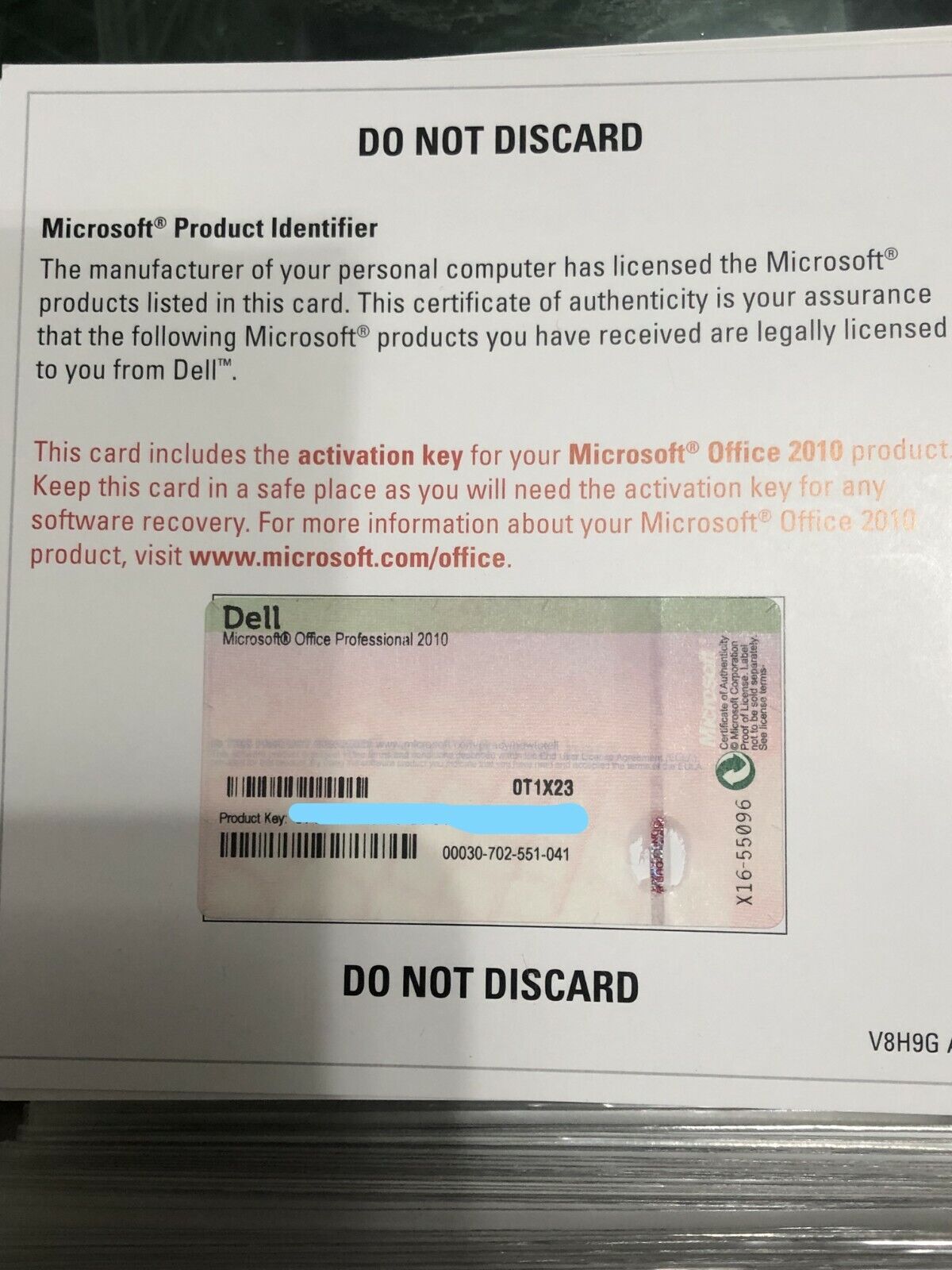
Finding the Microsoft Office 2010 product key is necessary if you are reinstalling the software on a computer and need to activate your license. You can typically locate this 25-character alphanumeric code on the physical packaging, in a confirmation email from a digital purchase, or by using specific administrative tools if the software is already installed.
Microsoft Office 2010 reached its end of extended support on October 13, 2020. While the software remains functional for users who possess a valid license and the installation media, Microsoft no longer provides technical support, security updates, or assisted activation services for this version. Consequently, finding your product key is the primary requirement for successful installation on a compatible operating system.
Understanding the Office 2010 License Structure
Before attempting to retrieve your product key, it is helpful to understand how Microsoft distributed Office 2010 licenses. The product key is a unique 25-character string divided into five groups of five characters (XXXXX-XXXXX-XXXXX-XXXXX-XXXXX).
If you purchased a physical copy of Office 2010, the product key is almost always located on an orange or yellow sticker attached to the product packaging—often on the DVD case or a separate "Certificate of Authenticity" card provided inside the box. If you purchased the software digitally through the Microsoft Store or an authorized retailer, the product key was sent to the email address used during the transaction.
Methods for Locating Your Product Key
1. Checking Physical Documentation
If you have a boxed version of the software, inspect the original media packaging. Look for a label that explicitly states "Product Key." Do not confuse this with the "Product ID," which is a generated string that appears within the software interface once installed; the ID is not the key required for activation.
2. Reviewing Digital Purchase Records
For digital downloads, search your email archives for keywords such as "Microsoft," "Office 2010," "Order Confirmation," or "Product Key." If you purchased the license through a Microsoft account, log in to the Microsoft account portal associated with your historical purchases. While Microsoft has moved many legacy products to the "Services & Subscriptions" page, some older licenses may not appear there depending on how they were registered at the time of purchase.
3. Utilizing Administrative Tools on Installed Systems
If Office 2010 is currently installed and activated on a computer, you may be able to extract the product key from the Windows Registry. Because the Registry is a sensitive database of system configurations, exercise caution.
The product key is stored in an encrypted format within the Windows Registry. You cannot simply read it by opening the registry editor. Instead, you must use a third-party software utility specifically designed to decrypt this information. Tools such as Belarc Advisor or NirSoft’s ProduKey are commonly used by system administrators to audit software licenses.
- Warning: Download utilities only from the original developer’s official website. Avoid "key finder" tools distributed through third-party download portals, as these often contain bundled adware or malicious scripts.
- Procedure: Once the utility is executed, it scans the installed software hives and displays the keys for detected Microsoft products. Note that these tools may only show the last five characters of the key for some modern versions of Office, though for Office 2010, they generally remain effective at recovering the full string.
Troubleshooting and Limitations
If you are unable to locate the product key, you must consider the current status of your software license.
- Retail vs. OEM Licenses: If Office 2010 came pre-installed on a computer purchased from an original equipment manufacturer (OEM) like Dell, HP, or Lenovo, the product key is often tied to the motherboard or provided on a separate "Product Key Card" included with the computer manuals. If the hard drive has been wiped and you lack this card, the license cannot be recovered.
- Volume Licensing: If you acquired Office 2010 through a business or academic volume license agreement, the product key is managed by your organization's IT department. Individual users do not have access to these keys.
- Non-Transferability: Most consumer licenses for Office 2010 are tied to the initial machine or the original purchaser. If you purchased a used copy of the software without the original product key, you do not have a valid license to use the product.
Comparison of Key Recovery Scenarios
| Scenario | Location of Key | Feasibility |
|---|---|---|
| Retail Boxed Version | Physical packaging/sticker | High |
| Digital Download | Confirmation email | High |
| Pre-installed (OEM) | System manual or sticker on PC | Moderate |
| Already Installed | Software audit tool (Registry) | High |
| Volume License | Organization IT portal | Restricted |
Frequently Asked Questions
1. Can I use a generic product key found online to activate my installation? No. Product keys are unique to specific license types. Using a key found on a public website will likely fail because it will have reached its activation limit or been blacklisted by Microsoft's activation servers.
2. Will Microsoft support help me recover a lost Office 2010 key? Generally, no. Because Office 2010 has been discontinued and reached end-of-support status, Microsoft support representatives no longer provide assistance for retrieving product keys or troubleshooting activation issues for this specific product version.
3. Why does my product key say it is invalid? An "invalid" error often occurs due to a typo. The characters B, 8, G, 6, Q, and O are frequently confused during manual entry. Verify that you are not transcribing the characters incorrectly. Alternatively, the key may be for a different edition (e.g., Home and Student vs. Professional) than the software you have installed.
4. Can I use my Office 2010 key for a newer version of Office? No. A product key is specific to the version and edition of the software for which it was purchased. An Office 2010 key cannot be used to activate Office 2013, 2016, 2019, 2021, or Microsoft 365.
5. What should I do if my computer crashes and I have no way to find the key? If you have no record of the key and it is not saved in a safe location, that specific installation license is effectively lost. You would need to purchase a current version of productivity software, as Office 2010 is no longer available for new purchase through official channels.
Recommendation
If you must use Office 2010, prioritize creating a physical or digital backup of your product key once it is located. Store this key in a password-protected document or a secure physical file. Given the security risks of running software that no longer receives security patches, consider upgrading to a currently supported version of office software to ensure your documents remain protected against modern vulnerabilities. If you cannot find your key, it is recommended to transition to a modern, supported office suite, as the cost and effort of "recovering" an unsupported, insecure license are not recommended for production environments.