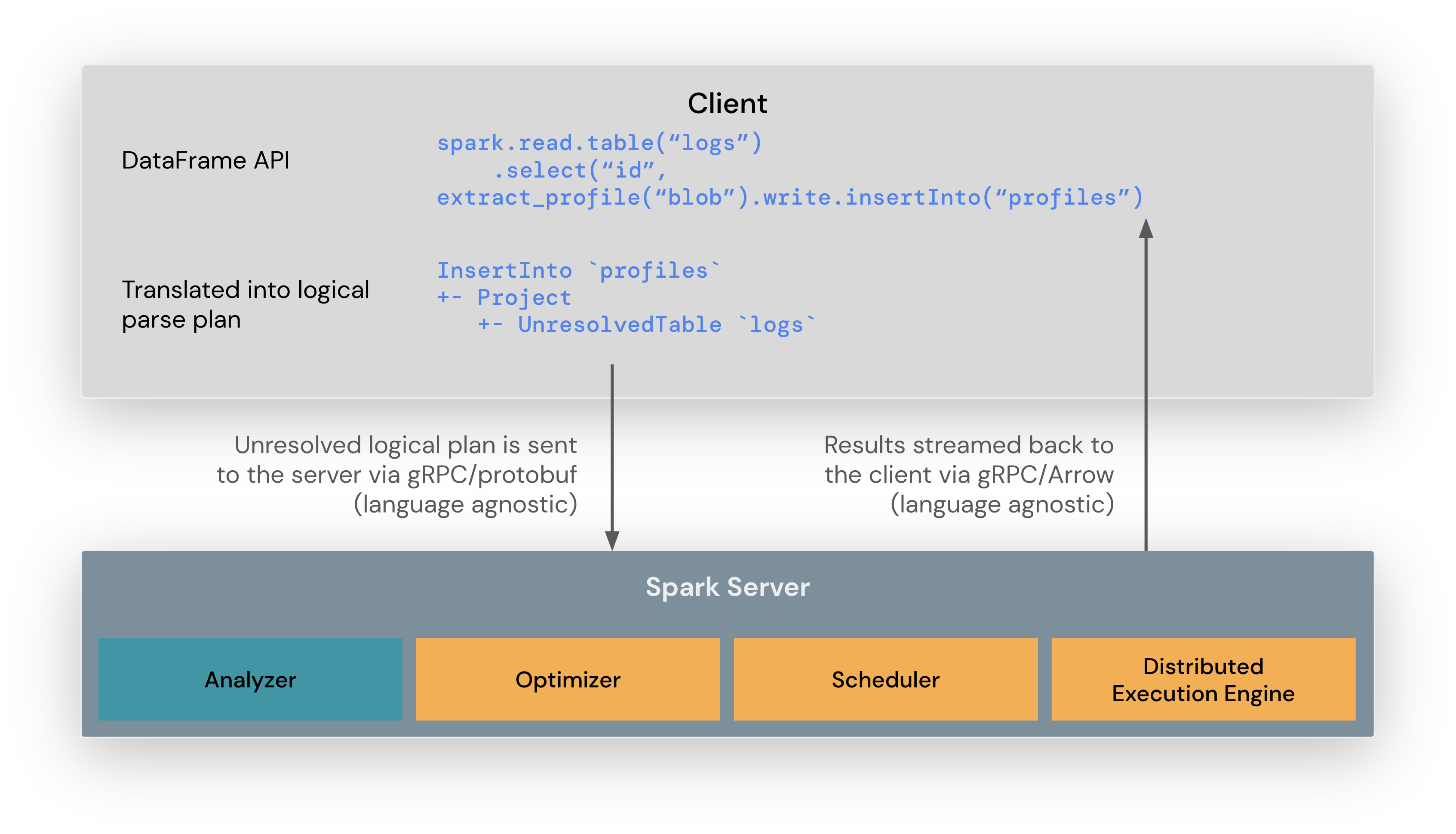
Running Apache Spark on AWS involves utilizing services like Amazon EMR for managed clusters, AWS Glue for serverless ETL, or Amazon EKS for containerized workloads. It allows organizations to process massive datasets efficiently by leveraging AWS's scalable infrastructure, integrated storage solutions like S3, and diverse instance types optimized for big data processing in 2026.
Apache Spark has established itself as the industry standard for distributed data processing, offering speed, ease of use, and a sophisticated stack for SQL, streaming, and machine learning. When deployed within the Amazon Web Services (AWS) ecosystem, Spark benefits from the cloud's inherent elasticity and a suite of integrated services that simplify cluster management, data ingestion, and security. As of 2026, the integration between AWS and Spark has matured into several distinct architectural patterns, each catering to different operational needs—from fully managed serverless environments to highly customizable containerized deployments.
The Core Ecosystem of Spark on AWS
The primary reason for Spark's dominance on AWS is the platform's ability to decouple compute from storage. In traditional on-premises Hadoop environments, compute and storage were often co-located on the same physical nodes. AWS revolutionized this by treating Amazon S3 (Simple Storage Service) as the primary data lake storage layer, allowing Spark clusters to scale up or down independently of the data size.
Amazon EMR (Elastic MapReduce)
Amazon EMR remains the most common way to run Apache Spark on AWS. It is a managed cluster platform that simplifies running big data frameworks. EMR provides the flexibility to choose specific EC2 instance types, customize Spark configurations, and utilize EMR-specific optimizations like the EMR File System (EMRFS), which improves Spark's performance when interacting with S3.
In 2026, EMR offers three primary deployment models:
- EMR on EC2: The classic model where you manage the underlying virtual servers. This is ideal for long-running clusters or workloads requiring deep kernel-level tuning.
- EMR on EKS: This allows you to run Spark jobs on Amazon Elastic Kubernetes Service. It is preferred by organizations that have standardized on Kubernetes for orchestration and want to share compute resources between microservices and data processing.
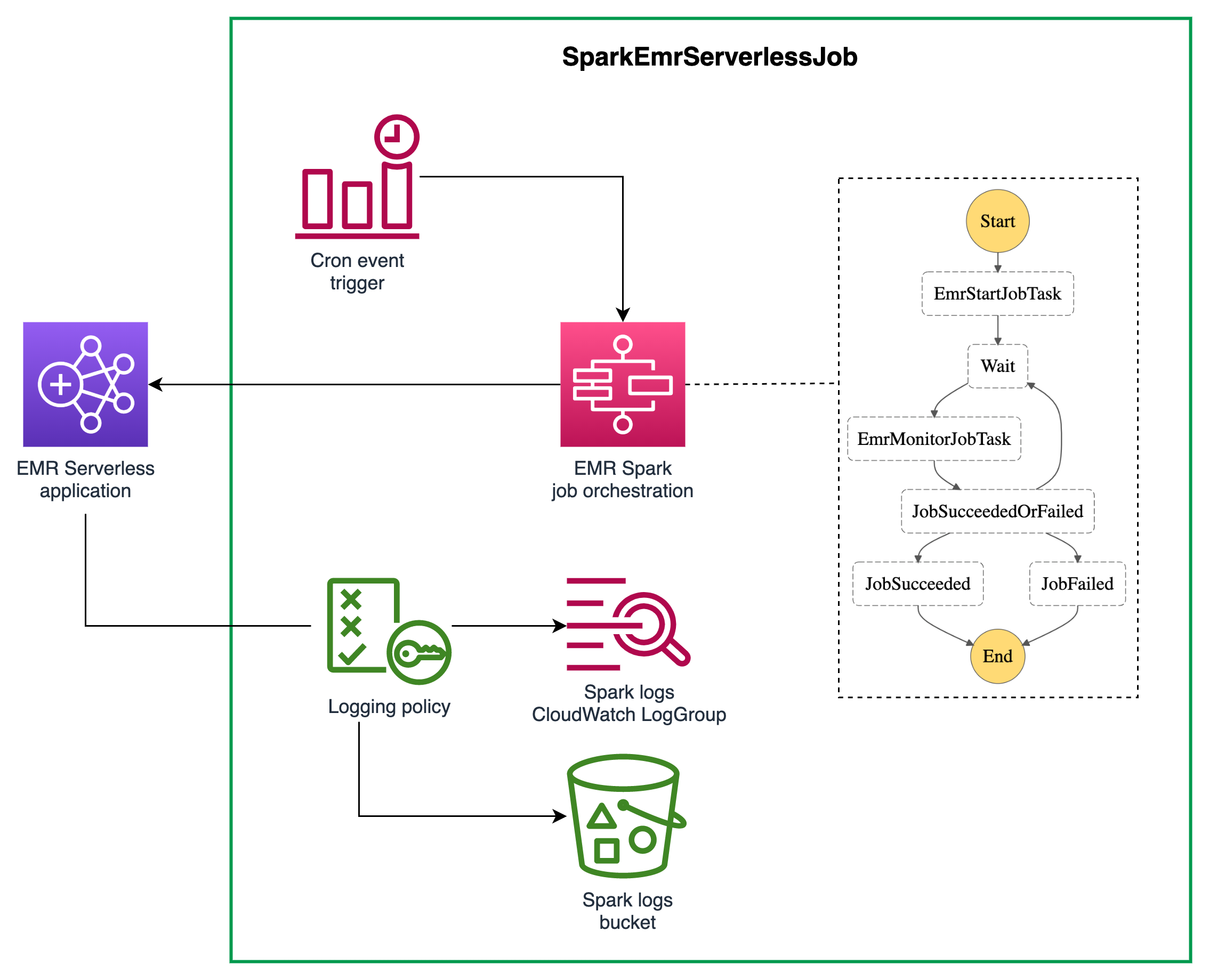
- EMR Serverless: A no-ops deployment option where AWS automatically determines the resources required by the Spark application, scaling them up and down without the user managing clusters or nodes.
AWS Glue
AWS Glue is a serverless data integration service that makes it easy to discover, prepare, and combine data for analytics. Glue ETL (Extract, Transform, Load) jobs run on a managed Spark environment. Unlike EMR, Glue is entirely serverless; there are no clusters to configure. It is particularly effective for event-driven data pipelines and scheduled batch processing where the overhead of managing a cluster is not justified.
Amazon Athena for Apache Spark
For data scientists and analysts who need to perform interactive analysis, Amazon Athena now supports Spark. This allows users to write Spark code (Python) in a notebook-like environment to query data in S3 without any infrastructure setup. It is optimized for sub-second startup times and is billed based on the compute usage per second, making it highly cost-effective for exploratory data analysis.
Choosing the Right Service for Your Spark Workload
Selecting the appropriate AWS service for Spark depends on your team's expertise, the predictability of your workload, and your requirements for customization. The following table provides a high-level comparison of the most popular options available in 2026.
| Feature | Amazon EMR (EC2) | AWS Glue | EMR Serverless | Amazon Athena (Spark) |
|---|---|---|---|---|
| Management Overhead | Moderate to High | Very Low | Low | Very Low |
| Customization | Full control over Spark/OS | Limited to Spark scripts | High Spark-level config | Minimal |
| Startup Time | 5–10 minutes | ~1 minute | Seconds | < 1 second |
| Primary Use Case | Large-scale, complex jobs | ETL and Data Pipelines | Variable batch workloads | Interactive Analysis |
| Scaling | Manual or Managed Scaling | Automatic | Automatic | Automatic |
| Cost Model | Instance-hour + EMR fee | Data Processing Units (DPU) | Resource-usage (vCPU/RAM) | Per-second compute |
Architectural Best Practices for Spark on AWS
Success with Spark on AWS is not just about choosing a service; it is about how you architect the data flow and manage resources.
Decoupling Compute and Storage
Always use Amazon S3 as your primary data store rather than HDFS (Hadoop Distributed File System) on local cluster storage. S3 offers 99.999999999% durability and allows you to shut down your Spark clusters when they aren't in use without losing data. For performance-critical workloads in 2026, utilizing S3 Express One Zone can significantly reduce latency for Spark shuffle operations and metadata-heavy tasks.
Leveraging Graviton Instances
AWS's ARM-based Graviton processors (such as Graviton3 and Graviton4) provide significantly better price-performance for Spark workloads compared to traditional x86 instances. Spark is highly compatible with ARM architecture, and migrating to Graviton-based EMR clusters often results in a 20-30% reduction in costs with no code changes.
Data Partitioning and File Formats
The efficiency of Spark on AWS is heavily dependent on how data is organized in S3.
- Columnar Formats: Use Apache Parquet or Apache Avro. Parquet is generally preferred for Spark because it allows the engine to skip unnecessary columns and rows, drastically reducing S3 I/O.
- Partitioning: Organize S3 keys in a
key=valueformat (e.g.,s3://bucket/table/year=2026/month=05/). This allows Spark to use "partition pruning" to only scan relevant files. - File Sizing: Avoid the "small files problem." Thousands of kilobyte-sized files slow down S3 listing and Spark task scheduling. Aim for file sizes between 128MB and 512MB.
Cost Optimization Strategies
Data processing at scale can become expensive if not monitored. In 2026, AWS provides several mechanisms to keep Spark costs under control.
- Spot Instances: For non-critical batch processing, use Amazon EC2 Spot Instances for EMR Task nodes. This can save up to 90% compared to On-Demand pricing. Ensure your Spark application is configured with appropriate checkpointing to handle potential node interruptions.
- Managed Scaling: Enable EMR Managed Scaling, which automatically adds or removes instances based on the workload. Unlike traditional auto-scaling, managed scaling is "Spark-aware," meaning it looks at the Spark scheduler's pending tasks to make scaling decisions.
- Lifecycle Policies: Use S3 Lifecycle policies to move older, infrequently accessed data to colder storage tiers like S3 Glacier Instant Retrieval. Spark can still access this data, but your storage costs will be significantly lower.
- Workload Bin-Packing: When using EMR on EKS, use tools like Karpenter to optimize node allocation, ensuring that Spark executors are densely packed onto the fewest possible instances.
Security and Governance
Operating Spark in a regulated environment requires a robust security posture. AWS integrates Spark with its core security services:
- IAM Roles for Service Accounts (IRSA): When running Spark on EKS or EMR, use fine-grained IAM roles to ensure that Spark executors only have access to the specific S3 buckets they need.
- AWS Lake Formation: This service provides a central place to manage permissions for your data lake. You can define column-level and row-level security policies that Spark jobs on EMR or Glue will respect.
- Encryption at Rest and in Transit: Use AWS Key Management Service (KMS) to encrypt data in S3 and EMR local disks. Spark's internal communication (shuffle data) should also be encrypted using TLS, which is easily configurable in EMR security configurations.
Troubleshooting Common Spark Issues on AWS
Even with managed services, Spark applications can encounter performance bottlenecks.
S3 Throttling
If a Spark job is making too many requests to a single S3 prefix, S3 may return "503 Slow Down" errors. To resolve this, increase the entropy in your S3 key names or use Spark configurations like fs.s3.maxConnections to tune the request rate.
Skewed Data
Data skew occurs when most of your data is concentrated in a few partitions, causing some Spark tasks to take much longer than others. Use Spark's salting technique or the AQE (Adaptive Query Execution) features—which are enabled by default in modern Spark versions—to rebalance the data during the shuffle phase.
Out of Memory (OOM) Errors
OOM errors are common when the Spark driver or executors run out of RAM. In an AWS context, this often happens when users choose instance types with high CPU but low memory. Ensure you select "memory-optimized" instances (e.g., the r family like r6g or r7g) for memory-intensive Spark operations like large joins or aggregations.
Frequently Asked Questions
Is AWS Glue better than Amazon EMR for Spark?
Neither is inherently "better"; they serve different purposes. AWS Glue is superior for serverless ETL where you want to minimize operational overhead and only pay for the duration of the job. Amazon EMR is better for complex, long-running clusters, interactive data science using notebooks, or workloads that require custom Spark configurations and specific third-party libraries.
How do I migrate my on-premises Spark jobs to AWS?
The most common approach is to use the "lift and shift" strategy with Amazon EMR. First, move your data to Amazon S3 using AWS DataSync or Snowball. Then, configure an EMR cluster with the Spark version that matches your on-premises environment. Finally, update your code to point to s3:// paths instead of hdfs:// paths.
Can I run Spark 3.5 or 4.0 on AWS?
Yes. As of 2026, Amazon EMR and AWS Glue support the latest stable versions of Apache Spark, including Spark 3.x and the newer Spark 4.0 releases. AWS typically updates its EMR releases within weeks of a major Apache Spark release to include new features like improved Adaptive Query Execution and enhanced Pandas API support.
What is the cheapest way to run Spark on AWS?
For intermittent, small-to-medium batch jobs, AWS Glue or EMR Serverless is often the most cost-effective because you don't pay for idle time. For massive, 24/7 processing, a finely-tuned EMR cluster utilizing a mix of Reserved Instances for the Master/Core nodes and Spot Instances for the Task nodes will likely yield the lowest cost per terabyte processed.
How does AWS Lake Formation work with Spark?
AWS Lake Formation acts as a governance layer. When a Spark job (on EMR or Glue) attempts to read data, Lake Formation verifies the IAM identity and applies any column-level filters or row-level permissions before allowing Spark to access the underlying S3 objects. This allows for centralized security management across different Spark applications.
Summary and Next Actions
Successfully implementing Apache Spark on AWS requires a strategic choice between the flexibility of Amazon EMR, the simplicity of AWS Glue, and the speed of Amazon Athena. By decoupling storage from compute using Amazon S3 and leveraging cost-saving measures like Graviton instances and Spot pricing, organizations can process petabytes of data efficiently.
To get started, follow these steps:
- Audit your current workloads: Identify if they are interactive (Athena), ETL-focused (Glue), or large-scale batch/streaming (EMR).
- Organize your Data Lake: Move a sample dataset to Amazon S3 and convert it to Parquet format to see immediate performance gains.
- Run a Pilot: Start with EMR Serverless to test your Spark code without the complexity of cluster management.
- Optimize: Once your code is running, switch to Graviton-based instances to optimize your price-performance ratio.
For more information on specific configurations, refer to the official Amazon EMR documentation and the Apache Spark project page.