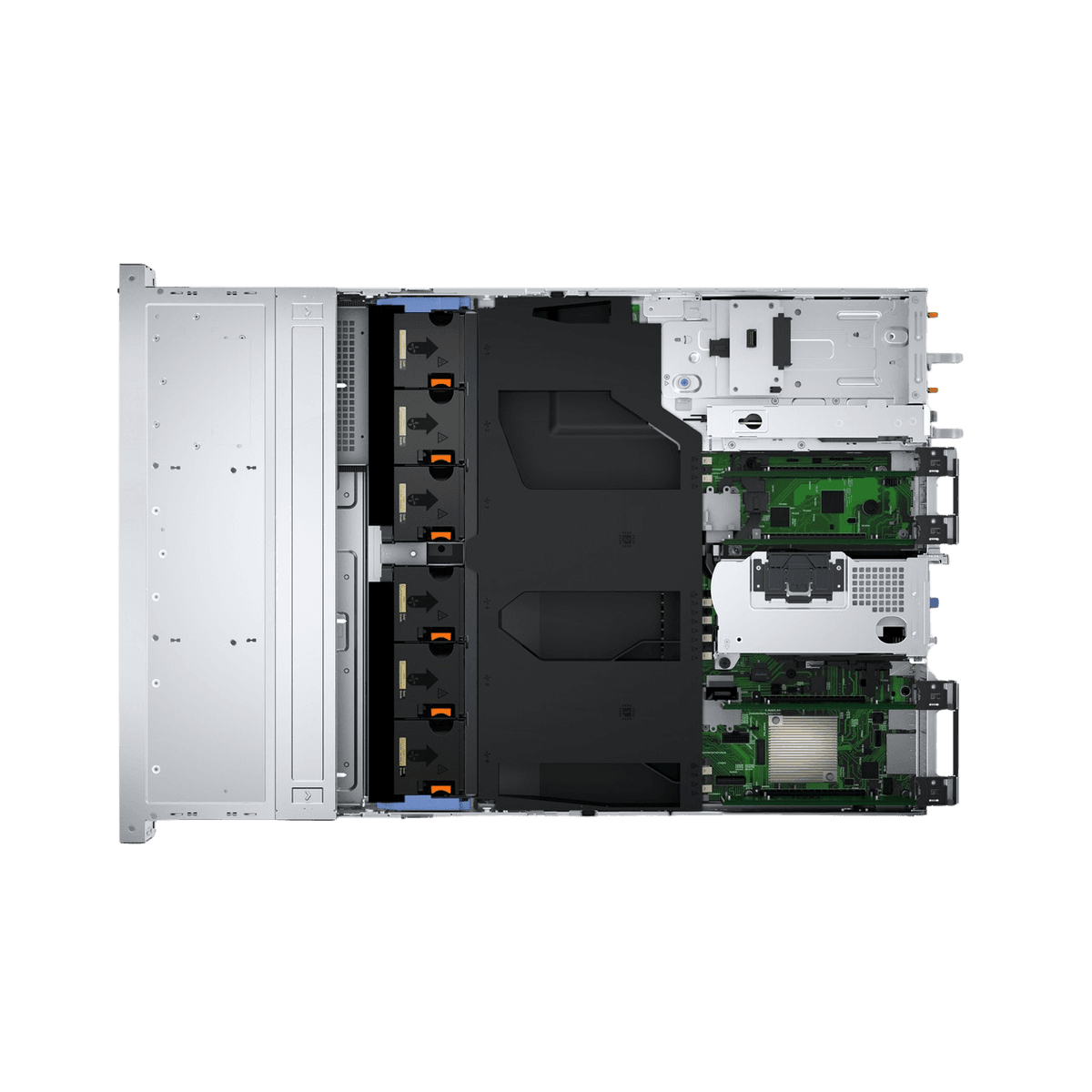
The Dell PowerEdge R760xs is a dual-socket, 2U rack server optimized specifically for virtualization, cloud-native workloads, and general-purpose data center tasks. It balances high-density compute power with cost-efficiency by focusing on the essential features required for modern software-defined storage and networking environments, omitting unnecessary high-end features found in the flagship R760.
Understanding the Positioning of the PowerEdge R760xs
The "xs" designation in the Dell PowerEdge portfolio represents a deliberate design philosophy: "specifically for scale-out." Unlike the standard R760, which serves as a Swiss Army knife for virtually any enterprise requirement, the R760xs is curated to provide a targeted set of capabilities that match the common requirements of cloud service providers and large-scale enterprises.
When looking inside the chassis, it becomes immediately apparent that the engineering team focused on thermal efficiency and accessibility. The R760xs is designed to house the 4th and 5th Generation Intel Xeon Scalable processors, providing a massive uplift in core counts and per-core performance over previous generations. By stripping away some of the extreme memory expansion slots or massive storage controller options found in the base R760, the R760xs provides a leaner internal layout that improves airflow, ultimately reducing the energy footprint of the data center.
Internal Layout and Thermal Architecture
Opening the chassis of the R760xs reveals a streamlined, modular interior that prioritizes ease of maintenance and airflow. The first thing a technician will notice is the air shroud, which is meticulously designed to direct cold air from the front fans directly over the processors and memory modules.
The central cooling block uses high-performance, counter-rotating fans. These are hot-swappable, a standard requirement for uptime-critical environments. The layout is purposefully sparse compared to high-end storage-heavy variants, which allows for better heat dissipation. Because the R760xs is often deployed in high-density rack environments, this internal configuration is optimized for "front-to-back" airflow, ensuring that even under sustained 90% CPU load, the system maintains thermal equilibrium.
Processor and Memory Configurations
At the heart of the system, the R760xs supports two Intel Xeon Scalable processors. The socket architecture is designed to handle TDPs (Thermal Design Power) that accommodate the breadth of the Intel Xeon line, ranging from entry-level efficiency cores to high-performance counts.
Regarding memory, the R760xs utilizes DDR5 RDIMMs. The memory subsystem is balanced; it does not offer the same total capacity as the R760, but it provides ample headroom for virtualization and containerization workloads.
- Memory Speed: Up to 5600 MT/s, depending on the processor and DIMM configuration.
- DIMM Slots: 16 DDR5 DIMM slots, allowing for significant capacity without the complexity of ultra-high-density configurations.
- Memory RAS: Features such as ECC (Error Correction Code) and Rank Multi-bit support are standard, ensuring data integrity for mission-critical databases and virtual machines.
Storage and Expansion Capabilities
The internal storage controller architecture of the R760xs is designed for performance and reliability. It supports the PERC (PowerEdge RAID Controller) 12 series, which offers significant throughput improvements over previous iterations. The server’s internal backplane is modular, allowing administrators to swap between SATA, SAS, and NVMe drives depending on the specific application need.
The PCIe expansion capabilities are a standout feature. The R760xs features several PCIe Gen5 slots. These slots are critical for modern networking—particularly for 100GbE or 200GbE connectivity—and for hardware accelerators such as GPUs. However, unlike the R760 which supports a wider array of double-width GPUs, the R760xs is architected primarily for lighter-duty inference or standard compute acceleration, keeping the interior layout clean and accessible.
Comparative Hardware Specifications
| Component | PowerEdge R760xs Specification | Primary Use Case |
|---|---|---|
| Processor | 2x Intel Xeon Scalable (Gen 4/5) | Virtualization & Cloud |
| Memory Capacity | Up to 1TB (16x 64GB DDR5) | General Compute |
| PCIe Lanes | PCIe Gen5 Slots | High-speed Networking |
| Front Drive Bays | Up to 12x 3.5" or 24x 2.5" | Data Density |
| Power Supply | Dual 600W to 2800W Titanium | Power Efficiency |
Management and Remote Access: iDRAC9
No look inside a Dell PowerEdge server is complete without discussing the Integrated Dell Remote Access Controller (iDRAC9). This is the "brain" of the server’s management layer. Even when the server is powered off, iDRAC9 allows for full remote power cycle control, BIOS configuration, and OS deployment.
The R760xs leverages the latest iteration of iDRAC9, which includes improved telemetry and proactive alerting. For data centers managing hundreds or thousands of these units, the integration with OpenManage Enterprise is essential. It allows for "one-to-many" updates, ensuring that security patches and firmware updates across a fleet of R760xs servers can be managed without physical intervention.
Prerequisites for Maintenance and Upgrades
Before attempting to open or modify the R760xs, there are standard professional practices that must be followed.
- Electrostatic Discharge (ESD) Safety: Always use an ESD wrist strap or mat. The high-density components in a 2U server are extremely sensitive to static buildup.
- Power Redundancy: Since the R760xs is intended for enterprise use, it almost certainly operates on dual power supplies. Ensure both are disconnected before performing any maintenance on internal components to avoid accidental shorts.
- Firmware Baseline: Before adding new hardware (like an additional NIC or expansion card), verify that the BIOS and iDRAC firmware are updated to the latest available version provided by the Dell support portal. Mismatched firmware levels are the most common cause of boot-time errors in modern PowerEdge servers.
Frequently Asked Questions
Is the R760xs suitable for high-performance computing (HPC)? While the R760xs is a powerhouse, it is optimized for virtualization and cloud-native workflows. If your HPC requirements demand maximum GPU density and extreme memory bandwidth, the standard R760 or R760xa may be a better fit.
Can I upgrade from an older R750 to the R760xs? Yes. The R760xs offers a significant leap in performance due to the transition to DDR5 memory and PCIe Gen5 interfaces. However, be prepared to re-evaluate your cabling and power infrastructure, as the power density per rack unit has increased with this generation.
How does the "xs" model differ from the standard R760? The R760xs is a "stripped-down" model meant for scale-out environments. It removes non-essential features like high-end storage controller support and extreme GPU expansion to reduce cost and power consumption for businesses that prioritize virtualization density over peak hardware extensibility.
What is the primary cooling concern for this server? The R760xs is designed for high-airflow data centers. In environments with poor cooling or stagnant air, the server will increase fan speeds to compensate, which increases power draw and noise. Ensure your rack has adequate ventilation to maintain peak efficiency.
Next Actions
To maximize the value of your Dell PowerEdge R760xs, start by mapping your workload requirements to the specific processor and RAM configurations supported by the latest firmware. For those managing a fleet, finalize your integration with Dell OpenManage to automate lifecycle management. If you are planning an expansion, verify that your current rack PDU (Power Distribution Unit) can handle the potential power draw of fully populated Gen5 PCIe slots and high-TDP processors. Regular maintenance of the air shroud and fan modules will ensure the longevity of your investment throughout its lifecycle.