Filing IRS Form 7004 electronically allows businesses and certain trusts or estates to secure an automatic extension of time to file their income tax returns. By completing the electronic filing process through an authorized IRS e-file provider or tax professional, filers can streamline submission, minimize postal delays, and receive immediate electronic confirmation of receipt from the Internal Revenue Service.
Navigating the tax compliance landscape requires precision, particularly when deadlines loom and business operations demand constant attention. For corporate entities, partnerships, and various other organizations operating on a calendar or fiscal year, IRS Form 7004 serves as the primary mechanism for requesting an automatic extension of time to file informational and income tax returns. While paper filing remains an option, modern administrative practices heavily favor electronic filing due to its speed, accuracy, and paper trail. Understanding the exact mechanical steps required to successfully transmit Form 7004 through electronic channels ensures compliance, prevents costly clerical errors, and provides critical peace of mind during peak accounting cycles.
1. Determine Eligibility and Applicable Entity Types
Before initiating any electronic filing sequence, you must verify that the entity in question is legally eligible to use Form 7004 and that the specific tax form you intend to extend qualifies for an automatic extension. Form 7004 is a versatile document, but it does not apply to every single type of return issued by the Internal Revenue Service.
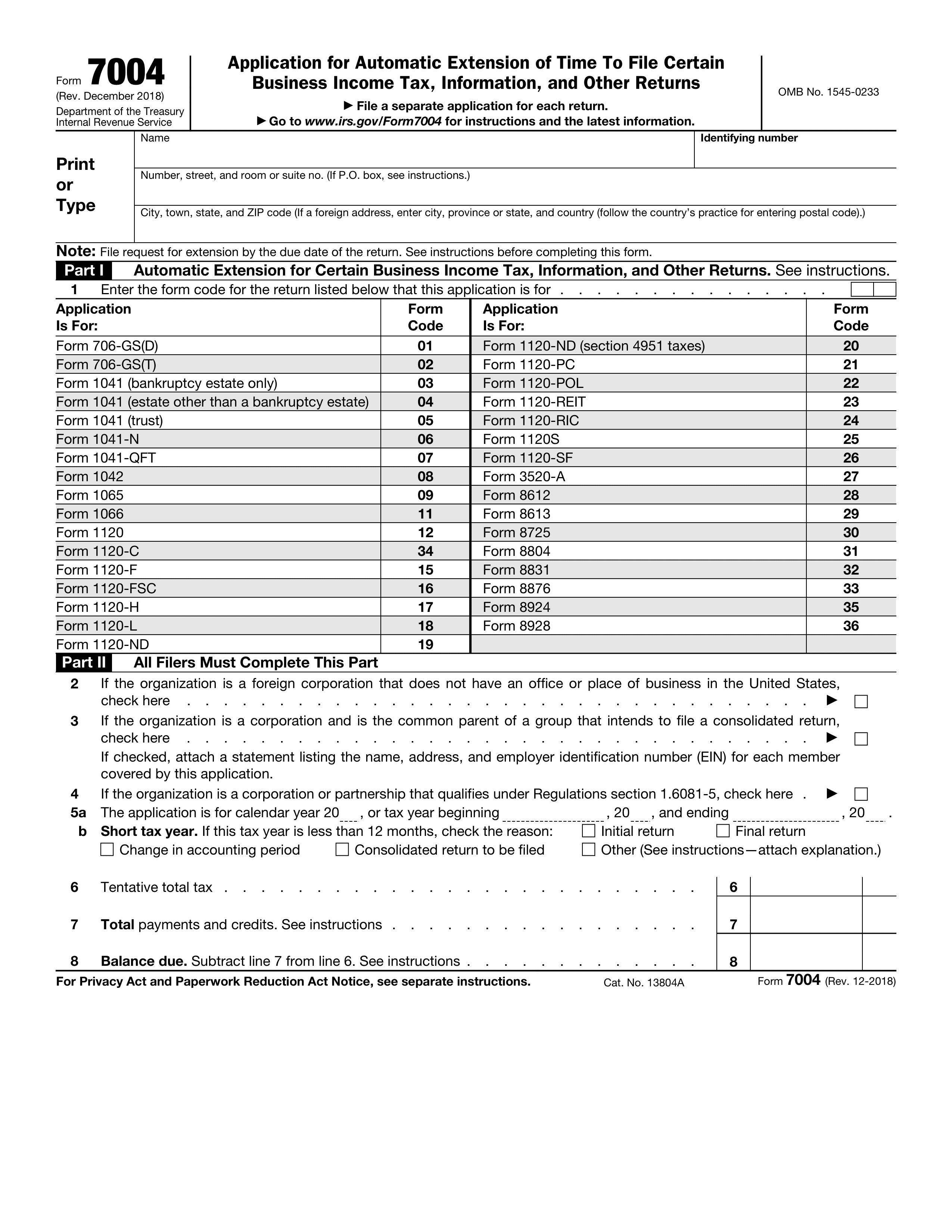
Eligible entities generally include corporations filing Form 1120-series returns, S corporations filing Form 1120-S, partnerships filing Form 1065, and certain trusts and estates filing fiduciary returns. Additionally, various specialized forms—such as those associated with certain exempt organizations, foreign corporations, and withholding agents—can also utilize Form 7004 to secure an extension.
It is vital to review the instructions accompanying your specific primary tax return to confirm that an extension under Form 7004 is appropriate. Attempting to file an extension for an ineligible form type via electronic channels will typically result in an immediate rejection notice from the IRS e-file system, requiring rapid correction before the original filing deadline expires.
2. Identify the Correct Tax Form and Extension Period
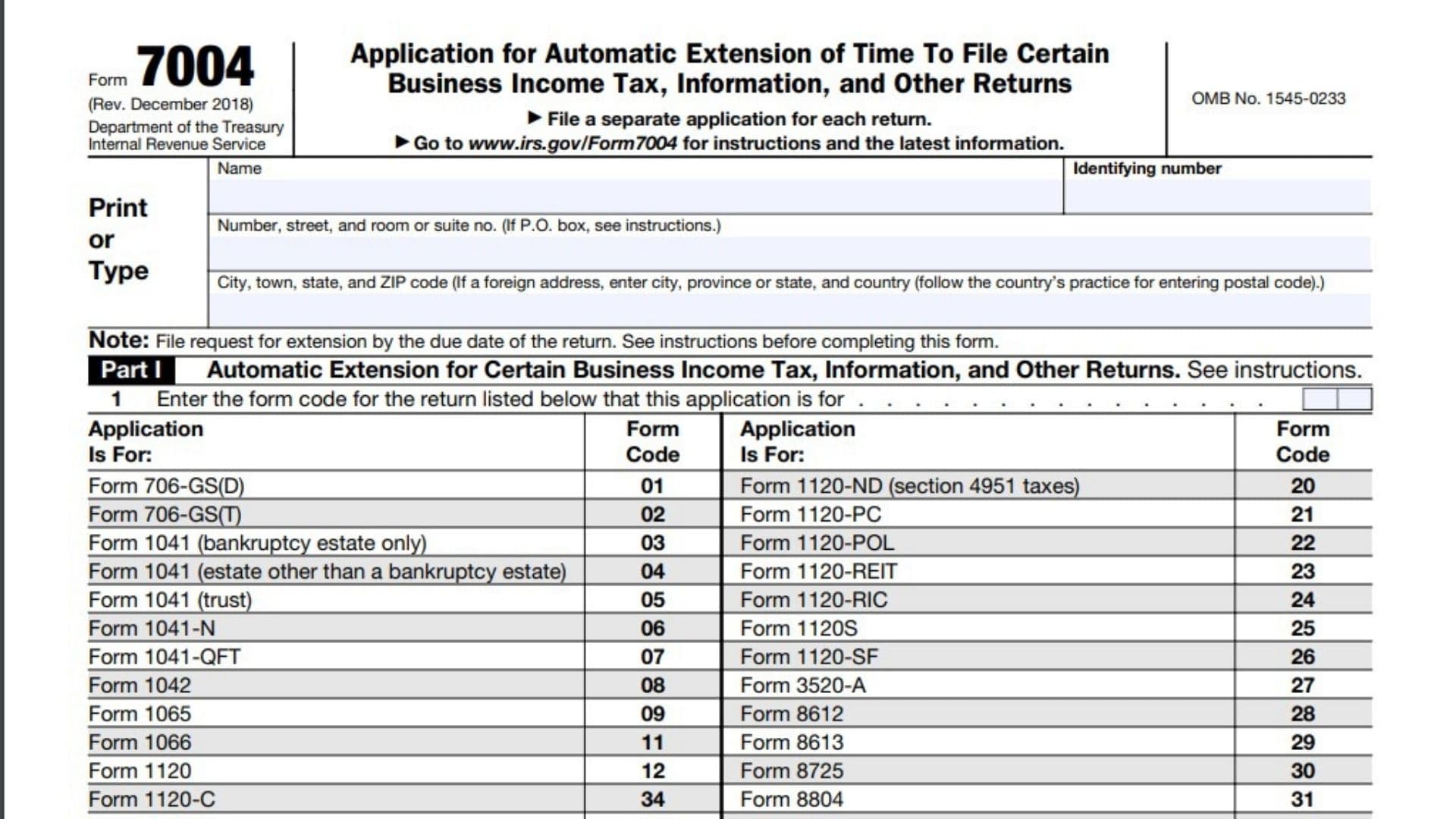
Once eligibility is established, you must accurately identify the exact numeric code associated with the tax return you are postponing. Form 7004 requires the filer to input a specific form code that corresponds to the underlying return. Entering an incorrect code is one of the most common catalysts for automated rejections.
Furthermore, the duration of the automatic extension varies depending on the entity classification and the tax period involved. For example, most corporate entities filing Form 1120 are granted a standard six-month extension, whereas partnerships and S corporations typically receive a six-month extension as well, though historical rules and specific entity structures can occasionally dictate alternative timeframes.
Reviewing the calendar year or fiscal year-end dates is equally critical. The extension moves the filing deadline forward from the original due date, but it does not extend the time to pay any underlying tax liability. Accurately mapping out these dates prevents miscalculations that could trigger late-filing or late-payment penalties.
3. Choose Your Electronic Filing Method
The IRS does not provide a direct, standalone public portal on its website where taxpayers can type in and transmit a free electronic Form 7004. Instead, electronic filing must be facilitated through approved third-party software channels. Taxpayers generally have two primary pathways for completing this step:
- Commercial Tax Preparation Software: Utilizing professional-grade desktop or cloud-based tax accounting suites (such as Thomson Reuters, CCH Axcess, TurboTax Business, or TaxAct) that incorporate business modules and direct IRS Modernized e-File (MeF) transmission capabilities.
- Authorized IRS e-file Providers: Engaging a Certified Public Accountant (CPA), Enrolled Agent (EA), or third-party reporting service provider who maintains an active Electronic Filing Identification Number (EFIN) and established connection to the IRS MeF infrastructure.
Selecting the appropriate method depends on the complexity of your organizational structure, your existing software infrastructure, and whether you manage your tax compliance internally or outsource it to licensed financial professionals.
4. Gather Essential Organizational and Financial Data
Precision is mandatory when compiling the data fields required for Form 7004. Before sitting down at your software terminal or providing data to your tax preparer, collect all foundational organizational details. This preparation minimizes data entry errors and ensures a seamless transmission process.
Required information typically includes:
- The exact legal name of the entity as registered with the IRS.
- The correct Employer Identification Number (EIN).
- The current physical and mailing address of the entity.
- The specific tax year begin and end dates (crucial for fiscal-year filers).
- The correct numeric tax return code (e.g., code 01 for Form 1120, code 09 for Form 1065).
Having these figures verified against prior-year filings and official IRS correspondence prevents mismatches that cause automated system rejections.
5. Calculate and Address Estimated Tax Liabilities
A frequent misconception among business taxpayers is that filing Form 7004 extends the deadline to pay taxes owed. It is critical to understand that Form 7004 is strictly an extension of time to file the return, not an extension of time to pay any tax liability.
During this step of the electronic filing preparation, you must estimate the total tax liability for the tax year in question. If the entity owes tax, an estimated payment must be calculated and remitted concurrently with or prior to the extension request to avoid statutory interest and late-payment penalties.
Electronic payment options for these estimates include:
- Electronic Federal Tax Payment System (EFTPS): The secure, government-backed portal for handling business tax payments.
- IRS Direct Pay: Available for certain eligible business entities utilizing bank account routing information.
- Credit Card or Digital Wallet Processors: Approved third-party payment processors that charge nominal processing fees.
Failing to properly account for and remit estimated taxes while filing Form 7004 can result in unexpected penalty assessments from the IRS, even if the actual paperwork extension is successfully approved.
6. Complete and Validate the Electronic Form 7004 Fields
With your software or tax professional ready, input the gathered data into the electronic template of Form 7004. Modern software platforms feature built-in validation checks that scan for missing data fields, incorrect EIN formats, or invalid tax return codes before submission.
Carefully review the electronic draft. Pay special attention to check-boxes that indicate whether the entity is a foreign corporation, whether it maintains an office or agency outside the United States, or whether a parent corporation is filing a consolidated return. Each check-box alters the legal implications and routing of the extension request within the IRS processing ecosystem. Utilizing the software's review feature helps catch typographical errors in numeric strings, such as transposed digits in the EIN or incorrect calendar years.
7. Transmit the Extension via the IRS Modernized e-File (MeF) System
Once the data is validated and verified, execute the electronic transmission command within your software platform or authorize your tax professional to submit the file. The software packages the data into an XML format compliant with IRS specifications and transmits it directly to the IRS Modernized e-File (MeF) system.
The transmission process typically takes only a few seconds or minutes, depending on internet connectivity and the volume of traffic on the IRS servers. However, filers should never wait until the final hours of the filing deadline to execute this transmission. Technical glitches, software updates, or unexpected internet disruptions can jeopardize timely filing if attempted at the absolute last minute.
8. Monitor Transmission Status and Acknowledgment Records
Following transmission, the IRS MeF system processes the electronic submission and generates an automated response known as an acknowledgment. This step is vital because transmission does not automatically equal acceptance.
Within a short window—usually ranging from a few minutes to 24 hours—your software dashboard will display one of two primary statuses:
- Accepted: The IRS has received, processed, and validated the Form 7004, and the extension is officially granted.
- Rejected: The IRS system identified an error (such as a mismatched EIN, a duplicate extension request, or an invalid form code).
You must review the specific rejection error codes provided in the acknowledgment, correct the underlying data fields in your software, and re-transmit the form promptly.
9. Secure and Archive Official Filing Confirmations
Upon receiving an "Accepted" status notification from the IRS, you must secure and archive the permanent electronic record. This documentation serves as your legal proof of compliance if the IRS ever questions the timeliness of your primary tax return submission.
Best practices for archiving electronic filing records include:
- Exporting and saving the official IRS Acknowledgement File (often containing a unique Submission ID).
- Retaining a digital copy of the completed Form 7004 PDF alongside the transmission logs.
- Filing the records within your corporate compliance directory alongside payment confirmation numbers if estimated taxes were paid.
Maintaining these records ensures your internal accounting team is fully protected during internal audits, financial reviews, or subsequent tax agency inquiries.
10. Prepare for the Extended Primary Tax Return Deadline
With Form 7004 successfully filed and accepted, the immediate pressure of the original filing deadline is alleviated. However, the final step involves leveraging this additional time constructively to ensure accurate preparation of the primary tax return.
| Entity Type | Standard Primary Deadline | Extension Period | New Extended Deadline |
|---|---|---|---|
| C Corporation (Calendar Year) | April 15 | 6 Months | October 15 |
| S Corporation (Calendar Year) | March 15 | 6 Months | September 15 |
| Partnership (Calendar Year) | March 15 | 6 Months | September 15 |
| Trust/Estate (Calendar Year) | April 15 | 5.5 to 6 Months | September 30 / October 15 |
Use the extended window to reconcile books, gather missing financial statements, resolve complex asset depreciation calculations, and consult with certified professionals. Adhering to an internal milestone schedule within the new extended timeframe prevents last-minute crises and ensures the final tax return is filed accurately before the new expiration date arrives.
Frequently Asked Questions
Can Form 7004 be filed electronically for free directly on the IRS website?
No. The IRS does not provide a direct, standalone public web portal for free electronic submission of Form 7004. Taxpayers must utilize commercial tax preparation software or engage an authorized IRS e-file provider with an active Electronic Filing Identification Number (EFIN) to transmit the form through the Modernized e-File system.
Does filing Form 7004 extend the time to pay corporate income taxes?
No. Form 7004 is strictly an extension of time to file the required tax or information return, not an extension of time to pay any tax due. Any estimated tax liability must be calculated and paid by the original due date using EFTPS or other approved payment methods to avoid interest and late-payment penalties.
What should I do if my electronic Form 7004 is rejected by the IRS?
If your submission is rejected, review the specific error code provided in the software acknowledgment. Common issues include incorrect EIN numbers, mismatched tax year dates, or invalid return codes. Correct the error within your software platform and re-transmit the file as soon as possible to maintain compliance.
Is an extension granted automatically when Form 7004 is transmitted?
Yes, for most eligible entities, Form 7004 secures an automatic extension of time to file upon successful transmission and acceptance by the IRS. Unlike older paper processes that sometimes required waiting for approval letters, electronic filings receive near-instantaneous validation through the MeF system.
Can fiscal-year corporations use electronic filing for Form 7004?
Yes. Fiscal-year filers can electronically file Form 7004 by accurately inputting their specific tax year beginning and ending dates into the software template, provided their software supports fiscal-year Modernized e-File submissions.