Setting a file to 644 permission means that the owner can read and write to the file, while the group and all other users are limited to read-only access. This specific configuration is a fundamental security standard for static files on web servers, as it allows the server process to serve content to visitors while preventing unauthorized modifications.
The Anatomy of File Permissions
In Unix-based operating systems, such as Linux and macOS, every file and directory is governed by a permission scheme that dictates who can perform specific actions. These actions are defined as Read (r), Write (w), and Execute (x). These permissions are assigned to three distinct categories of users: the Owner (the user who created the file), the Group (a collection of users with shared access), and Others (everyone else on the system).
The numeric representation of these permissions is calculated by assigning values to each action:
- Read = 4
- Write = 2
- Execute = 1
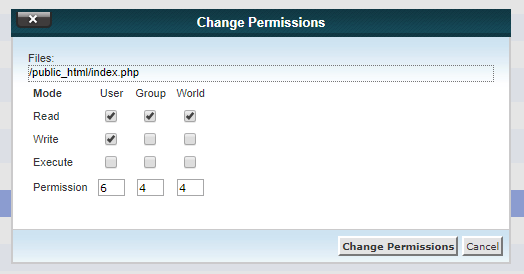
When you look at the 644 permission string, you are essentially seeing the sum of these values across the three user categories. The first digit represents the Owner, the second the Group, and the third the Others.
- Owner (6): 4 (read) + 2 (write) = 6. The owner has full control to view and edit.
- Group (4): 4 (read) + 0 (write) + 0 (execute) = 4. The group can only view the file.
- Others (4): 4 (read) + 0 (write) + 0 (execute) = 4. The public/general system users can only view the file.
By using 644, you ensure that while the web server or other users can display the file’s contents, they lack the technical authority to delete or modify the underlying data, protecting your system from malicious or accidental alterations.
Why 644 is the Industry Standard for Web Content
For static files—such as HTML documents, CSS stylesheets, JavaScript files, and images—644 is widely considered the optimal security configuration. Most web servers, such as Apache or Nginx, operate under a specific system user account (often www-data). By setting files to 644, the server process has sufficient permission to read the files and deliver them to a visitor’s browser.
If you were to set permissions to 666 (allowing everyone to write), a vulnerability in your web application could allow an attacker to inject malicious code into your files. Conversely, if you set them to 400 (only the owner can read), the web server might be unable to access the files at all, resulting in a 403 Forbidden error for your visitors. The 644 standard strikes a precise balance between operational functionality and the principle of least privilege, which dictates that every module or user should have only the minimum access necessary to perform its job.
Technical Implementation: Using chmod
To apply 644 permissions to your files, you use the chmod (change mode) command in your terminal. This tool allows you to modify the access rights of files and directories.
To change a specific file, the command is:
chmod 644 filename.html
In many scenarios, you may need to apply this permission to a large number of files at once, such as all files within a specific website directory. You can use the find command to isolate files without affecting directories:
find /path/to/directory -type f -exec chmod 644 {} \;
This command identifies all items that are files (-type f) and executes the chmod 644 command on each one individually. It is important to distinguish between files and directories; while 644 is ideal for files, directories typically require 755 permissions. A directory requires execute (x) permission to be "entered" or traversed. If you apply 644 to a directory, the system will prevent you from listing the files contained within it, effectively locking the folder.
Comparing Permission Standards
Understanding why 644 is used requires seeing how it compares to other common permission sets. The following table illustrates the access levels for common numeric codes.
| Numeric Value | Owner Access | Group Access | Others Access | Recommended Use Case |
|---|---|---|---|---|
| 644 | Read/Write | Read | Read | Standard HTML, CSS, and Image files. |
| 600 | Read/Write | None | None | Sensitive configuration files containing passwords. |
| 755 | Read/Write/Exec | Read/Exec | Read/Exec | Directories and executable scripts. |
| 777 | Read/Write/Exec | Read/Write/Exec | Read/Write/Exec | Dangerous; rarely needed, use with extreme caution. |
| 444 | Read | Read | Read | Read-only documentation or locked logs. |
The move from 644 to 777 is a common mistake made by beginners trying to troubleshoot "Permission Denied" errors. While 777 allows everything to work, it effectively removes all security, allowing any user or process on the server to modify or delete your files, which invites catastrophic security breaches.
Troubleshooting Common Permission Issues
If your website is serving files but you encounter errors, the problem may not be the file permissions themselves, but the ownership of the files. Even if a file is set to 644, if the file is owned by a user that the web server is not allowed to access, or if the parent directory lacks proper permissions, the file will remain inaccessible.
1. Check Ownership
Use the ls -l command to see who owns the file. The output will show the owner and the group. Ensure the files are owned by the user account that runs your web server or your personal developer account if you are managing the server via that user.
ls -l filename.html
2. Verify Parent Directory Permissions
As noted, directories need the execute (x) bit. If a directory is set to 644, you cannot cd into it or list its contents. If you find your files are inaccessible, ensure the parent directory is set to 755.
3. Server Configuration Some hosting environments, particularly shared hosting, use security modules like suPHP or ITK, which require specific ownership configurations. If you strictly follow the 644 file permission standard and still encounter issues, consult your hosting provider’s documentation, as they may have server-level restrictions that override standard Linux permissions.
Security Best Practices
Beyond simply setting permissions to 644, adopt a comprehensive approach to server security:
- Audit Regularly: Periodically check your directory structure to ensure that no files have accidentally had their permissions escalated to 666 or 777.
- Limit Ownership: Never set the web server user (e.g., www-data) as the owner of your PHP scripts if possible. Having a distinct owner for files allows you to maintain better control over who can perform write operations.
- Use Configuration Files Wisely: Files containing database credentials or API keys should be moved outside of the public web root (often the
public_htmlorwwwfolder) and set to 600. This ensures that even if a server misconfiguration occurs, these sensitive files remain unreadable by the web server process. - Avoid Global Write Access: Never use 777 unless you are performing temporary debugging, and even then, only on a development machine that is not exposed to the public internet.
Frequently Asked Questions
What happens if I set my files to 644 but the server still gives a 403 Forbidden error? The 403 error often indicates that the web server user does not have permission to traverse the directory containing the file. Ensure that all parent directories leading to your file are set to 755 permissions, which grants the "execute" permission necessary for the server to enter and read the directory contents.
Is 644 safe for PHP files? Yes, 644 is generally safe and appropriate for PHP files. Because the web server only needs to read the PHP script to execute it, 644 prevents other users from modifying your application logic while allowing the server to perform its primary function.
How do I revert files that were accidentally set to 777?
You can use the find command to systematically reset permissions for all files in a directory tree. Running find /path/to/website -type f -exec chmod 644 {} \; will restore all files to 644, while leaving directories (which usually need 755) unaffected.
Can I use 644 on log files? Log files typically require the web server to write to them constantly. If you set log files to 644, the server will lose its ability to append new entries, potentially causing your application to crash or stop recording data. Log files usually require 664 or 660, depending on your group configurations.
Are 644 permissions affected by operating system updates? Standard system updates in 2026 generally do not alter your file permissions unless you are running a tool that specifically modifies the file system structure (like a security hardening script). However, installing new software packages can occasionally change ownership or permissions, so it is good practice to perform a permission audit after significant system changes.
Final Recommendation
To maintain a secure server environment, implement 644 permissions on all static web files and enforce 755 for all directories. This configuration, paired with a policy of keeping sensitive configuration files at 600 and ensuring that the web server user does not hold ownership of executable scripts, creates a robust defense against common unauthorized modification attempts. Periodically verify your file permissions using the find command to ensure that no inadvertent changes have compromised your security posture.