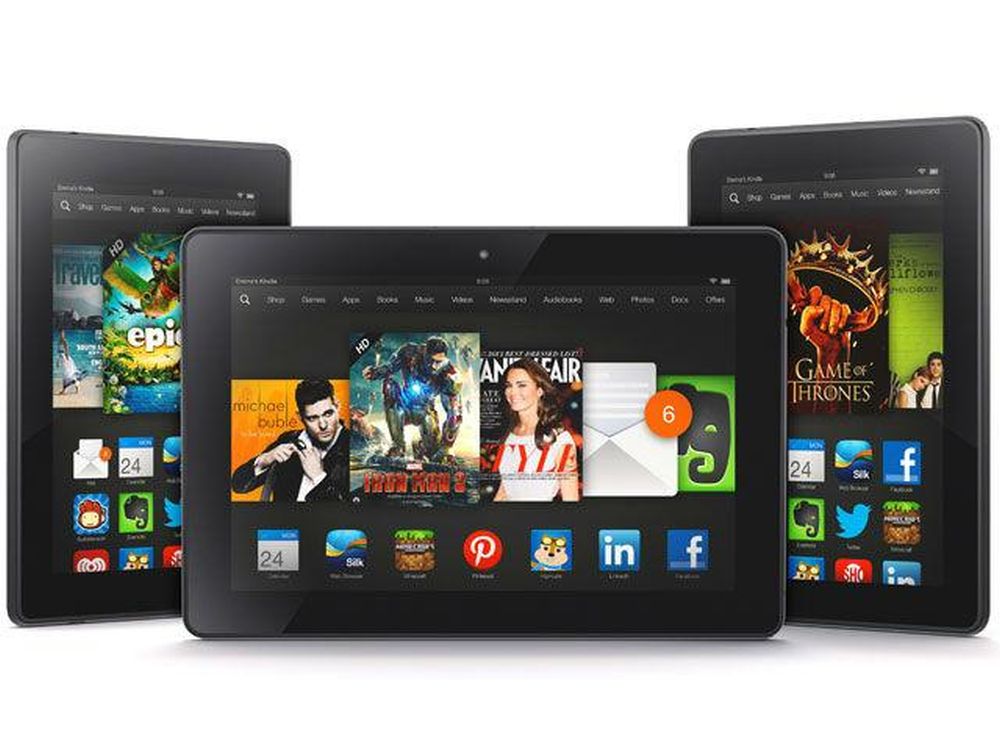
Amazon Fire tablets run Fire OS, a customized operating system built on the Android Open Source Project (AOSP). While Fire OS uses Android as its core foundation, it replaces Google services with Amazon’s ecosystem. This software fork allows low hardware costs and seamless integration with Amazon content, but it changes app availability, performance APIs, and user interfaces compared to standard Android devices.
The Engineering Behind Fire OS: How AOSP Powers Amazon Hardware
Every Amazon Fire tablet shipped since the introduction of the Kindle Fire line operates on a heavily modified version of Android. Rather than licensing the full commercial version of Android distributed by Google, Amazon utilizes the source code provided through the Android Open Source Project (AOSP). AOSP is published under open-source software licenses (primarily the Apache Software License 2.0), allowing any developer or hardware manufacturer to modify, adapt, and distribute the underlying operating system without paying licensing fees or adhering to Google’s hardware certification requirements.
- Android Open Source Project (AOSP) (Linux Kernel, Core Runtime, System Libraries, APIs)
- Google Mobile Services (GMS)
- Google Play Store
- Google Play Services Framework
- Firebase Cloud Messaging
- Chrome / Maps / Gmail
- Amazon Fire OS Stack (FOS)
- Amazon Appstore
- Amazon Device Messaging
- Amazon In-App Purchasing
- Silk Browser / Prime Video
- Google Mobile Services (GMS)
The key distinction between standard Android smartphones or tablets and Amazon Fire devices lies in the software stack layered on top of AOSP:
- Google Mobile Services (GMS): Standard Android tablets ship with GMS, a proprietary suite of Google applications, cloud interfaces, and background services. GMS includes the Google Play Store, Google Maps APIs, Firebase Cloud Messaging (FCM), and Google Play Services location framework. Hardware vendors must sign Google’s Compatibility Test Suite (CTS) and Mobile Application Distribution Agreement (MADA) to bundle GMS.
- Amazon Fire OS Stack: Amazon forks AOSP at a specific system version and strips out all GMS components. In their place, Amazon implements proprietary background services, including Amazon Device Messaging (ADM) for push notifications, Amazon In-App Purchasing (IAP) for subscription management, Amazon Maps API, and the Amazon Appstore as the primary marketplace.
By leveraging AOSP, Amazon maintains full control over the user experience, cloud service integration, software updates, and commercial revenue streams. This architecture enables Amazon to monetize hardware through digital content subscriptions (such as Prime Video, Audible, and Kindle Unlimited) and targeted lock-screen advertising, rather than relying solely on hardware retail margins.
Fire OS Version Mapping: Which Android Base Powers Each Generation?
Because Fire OS is an independent fork of AOSP, its version numbering does not match Google's standard Android release schedule. Amazon periodically updates Fire OS by rebasing its custom interface onto newer AOSP code releases. However, older Fire tablets rarely receive upgrade paths to newer underlying Android versions; instead, they receive system patches built on their original AOSP base.
Understanding which version of Android underpins a specific Fire OS release is critical for assessing app compatibility, security patch availability, and API functionality. Developers targeting Fire OS devices refer to the underlying Android Application Programming Interface (API) level to determine device capabilities.
| Fire OS Version | Base Android Version | API Level | Representative Hardware | Key Architectural Features |
|---|---|---|---|---|
| Fire OS 5 | Android 5.1 (Lollipop) | API 22 | Fire 7 (5th–9th Gen), Fire HD 8 (5th–8th Gen), Fire HD 10 (5th–7th Gen) | Introduced ART runtime by default, 64-bit CPU support, unified card layout. |
| Fire OS 6 | Android 7.1 (Nougat) | API 25 | Fire HD 8 (8th Gen), Fire 7 (9th Gen) | Multi-window support, improved background app restrictions, Doze mode battery optimization. |
| Fire OS 7 | Android 9.0 (Pie) | API 28 | Fire HD 10 (9th–11th Gen), Fire HD 8 (10th Gen), Fire 7 (12th Gen) | System-wide dark mode support, enhanced notification channels, hands-free Alexa engine integrations. |
| Fire OS 8 | Android 11 | API 30 | Fire HD 8 (12th Gen), Fire HD 10 (13th Gen), Fire Max 11 (13th Gen) | Scoped storage enforcement, one-time runtime permissions, auto-reset permissions for unused apps. |
Developers building software for Fire tablets must target these specific API levels. For example, an application requiring Android 12 (API level 31) will fail to install or execute natively on a device running Fire OS 8, as its underlying system environment is pinned to Android 11 (API level 30).
Key Differences: Fire OS vs. Standard Android (Stock / GMS)
While an Amazon Fire tablet runs an Android engine underneath, the operational environment differs significantly from traditional commercial Android installations manufactured by companies like Samsung, Google, or Lenovo.
| Feature Aspect | Standard Android (GMS) | Amazon Fire OS (AOSP Fork) |
|---|---|---|
| Primary App Store | Google Play Store | Amazon Appstore |
| Push Notifications | Firebase Cloud Messaging (FCM) | Amazon Device Messaging (ADM) |
| Default Web Browser | Google Chrome | Amazon Silk |
| Virtual Assistant | Google Assistant / Gemini | Amazon Alexa |
| Launcher Environment | Customizable App Grid & Widgets | Content Carousel & Amazon Feeds |
| System API Engine | Google Play Services Framework | Amazon Appstore SDK Core |
Content-Centric Launcher and Interface
Standard Android user interfaces prioritize application launchers, widgets, and customizable desktop grids. Fire OS replaces this approach with a content-first interface. The home screen is organized into dedicated horizontal tabs—such as "Home," "Library," and "For You"—that aggregate media, books, games, and video streaming recommendations directly from Amazon services. Widgets are restricted or heavily modified, and standard Android launcher customizations are natively blocked by system policies.
Cloud and Service Dependencies
On a standard Android device, system utilities rely on Google Play Services to handle real-time geolocation, cloud syncing, account authentication, and push notifications via Firebase Cloud Messaging.
Fire OS strips these background daemons completely. If an app written for standard Android attempts to call Google Play Services without fallbacks, it will crash or fail to execute key routines. Amazon provides drop-in replacement SDKs for developers—such as Amazon Maps API v2 and Amazon Device Messaging—but app developers must explicitly recompile their apps with these Amazon libraries to publish them on the Amazon Appstore.
Web Engine and Digital Rights Management (DRM)
Fire OS replaces Google Chrome with Amazon Silk, a cloud-accelerated web browser. Silk routes web queries through Amazon Web Services (AWS) servers to pre-render and compress page components. Additionally, Fire OS incorporates proprietary hardware-level Digital Rights Management (DRM) routines optimized for Widevine and PlayReady protocols, enabling high-definition playback within Prime Video, Audible, and Kindle applications.
App Compatibility and Ecosystem Limits
Because Fire OS executes Android binaries (APK and AAB package formats), it is technically capable of running standard Android applications. However, structural differences between the Google and Amazon ecosystems create practical limitations for software distribution and performance.
Amazon Appstore Curation
The official app distribution vector on Fire tablets is the Amazon Appstore. While the Appstore contains hundreds of thousands of applications, its catalog is smaller than the millions available on the Google Play Store. Key missing items often include native Google applications:
- Google Maps
- YouTube (official native client; web wrappers exist)
- Google Drive and Google Docs Suite
- Gmail
- Google Chrome
- Google Photos
Popular third-party applications (such as Netflix, Disney+, Spotify, Zoom, and Microsoft Office) are available on the Amazon Appstore because their developers maintain dedicated builds targeting Amazon’s SDK requirements.
Dependency Failures in Unmodified Android Apps
When users attempt to install Android applications sourced outside the Amazon Appstore, software behavior depends on how the application was engineered:
- Independent Apps: Software relying purely on base Android APIs (such as local file managers, simple offline games, media players like VLC, or utility apps) typically run without issues.
- GMS-Dependent Apps: Software requiring Google Play Services for core capabilities will fail to function correctly. Common failure points include:
- Inability to log into user accounts (missing Google Sign-In framework).
- Failed in-app purchases (missing Google Play Billing Library).
- Broken real-time alerts (missing Firebase Cloud Messaging).
- Location tracking failures (missing Google Fused Location Provider).
How to Sideload the Google Play Store (Technical Process and Risks)
Because Fire OS preserves standard AOSP package installation utilities, users can manually install (sideload) missing software binaries, including the Google Play Store environment itself. Sideloading Google Play Services onto a Fire tablet injects the missing Google framework libraries into Fire OS.
- Step 1: Google Account Manager (APK) (Provides account registration & token storage)
- Step 2: Google Services Framework (APK) (Provides system-level communication protocols)
- Step 3: Google Play Services (APK) (Provides background APIs, location, FCM routing)
- Step 4: Google Play Store (APK) (Provides digital storefront user interface)
The Four-APK Installation Chain
To establish a functional Google Play ecosystem, four distinct software packages must be installed in a strict, sequential order. Installing these packages out of sequence breaks system permission assignments and prevents account authentication.
- Google Account Manager: Handles authentication protocols and stores credentials.
- Google Services Framework: Provides core background communication channels between the OS kernel and Google cloud infrastructure.
- Google Play Services: Delivers runtime APIs for locations, push notifications, and background processing.
- Google Play Store: Provides the front-end user interface for searching, purchasing, and updating applications.
The exact APK files chosen must match both the architecture of the Fire tablet processor (32-bit armeabi-v7a vs. 64-bit arm64-v8a) and the underlying Android version corresponding to the active Fire OS release. Detailed technical setup parameters for common Fire OS platforms include:
- Fire OS 7 (Android 9.0 / API 28): Requires Google Play Services builds designed for Android 9.0 (ARM64 or ARM32 depending on model chipset constraints).
- Fire OS 8 (Android 11 / API 30): Requires Google Play Services builds compiled for Android 11 (typically 64-bit architecture for modern Fire HD 10 and Fire Max 11 models).
Operational Risks and Limitations of Sideloading
While sideloading Google Play Services provides access to a broader application library, it introduces system-level tradeoffs:
- Increased Resource Drain: Google Play Services runs multiple persistent background daemons. On entry-level Fire tablets with limited system RAM (such as 2 GB or 3 GB), running both Amazon and Google background stacks simultaneously can lead to memory exhaustion, UI latency, and faster battery depletion.
- OTA Update Breakage: When Amazon issues Over-The-Air (OTA) updates for Fire OS, system binaries may be patched or overwritten. An OTA update can silently break Google Play Services permissions, requiring users to manually reinstall or reconfigure the Google APK stack.
- SafetyNet / Play Integrity Failures: Amazon Fire tablets are not certified GMS devices under Google’s official hardware testing criteria. As a result, security verification mechanisms like Google's Play Integrity API (formerly SafetyNet) will fail. Banking applications, high-security enterprise suites, and streaming services enforcing strict DRM (such as Google Pay or certain secure gaming apps) will refuse to execute even if the Google Play Store is successfully installed.
Custom Launchers, Custom ROMs, and System Constraints
Advanced Android users often seek to strip Fire OS completely, replacing Amazon's skin with custom third-party launchers (like Nova Launcher or Lawnchair) or full aftermarket Android operating systems (like LineageOS). However, Amazon enforces hardware security policies to preserve its software ecosystem.
Bootloader Locking and Hardware Security
Modern Amazon Fire hardware features locked bootloaders protected by cryptographic signature verification during the boot chain. The low-level bootrom verifies that the primary system kernel and recovery images are digitally signed by Amazon’s private cryptographic keys.
As a result, installing a custom ROM (such as standard AOSP or LineageOS) is impossible on nearly all contemporary Fire tablets manufactured in recent years, as no unverified code can pass the hardware boot checks.
- Hardware Power-On / BootROM
- Cryptographic Key Verification (Signature Check)
- Signature Verified: Load Official Kernel (Fire OS AOSP)
- Unverified: Halt Hardware Boot (Security Violation)
- Cryptographic Key Verification (Signature Check)
Launcher Management Restrictions
In earlier versions of Fire OS (such as Fire OS 5), users could utilize third-party utility scripts or software tools like Fire Toolbox to override the default system launcher via standard Android accessibility permissions or adb (Android Debug Bridge) commands:
# Example ADB command historically used to disable default system launcher package adb shell pm disable-user --user 0 com.amazon.firelauncher
However, in updated releases of Fire OS 7 and Fire OS 8, Amazon introduced system-level defenses:
- The system actively monitors the status of
com.amazon.firelauncher. - If the default launcher package is disabled, hidden, or modified via ADB permissions, the operating system blocks screen access, forces a fallback system loop, or restores the package automatically upon reboot.
- Accessibility services used by third-party "launcher manager" apps are routinely stripped of elevated execution rights during incremental OTA firmware updates.
Consequently, while Fire tablets remain open enough to accept manual APK installations, they are heavily hardened against low-level system modifications, kernel replacements, or custom launcher overrides.
Frequently Asked Questions
Can Amazon Fire tablets run standard Android apps?
Yes. Fire OS uses the Android Open Source Project (AOSP) as its foundation, allowing Fire tablets to execute standard Android application packages (APK files). However, apps that strictly require Google Play Services (such as Google Maps or apps using Google Sign-In) may not function properly without manual modifications or side-loading missing Google framework libraries.
Does an Amazon Fire tablet have access to the Google Play Store out of the box?
No. Amazon Fire tablets ship with the Amazon Appstore as their exclusive software repository. The Google Play Store and Google Mobile Services (GMS) are completely omitted from the default factory software build.
Will sideloading the Google Play Store void an Amazon Fire tablet's hardware warranty?
Sideloading software applications by enabling package installations from unknown sources does not break hardware components or void the legal manufacturer hardware warranty. If software issues occur, restoring the tablet to factory settings removes all side-loaded Google APK files and returns the device to its original factory state.
How do I check which version of Android my Fire tablet is running?
Open the Settings menu on your device, navigate to Device Options, and select System Updates. The interface will display your current Fire OS build (such as Fire OS 8.3). By referencing official hardware specifications, you can map this build to its underlying AOSP base (for example, Fire OS 8 corresponds to Android 11).
Why are some popular apps missing from the Amazon Appstore?
Developers must explicitly submit their Android applications to the Amazon Appstore and adapt them to use Amazon's background APIs (such as Amazon Device Messaging and Amazon In-App Purchasing). If a developer chooses not to maintain a build for the Amazon platform or relies exclusively on proprietary Google APIs, their application will not be available in the native Amazon Appstore catalog.
Summary and Practical Recommendations
Amazon’s decision to power Fire tablets with a customized fork of Android built on AOSP balances low hardware prices with ecosystem integration. Understanding how Fire OS operates helps clarify whether an Amazon Fire tablet fits your specific technical requirements:
- Ideal Candidates for Unmodified Fire OS: Users deep within the Amazon ecosystem who primarily consume media—such as Prime Video streaming, Kindle reading, Audible audiobooks, basic web browsing via Silk, and casual gaming—will find Fire OS efficient, stable, and cost-effective out of the box.
- Candidates for Sideloading Google Services: Moderate technical users who require access to specific software missing from the Amazon Appstore (such as YouTube, Chrome, Google Classroom, or niche productivity apps) can manually sideload the four core Google Play APKs to expand device capabilities without buying standard Android hardware.
- When to Buy Standard Android Hardware: Users who require deep Google ecosystem integration, custom launchers, root-level administrative access, high-performance gaming, or uncompromised Google Play Integrity support (for corporate security apps or mobile banking) should avoid Fire OS devices. Instead, select a standard GMS-certified Android tablet from manufacturers such as Lenovo, Samsung, or Google.
Next Action: To evaluate an existing Fire tablet's capabilities, navigate to Settings > Device Options > About Fire Tablet to confirm your Fire OS generation, then cross-reference the version matrix above before attempting app side-loading or infrastructure updates.