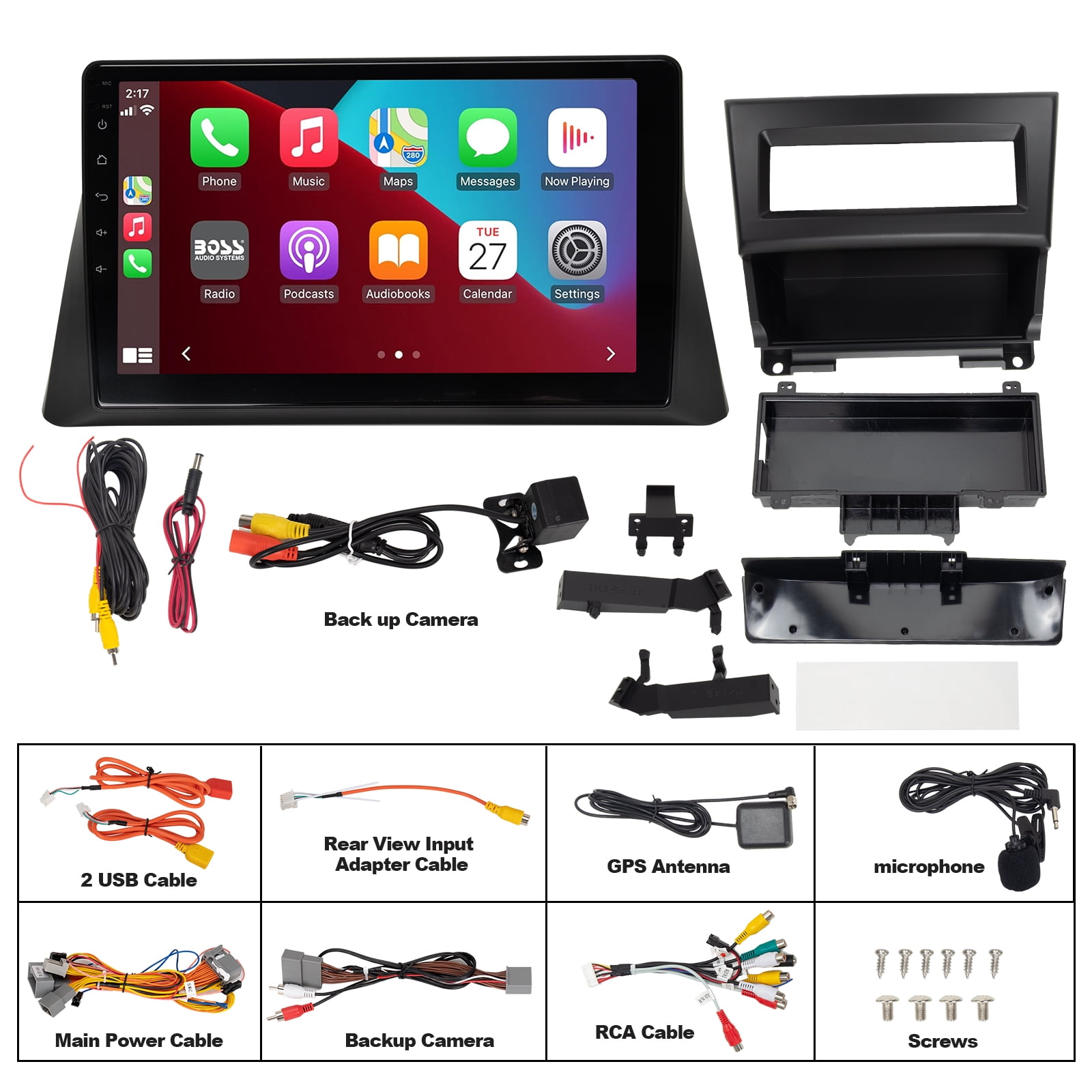
Integrating Apple CarPlay into a 2008 Honda Accord is not a factory-supported feature, as the eighth-generation Accord predates the wide-scale implementation of smartphone-mirroring technology by several years. To achieve this functionality, owners must replace the original factory head unit with an aftermarket double-DIN receiver, requiring specific installation kits, wiring harness adapters, and steering wheel control interfaces to ensure a seamless transition to modern connectivity.
The 2008 Honda Accord remains a highly regarded vehicle for its reliability and mechanical longevity. However, the factory-installed audio system—even the premium setups—is fundamentally limited to CD playback, AM/FM radio, and rudimentary auxiliary inputs. As of 2026, the absence of Bluetooth audio streaming for music or navigation integration makes the stock experience feel dated. For owners looking to modernize their driving experience, transitioning to a CarPlay-enabled system is the primary path forward.
Understanding the Compatibility Limitations of the 2008 Accord
The factory audio system in the 2008 Honda Accord is deeply integrated into the vehicle's center console dashboard architecture. Unlike modern vehicles that use standard modular interfaces, the 2008 model features a non-standard shape for the head unit and climate control housing. This creates a primary technical hurdle: you cannot simply slide a standard aftermarket unit into the dash without a specialized mounting kit.
Furthermore, the vehicle’s electrical system uses a proprietary data bus. When removing the factory radio, you must account for the dual-zone climate control displays and steering wheel-mounted controls. Failing to use the correct integration adapter will result in the loss of climate control visibility and steering wheel button functionality. Modern aftermarket solutions now provide high-quality interfaces that retain these features, but they require careful component selection during the planning phase of your upgrade.
Core Prerequisites for an Apple CarPlay Conversion
To transition your 2008 Honda Accord to a modern infotainment standard, you must acquire four distinct categories of hardware. Skipping or opting for generic versions of these parts often leads to malfunctions, such as battery drain or incomplete integration with the car's electronics.
1. The Aftermarket Head Unit
You require a head unit that explicitly supports Apple CarPlay. Whether you choose a wired or wireless version, ensure the unit is of a standard double-DIN size. Popular manufacturers such as Pioneer, Alpine, Kenwood, and Sony offer reliable units that integrate well with the Accord’s cabin aesthetics.
2. The Dashboard Installation Kit
This is the most critical aesthetic piece. You must purchase a dash kit specifically designed for the 2008 Accord (often labeled for the 2008–2012 generation). These kits include a replacement faceplate that houses the new radio while perfectly matching the textures and colors of the factory dashboard. Some kits include a pre-wired climate control circuit board, which is essential if your trim level features dual-zone automatic climate control.
3. Wiring Harness Adapters
You should avoid "hard-wiring" (cutting and splicing) your vehicle's factory harness. Instead, use a vehicle-specific harness adapter that plugs into the Honda’s factory connector. For the 2008 model, a harness that includes a CAN-bus or data-bus interface module is necessary to communicate with the car’s computer and properly power on the radio without the need for manual ignition-switched wiring.
4. Steering Wheel Control (SWC) Interface
To keep your volume, mode, and track-selection buttons functional, you need an SWC interface module. This device programs the steering wheel signals into a format that the new aftermarket head unit can interpret.
Step-by-Step Integration Workflow
The process of installing CarPlay in a 2008 Honda Accord is a significant project that requires moderate technical skill. If you are not comfortable working with automotive interior trim, dashboard disassembly, and basic wiring, professional installation is strongly recommended.
Phase 1: Preparation and Safety
Disconnect the negative terminal of your car battery. This prevents short-circuiting the climate control board or accidental airbag deployment during the removal of the dashboard trim. Ensure you have the necessary trim removal tools—plastic pry bars are preferred over metal screwdrivers to prevent scratching the soft-touch plastics of the dashboard.
Phase 2: Dash Disassembly
Accessing the radio requires removing the center console trim, starting from the gear shifter area and moving upward. You will encounter several screws behind the trim panels. Carefully label these screws, as the 2008 Accord uses different lengths for various mounting points. Once the faceplate is loose, unplug the hazard light switch and the climate control module.
Phase 3: Wiring Configuration
Before mounting the unit, connect the new radio’s harness to the vehicle-specific adapter. Use crimp connectors or high-quality heat-shrink butt connectors to join the color-coded wires. Ensure the power, ground, illumination, and parking brake sense wires are connected correctly. The parking brake wire is mandatory for Apple CarPlay to verify the vehicle is stopped for certain settings access.
Phase 4: Verification
Before snapping the dash trim back into place, temporarily reconnect the battery to test the system. Verify that:
- The head unit powers on with the ignition.
- The climate control display functions correctly.
- The Apple CarPlay interface launches when an iPhone is connected via USB or wireless pairing.
- The steering wheel buttons perform the mapped functions.
Comparison Table: Factory System vs. Aftermarket CarPlay
| Feature | 2008 Factory Head Unit | Aftermarket CarPlay Unit (2026) |
|---|---|---|
| Connectivity | Aux/CD/AM/FM | Wireless/Wired CarPlay |
| Navigation | None (or DVD-based) | Real-time Maps (Apple/Google) |
| Streaming | None | Spotify/Apple Music/Podcasts |
| Siri Integration | None | Full Voice Command Support |
| Aesthetics | Integrated OEM look | Modular/Customizable UI |
| Steering Control | Integrated | Requires Interface Module |
Troubleshooting Common Issues
Even with high-quality components, users may encounter minor issues during or after installation.
- Climate Control Issues: If your climate control display is blank or unresponsive, it is likely that the ribbon cable connecting the factory climate board to the new dash kit is seated incorrectly. Double-check all physical connections.
- Persistent Battery Drain: This usually occurs if the head unit is wired to a constant 12V power source rather than an ignition-switched source. Ensure your harness adapter is correctly programmed for the 2008 Accord's specific electrical layout.
- CarPlay Disconnects: If using a wired connection, ensure you are using a high-quality MFi-certified Lightning or USB-C cable. Low-quality aftermarket cables are notorious for data-transfer errors which cause the CarPlay interface to drop during driving.
- Audio Quality: If the sound appears thin or distorted, verify that the "Amp Turn-On" wire is properly connected if your Accord was equipped with the factory premium sound system (which includes a separate amplifier).
Frequently Asked Questions
1. Does a 2008 Honda Accord have a hidden CarPlay setting? No. The 2008 Accord hardware was manufactured long before the introduction of Apple CarPlay. There is no software update or hidden menu that can enable this functionality on the factory head unit.
2. Can I keep my factory backup camera if I upgrade? Yes, but you will need an additional "reverse camera retention" adapter. This allows the factory camera signal to be fed into the rear-camera input of the new aftermarket head unit.
3. Is wireless CarPlay stable in an older vehicle? Yes, modern head units utilize 5GHz Wi-Fi and Bluetooth 5.0+, which provide a very stable connection. However, ensure the head unit is mounted in a location that allows for adequate ventilation, as wireless processing can generate heat.
4. Will upgrading the head unit affect my insurance? Generally, installing an aftermarket audio system does not impact standard vehicle insurance policies. However, if the system involves high-value equipment, you may want to document it for "custom equipment" coverage in case of theft or damage.
5. How long does the installation typically take? For a professional installer, this is usually a 2 to 4-hour job. For a DIY enthusiast, it is best to allocate a full day to allow for troubleshooting and ensuring the fit-and-finish of the trim.
Final Recommendation
For the 2008 Honda Accord owner, the upgrade to an Apple CarPlay-capable head unit is the single most impactful modification you can make. It fundamentally transforms the daily driving experience, bringing turn-by-turn navigation, streaming audio, and hands-free communication to a vehicle that remains otherwise mechanically sound. Prioritize purchasing a high-quality integration kit—the savings gained by doing the installation yourself should be reinvested into a reputable, name-brand head unit to ensure long-term reliability and compatibility with future iOS updates.