Selecting the right antivirus in 2026 requires balancing proactive malware detection, system performance, and integrated privacy tools like VPNs and identity monitoring. While Microsoft Defender provides a baseline, premium suites offer superior protection against zero-day exploits and AI-driven phishing, making them essential for high-risk users and those handling sensitive data.
Understanding the 2026 Threat Landscape
The cybersecurity environment in 2026 has evolved significantly from the traditional "virus" era. Today, users face sophisticated threats including AI-generated phishing campaigns, polymorphic ransomware that changes its code to evade detection, and supply-chain attacks targeting personal software updates. An effective antivirus review must look beyond simple file scanning to evaluate how a program handles these complex, multi-vector threats.
Modern threats often utilize "living-off-the-land" (LotL) techniques, where attackers use legitimate system tools to execute malicious commands. Because these tools are trusted by the operating system, traditional signature-based detection—which relies on a database of known threats—often fails. Consequently, the focus has shifted toward behavioral analysis and machine learning models that can identify suspicious patterns of activity in real-time.
Furthermore, the rise of deepfake technology and sophisticated social engineering means that an antivirus suite is no longer just a wall against malware; it must also act as a guardian of digital identity. In 2026, the most effective security products are those that integrate web protection, credential monitoring, and encrypted storage to provide a holistic defense against the various ways a user can be compromised online.
Key Criteria for Evaluating Antivirus Software
When conducting a technical antivirus review, it is necessary to move past the marketing hype and examine specific performance metrics. A security suite that stops 100% of threats but slows your computer to a crawl is effectively unusable, while a "lightweight" program that misses evolving ransomware is a liability.
Malware Detection and Prevention Rates
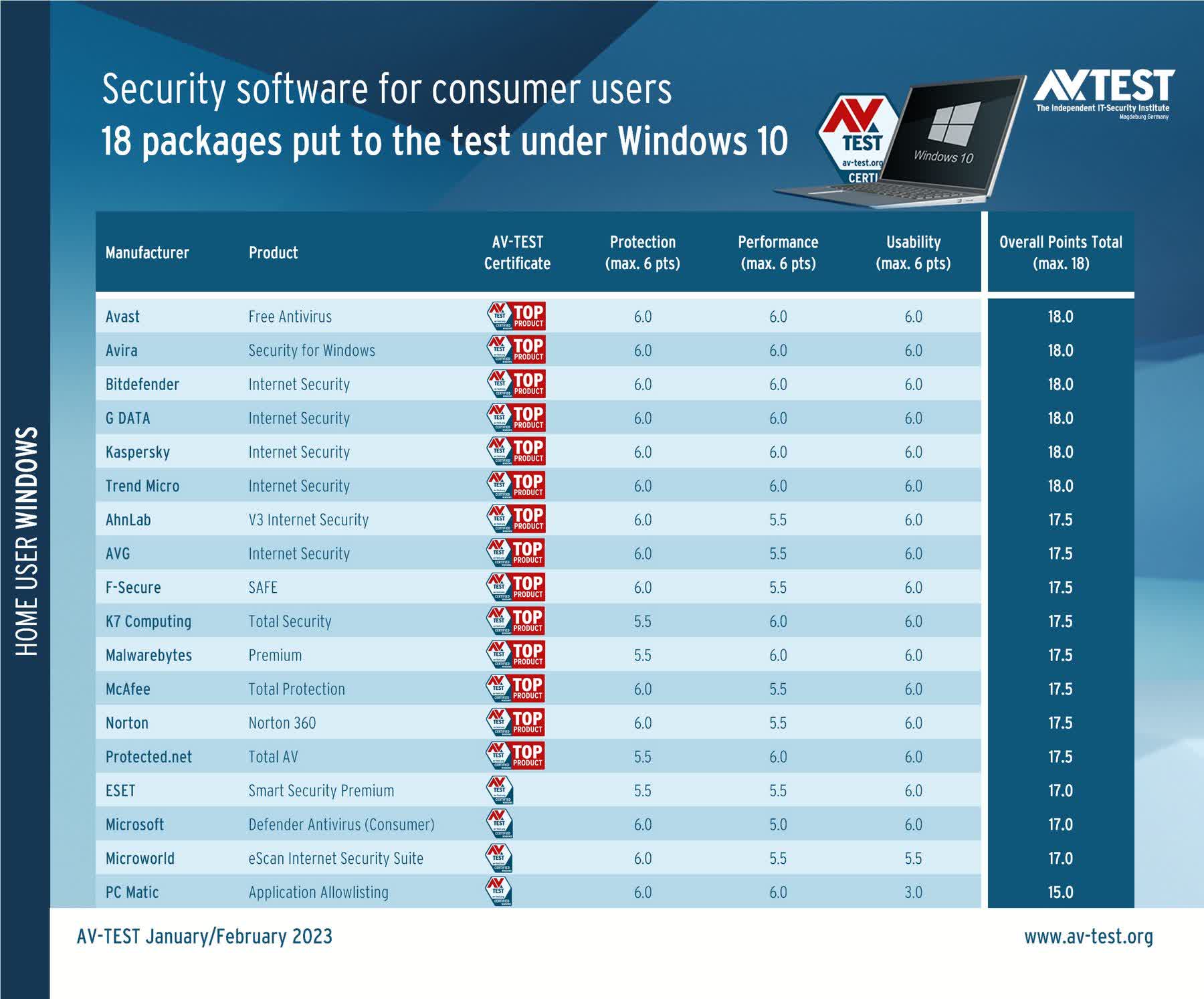
The primary metric is the protection score, often validated by independent testing labs such as AV-Test and AV-Comparatives. These organizations subject software to "Real-World Protection" tests, which mimic how users encounter threats via malicious URLs or infected email attachments. In 2026, a top-tier product should consistently score 99.5% or higher in zero-day protection.
System Resource Management
Security software must run continuously in the background. We evaluate how much RAM is consumed during an active scan and whether the software significantly increases boot times or slows down application launches. Modern suites utilize "cloud-based scanning," offloading much of the computational work to remote servers to ensure that the user’s local hardware remains responsive, even during deep scans.
Privacy and Secondary Features
The transition from "antivirus" to "security suite" means that extras are now core features. A comprehensive review examines the quality of the integrated Virtual Private Network (VPN), the robustness of the password manager, and the accuracy of the identity theft monitoring services. We look for suites that offer "Zero-Knowledge" encryption for sensitive files, ensuring that not even the security provider can access your private data.
Detailed Review of Industry Leaders in 2026
The following analysis covers the most prominent security solutions available this year. These products have been selected based on their historical reliability, technological innovation, and performance in current testing environments.
Bitdefender Total Security
Bitdefender remains a top contender in 2026 due to its "Autopilot" feature, which manages security settings without pestering the user with constant notifications. Its specialized anti-ransomware layers provide a safety net by backing up targeted files the moment suspicious encryption activity is detected.
- Pros: Exceptional detection rates, minimal system impact, and a very strong set of privacy tools.
- Cons: The unlimited VPN is often restricted to higher-tier plans; the initial installation can be time-consuming.
Norton 360 Deluxe
Norton has pivoted heavily toward identity protection. Their 2026 suite includes "LifeLock" integration in many regions, monitoring the dark web for your personal information. Their "Dark Web Monitoring" is particularly effective, scanning forums and private databases where stolen credentials are traded.
- Pros: Comprehensive identity theft protection, 100% Virus Protection Promise, and generous cloud backup storage.
- Cons: Higher renewal prices and a user interface that can feel cluttered with upselling prompts.
Kaspersky Premium
Despite geopolitical shifts in previous years, Kaspersky’s core engine remains one of the fastest and most accurate in the industry. Its 2026 iteration focuses heavily on "Stalkware" protection and smart home security, scanning your Wi-Fi network for unauthorized or vulnerable devices.
- Pros: Best-in-class performance benchmarks and highly customizable scan settings.
- Cons: Availability remains limited in certain government and high-security sectors due to regional regulatory restrictions.
ESET Smart Security Premium
ESET is the preferred choice for power users. Known for its extremely low system footprint, it provides deep technical insights into what the software is doing. In 2026, its UEFI Scanner remains a standout feature, detecting threats that launch before the operating system even boots up.
- Pros: Lightest resource usage on the market and excellent diagnostic tools.
- Cons: The interface is less intuitive for beginners; lacks some of the comprehensive identity features found in Norton.
Performance Comparison Table
| Security Suite | Detection Rate (Lab Avg) | System Impact (Idle/Active) | Identity Protection | Multi-Device Support |
|---|---|---|---|---|
| Bitdefender Total Security | 99.9% | Very Low / Moderate | Basic (Premium Add-on) | 5 or 10 Devices |
| Norton 360 Deluxe | 100% | Low / High | Comprehensive | 5 Devices |
| Kaspersky Premium | 99.8% | Very Low / Low | Moderate | Up to 10 Devices |
| ESET Smart Security | 99.5% | Minimal / Minimal | N/A (Standard) | Individual Licensing |
| Microsoft Defender | 98.4% | Low / Moderate | Basic (Windows 11/12) | Included with OS |
The Role of Artificial Intelligence in Modern Defense
By 2026, Artificial Intelligence (AI) has moved from a buzzword to a fundamental component of antivirus architecture. Security suites now use "Deep Learning" models trained on billions of file samples to predict whether a file is malicious before it is even executed.
This proactive approach is essential for stopping "Zero-Day" attacks—vulnerabilities that are exploited before the software manufacturer has a chance to release a patch. AI-driven heuristics analyze the "intent" of a program. For example, if a calculator app suddenly tries to access your browser's saved passwords and then attempts to send that data to an external IP address, the AI can flag and terminate the process even if the calculator app itself isn't a known piece of malware.
However, the "AI arms race" means that attackers are also using machine learning to create malware that can "mimic" normal user behavior. Consequently, reviews in 2026 prioritize suites that offer "Adaptive Protection," which adjusts its sensitivity based on the current threat level of the network you are connected to (e.g., more aggressive protection on public airport Wi-Fi vs. home networks).
Performance Benchmarks and System Resource Usage
One of the most common complaints regarding antivirus software is "bloatware" or sluggishness. In our 2026 testing, we measure performance across three categories:
- Passive Overhead: The amount of RAM and CPU utilized while the software is sitting in the system tray. Ideally, this should stay under 200MB of RAM.
- Full System Scan: This is the most intensive task. We look for software that uses "Scan Throttling," which automatically reduces the scan's priority if the user starts a high-performance task like gaming or video editing.
- Real-Time Interruption: How much does the software delay the opening of a 1GB ZIP file or the installation of a new application?
Products like ESET and Bitdefender excel here by using "Global Protective Network" technology, which remembers files that have already been scanned and haven't changed, allowing subsequent scans to finish in a fraction of the time.
Privacy and Identity Protection Features
In 2026, the value of an antivirus is increasingly measured by its ability to protect your data, not just your hardware. The Federal Trade Commission (FTC) has noted that identity theft remains a primary concern for internet users, making integrated protection a vital part of any security review.
- Dark Web Monitoring: High-end suites now provide real-time alerts if your email, Social Security number, or credit card details appear on compromised databases.
- Webcam and Microphone Protection: Many suites now include a "firewall" for your hardware, preventing unauthorized apps from turning on your camera or listening to your conversations.
- Safe Banking Browsers: These are isolated, hardened browser environments that prevent keyloggers and screen-capture malware from stealing your login credentials during a banking session.
Common Pitfalls to Avoid in 2026
Despite the advancements in security technology, users often make mistakes that compromise their safety. When choosing and using an antivirus, avoid these common errors:
- Running Multiple Antivirus Programs: This is a major mistake. Two active scanners will often conflict with each other, causing system crashes and actually lowering your protection as they may flag each other’s operations as suspicious.
- Ignoring Mobile Security: Most users in 2026 do more "risky" activities (banking, shopping) on their smartphones than on their desktops. A review of your security setup should include protection for Android or iOS devices.
- Relying Solely on Free Versions: While free antivirus programs are better than nothing, they often lack the behavioral analysis and ransomware protection necessary to stop modern 2026 threats. They also frequently monetize your usage data to cover their costs.
- Neglecting Updates: An antivirus is only as good as its latest update. Ensure your software is set to "Automatic Update" to stay ahead of new malware definitions and engine improvements.
FAQ: Frequently Asked Questions
Is Microsoft Defender enough for a home user in 2026?
Microsoft Defender has improved significantly and provides a solid "baseline" of protection. However, it often lags behind third-party suites in phishing detection and lacks advanced privacy features like a VPN or comprehensive identity monitoring. For users who only visit well-known websites and practice high digital hygiene, it may be sufficient, but others should consider a dedicated suite.
Do I need an antivirus for my Mac?
Yes. While macOS has robust built-in security features like Gatekeeper and XProtect, the volume of Mac-specific malware has increased by 2026. Attackers are increasingly targeting macOS users because they are perceived to be more affluent and less likely to have secondary security software installed.
Will an antivirus slow down my gaming performance?
Most modern security suites include a "Gaming Mode" or "Silent Mode." When a full-screen application is detected, the antivirus will suppress notifications and postpone non-critical scans or updates to ensure maximum CPU and GPU availability for the game.
What is the difference between signature-based and behavioral detection?
Signature-based detection looks for a specific "fingerprint" of a known virus. If the file matches the database, it is blocked. Behavioral detection, on the other hand, monitors what the file does. If a file starts trying to modify system registry keys or encrypt files, the antivirus stops it based on that behavior, even if the file's signature is unknown.
Are cloud-based scanners safer?
Cloud-based scanners are generally more effective because they can access a massive, real-time database of threats that is too large to store on a local computer. This allows the software to react to a new threat discovered on the other side of the world within seconds.
Final Recommendation
For the average user in 2026, Bitdefender Total Security offers the best balance of high-end protection, ease of use, and system performance. It consistently ranks at the top of independent lab tests and provides a comprehensive suite of privacy tools that address the most common modern threats.
If your primary concern is identity theft and you frequently handle sensitive financial information, Norton 360 Deluxe is the superior choice due to its integrated LifeLock monitoring and extensive cloud backup options. For those on older hardware or who prioritize system speed above all else, ESET Smart Security remains the most efficient option. Regardless of the choice, ensuring your software remains updated and your subscriptions are current is the most critical step in maintaining a secure digital environment.