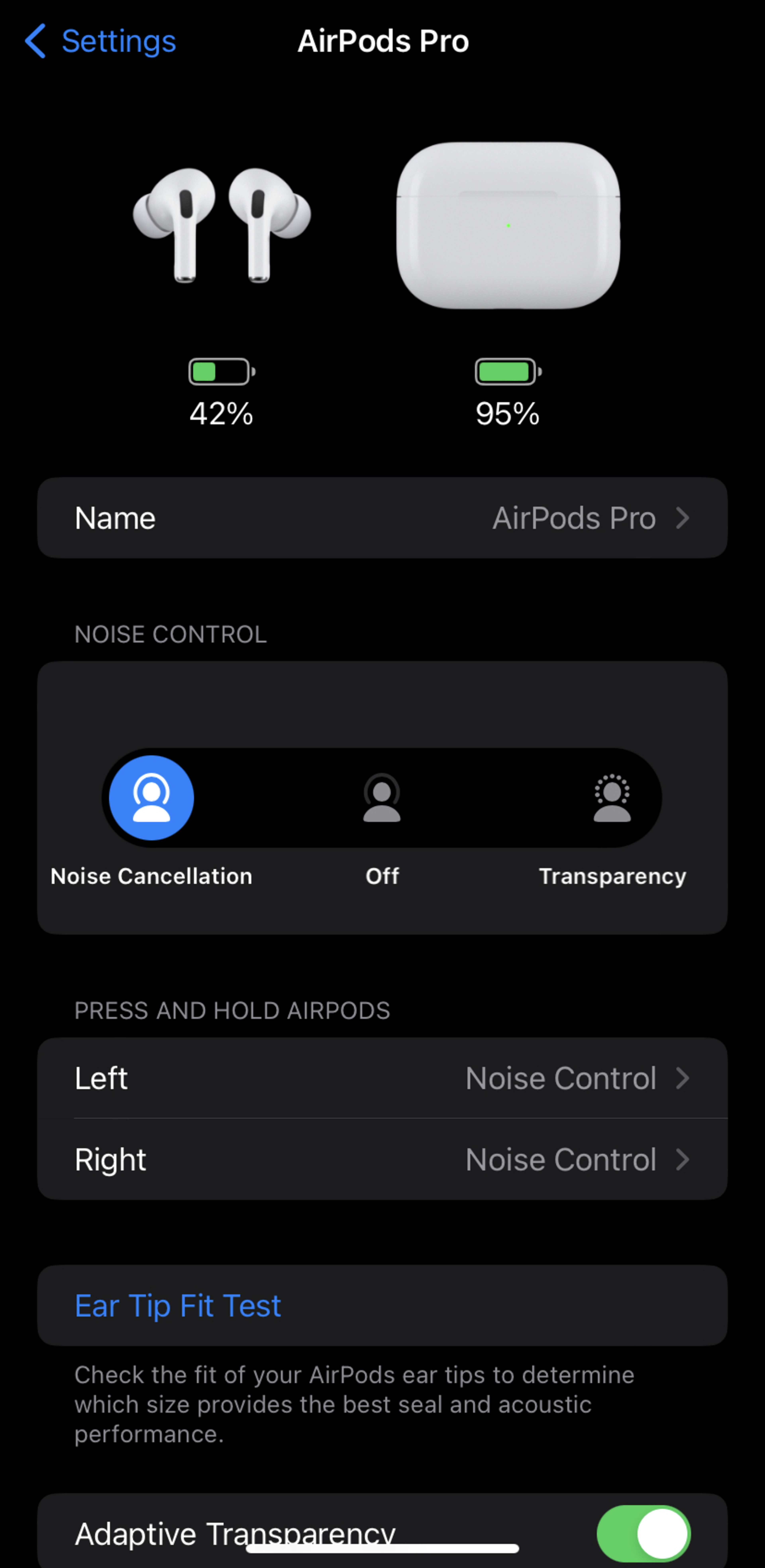
Transparency mode is a signature audio feature found in select Apple AirPods models that uses external-facing microphones to pass ambient environmental sounds into the wearer’s ears. By neutralizing the isolating effect of silicone ear tips or over-ear cushions, it allows users to hear conversations and surroundings with a natural clarity that mimics not wearing headphones at all.
For years, the primary complaint regarding noise-canceling earbuds was the "occlusion effect"—that pressurized, underwater feeling that makes your own voice sound boomy and disconnects you from the world. Apple’s Transparency mode solved this by utilizing high-performance processors and advanced acoustic algorithms. As of 2026, this technology has evolved into Adaptive Audio, which intelligently blends Transparency and Active Noise Cancellation (ANC) based on your immediate environment. Understanding which models support these features and how to optimize them is essential for any user looking to balance high-fidelity audio with situational awareness.
The Technical Mechanics of Transparency Mode
To appreciate how AirPods with transparency mode function, one must look at the hardware-software synergy within the H-series chips. Traditional headphones rely on physical isolation to block sound. When you engage Transparency mode, the microphones on the exterior of the AirPods (the beamforming arrays) begin sampling external audio at an incredible rate.
In the AirPods Pro (2nd Generation) and newer models, the H2 chip processes this audio 48,000 times per second. This ultra-low latency is the "secret sauce" that prevents the slight delay or "echo" often heard in cheaper competitors. The internal-facing microphone also plays a role; it listens to what you are hearing inside the ear canal and works with the processor to adjust the frequencies so that the ambient sound feels spatially accurate and tonally balanced.
The result is a transparent acoustic experience where the user can maintain a conversation, listen for traffic while running, or hear flight announcements at an airport without ever removing their earbuds. The software even compensates for the physical blockage of the ear tip, applying an equalization curve that makes the incoming sound feel like it is passing through air rather than being piped through a speaker.
Adaptive Transparency: The H2 Chip Revolution
With the introduction of the H2 chip, Apple moved beyond static Transparency mode to Adaptive Transparency. This was a significant leap for user safety and comfort. While standard Transparency mode lets all sounds in, Adaptive Transparency identifies sounds that exceed a safe or comfortable decibel threshold—such as a passing siren, a jackhammer, or a loud motorcycle—and instantly suppresses them.
This "on-the-fly" attenuation means you can walk through a noisy construction zone in Transparency mode without being deafened, as the AirPods selectively dampen the most intrusive noises while keeping your music and the sounds of nearby pedestrians audible. This feature is particularly valuable for city dwellers who need to remain alert but want to protect their long-term hearing health. By 2026, this has become a standard expectation for premium audio gear, though Apple's implementation remains a benchmark for its lack of audible artifacts during the transition between loud and quiet states.
Which AirPods Have Transparency Mode in 2026?
Not every model in the AirPods lineup features this technology. Transparency mode requires the specific microphone architecture and processing power associated with Apple's noise-canceling tiers.
AirPods Pro (2nd Generation)
The AirPods Pro 2 remains the flagship for in-ear transparency. Whether you have the original MagSafe (Lightning) version or the updated USB-C version, both utilize the H2 chip to provide the full suite of Adaptive Transparency features. These are generally considered the best implementation of the technology due to their lightweight design and the effectiveness of the H2 processor.
AirPods Max
Apple’s over-ear headphones, the AirPods Max, offer a remarkably natural Transparency mode. Because they cover the entire ear, the "closed-off" feeling is usually much stronger than with earbuds. The AirPods Max uses a dedicated H1 chip in each ear cup to sync the external audio. The result is an expansive soundstage where you can hear the directionality of sounds around you with pinpoint accuracy.
AirPods 4 with Active Noise Cancellation
A newer addition to the lineup, the AirPods 4 with ANC, brings Transparency mode to an open-ear design. Unlike the Pro models, these do not have silicone ear tips. However, because they still offer Active Noise Cancellation, Apple included Transparency mode to help users transition between a focused listening state and a social one. While the isolation isn't as intense as the Pro, the Transparency mode is still highly effective for enhancing environmental awareness.
Models Without Transparency Mode
It is important to note that the standard AirPods (1st, 2nd, and 3rd Generation) and the base-model AirPods 4 do not feature Transparency mode. These models are "open" by design and do not have the ANC hardware required to toggle between isolation and transparency.
Feature Comparison: AirPods with Transparency Mode
| Feature | AirPods Pro (2nd Gen) | AirPods Max | AirPods 4 (with ANC) |
|---|---|---|---|
| Processor | H2 Chip | Dual H1 Chips | H2 Chip |
| Acoustic Design | In-ear (Silicone tips) | Over-ear (Cushions) | Open-ear (No tips) |
| Adaptive Audio | Yes | Limited (Firmware dep.) | Yes |
| Loud Sound Reduction | Yes | No | Yes |
| Conversation Awareness | Yes | No | Yes |
| Charging Port | USB-C / MagSafe | USB-C / Lightning | USB-C |
How to Control and Customize Transparency Mode
Apple provides several ways to toggle Transparency mode, allowing users to switch based on their immediate needs.
1. On-Device Controls
- AirPods Pro: Long-press the "force sensor" (the indented groove) on either earbud stem. A chime will indicate the mode has changed.
- AirPods Max: Press the dedicated Noise Control button located on the top of the right ear cup, next to the Digital Crown.
- AirPods 4 ANC: Press and hold the stem, similar to the Pro models.
2. Control Center (iOS and iPadOS)
Swipe down from the top-right corner of your iPhone or iPad screen. Long-press the volume slider (which should show an icon of your AirPods). Tap the "Noise Control" button at the bottom left and select Transparency.
3. Apple Watch
While audio is playing, tap the AirPlay icon (the triangle with circles) in the Now Playing app. You can toggle between Noise Cancellation, Transparency, and Off directly from your wrist.
4. Customizing the "Long Press"
In the Settings app on your iPhone, navigate to the Bluetooth menu and tap the "i" icon next to your AirPods. Here, you can customize what a long-press does. You can set it to cycle through all three modes (ANC, Transparency, Off) or just toggle between the two you use most.
Advanced Transparency Features: Conversation Awareness
By 2026, the software stack for AirPods with transparency mode has expanded to include Conversation Awareness. This feature uses machine learning to detect when you start speaking. Once you begin a conversation, the AirPods automatically lower the volume of your media, enhance the voices of the people in front of you, and reduce background noise.
This is a "hands-free" extension of Transparency mode. When the conversation ends, the AirPods intelligently ramp the volume back up and return to your previous noise-control setting. This is particularly useful in office environments or coffee shops where brief interactions are frequent. You can enable or disable this in the AirPods settings menu under the "Audio" section.
Practical Use Cases for Transparency Mode
While many users focus on the "silence" of noise cancellation, Transparency mode is arguably more useful in daily life.
- Commuting and Travel: Walking through busy intersections requires auditory cues from traffic. Transparency mode allows you to enjoy your podcast while remaining aware of vehicles or emergency sirens.
- The Office Environment: You can listen to focus music while remaining "available" to colleagues. With Conversation Awareness turned on, the transition between deep work and social interaction becomes seamless.
- Fitness and Outdoor Activities: For runners and cyclists, hearing approaching cars or other path users is a critical safety requirement. AirPods Pro are often preferred by athletes specifically because their Transparency mode is so wind-resistant.
- Hearing Support: While not a replacement for medical-grade hearing aids, the "Conversation Boost" feature (available on Pro models) uses the transparency microphones to focus on the person speaking directly in front of you, making it easier to hear in noisy restaurants.
Troubleshooting Common Transparency Issues
If your Transparency mode feels "off" or sounds muffled, there are a few common culprits to investigate:
- Clogged Microphone Grilles: The most frequent cause of poor transparency performance is earwax or debris blocking the external microphone meshes. Clean the grilles gently with a dry cotton swab or a soft-bristle brush.
- Poor Ear Tip Fit: If the silicone tips are not creating a proper seal, the AirPods cannot accurately calculate the anti-noise or transparency frequencies. Use the "Ear Tip Fit Test" in the iOS Bluetooth settings to ensure you are using the correct size.
- Firmware Version: Apple frequently updates the algorithms for the H2 chip. Ensure your AirPods are updated by keeping them in their charging case near your iPhone while connected to Wi-Fi.
- Hardware Failure (Crackling): If you hear a persistent crackling or static sound when in Transparency mode, it may indicate a failure in the microphone array. Apple has had service programs for this issue in the past, so check their official support site for coverage.
Frequently Asked Questions
Does Transparency mode drain the battery faster?
Transparency mode uses roughly the same amount of battery power as Active Noise Cancellation because the microphones and the H-series processor are actively working to sample and process sound. Using "Off" mode (where no processing occurs) will typically extend battery life by about 30 to 60 minutes, depending on the model.
Is Transparency mode the same as turning the headphones off?
No. When AirPods are "Off," you are hearing the world through a physical barrier (the ear tip), which sounds muffled. Transparency mode uses electronics to "remove" that barrier, making it sound as if your ears are completely open.
Can I use Transparency mode with just one AirPod?
Yes. If you are wearing only one AirPod Pro or AirPod 4 ANC, you can enable Transparency mode for that single ear. This is helpful for people who want to keep one ear completely free while having the other enhanced by the H2 chip’s processing.
Can I adjust the volume of the ambient sound?
Yes. Through the "Accessibility" settings on your iPhone (under Audio/Visual > Headphone Accommodations), you can customize Transparency mode to boost certain frequencies or increase the overall volume of the environmental sound, effectively turning it into a mild sound amplifier.
Does Transparency mode work with Android devices?
Basic Transparency mode works with Android because the toggle is handled by the hardware on the AirPod stem. However, advanced features like Adaptive Audio, Conversation Awareness, and customization of the long-press gesture require an iOS device.
Final Recommendation: Choosing the Right AirPods
In 2026, the choice for AirPods with transparency mode depends largely on your preferred form factor. If you want the most advanced, adaptive experience with the best hearing protection, the AirPods Pro (2nd Generation) remains the gold standard. The combination of the H2 chip and the sealing ear tips allows for a level of control that open-ear models cannot match.
For those who find in-ear tips uncomfortable, the AirPods 4 with ANC is a revolutionary middle ground, providing transparency benefits in a more traditional earbud shape. Finally, if you are a power user who prioritizes audio fidelity and cinematic experiences, the AirPods Max offers the most natural, spatially accurate transparency mode on the market. Regardless of your choice, ensure you regularly clean your device's microphone grilles to maintain the clarity and safety that this technology provides.