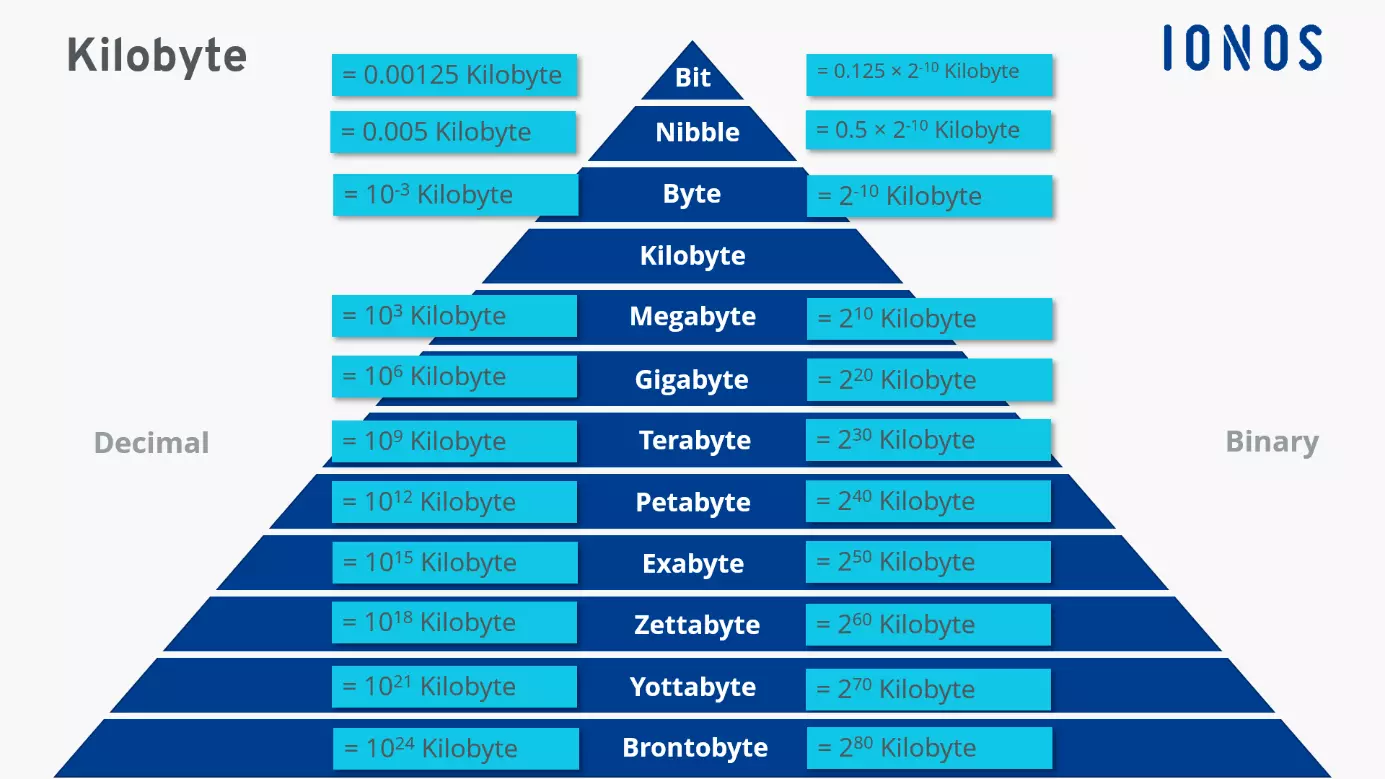
In the binary system used by most computer operating systems, 1 Megabyte (MB) is equal to 1,024 Kilobytes (KB). However, in the decimal system used by hardware manufacturers and the International System of Units (SI), 1 Megabyte is defined as 1,000 Kilobytes. This distinction often leads to discrepancies between advertised storage capacity and what is actually visible on your device.
The relationship between a Megabyte and a Kilobyte is one of the most fundamental concepts in computing. While the numbers may seem straightforward, the logic behind them involves decades of evolving standards, mathematical systems, and industrial practices. Whether you are checking the size of an email attachment, managing cloud storage, or optimizing a website for speed in 2026, understanding this conversion is essential for accurate data management.
The Foundation of Digital Measurement: Bits and Bytes
To understand the jump from a Kilobyte to a Megabyte, we must first look at the smallest units of data: the bit and the byte.
A bit (binary digit) is the most basic unit of information in computing. It represents a logical state with one of two possible values: 0 or 1. These bits are the "on" and "off" switches of the digital world. However, a single bit is too small to be useful for representing complex information like a letter or a number.
To make data more manageable, bits are grouped into bytes. Traditionally, one byte consists of 8 bits. A single byte is roughly enough to store one character of text (using standard encoding like ASCII). For example, the letter "A" is represented by a specific 8-bit sequence.
As files grew larger—from simple text documents to high-resolution images and 8K video streams—we needed larger units of measurement. This led to the adoption of the metric prefixes "Kilo," "Mega," "Giga," and "Tera." This is where the confusion between 1,000 and 1,024 begins.
The Binary System (Base-2) vs. The Decimal System (Base-10)
The core reason why there are two different answers to "How many KB are in a MB?" lies in the mathematical base used for the calculation.
The Binary System (1,024)
Computers operate on a binary system because their hardware consists of transistors that are either on or off. Because of this, it is mathematically more efficient for computers to address memory and storage in powers of two.
When engineers first began naming larger units of data, they chose the prefix "Kilo" (which means 1,000 in Greek) because $2^{10}$ (2 to the power of 10) equals 1,024. This is remarkably close to 1,000, so "Kilobyte" became the standard term for 1,024 bytes. Consequently:
- 1 Kilobyte (KB) = 1,024 Bytes
- 1 Megabyte (MB) = 1,024 Kilobytes
- 1 Gigabyte (GB) = 1,024 Megabytes
Operating systems like Microsoft Windows still use this binary-based calculation today. When you see a file size in Windows Explorer, it is calculating based on 1,024.
The Decimal System (1,000)
Outside of the computing world, the "Kilo" prefix strictly means 1,000. In the International System of Units (SI), which governs weights and measures like kilometers and kilograms, everything is based on powers of ten ($10^3$).
Storage manufacturers (the companies that make hard drives, SSDs, and USB flash drives) use the decimal system. To a manufacturer:
- 1 Kilobyte (KB) = 1,000 Bytes
- 1 Megabyte (MB) = 1,000 Kilobytes
- 1 Gigabyte (GB) = 1,000 Megabytes
This discrepancy explains why a "1 Terabyte" hard drive appears to have only about 931 Gigabytes of space when plugged into a Windows computer. The manufacturer is counting in groups of 1,000, while the computer is counting in groups of 1,024.
Standardizing the Terminology: KB vs. KiB
To resolve the confusion between 1,000 and 1,024, the International Electrotechnical Commission (IEC) introduced a new set of prefixes in 1998. These were designed to distinguish binary measurements from decimal ones.
- Kilobyte (KB): Refers to 1,000 bytes (Decimal/SI).
- Kibibyte (KiB): Refers to 1,024 bytes (Binary/IEC).
- Megabyte (MB): Refers to 1,000,000 bytes or 1,000 KB.
- Mebibyte (MiB): Refers to 1,048,576 bytes or 1,024 KiB.
While these terms are technically the correct way to differentiate the two systems, they have been slow to gain mainstream adoption. Most casual users and even many IT professionals still use "MB" to refer to 1,024 KB. However, macOS (since version 10.6) and Ubuntu Linux have officially switched to the decimal (1,000) system for reporting file sizes to match the way storage is sold, making it easier for users to understand their available capacity.
Practical Conversion Table: MB to KB
Understanding these conversions is vital when managing file uploads or storage quotas. The following table provides the conversion for both the Binary (Standard Computing) and Decimal (Manufacturer/SI) systems.
| Megabytes (MB) | Binary (1,024 KB) | Decimal (1,000 KB) | Common Use Case Example |
|---|---|---|---|
| 0.5 MB | 512 KB | 500 KB | Small, low-resolution profile picture |
| 1 MB | 1,024 KB | 1,000 KB | A 500-page plain text document |
| 2 MB | 2,048 KB | 2,000 KB | A standard high-quality PDF resume |
| 5 MB | 5,120 KB | 5,000 KB | A 4-minute MP3 song (128 kbps) |
| 10 MB | 10,240 KB | 10,000 KB | A high-resolution smartphone photo |
| 25 MB | 25,600 KB | 25,000 KB | Maximum Gmail attachment limit |
| 100 MB | 102,400 KB | 100,000 KB | A short 1080p video clip |
| 1,000 MB (1 GB) | 1,024,000 KB | 1,000,000 KB | Roughly 200 high-quality photos |
Why 1 MB Matters in 2026: Modern Context
In the earlier days of computing, 1 MB was considered a significant amount of data. The original 3.5-inch floppy disks held only 1.44 MB. Today, in 2026, 1 MB is considered quite small, but it remains a critical threshold in several technical areas:
Web Performance and SEO
For web developers and SEO specialists, 1 MB is a massive figure for a single web page. Google and other search engines prioritize fast-loading pages. A webpage that exceeds 1-2 MB in total size (including images, scripts, and CSS) may suffer from slower load times, especially on mobile networks, leading to lower search rankings and higher bounce rates. Optimizing images to be in the Kilobyte range rather than the Megabyte range is a standard best practice.
Email and Messaging
Most email providers, such as Gmail and Outlook, still enforce a 25 MB limit on attachments. If you are sending a folder full of images, knowing that each 5,000 KB photo is 5 MB helps you realize you can only attach five of them before hitting the limit.
Internet Speeds: MB vs. Mb
A very common mistake is confusing Megabytes (MB) with Megabits (Mb). Internet Service Providers (ISPs) almost always advertise speeds in Megabits per second (Mbps). Since there are 8 bits in a byte, a 100 Mbps connection does not download 100 MB per second; it downloads approximately 12.5 MB per second. Understanding this ratio is essential for troubleshooting slow downloads or streaming issues.
How to Check File Sizes in KB and MB
Depending on your device, checking the size of a file to see how many KB it occupies is simple.
On Windows
- Right-click the file you wish to examine.
- Select Properties.
- Look for the "Size" and "Size on disk" fields. Windows will usually show the size in both KB (or MB) and the exact number of bytes. Remember, Windows uses the 1,024 conversion.
On macOS
- Right-click (or Control-click) the file.
- Select Get Info.
- The size will be displayed at the top. Since macOS uses the decimal system (1,000), 1 MB will appear as exactly 1,000,000 bytes.
In Web Browsers
If you are using Chrome or Firefox, you can use the Developer Tools (F12) and go to the Network tab. When you refresh a page, it will show you exactly how many KB or MB each element of the site takes to load. This is the most accurate way to see how "heavy" a website is.
Storage Capacity and the "Missing" Space
One of the most frequent questions users have is: "I bought a 500 GB SSD, but my computer says it only has 465 GB. Where did the rest go?"
This is not a defect or a scam. It is the direct result of the 1,024 vs. 1,000 conversion.
- The manufacturer calculates 500 GB as $500 \times 1,000 \times 1,000 \times 1,000$ bytes = 500,000,000,000 bytes.
- Windows takes those 500,000,000,000 bytes and divides them by 1,024 three times ($1,024^3$) to find the Gigabyte equivalent.
- $500,000,000,000 / 1,073,741,824 \approx 465.66$ GB.
As storage capacities increase into the Terabyte (TB) and Petabyte (PB) range, this "gap" becomes even larger. On a 1 TB drive, the difference is about 70 GB, which is enough space to store several modern video games.
Summary of Key Differences
| Feature | Binary System (Standard) | Decimal System (SI/Manufacturers) |
|---|---|---|
| 1 MB Equals | 1,024 KB | 1,000 KB |
| Used By | Windows, RAM, most software | Disk Manufacturers, macOS, Linux |
| Calculation | $2^{10}$ | $10^3$ |
| Technically Known As | Mebibyte (MiB) | Megabyte (MB) |
Frequently Asked Questions
Is 1,000 KB or 1,024 KB more accurate?
Both are accurate within their respective contexts. 1,024 KB is the "mathematically correct" version for how computer hardware and memory (RAM) actually function. 1,000 KB is the "standard metric" version used for consumer labeling and by some modern operating systems to align with the metric system.
How many KB is a typical photo?
In 2026, a standard high-quality photo taken on a modern smartphone typically ranges from 3,000 KB to 10,000 KB (3 MB to 10 MB). Professional RAW photos can be much larger, often exceeding 50,000 KB (50 MB).
Why do some people use "KiB" instead of "KB"?
The term "KiB" (Kibibyte) was created by the IEC to specifically mean 1,024 bytes, leaving "KB" to mean exactly 1,000 bytes. While it is more precise and avoids ambiguity, it is mostly used in technical documentation, Linux environments, and specialized engineering fields rather than by the general public.
How many 1 MB files fit in a 1 GB drive?
If using the binary system (where 1 GB = 1,024 MB), you can fit 1,024 files of 1 MB each. If using the decimal system (where 1 GB = 1,000 MB), you can fit exactly 1,000 files of 1 MB each. Note that "system overhead" and formatting will always take up a small portion of any drive, slightly reducing the actual number of files you can store.
Does converting MB to KB reduce file quality?
No. Converting the measurement (e.g., saying 1 MB is 1,024 KB) does not change the file itself. However, if you use software to compress a file from 5 MB down to 500 KB, you are removing data, which usually results in a loss of visual or audio quality.
Next Steps for Managing Your Data
To apply this knowledge practically, start by reviewing your most used storage services. Check your cloud storage (like Google Drive or Dropbox) and note whether they use the 1,000 or 1,024 conversion for their quotas. If you are a website owner, use tools like PageSpeed Insights to verify that your images are optimized to the lowest possible KB size without sacrificing quality. Understanding that every MB is composed of over a thousand KB allows you to be more precise in managing your digital footprint and ensuring your devices run efficiently.