Choosing the right Microsoft 365 or Office 365 subscription depends largely on your organization's user capacity, security requirements, and advanced compliance needs. While both tiers offer core productivity applications like Word, Excel, and Outlook, they are engineered for vastly different organizational structures, ranging from small to medium-sized businesses up to large-scale enterprises.
Understanding the structural distinctions between Business and Enterprise tiers is essential for IT administrators and business leaders looking to optimize software investments without hitting functional walls or overpaying for unused capabilities. This analysis breaks down the five core differences separating Office 365 and Microsoft 365 Business plans from their Enterprise counterparts.
1. User License Caps and Maximum Scalability
The most immediate and rigid boundary separating Business plans from Enterprise plans is the hard user limit enforced on the subscription tier.
Office 365 Business Limits
Business plans—such as Microsoft 365 Business Basic, Business Standard, and Business Premium—are explicitly designed for smaller organizations. Microsoft enforces a strict maximum ceiling of 300 active users per tenant for these plans. If an organization reaches 301 users, it must either split its tenant structure or transition its licensing model.
Office 365 Enterprise Limits
Enterprise plans—designated by E1, E3, and E5 identifiers—remove this restriction entirely. They are built for scalability, accommodating unlimited users under a single tenant architecture. This makes Enterprise licenses the mandatory choice for corporations experiencing rapid headcount growth or those scaling past the 300-seat threshold.
Operational Impact
Exceeding the 300-seat limit on Business plans forces a migration project. Migrating user data, emails, and SharePoint permissions from a Business tenant to an Enterprise tenant can introduce operational friction and administrative overhead. Consequently, growing organizations must project their headcount trajectory over a 3-to-5-year window before committing to a Business-tier subscription.
2. Advanced Security and Threat Protection Features
While Business plans offer foundational security controls, Enterprise tiers provide sophisticated, automated threat protection mechanisms tailored to complex corporate networks and high-risk environments.
Security in Business Plans
Business plans—specifically Microsoft 365 Business Premium—include respectable security utilities like Microsoft Defender for Business, basic conditional access policies, and mobile device management (MDM). These tools protect endpoints against standard malware, phishing, and ransomware attacks, making them sufficient for organizations with standard IT risk profiles.
Security in Enterprise Plans
Enterprise plans unlock advanced automated security suites, most notably Microsoft Defender for Office 365 (Plan 1 or Plan 2) and Enterprise Mobility + Security (EMS) integrations.
- Safe Attachments and Safe Links: Enterprise tools scan email attachments and URLs in real time using behavior-based analysis and sandbox environments to detonate zero-day payloads before they reach user inboxes.
- Privileged Access Management (PAM): E5 plans offer granular control over administrative access, requiring explicit approval workflows for high-privilege tasks to prevent insider threats and credential theft.
3. Compliance, EDiscovery, and Information Governance
Regulatory frameworks such as GDPR, HIPAA, and financial industry mandates require stringent data governance, archiving, and auditing capabilities. The depth of compliance tooling varies dramatically between the two tiers.
Compliance Capabilities in Business Tiers
Business plans offer basic data retention policies, litigation hold capabilities (in certain configurations), and standard Exchange Online archiving. However, they lack automated auditing and advanced classification engines required by heavily regulated industries.
Compliance Capabilities in Enterprise Tiers
Enterprise tiers (especially E3 and E5) provide enterprise-grade compliance suites:
- Advanced eDiscovery: Allows legal and compliance teams to search, hold, review, and export data across Exchange, SharePoint, OneDrive, and Microsoft Teams with defensible chain-of-custody reporting.
- Data Loss Prevention (DLP): Enterprise DLP policies automatically detect, warn, and block the sharing of sensitive information—such as Social Security numbers, credit card data, or intellectual property—across email and cloud storage.
- Customer Lockbox: Ensures that Microsoft support engineers cannot access your organizational data without explicit, time-bound approval from your designated administrators.
4. Voice, Telephony, and Communication Infrastructure
Unified communications have become the backbone of modern corporate infrastructure. How an organization handles telephony and large-scale broadcasting depends heavily on its chosen license tier.
Calling Features in Business Plans
Microsoft Teams is included in both Business and Enterprise tiers. However, Business plans support Teams primarily for internal chat, video conferencing, and standard cloud file collaboration. Integrating Public Switched Telephone Network (PSTN) calling requires purchasing separate add-on licenses and third-party routing configurations.
Calling Features in Enterprise Plans
Enterprise plans—particularly E5 or Microsoft 365 E5 with Calling Plan—integrate advanced telephony features natively:
- Phone System and Audio Conferencing: Provides cloud-based call control, auto-attendants, call queues, and dial-in conferencing numbers for global meetings.
- Microsoft Teams Rooms and Broadcasts: Supports large-scale webinars and virtual town halls accommodating up to 20,000 attendees, alongside advanced room systems management.
5. Pricing, App Install Limits, and Licensing Structure
The financial commitment and installation rights associated with each tier reflect their intended market segments.
Installation Rights
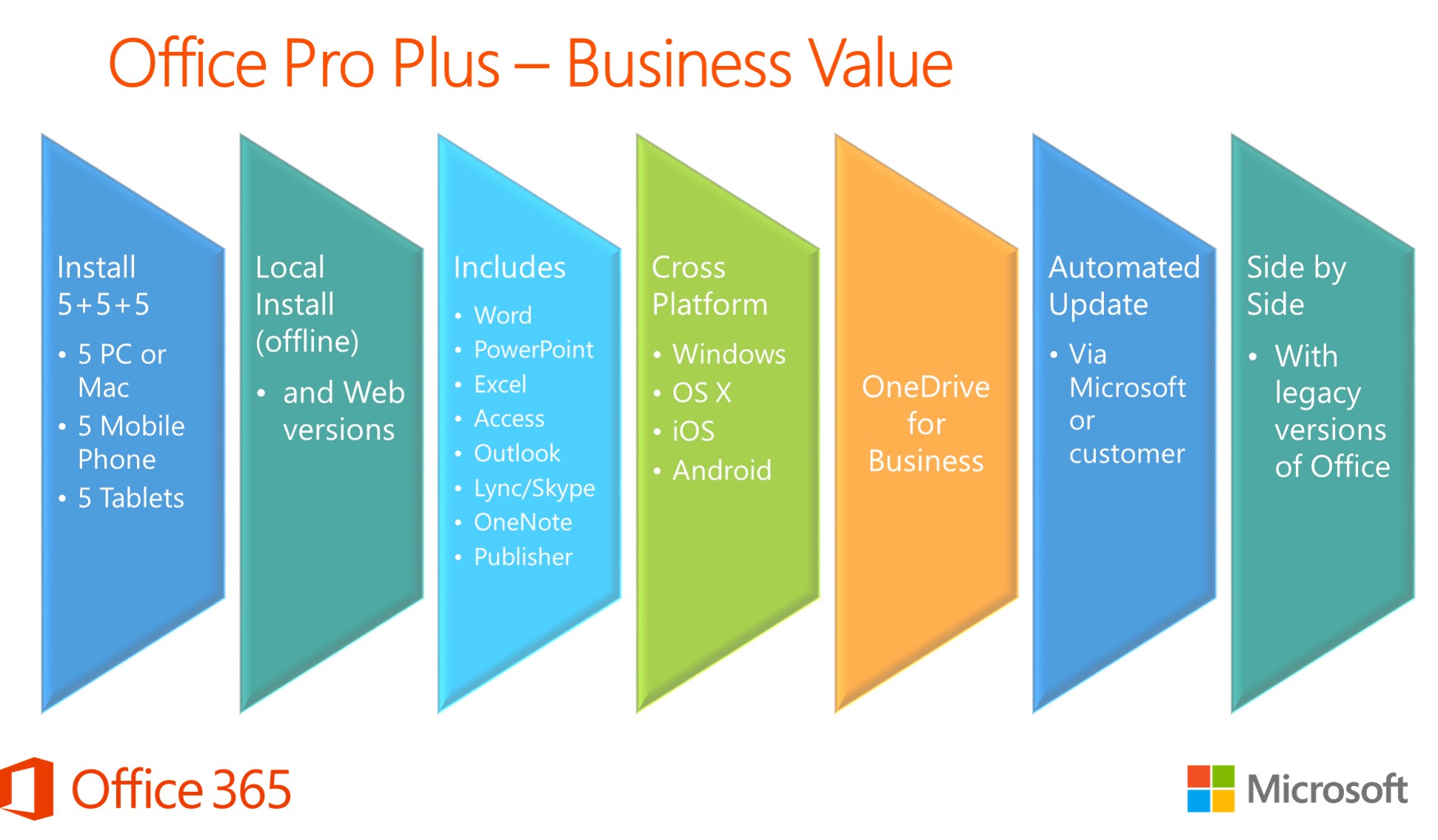
Both Business and Enterprise tiers typically allow a single user to install desktop Office applications (Word, Excel, PowerPoint, Outlook) on up to 5 mobile devices, 5 tablets, and 5 PCs or Macs simultaneously. However, the underlying service limits—such as mailbox storage sizes and SharePoint storage allocations—scale significantly higher in Enterprise environments.
Pricing Models and Commitment
Business plans are generally more cost-effective for smaller teams, offering lower per-user monthly subscription fees. Enterprise plans carry a higher price tag, justified by the inclusion of advanced security, unlimited user scaling, and deep compliance engines.
| Feature / Metric | Office / Microsoft 365 Business | Office / Microsoft 365 Enterprise |
|---|---|---|
| User Seat Limit | Maximum 300 users per tenant | Unlimited users |
| Primary Target Audience | Small to medium businesses (1–300 seats) | Mid-market to large global corporations |
| Advanced Threat Protection | Defender for Business (in Premium tier) | Defender for Office 365 (Plan 1 / 2), PIM, PAM |
| Compliance & eDiscovery | Basic retention and litigation hold | Advanced eDiscovery, Automated DLP, Customer Lockbox |
| Telephony & Voice | Basic Teams chat/video (PSTN requires add-ons) | Native Phone System, Audio Conferencing, E5 Calling |
Frequently Asked Questions
Can I mix Business and Enterprise licenses in the same tenant?
No. Microsoft generally prohibits mixing Business-tier licenses (such as Business Standard) and Enterprise-tier licenses (such as E3) within the exact same tenant infrastructure, with rare exceptions for specialized frontline worker add-ons. Organizations must migrate all users to one ecosystem when crossing the 300-seat threshold.
Is Microsoft 365 Business Premium sufficient for HIPAA compliance?
While Microsoft 365 Business Premium includes foundational security and encryption controls that help support HIPAA compliance, it lacks the advanced automated auditing, compliance manager scoring, and sophisticated DLP tools found in Enterprise E3 or E5 plans. Covered entities should review their specific risk management framework before deployment.
What happens if my Business tenant reaches 300 users?
Once you hit 300 active users on a Business plan, you cannot purchase additional Business licenses within that tenant. You must initiate a tenant-to-tenant migration or a license transition upgrade path to move your users to an Enterprise plan (E1, E3, or E5).
Do Enterprise plans include desktop apps for every user?
It depends on the specific sub-tier. For example, Office 365 E1 provides web and mobile versions of Office apps only, without desktop installations. Enterprise plans like E3 and E5 include full desktop application licenses alongside web and mobile versions.
How do I decide between Business Premium and Enterprise E3?
Evaluate your user headcount and compliance obligations first. If you have fewer than 300 users and standard security needs, Business Premium offers the best value. If you require advanced eDiscovery, automated DLP, or expect to scale past 300 seats, Enterprise E3 or E5 is the required path.
Final Recommendation
When mapping out your organization's software deployment strategy, prioritize long-term scalability and regulatory exposure over immediate cost savings. If your headcount is firmly under 300 employees and your compliance requirements are straightforward, Microsoft 365 Business Premium provides a robust, cost-effective suite. However, if your enterprise is scaling rapidly toward the 300-seat cap, operates in a heavily regulated sector, or demands advanced threat intelligence and telephony integration, investing in Enterprise tiers (E3 or E5) from inception will prevent costly future migrations.