Selecting the right 1099 INT software for tax professionals requires balancing IRS compliance, batch-processing efficiency, recipient distribution methods, and seamless integration with existing accounting and tax preparation suites. Modern practices must evaluate whether a solution supports current regulatory filing thresholds, accurate TIN matching, and secure electronic delivery to recipients.
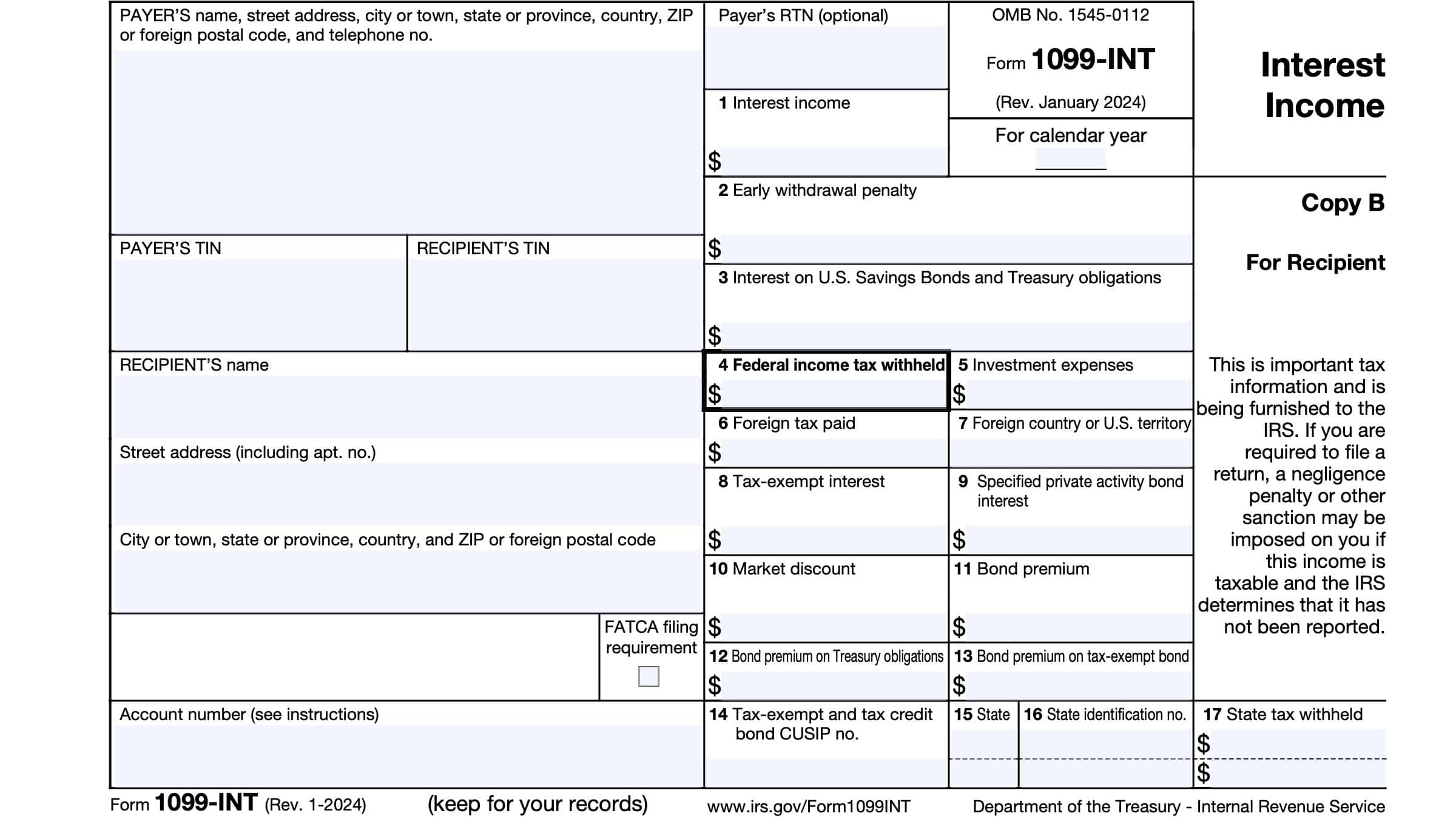
As tax practices scale their operations, managing information returns efficiently is critical to maintaining profitability and compliance. Form 1099-INT, which reports interest income paid to individuals and entities throughout the tax year, is a fundamental obligation for financial institutions, businesses, and accounting practices filing on behalf of clients. Choosing the optimal software solution ensures compliance with Internal Revenue Service (IRS) standards, safeguards sensitive taxpayer data, and minimizes manual data entry errors. This guide explores the core options, features, and evaluation criteria tax professionals must consider when choosing 1099-INT processing platforms.
Understanding the Landscape of 1099-INT Software for Tax Professionals
Tax professionals require software solutions that extend far beyond simple PDF generation. Unlike small business owners who may only file a handful of forms annually, professional tax preparers handle high volumes of information returns across multiple clients. Consequently, the chosen platform must support multi-client management, robust user permission controls, and secure cloud storage.
The primary objective of 1099-INT software is to streamline the reporting of interest income—such as savings and CD interest, broker distributions, and mortgage interest refunds—directly to the IRS and state tax agencies via the Filing Information Returns Electronically (FIRE) system or the newer Information Returns Intake System (IRIS). Tax professionals must choose between standalone software installations, cloud-based SaaS platforms, and comprehensive tax suites that include information return modules as part of an integrated ecosystem.
Furthermore, compliance requirements dictate strict adherence to formatting standards, filing deadlines, and mandatory electronic filing thresholds. While the statutory threshold for electronic filing has historically shifted, current IRS guidelines generally mandate electronic filing for practitioners filing a cumulative total of 10 or more information returns across certain categories. Software options must facilitate this requirement seamlessly to protect clients from costly late-filing and non-compliance penalties.
Core Features Required in Professional Information Return Software
When evaluating 1099-INT software options, tax professionals should look beyond basic form population capabilities. Enterprise-grade features ensure that workflow bottlenecks are eliminated during the peak tax season.
Bulk Import and Data Mapping
Tax preparers frequently receive raw financial data in various formats, including Excel spreadsheets, CSV files, and exports from accounting packages like QuickBooks or Xero. The software must feature flexible data mapping tools that allow users to import large datasets without manual data entry. Error-checking algorithms that flag missing Taxpayer Identification Numbers (TINs), invalid zip codes, or formatting discrepancies prior to submission are indispensable.
TIN Matching Services
To prevent IRS penalty notices (such as Letter 972CG) and backup withholding complications, integrated Taxpayer Identification Number matching is vital. Real-time or batch TIN matching validates recipient names and Social Security Numbers (SSNs) or Employer Identification Numbers (EINs) against IRS databases before forms are finalized and transmitted.
Electronic and Postal Distribution
A comprehensive platform must provide dual distribution channels. It should support direct e-filing with the IRS, automated generation of state-level filings where applicable, and multiple recipient delivery methods. These methods include secure portal access, password-protected email delivery, and print-and-mail outsourced fulfillment services for clients or recipients who require physical copies.
Security and Compliance Protocols
Because 1099-INT forms contain sensitive financial data and Personally Identifiable Information (PII), software must comply with stringent security frameworks. Essential safeguards include 256-bit encryption at rest and in transit, multi-factor authentication (MFA), SOC 2 Type II certification, and adherence to Gramm-Leach-Bliley Act (GLBA) safeguarding requirements.
Leading Software Categories and Solutions
Tax professionals generally choose from three primary categories of software solutions to handle Form 1099-INT: dedicated information return specialists, comprehensive professional tax suites, and cloud-based accounting ecosystems.
Dedicated Information Return Software
Platforms built exclusively for information reporting—such as Nelco, Tax1099, and Track1099—offer specialized workflows for high-volume filers. These solutions excel at processing thousands of 1099 variants simultaneously. They typically operate on a pay-per-form or tiered volume pricing model, making them cost-effective for practices that handle information reporting separately from core 1040 or 1120 tax preparation.
Comprehensive Professional Tax Suites
Major tax software suites—including Thomson Reuters (UltraTax CS), Wolters Kluwer (CCH Axcess Tax), and Intuit (ProConnect Tax or Lacerte)—often include native 1099 processing modules or integrate tightly with partner services. The advantage of these platforms is unified client data. Client information entered for business returns can be leveraged directly for 1099-INT generation without rekeying data across disparate systems.
Accounting Software Ecosystems
For practices that provide ongoing bookkeeping and write-up services, platforms like QuickBooks Desktop, QuickBooks Online Accountant, and FreshBooks offer built-in 1099 processing. While sometimes less customizable than dedicated reporting tools, these platforms allow preparers to track interest payments throughout the year and generate forms natively at year-end.
| Software Solution Category | Primary Strengths | Best Suited For | Typical Cost Structure |
|---|---|---|---|
| Dedicated Reporting Platforms (e.g., Tax1099, Nelco) | High-volume batch importing, advanced TIN matching, multi-tier user roles. | Accounting firms managing 1099s for dozens of diverse business clients. | Pay-per-form or volume-tiered pricing. |
| Comprehensive Tax Suites (e.g., CCH Axcess, UltraTax CS) | Unified client databases, cross-module data sharing, deep historical archiving. | Established CPA firms managing end-to-end business and individual tax returns. | Annual software licensing fees with module add-ons. |
| Accounting Ecosystems (e.g., QuickBooks Accountant) | Year-round transaction tracking, direct bank feeds, native client access. | Bookkeepers and fractional CFO practices managing daily client ledgers. | Subscription-based access bundled with accounting tools. |
Evaluating Cost Considerations and ROI
Pricing models for 1099-INT software vary significantly across the industry, directly impacting practice profitability. Tax professionals must evaluate total cost of ownership rather than baseline sticker prices.
Dedicated e-file providers typically charge per form, with tiered volume discounts. While this model requires low upfront investment, costs can escalate rapidly for practices managing high-volume portfolios. Conversely, comprehensive professional suites involve substantial annual licensing commitments but often include unlimited or high-cap processing tiers for standard information returns.
Additional fees to watch for include charges for state e-filing, TIN matching verification queries, postal mail fulfillment services, and multi-user access licenses. Evaluating these hidden variables ensures accurate budgeting ahead of the filing season.
Implementation Workflow and Best Practices
Deploying a new 1099-INT software solution requires careful planning and execution to avoid disruptions during peak reporting windows. Tax professionals should follow a structured onboarding roadmap:
- Audit Client Portfolios: Review existing client lists to determine total form volume, state-specific filing requirements, and preferred delivery methods.
- Data Standardization: Cleanse existing client data in legacy databases, ensuring consistent formatting for names, addresses, and TINs to prevent import errors.
- Run Pilot Imports: Test sample data files through the software sandbox or import wizard to verify that field mappings operate correctly.
- Schedule TIN Matching: Execute batch TIN matching well ahead of January deadlines to resolve discrepancies before IRS submission windows open.
- Establish Client Communication: Inform business clients of data submission deadlines and required input formats early in the fourth quarter.
Frequently Asked Questions
What are the electronic filing thresholds for Form 1099-INT?
The IRS maintains rules requiring electronic filing when a filer aggregates 10 or more information returns of various types combined. Tax professionals must verify current IRS guidelines annually, as threshold aggregation rules apply across all information return types filed by a single taxpayer or firm.
Can tax software handle state-specific 1099-INT reporting requirements?
Yes, most professional-grade information return software solutions support Combined Federal/State Filing (CF/SF) programs for participating states, as well as direct state electronic filing for jurisdictions that do not participate in the federal program. Preparers must verify individual state mandates, as some states require direct reporting regardless of federal submission.
How does TIN matching protect tax professionals and their clients?
TIN matching queries IRS databases to verify that the combination of a recipient's name and identification number matches official records. Utilizing this feature reduces the risk of receiving IRS penalty notices, avoids mandatory backup withholding liabilities, and ensures accurate processing of information returns.
What happens if a 1099-INT is submitted with incorrect data?
If an error is discovered after submission, tax professionals must file a corrected return (Form 1099-INT with the "Corrected" checkbox marked) with the IRS and provide an updated copy to the recipient. Choosing software that simplifies the correction-filing workflow minimizes administrative overhead when errors occur.
Is cloud-based 1099 software secure enough for sensitive financial data?
Reputable cloud-based information return platforms employ rigorous security measures, including end-to-end encryption, multi-factor authentication, and SOC compliance audits. Tax professionals must ensure that any chosen vendor meets industry standards and executes Business Associate Agreements (BAAs) or data processing addendums where applicable.
Conclusion and Next Actions
Selecting the appropriate 1099-INT software solution is a strategic decision that directly influences practice efficiency, compliance accuracy, and client satisfaction. Tax professionals should begin by auditing their annual form volume, evaluating integration capabilities with existing accounting and tax stacks, and testing candidate platforms using trial accounts or sample data imports. By prioritizing robust TIN matching, secure distribution channels, and scalable pricing models, practices can streamline year-end reporting and position themselves for sustainable growth.