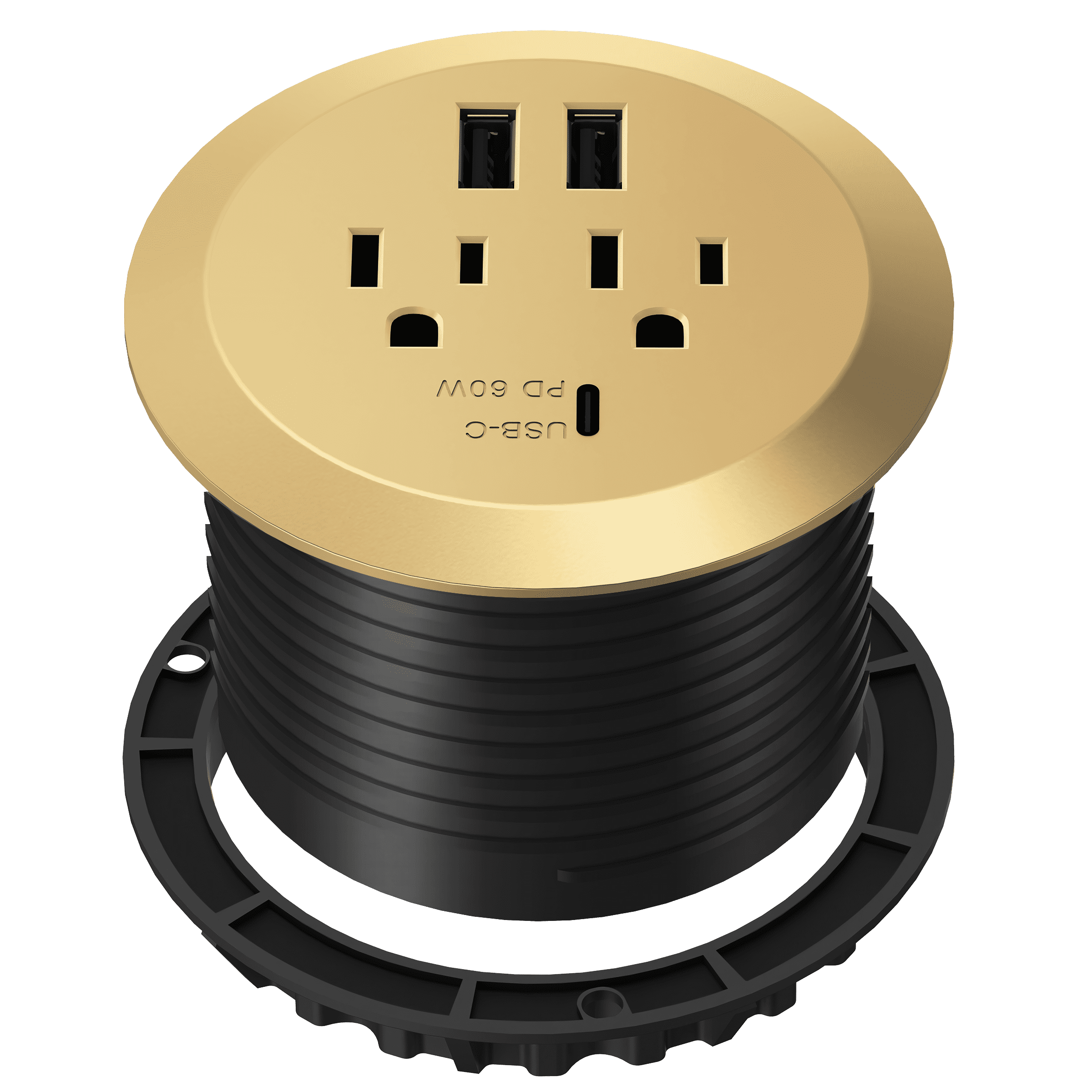
A desk grommet is a small hardware insert placed into a pre-drilled desktop hole to manage cables, protect wire insulation from sharp wood or metal edges, and maintain an organized workspace. Far from being a mere afterthought, this simple accessory transforms a chaotic tangle of cords into a streamlined, efficient workstation.
Understanding the Anatomy and Purpose of a Desk Grommet
When evaluating workspace ergonomics and aesthetic appeal, large furniture pieces often take center stage. However, the details dictate how functional a workstation remains over years of heavy daily use. A desk grommet serves as the literal and figurative gateway between the visible surface of a desk and the complex web of power strips, data lines, and peripheral cords hidden below.
At its core, a grommet is an engineered collar or ring that lines the interior circumference of a bored hole in a desktop. Without this protective lining, raw wood, compressed particle board, or exposed metal edges can subject cables to constant friction, pinching, and gradual degradation. Over time, the movement of a monitor arm, the adjustment of a standing desk, or simply shifting a laptop can strip cable insulation, creating potential short circuits, electrical hazards, or ruined hardware connections.
Beyond safety and wire preservation, a grommet provides structural reinforcement to the desktop itself. Drilling a hole through solid wood, plywood, or high-density fiberboard (HDF) exposes the vulnerable core material to moisture, dust, and physical impact. A properly fitted grommet locks the layers together, sealing the exposed edge and preventing chipping, swelling, or structural weakening around the cutout zone.
The Evolution of Workspace Cable Management
The necessity of the humble desk grommet has scaled alongside the evolution of modern office technology. Decades ago, a standard desktop accommodated little more than a heavy desktop computer with a dedicated CPU tower, a single monitor, a keyboard, and a mouse. Cords were thick, relatively few in number, and easily relegated to the back edge of a wooden table.
Today, the modern desk supports an array of personal technology: dual or triple ultra-wide monitors, docking stations, external solid-state drives, USB hubs, audio interfaces, charging pads, and smart lamps. This dense concentration of peripherals multiplies the volume of wiring exponentially. Without structured routing channels, gravity pulls cords downward in a messy waterfall, creating a visual distraction and physical obstruction for knees, feet, and office chairs.
The desk grommet acts as the primary choke point for this digital footprint. By gathering disparate power cords, DisplayPort cables, USB-C lines, and ethernet connections into a single, clean vertical drop, the grommet restores order. It shifts the visual clutter away from the eye line, allowing the workspace to remain clear, professional, and conducive to sustained focus.
Material Variations and Their Functional Trade-offs
Selecting a desk grommet involves understanding the material properties of both the accessory and the furniture it inhabits. Manufacturers produce grommets in a variety of materials, each tailored to specific aesthetic preferences, durability requirements, and installation constraints.
Plastic Grommets
Plastic represents the most common, cost-effective, and versatile material choice for desk grommets. Typically molded from high-impact ABS or polypropylene, plastic grommets are lightweight, resistant to scratching, and available in a wide spectrum of colors—ranging from basic black and white to brushed metallic finishes that mimic higher-end materials.
- Pros: Highly affordable, easy to modify with standard tools, gentle on cable insulation, and resistant to corrosion or rust.
- Cons: Can appear utilitarian or cheap in luxury executive settings; plastic can become brittle or discolor under direct, prolonged ultraviolet exposure.
Metal Grommets
For executive suites, heavy-duty industrial setups, or modern minimalist environments, metal desk grommets offer superior durability and a premium tactile feel. Common metallic options include anodized aluminum, brushed stainless steel, cast zinc, and polished brass.
- Pros: Exceptional longevity, high resistance to physical impact, sleek modern aesthetic, and ability to withstand high-friction environments.
- Cons: Higher price point; if the interior edge of the metal lacks proper deburring or a smooth rubber lining, it can scrape or damage delicate cable jackets.
Rubber and Silicone Grommets
Flexible rubber or silicone inserts have surged in popularity, particularly for minimalist desks and custom gaming setups. Rather than serving as a rigid collar, a flexible grommet often functions as a tight aperture that grips cords in place or completely seals the hole when not in use.
- Pros: Excellent grip prevents cables from slipping backward through the hole; completely eliminates rattling or vibration noise; offers a soft, modern touch.
- Cons: Can be difficult to force large, bulky connector heads through tight rubber slits; may degrade or attract dust over extended periods.
Comparing Desk Grommet Materials and Applications
| Material | Primary Applications | Durability | Aesthetic Impact | Cost Profile |
|---|---|---|---|---|
| ABS Plastic | Corporate offices, budget desks, educational facilities | Moderate to High | Neutral, utilitarian | Low |
| Aluminum | Modern workstations, standing desks, architectural tables | High | Sleek, professional, modern | Moderate |
| Stainless Steel | Heavy industrial labs, high-end executive furniture | Very High | Premium, industrial, robust | High |
| Silicone / Rubber | Gaming setups, minimalist writing desks, flexible routing | Moderate | Clean, flush, matte texture | Low to Moderate |
Key Features and Functional Variations
Not all grommets are built the same way. Understanding the specific mechanical features available on the market ensures that the chosen hardware matches the exact demands of a workstation setup.
Open-Slot vs. Brush-Seal Grommets
Traditional grommets feature an open, circular channel with a removable rotating cap. While effective for passing plugs through, they leave a wide-open gap where dust, paper clips, and small items can fall into the cable tray below.
Modern designs frequently incorporate a brush-seal insert. Dense rows of nylon bristles line the interior perimeter of the grommet. These bristles allow dozens of thin cables to pass through while physically blocking dust, debris, and lost items from falling through the opening, all while keeping cables neatly centered.
Integrated Power and Data Grommets
The boundary between simple hardware and active electronics has blurred with the advent of power-integrated grommets. These advanced units replace a standard passive ring with a recessed cylinder equipped with AC power outlets, USB-A and USB-C fast-charging ports, and pass-through ports for HDMI or Ethernet.
- Convenience: Places power delivery directly on the desktop surface, eliminating the need to crawl underneath a desk to plug in a laptop charger.
- Installation Note: These units require larger hole diameters (frequently 60mm to 80mm or larger) and access to an underlying power source to feed the integrated power whip.
Step-by-Step Installation Guide for Retrofitting a Desk Grommet
Adding a grommet to an existing desk requires precision and the correct cutting tools. Rushing the process can result in splintered wood, cracked laminate, or an improperly sized hole that leaves the grommet loose.
Tools and Materials Required
- Cordless drill or drill press
- Hole saw attachment (sized precisely to the grommet manufacturer's specification, commonly 2 inches or 60mm–80mm)
- Painter's tape
- Fine-grit sandpaper (120-grit to 220-grit)
- Vacuum or compressed air for dust removal
- Wood sealant or clear varnish (for exposed wood cores)
Step 1: Planning Placement and Clearance
Before drilling any holes, map out the layout of your equipment. Place monitors, keyboards, and laptops in their intended positions. Identify where cords naturally congregate. Avoid placing the hole directly over structural metal frames, internal crossbeams, or drawer tracks located underneath the desktop. Use a stud finder or inspect the underside of the desk visually to confirm clearance.
Step 2: Surface Preparation
To prevent chipping or splintering—especially on laminated particle board or veneered wood—apply a strip of painter's tape across the targeted drilling location. Draw crosshairs with a pencil to mark the exact center point of the intended hole. The tape holds the surface fibers together as the teeth of the hole saw make initial contact.
Step 3: Drilling the Hole
Attach the correct size hole saw to your drill. Hold the drill perpendicular (at a strict 90-degree angle) to the desk surface. Begin drilling at a slow, controlled speed until the pilot bit cuts completely through and the saw teeth engage the surface. Maintain steady, moderate pressure without forcing the tool. If cutting through thick hardwood, periodically back the saw out to clear accumulated sawdust and prevent overheating.
Step 4: Edge Treatment and Sealing
Once the core slug is removed, peel away the painter's tape. Use fine-grit sandpaper to smooth away any rough burrs or jagged edges inside the newly cut bore. If the desk is made of raw wood, MDF, or particle board, apply a thin coat of polyurethane, wood glue, or clear sealant to the exposed interior edge. This crucial step prevents ambient humidity from causing the core material to swell or degrade over time.
Step 5: Insertion and Cable Routing
Press the outer sleeve of the desk grommet firmly into the hole. A snug fit should hold it securely in place without requiring heavy adhesive, though a small bead of silicone caulk can be applied for permanent installation if the fit is loose. Feed your cables through the opening from top to bottom, replace the cover or snap the brush insert into place, and arrange your workspace.
Common Mistakes to Avoid When Installing Desk Grommets
- Measuring the Grommet Outer Diameter Instead of the Inner Bore: Manufacturers specify hole saw sizes based on the mounting diameter (the body that drops into the desk), not the decorative top flange. Always verify the manufacturer's technical drawing before purchasing a hole saw.
- Ignoring Underside Obstructions: Drilling blindly without checking beneath the desk can lead to cutting through steel support beams, electrical channels, or clipping drawer mechanisms.
- Skipping Edge Sealing: Leaving exposed particle board unsealed invites moisture absorption, leading to warping and structural failure around the cutout.
- Overloading a Single Grommet: Squeezing too many thick cables through a small grommet can pinch wires, crack plastic inserts, or make future adjustments frustrating. Use multiple grommets for complex workstation setups.
Frequently Asked Questions
What is the standard size for a desk grommet?
The most common standard sizes for desk grommets are 2 inches (approximately 50mm) and 60mm to 80mm in metric measurements. These dimensions accommodate the vast majority of standard power plugs, USB cables, and monitor wires while fitting comfortably within typical desk structural limits. Always check the manufacturer specifications for the exact cutout requirement before drilling.
Can I install a desk grommet in a glass or metal desk?
Installing a grommet in a solid glass desk is generally impossible because tempered glass shatters when drilled. However, specialized glass desks often come with pre-cut holes factory-installed. For solid metal or hollow steel desks, you can install metal or plastic grommets using a bi-metal hole saw, provided you deburr the sharp metal edges thoroughly and use a rubber protective liner to prevent cable damage.
How do I manage cables that have plugs too large to fit through a grommet?
Many standard grommets feature a removable center cap or a split-ring design that allows you to open the entire channel, pass large molded plugs through, and then snap the collar back around the cords. If your grommet has a fixed opening, always route your cables from the underside (plug end) up through the desk surface to the peripheral device, or use modular cables with detachable heads whenever possible.
Do desk grommets work well with standing desks?
Yes, desk grommets are essential for motorized standing desks. Because standing desks move vertically, cables must possess enough slack to travel between sitting and standing heights without pulling tight. A well-placed grommet keeps this slack organized in a vertical drop line, preventing cables from snagging on desk legs, crossbars, or office chair arms during height adjustments.
Are integrated power grommets safe to plug into extension cords?
Integrated power grommets are rated for specific electrical loads, typically up to 10A or 15A depending on regional standards. While they can be plugged into standard wall outlets or surge protectors, you must avoid "daisy-chaining"—plugging power strips into other extension cords or multiple high-wattage appliances (like space heaters or heavy kitchen gear) into a desk grommet, as this creates serious fire and electrical hazards.
Practical Next Steps for Your Workspace Setup
Transforming a cluttered workstation begins with a thorough inventory of your current technology and cable paths. Map out your equipment layout, verify whether your desk surface permits cutting, and select the grommet material and size that balances your aesthetic goals with functional durability. By investing a small amount of time into proper cable routing and hardware installation, you eliminate daily visual distractions, protect expensive hardware investments, and create a clean, professional environment optimized for productivity.