Arrays in C are fixed-size, sequential collections of elements of the same data type stored in contiguous memory locations. They allow developers to manage multiple data points under a single identifier using an index-based system, providing efficient O(1) access time for retrieving or modifying data based on its position within the sequence.
Understanding the Core Concept of Arrays in C
At its most fundamental level, an array is a structure that allows you to store a fixed-size sequential collection of elements of the same type. Instead of declaring individual variables, such as number0, number1, and number2, you declare one array variable like numbers and use numbers[0], numbers[1], and numbers[2] to represent individual variables.
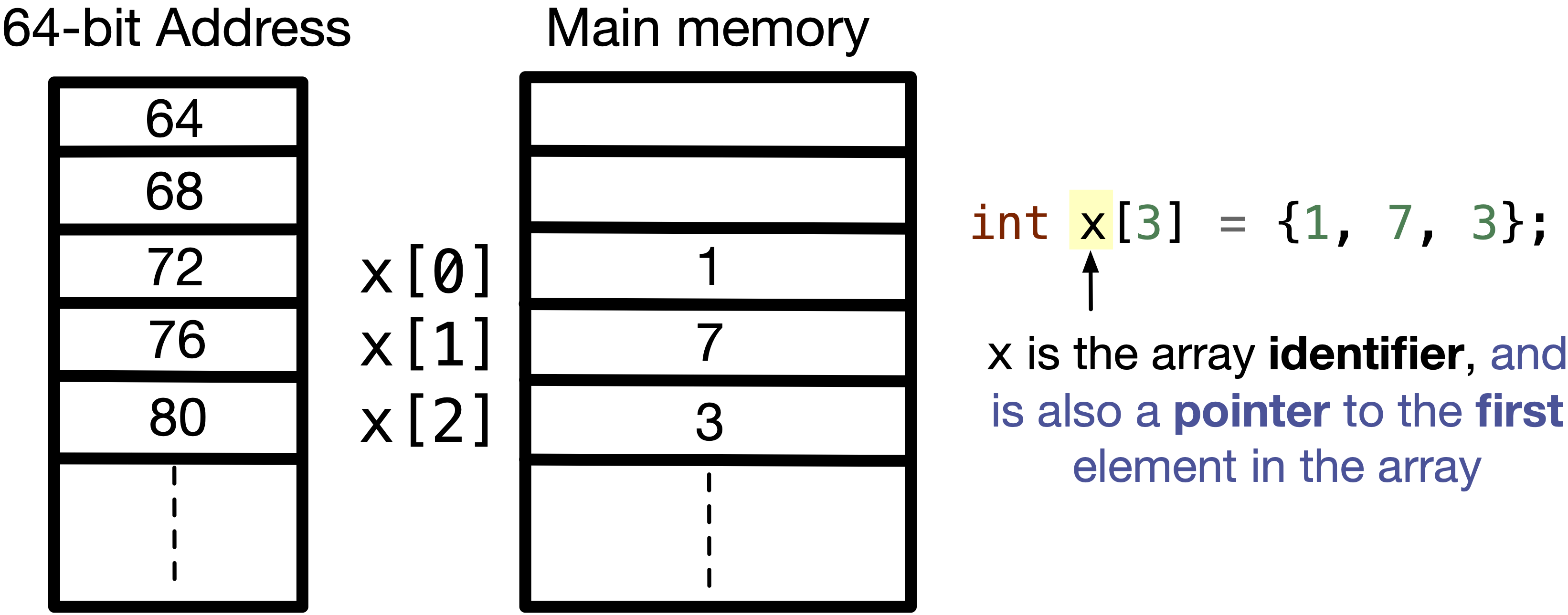
In the C programming language, arrays are considered a "derived" data type. This means they are built out of the primary data types—such as int, char, or float. The strength of the array lies in its memory layout. When you declare an array, the C compiler allocates a solid block of memory large enough to hold all the elements. This contiguous nature is what makes arrays incredibly fast; the CPU can predict where the next piece of data is located, which optimizes cache performance.
As of 2026, despite the rise of higher-level languages and more complex data structures, the basic C array remains a cornerstone of systems programming, embedded firmware, and high-performance computing. It provides the "bare metal" efficiency required when every clock cycle and byte of RAM counts.
Declaration and Initialization Syntax
To use an array in C, you must first declare it. The declaration tells the compiler the type of elements the array will hold and the number of elements it will contain.
Basic Declaration
The standard syntax for declaring an array is:
type arrayName[arraySize];
For example, int dailyTemperatures[31]; reserves enough space in memory to store 31 integers. It is important to note that the arraySize must be an integer constant greater than zero. In older C standards (C89/90), this size had to be a literal or a macro. Modern C standards, including C23, continue to support Variable Length Arrays (VLAs) in certain contexts, though they are often avoided in safety-critical systems due to stack overflow risks.
Initialization Methods
There are several ways to initialize an array at the time of declaration:
- Full Initialization: You provide a value for every element.
int scores[5] = {90, 85, 70, 95, 88}; - Partial Initialization: If you provide fewer values than the size, the remaining elements are automatically initialized to zero.
int counts[10] = {1, 2, 3}; // counts[3] through counts[9] will be 0. - Inferred Size: If you omit the size but provide an initializer list, the compiler counts the elements for you.
double prices[] = {10.99, 5.50, 20.00}; // Size is automatically 3. - Designated Initializers: Introduced in C99 and refined in later standards, this allows you to initialize specific indices.
int grid[10] = {[2] = 5, [5] = 12};
Memory Management and the Indexing System
One of the most critical aspects of "arrays in c explained" is the concept of zero-based indexing. In C, the first element of an array is at index 0, not index 1. If an array has n elements, the valid indices range from 0 to n-1.
How Memory Mapping Works
The reason for zero-based indexing is rooted in pointer arithmetic. The name of the array acts as a constant pointer to the first element. When you access array[i], the compiler actually performs a calculation to find the memory address:
Address of element = Base Address + (index * size of element type)
If the index is 0, the calculation points exactly to the base address. This efficiency is why C does not perform "bounds checking" by default. If you try to access array[10] on an array of size 5, the compiler will calculate a memory address outside the allocated block and attempt to read or write there. This leads to undefined behavior, often manifesting as segmentation faults or security vulnerabilities like buffer overflows.
The Role of sizeof
To determine the total size of an array in bytes, the sizeof operator is used. However, a common task is finding the number of elements in an array. This is achieved by dividing the total size of the array by the size of a single element:
int length = sizeof(arr) / sizeof(arr[0]);
This technique is vital for writing loops that iterate through arrays without hard-coding the size, though it only works within the scope where the array was defined.
Multi-dimensional Arrays: Matrices and Beyond
C supports multidimensional arrays, which are essentially "arrays of arrays." The most common form is the two-dimensional (2D) array, often used to represent matrices or grids.
Declaring 2D Arrays
int matrix[3][4];
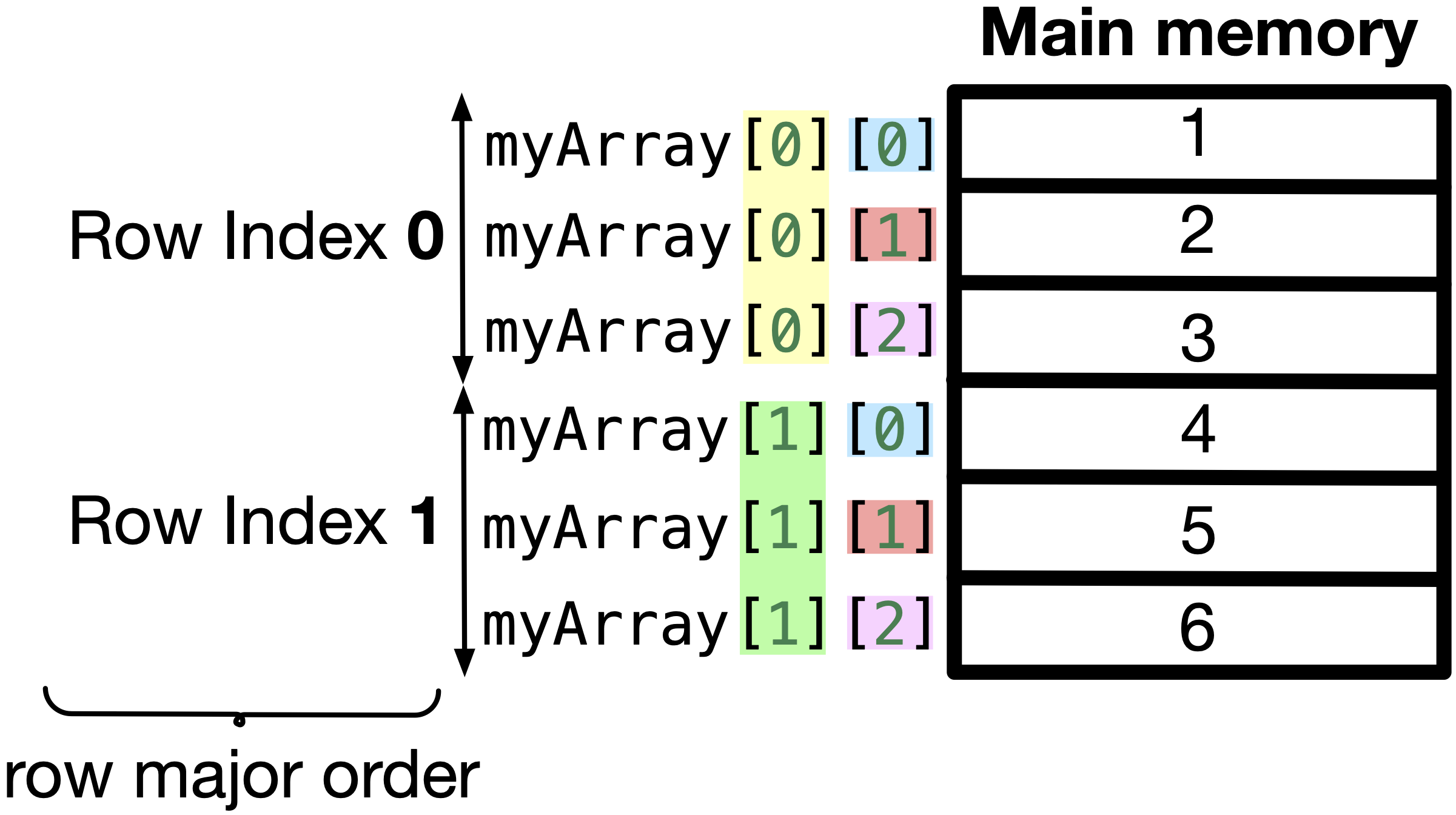
This creates a table with 3 rows and 4 columns, totaling 12 elements. In memory, however, C stores these elements in row-major order. This means all elements of the first row are stored first, followed by all elements of the second row, and so on.
Initializing 2D Arrays
Visualization helps when initializing:
int board[2][3] = { {1, 2, 3}, // Row 0 {4, 5, 6} // Row 1 };
While the nested braces are optional, they are highly recommended for readability. Accessing an element follows the same logic: board[1][2] would yield the value 6.
The Relationship Between Arrays and Pointers
In C, the relationship between arrays and pointers is so close that they are often confused. While they are distinct entities, an array name "decays" into a pointer to its first element in most expressions.
Pointer Arithmetic
If you have int arr[5], the expression arr is equivalent to &arr[0]. Consequently, *(arr + 1) is exactly the same as arr[1]. The square bracket notation is actually "syntactic sugar" for pointer dereferencing.
Differences Between Arrays and Pointers
- Mutability: An array name is a constant pointer. You cannot perform
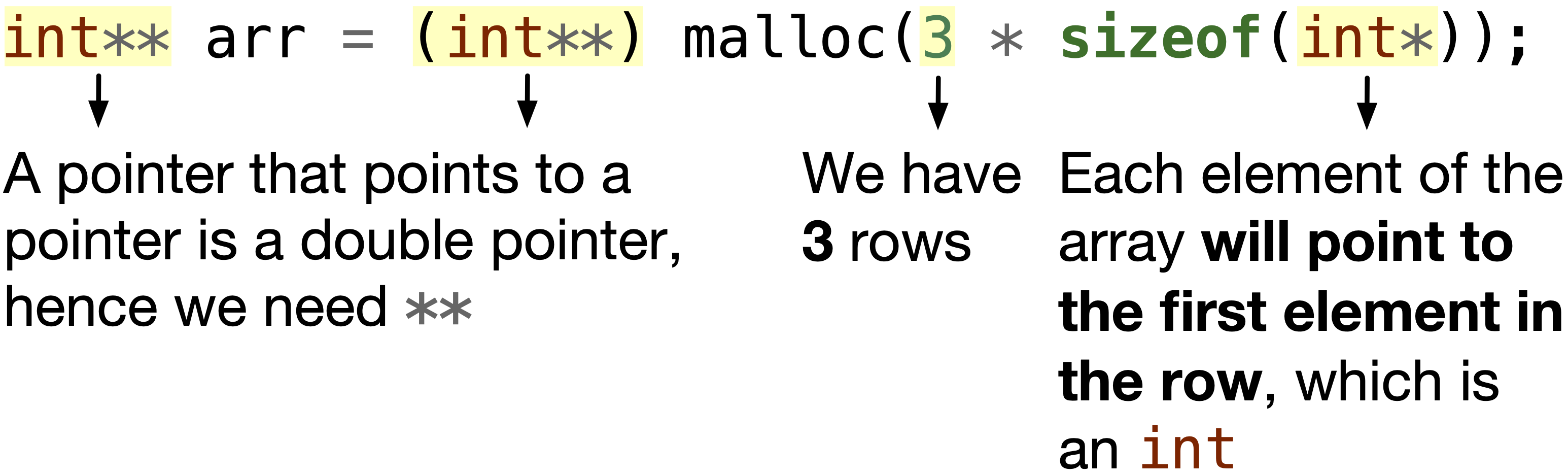
arr = ptr;. A pointer variable, however, can be reassigned to point elsewhere. - Memory Allocation: An array allocates space automatically on the stack (usually). A pointer only allocates space for an address (4 or 8 bytes) unless it is manually pointed to a heap-allocated block via
malloc. - Sizeof:
sizeof(array)returns the total bytes of all elements.sizeof(pointer)returns the size of the memory address itself.
Passing Arrays to Functions
When you pass an array to a function, C does not pass a copy of the entire array. Instead, it passes a pointer to the first element. This is known as "pass by reference" behavior (simulated), which is efficient because it avoids copying large amounts of data.
Function Signature Options
All three of the following declarations are equivalent for a function that accepts an integer array:
void myFunction(int *param)void myFunction(int param[10])void myFunction(int param[])
Because the function only receives a pointer, it has no inherent knowledge of the array's size. Therefore, it is a standard best practice in C to pass the size as a second argument:
void processArray(int *arr, int size);
Common Challenges and Memory Safety
Working with arrays in C requires a disciplined approach to memory management. Because the language prioritizes speed and gives the programmer direct control, it does not provide the safety nets found in languages like Python or Java.
Buffer Overflows
A buffer overflow occurs when data is written beyond the boundaries of the array. In 2026, this remains a primary target for cybersecurity exploits. Writing to arr[size] when the maximum index is size-1 can overwrite adjacent memory, potentially altering the function's return address and allowing for arbitrary code execution.
Off-by-One Errors
These are logical errors where a loop iterates one time too many or too few. For example:
for(int i = 0; i <= size; i++)
The <= condition will cause the loop to attempt to access an index equal to the size, which is out of bounds. The correct pattern is almost always i < size.
Returning Arrays from Functions
A frequent mistake is attempting to return a local array from a function:
int* getValues() { int localArr[3] = {1, 2, 3}; return localArr; // Dangerous! }
Local arrays are stored on the stack and are destroyed when the function exits. Returning a pointer to this memory results in a "dangling pointer." To return an array, you must either allocate it dynamically using malloc or pass an array into the function to be filled.
Technical Comparison: Array Types and Characteristics
The following table compares different ways to handle sequential data in C to help you decide which structure fits your specific use case.
| Feature | Static Array | Variable Length Array (VLA) | Dynamic Array (malloc) |
|---|---|---|---|
| Allocation Time | Compile-time | Runtime (Stack) | Runtime (Heap) |
| Size Flexibility | Fixed at compile-time | Set at runtime start | Resizable via realloc |
| Memory Location | Stack or Data Segment | Stack | Heap |
| Standard Support | All (C89, C99, C11, C23) | C99 (Optional in C11+) | All (Standard Library) |
| Risk Factor | Low | High (Stack Overflow) | Medium (Memory Leaks) |
| Performance | Highest | High | Moderate (Indirection) |
Frequently Asked Questions
How do I find the length of an array passed to a function?
You cannot find the length of an array inside a function using sizeof. When an array is passed to a function, it "decays" into a pointer. sizeof(arr) inside the function will return the size of the pointer (usually 8 bytes on 64-bit systems), not the total size of the array. You must always pass the array size as a separate argument to the function.
What is the difference between char arr[] = "Hello"; and char *ptr = "Hello";?
The first, char arr[], creates a string in writable memory (the stack). You can modify individual characters, like arr[0] = 'J';. The second, char *ptr, creates a pointer to a string literal, which is usually stored in read-only memory. Attempting to modify ptr[0] will often result in a segmentation fault.
Can an array hold different data types?
No. C arrays are homogeneous, meaning every element must be of the same data type. If you need to store different types of data together, you should use a struct. However, you can have an array of structs, which is a powerful way to organize complex data sets.
What happens if I don't initialize an array?
If a local array is declared but not initialized (e.g., int arr[5];), it contains "garbage values"—whatever data happened to be in that memory location previously. If the array is declared globally or as static, it is automatically initialized to zero by the compiler.
Is it possible to resize an array in C?
Standard static arrays cannot be resized once declared. If you need a flexible size, you must use dynamic memory allocation. By using malloc() to allocate memory and realloc() to change its size later, you can simulate a resizable array. This requires manual memory management using free() to prevent leaks.
Why does C use zero-based indexing?
Zero-based indexing simplifies the math for the compiler and the CPU. The index essentially represents the "offset" from the starting memory address. An index of 0 means "zero elements away from the start," which is the first element itself. This avoids an extra subtraction operation (index - 1) that would be necessary if indexing started at 1.
Practical Recommendation
When working with arrays in C, always prioritize safety by explicitly tracking the array size. For most applications, define a constant or a macro for your array sizes to ensure consistency across loops and function calls. If you are developing for embedded systems or high-security environments, avoid Variable Length Arrays (VLAs) in favor of fixed-size buffers or carefully managed dynamic memory. Finally, always use tools like Valgrind or AddressSanitizer during development to catch out-of-bounds errors that the C compiler will not stop you from making.