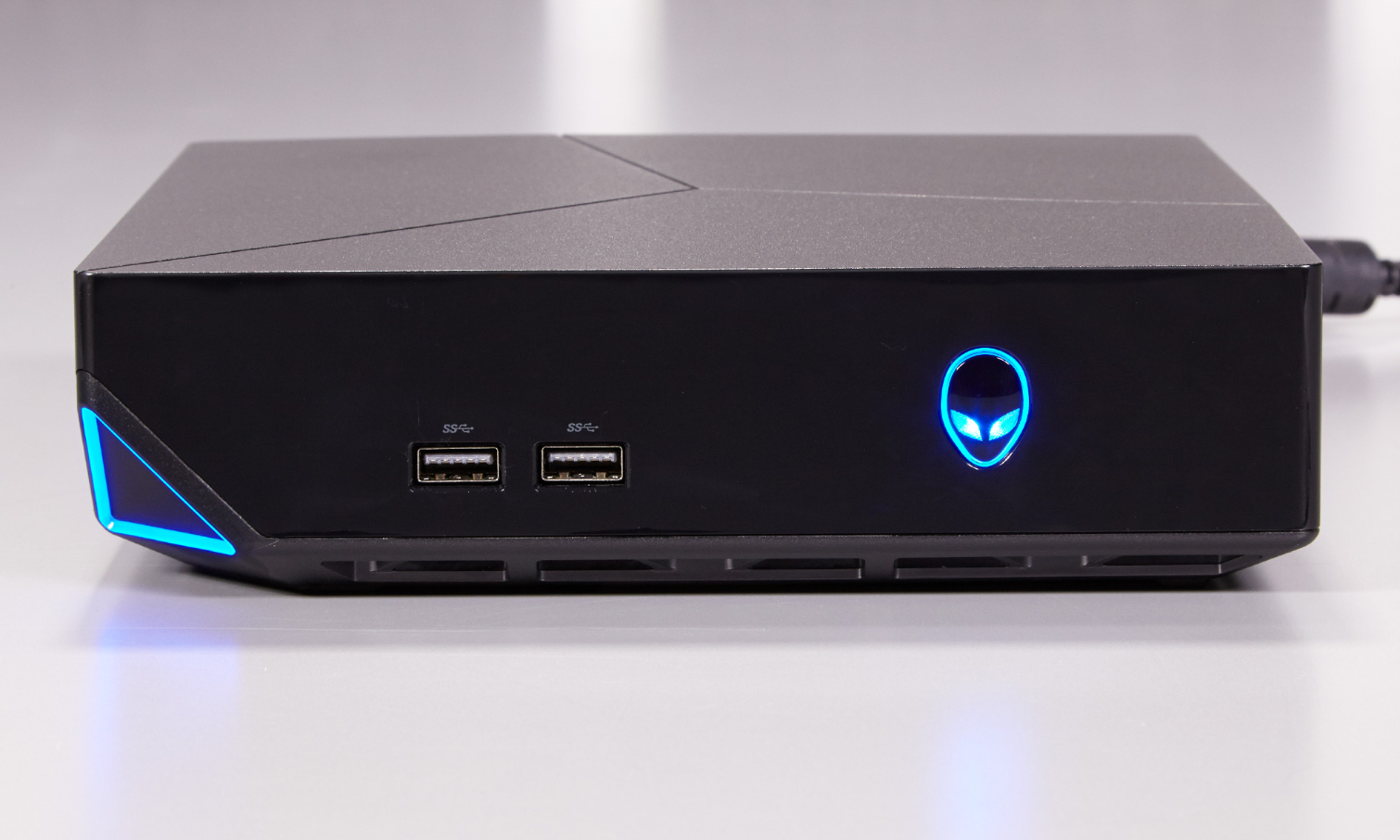
The Alienware Alpha arrived in late 2014 as a pioneering attempt to bridge the gap between PC gaming and the console living room experience. By leveraging the Windows operating system within a compact, console-sized chassis, it offered a unique hybrid value proposition for gamers seeking both the flexibility of a PC and the plug-and-play convenience of a traditional home gaming system.
The Genesis of the Alienware Alpha Concept
The mid-2010s represented a volatile period for gaming hardware. While the PlayStation 4 and Xbox One had solidified their presence in living rooms, a growing segment of the PC gaming community sought a more ergonomic way to enjoy their Steam libraries without the constraints of a traditional tower desktop or the complexity of building a custom Small Form Factor (SFF) machine. Dell, through its Alienware subsidiary, identified this gap as an opportunity to introduce a dedicated device that could compete directly with consoles.
The primary engineering objective was to distill the performance of a mid-range gaming desktop into a box that felt at home next to a television. This required a custom motherboard, a specialized thermal cooling solution, and an external power supply to keep the device footprint minimal. The result was a compact unit measuring roughly 8x8x2 inches, an impressive feat of engineering at the time that prioritized silent operation and aesthetic integration.
Official Launch Details and Technical Specifications
The Alienware Alpha was officially unveiled at the 2014 Electronic Entertainment Expo (E3) and hit the market in November 2014. The launch was strategically timed to coincide with the holiday shopping season. At its core, the Alpha was not a proprietary console, but a Windows-based PC pre-loaded with "Alpha UI," a custom-built interface that allowed users to navigate their Steam Big Picture mode and system settings using only a controller.
The hardware configurations at launch were based on the Intel Haswell architecture. Users could choose between several variants, typically starting with an Intel Core i3 processor, 4GB of RAM, and a 500GB hard drive. The graphics processing was handled by a custom-engineered NVIDIA GeForce GPU based on the Maxwell architecture, which was soldered directly to the motherboard to save space. This GPU was roughly equivalent to a desktop-class GTX 750 Ti, providing ample power to run many popular titles at 1080p resolution with respectable frame rates.
| Component | Base Configuration Details |
|---|---|
| Processor | Intel Core i3-4130T (Haswell) |
| Memory | 4GB DDR3L 1600MHz |
| Graphics | Custom NVIDIA GeForce GTX GPU (2GB GDDR5) |
| Storage | 500GB 7200RPM HDD |
| Connectivity | Dual-band Wireless-AC, Bluetooth 4.0, Gigabit Ethernet |
| OS Interface | Windows 8.1 with Custom Alpha UI |
The "Console" Paradigm: Software and User Interface
A defining aspect of the Alienware Alpha launch was the software experience. Recognizing that a standard Windows desktop interface is difficult to navigate with a gamepad, Alienware developed its custom launcher. Upon booting, the system would launch the Alpha UI, which allowed players to access their game libraries, adjust display settings, and manage hardware performance.
For users who wanted to utilize the machine as a traditional PC, the Alpha allowed a seamless exit to the standard Windows desktop environment. This "dual-personality" design remains one of the device's most significant historical strengths. It addressed the primary frustration of console gaming—limited software flexibility—by providing full access to the vast Steam library, emulators, and productivity applications, while maintaining the simplicity of an app-centric launcher.
Prerequisites for Optimal Performance
To get the most out of the Alienware Alpha at the time of its release, certain prerequisites were necessary. Because it was a compact system, thermals were the primary constraint. Users needed to ensure the device had adequate airflow; placing the console inside an enclosed cabinet with limited ventilation could lead to thermal throttling, where the CPU and GPU intentionally lower their clock speeds to prevent heat damage.
Additionally, because the Alpha relied on a proprietary custom NVIDIA chip, driver updates were sometimes dependent on Dell's approval rather than just the latest NVIDIA GeForce Experience release. Staying updated with official Alienware drivers was critical for maintaining compatibility with newer game releases. Furthermore, users were encouraged to upgrade the system’s RAM—often a simple process involving access to the underside of the chassis—to improve performance, particularly as game requirements began to scale in the years following the launch.
Comparisons with Contemporary Consoles
When the Alienware Alpha arrived, it was frequently compared to the Xbox One and PlayStation 4. The comparison was nuanced. While consoles offered a "walled garden" approach—guaranteeing that every game purchased would run on the system without configuration—the Alpha offered superior graphics settings and the ability to upgrade components.
However, the Alpha came with a price premium. Entry-level models were priced higher than traditional consoles, and the cost of the device did not include the peripheral ecosystem that consoles often subsidized. Despite this, the Alpha won over a dedicated following of "prosumer" gamers who valued the ability to perform tasks outside of gaming, such as media streaming, basic video editing, and web browsing, all from the comfort of their couch.
Limitations and Challenges
The project did face hurdles. The primary critique during the launch period was the lack of user-upgradable graphics. While the RAM and storage were accessible, the GPU was fixed. As graphical requirements for triple-A titles grew exponentially during the late 2010s, the original Alpha units began to struggle with modern titles at high fidelity.
Another point of friction was the operating system. Since the Alpha was essentially a Windows PC, it was subject to the update cycles, background processes, and potential driver conflicts inherent to Windows. While the Alpha UI did a commendable job of hiding this, users occasionally had to "drop" into the desktop to troubleshoot issues, which broke the illusion of a pure console experience.
Troubleshooting Common Issues
For those still engaging with the original Alpha hardware or seeking to understand its performance history, the most common issues generally centered on three areas:
- Thermal Management: If the system fan becomes noticeably loud, it is often a sign of accumulated dust. Using compressed air to clear the side vents is a standard maintenance step to maintain performance.
- Driver Mismatches: If a game crashes or fails to launch, it is often due to an outdated GPU driver. Even if the system is older, ensuring the latest supported Dell-certified NVIDIA driver is installed is the primary remedy.
- Booting Issues: If the Alpha UI fails to load, it can typically be bypassed by entering the Windows desktop environment directly via a connected keyboard and mouse to repair or reinstall the Alienware Alpha software package.
Evolution and Legacy
The Alienware Alpha paved the way for subsequent small-form-factor initiatives. It proved that there was a viable market for "console-sized" PCs. While the specific hardware of the 2014 launch is now considered legacy, the design philosophy influenced later iterations, such as the Alienware Steam Machine and various Mini-PC products that currently populate the market in 2026.
The launch served as a masterclass in compromise—showing how to balance the heat of a desktop processor with the power requirements of a game-ready GPU in a package no larger than a stack of books. For users looking at these devices in the secondary market, it is essential to view them as a historical bridge between the eras of fixed consoles and the modern, flexible PC gaming living room.
Frequently Asked Questions
Was the Alienware Alpha a true gaming console? The Alienware Alpha was a hybrid device. While it operated like a console via its specialized UI and controller support, it was technically a Windows PC. It provided the convenience of a console while retaining the internal architecture and flexibility of a traditional gaming computer.
Can I still buy an Alienware Alpha today? As of 2026, the original Alienware Alpha models are no longer sold through primary retail channels. They are commonly found in the used electronics market. Potential buyers should be aware that their hardware is now significantly dated and may struggle to run modern games released in the mid-2020s.
What is the best way to upgrade an original Alpha? The most impactful upgrades are the RAM and the hard drive. Swapping the mechanical HDD for a 2.5-inch SATA SSD significantly improves load times and the overall responsiveness of the Windows operating system. Upgrading the RAM to 8GB or 16GB provides enough headroom for multi-tasking and prevents memory bottlenecking in newer software.
Did the Alienware Alpha require a monthly subscription like other consoles? No. Unlike PlayStation Plus or Xbox Live Gold, the Alienware Alpha did not require a subscription to access online features or multiplayer gaming. Since it functioned as a PC, it utilized the Steam platform’s existing infrastructure, which is free to use for most multiplayer services.
How does the Alpha UI handle modern games? The original Alpha UI was designed for Steam Big Picture mode as it existed in 2014. While it may still launch, many modern features of the Steam interface have evolved. Users today will likely find the best experience by simply booting directly to the Windows desktop and launching Steam in its modern Big Picture mode, which provides better support for current games and controller profiles.
Recommendation for Enthusiasts
If you currently own or are considering acquiring an original Alienware Alpha for its historical value or as a compact retro-gaming station, prioritize upgrading the internal drive to an SSD and performing a fresh installation of Windows. This will eliminate years of software "bloat" and ensure the machine runs as efficiently as possible. When setting it up, use modern Steam Big Picture mode rather than the legacy Alienware UI to ensure the best compatibility with contemporary game controllers and titles.