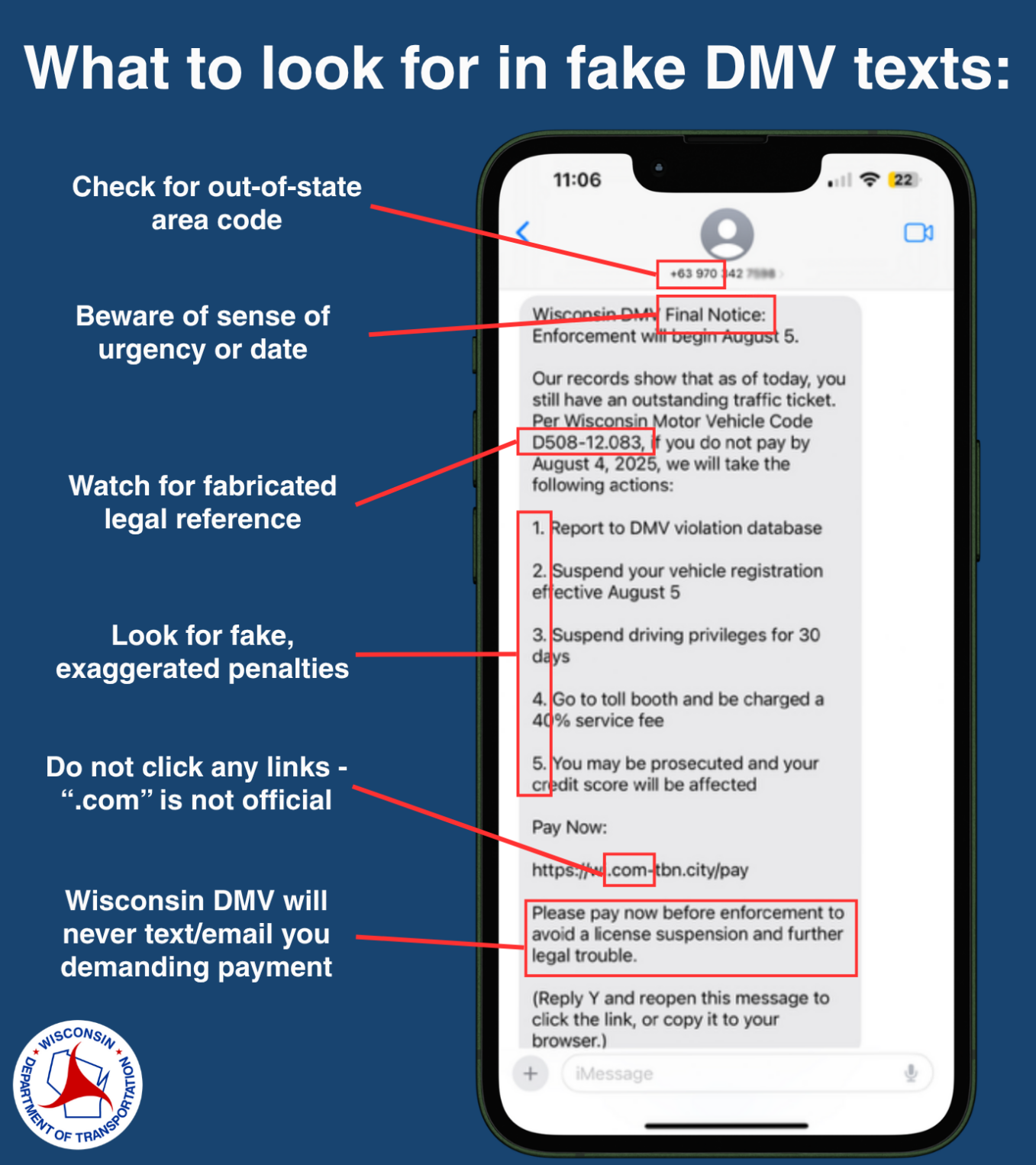
Yes, DMV text scams are real, active, and widespread across the United States. Scammers send fraudulent SMS messages—a practice known as "smishing"—impersonating state Departments of Motor Vehicles to threaten driver's license suspensions, demand payment for fake unpaid tolls, or request urgent updates to vehicle registrations. These texts contain malicious links designed to steal personal identity details and financial credentials.
Understanding the DMV Text Scam Phenomenon
Text-based phishing scams targeting drivers have surged across every U.S. state. Motorists frequently receive urgent messages claiming that their driver's license will be suspended, their vehicle registration is invalid, or they owe outstanding fines for toll violations.
These communications are fraudulent attempts by cybercriminals to exploit the universal nature of motor vehicle administration. Because almost every adult interaction with a Department of Motor Vehicles (DMV) or Department of Transportation (DOT) carries regulatory weight, scammers leverage fear, confusion, and strict deadlines to compel victims into acting without verifying the message.
Understanding how these scams operate, why they are so persistent, and how to verify legitimate state communications is essential for protecting your personal information and financial accounts.
How the DMV Smishing Scam Works
Smishing operates on the exact same psychological principles as traditional email phishing, but it leverages the high open rates of text messaging. Mobile phone users are far more likely to open and read a text message within minutes of receipt compared to an email, making SMS an efficient channel for malicious actors.
[Fake SMS Notification] "DMV Notice: Your driver's license registration requires immediate updating to comply with state regulations. Failure to update will result in suspension. Update now at: https://dmv-state-notice-online.com"
The attack chain for a typical DMV text scam follows a predictable sequence:
1. Delivery via Mass Automated SMS
Scammers utilize automated text-blasting software, web-to-SMS gateways, or compromised mobile connections to distribute thousands of messages simultaneously. These operations operate indiscriminately, sending text blasts across entire area codes without knowing whether the recipient actually holds a driver's license in that specific state.
2. Crafting Urgent, High-Stakes Scenarios
The text message relies on artificial urgency. Messages frequently reference harsh penalties, such as:
- Immediate driver's license revocation or suspension.
- Accruing daily late fees on unpaid tolls or parking tickets.
- Failure to meet upcoming legal requirements (such as REAL ID compliance).
- Cancellation of vehicle registration plates.
3. Redirection to a Spoofed Website
The text message contains a hyperlink designed to look like an official state government website. Scammers register domain names that incorporate official-sounding terms, such as dmv-update-online.org, state-service-dot.info, or toll-pay-portal.com. When clicked, the link leads to a phishing site that mirrors the branding, logos, and layout of a genuine state government portal.
4. Data Harvesting and Financial Theft
Once on the fraudulent site, the victim is prompted to fill out fields to "verify their identity" or "clear their account balance." These web forms collect high-value Personally Identifiable Information (PII), including:
- Full legal name, date of birth, and home address.
- Social Security Number (SSN).
- Driver's license number.
- Credit card or debit card numbers, including security codes (CVV) and expiration dates.
In many cases, the website charges a small "processing fee" (such as $2.50 or $5.00) to resolve the issue. Once entered, the payment details are immediately captured by cybercriminals to execute larger unauthorized transactions or sold on dark web marketplaces.
Common Variations of Fake DMV Texts
DMV text scams evolve continuously. While the underlying objective remains identity theft or financial extortion, attackers vary their messaging depending on local regulations and seasonal events.
- DMV Text Scam Variants
- Toll & Fine Scams (E-ZPass, SunPass, TxTag, FasTrak)
- License & Registration Suspension Threats
- REAL ID & Refund Processing Claims
The Unpaid Toll / Express Lane Scam
One of the most widespread variants involves claims of unpaid toll fees. The text asserts that you have driven through a toll gantry without paying, and that unpaid balances have incurred hefty penalties. The message directs you to a fake portal—often mimicking regional electronic toll systems like E-ZPass, SunPass, FasTrak, or TxTag—to pay the balance immediately to avoid license suspension.
The Federal Bureau of Investigation (FBI) Internet Crime Complaint Center (IC3) has issued warnings regarding targeted smishing campaigns targeting toll system users nationwide.
Driver's License Suspension Threats
This variation directly targets your driving privileges. The message asserts that your license has been flagged for administrative review, unpaid citations, or missing identity documentation. The text warns that unless you update your records within 24 to 48 hours through the provided link, your license will be suspended, and law enforcement will be notified.
REAL ID Compliance Updates
As state and federal authorities implement REAL ID requirements, scammers use federal compliance deadlines to deceive drivers. Texts claim that your current license does not meet federal REAL ID standards and that you must submit identity documentation online via a link to avoid losing driving or airport security privileges.
Vehicle Registration Renewal Notices
These messages claim that your vehicle's registration has expired or encountered a processing error during automatic renewal. The text provides a link to complete the renewal process online to prevent vehicle impoundment or traffic citations.
Refund and Overpayment Claims
Not all fraudulent texts rely on intimidation. Some claim that the state DMV owes you a refund due to an overpayment on vehicle taxes, administrative processing fees, or emissions testing. The text asks you to click a link and input your banking details or debit card information to claim your money.
Red Flags: How to Identify a Fake DMV Text
Recognizing a phishing attempt relies on examining message characteristics rather than emotional triggers. Official state communications adhere to strict legal protocols, which scammers rarely replicate correctly.
| Indicator | Red Flag / Scam Characteristic |
|---|---|
| Web Address (URL) Domain | Uses .com, .net, .org, .info, .top instead of .gov |
| Sender Phone Number | 10-digit consumer cell, toll-free, or international |
| Payment Requests | Demands credit card payment via unverified SMS |
| Language & Tone | Extreme urgency, legal threats, poor grammar |
| Unsolicited Financial Claims | Unsolicited promises of overpayment refunds |
1. Non-Government Web Addresses (URLs)
The clearest indicator of a scam text is the web address provided in the message. Official U.S. government websites at the federal, state, and local levels use the .gov top-level domain (TLD) or specific state-restricted subdomains (such as .ca.gov, .ny.gov, or .gov.texas.gov).
Scammers cannot purchase legitimate .gov domains because domain registration for government entities requires rigorous validation through the Cybersecurity and Infrastructure Security Agency (CISA).
If a link ends in .com, .net, .org, .info, .online, .top, or uses URL shorteners (like bit.ly or tinyurl.com), it is not an official state government portal.
2. Standard 10-Digit Phone Numbers
State agencies that utilize automated text notification systems generally send messages using recognized five- or six-digit short codes (e.g., 48369) or verified notification networks. If you receive a text about state driving records from a standard 10-digit mobile number, a toll-free 800 number, or an international number (often starting with country codes other than +1), it is a scam.
3. Immediate Requests for Sensitive Personal Information
Legitimate state agencies will never send an unsolicited text message demanding that you enter your Social Security Number, complete financial account numbers, or credit card security codes on an unverified third-party webpage.
4. Coercive and Urgent Threats
Scam messages are written to provoke panic. Phrases such as "FINAL NOTICE," "Immediate Action Required," "License Suspension Pending," or "Law Enforcement Will Be Contacted" are designed to override your critical thinking and prompt an immediate click.
Official DMV Communication Policies
Understanding how state motor vehicle departments actually communicate helps you quickly differentiate legitimate notices from fraudulent text blasts.
| Feature / Indicator | Fake DMV Text Message | Authentic DMV Communication |
|---|---|---|
| Primary Contact Method | Unsolicited SMS Text | Postal Mail (Official USPS Letter) |
| Primary Web Domain | .com, .org, .info, .online, .top | Official .gov or State Portal |
| Direct Payment via Link | Demands payment via SMS link | Requires login to main .gov site |
| Personal Info Requests | Demands SSN, CVV via web form | Never requests full SSN over text |
| Use of Urgency / Threats | Severe immediate legal threats | Written formal notice period |
Standard Communication Channels
State DMVs communicate almost exclusively through official postal mail sent by the U.S. Postal Service (USPS) to the address registered on your driver's license or vehicle title. Official notices regarding license expirations, vehicle registration renewals, suspension hearings, and unpaid traffic citations are delivered in formal written letters.
Opt-In Text Alerts
Some state DMVs do offer optional text notifications. However, these services operate under strict rules:
- Opt-In Required: You must explicitly sign up for text alerts through the state's official web portal or during an in-person office visit.
- Informational Only: Legitimate text alerts are primarily informational—such as reminding you of an upcoming driving test appointment or alerting you that a physical license has been mailed.
- No Direct Payment Demands: Authentic text updates do not demand direct credit card entries through links provided in the body of the message. Instead, they direct you to navigate independently to the main state government home page.
Step-by-Step Guide: What to Do If You Receive a DMV Scam Text
If a text message claiming to be from the DMV or a state toll agency arrives on your phone, follow these steps to protect your device and identity:
- Received Suspicious DMV Text
- Step 1: DO NOT Click Links
- Step 2: DO NOT Reply "STOP"
- Step 3: Forward Text to 7726
- Step 4: Report to FTC / IC3
- Step 5: Verify on Official State .gov Website
1. Do Not Click Any Links
Do not tap the hyperlink provided in the text message. Opening the link reveals your IP address to the attacker and confirms that your phone number is active. If the destination site contains malicious scripts, simply visiting the page can expose your mobile browser to security risks.
2. Do Not Reply to the Message
Avoid responding to the message, even if the text instructs you to reply with "STOP" or "NO" to unsubscribe. Replying to a scam text confirms to the attacker's automated system that your phone number belongs to a real person. This will lead to an increase in scam calls and texts.
3. Take a Screenshot for Documentation
If you intend to file an official report with state law enforcement or consumer protection agencies, capture a clear screenshot of the text message that displays the sender's full phone number or email address, the timestamp, and the complete text content including the URL.
4. Forward the Message to 7726 (SPAM)
Major wireless carriers in the U.S. (including AT&T, T-Mobile, and Verizon) participate in a unified spam reporting service. Forward the scam text message to 7726 (which spells SPAM on a standard phone keypad). This reports the sender's number and embedded URLs to wireless security systems to block similar messages across the network.
5. Report the Incident to Fraud Authorities
File reports with official consumer protection agencies to help law enforcement track and shut down active smishing operations:
- Federal Trade Commission (FTC): Report the text online at ReportFraud.ftc.gov.
- FBI Internet Crime Complaint Center (IC3): Submit a complaint regarding financial or identity phishing at IC3.gov.
- State Attorney General: Most state Attorneys General maintain specialized division websites for reporting consumer fraud and impersonation of state agencies.
6. Verify Your DMV Status Directly
If you are concerned that you might actually owe a fine, have an expired registration, or face a license issue, do not use the information provided in the text message. Open a web browser, independently search for your state's official .gov motor vehicle website, log into your personal user portal, or call the agency using a phone number published on an official state document.
What to Do If You Already Clicked the Link or Submitted Data
If you interacted with a scam text or entered sensitive information into a fraudulent website, act immediately to secure your identity and finances.
- Data Entered on Fake Site
- Financial Information Compromised
- Call Bank Card Issuer Immediately
- Cancel Affected Cards
- Request New Account Numbers
- Personal Identity (SSN/DL) Compromised
- Report to IdentityTheft.gov (FTC)
- Place Fraud Alert on Credit Reports
- Freeze Credit via Equifax, Experian, TransUnion
- Financial Information Compromised
If You Entered Payment Information
- Contact Your Bank Immediately: Call the customer service number on the back of your credit or debit card. Inform the fraud department that you entered your card details on a fraudulent website.
- Cancel and Replace Cards: Request that the compromised card be canceled and reissued with a new card number and CVV.
- Review Account Statements: Monitor your bank statements closely for unauthorized transactions, including tiny "micro-charge" tests (such as $0.99 or $1.00) that scammers use to test card validity.
If You Entered Personally Identifiable Information (SSN, License #)
- File an Identity Theft Report: Visit the FTC's dedicated portal at IdentityTheft.gov to create an official recovery plan and document the compromise of your Social Security Number or government identification.
- Place a Fraud Alert on Your Credit Reports: Contact one of the three major nationwide credit bureaus to place a free initial fraud alert on your credit file. Placing an alert with one bureau automatically requires them to notify the other two:
- Equifax: 1-800-525-6285 / equifax.com
- Experian: 1-888-397-3742 / experian.com
- TransUnion: 1-800-680-7289 / transunion.com
- Freeze Your Credit: Consider executing a complete credit freeze across all three credit bureaus. A credit freeze prevents anyone—including cybercriminals—from opening new credit accounts, credit cards, or loans in your name.
- Notify Your State DMV: Inform your state motor vehicle office that your driver's license number was compromised through a phishing scam. Some states can place a fraud flag on your driving record to prevent unauthorized license duplication or address changes.
If You Downloaded an Attachment or App
If the fake site prompted you to download a file or install a profile onto your phone:
- Disconnect your phone from Wi-Fi and mobile data networks immediately.
- Go to your device's settings to inspect installed profiles or recent downloads and remove any unfamiliar files or apps.
- Run a security scan using reputable anti-malware software designed for mobile operating systems, or restore your device from a known clean backup.
Frequently Asked Questions
Does the DMV ever send text messages to drivers?
Yes, some state DMVs send text messages, but only if you explicitly opted into a notification system. Legitimate DMV texts are informational—such as confirming an appointment time or notifying you that a driver's license has shipped. Official text alerts will never ask you to reply with sensitive financial data or click a non-.gov link to make immediate payments to avoid license revocation.
Why am I receiving a DMV text from a state I don't live in?
Scammers use automated dialers to send text blasts to millions of random phone numbers simultaneously. They do not know where you live or whether you own a car. If you receive a text claiming you owe tolls or registration fees in a state you have never visited, it is a random mass-phishing attempt.
Can simply opening a DMV text message hack my phone?
Simply opening and reading a text message is extremely unlikely to compromise your mobile device. The primary risk lies in clicking the links contained inside the message or entering your personal information into the phishing site. However, opening the link alone can reveal device metadata to attackers, so it is best practice to delete suspicious texts immediately.
Will replying "STOP" unsubscribe me from these scam texts?
No. Replying "STOP" to a scam text does not unsubscribe you. Phishing operations do not abide by telemarketing regulations. Replying to a scam text confirms that your phone number is active and monitored by a real person, which often results in your number being added to higher-priority target lists for future scams.
How did scammers get my phone number and know I am a driver?
Scammers do not necessarily know you are a driver. Because driving is extremely common, cybercriminals broadcast generic messages to millions of phone numbers acquired through corporate data breaches, public directory scraping, or automated number generation. By chance, a large percentage of recipients will happen to hold a driver's license, making the scam seem targeted when it is actually random.
Practical Recommendation & Next Actions
To safeguard your identity and mobile devices against ongoing DMV text scams, implement these permanent protective habits:
- Enforce the
.govRule: Never trust a web link claiming to belong to a state motor vehicle department unless it ends strictly in.govor an established official state portal domain. - Rely on Postal Mail & Direct Portals: Treat all unexpected, high-pressure text messages regarding driving records or tolls as fraudulent until proven otherwise. Verify your driving record status by navigating directly to your state's motor vehicle website independently through your web browser.
- Utilize Carrier & Device Spam Filters: Enable built-in spam blocking features on your smartphone (such as "Filter Unknown Senders" on iOS or "Spam Protection" on Android) and forward suspicious texts to 7726.
- Secure Your Identity: If you suspect your Social Security Number or banking details have been compromised, immediately place a fraud alert or credit freeze through Equifax, Experian, and TransUnion, and report the incident at IdentityTheft.gov.