Amazon automated emails for sellers are system-generated or third-party triggered communications designed to streamline customer service, solicit product reviews, and manage order updates. By utilizing Amazon’s "Request a Review" API or compliant Buyer-Seller Messaging templates, sellers can scale their feedback loops and brand presence while strictly adhering to Amazon’s rigorous Communication Guidelines.
Managing a high-volume Amazon business in 2026 requires more than just high-quality products; it demands a sophisticated approach to post-purchase communication. Automated emails represent the bridge between a completed transaction and a long-term customer relationship. However, the ecosystem has become increasingly regulated, with Amazon employing advanced AI to monitor every message for policy violations. This guide explores the technical requirements, strategic implementation, and compliance hurdles of automating your Amazon email workflow.
The Evolution of Amazon Seller Communications
In the early days of the Marketplace, sellers had significant latitude in how they contacted customers. This led to an influx of "spammy" marketing emails, which eventually forced Amazon to implement the Buyer-Seller Messaging (BSM) system. Today, in 2026, the landscape is defined by two distinct paths: the official "Request a Review" functionality and the highly restricted BSM templates.
Amazon’s primary goal is to protect the customer experience. Consequently, they have shifted the "automated" aspect away from open-ended marketing and toward transactional necessity. Sellers must understand that they do not "own" the customer's email address; they are merely granted a temporary, anonymized channel to facilitate a specific order. Automation tools now act as a layer of efficiency over these channels, ensuring that requests are sent at the optimal time without the risk of human error or manual fatigue.
Understanding the Two Primary Automation Methods
Before selecting a tool or drafting a template, you must distinguish between the two mechanisms available for automation. Each has its own set of rules, technical triggers, and impact on your seller metrics.
1. The "Request a Review" API
This is the safest and most efficient way to automate feedback. Instead of drafting a custom message, you trigger Amazon’s own standardized template.
- How it works: Third-party software uses Amazon's Selling Partner API (SP-API) to "click" the Request a Review button on your behalf for every eligible order.
- The Message: It is a non-customizable, Amazon-branded email that asks for both a product review and seller feedback. It is automatically translated into the buyer's preferred language.
- Compliance: Since Amazon generates the content, there is zero risk of being flagged for "prohibited language."
2. Automated Buyer-Seller Messaging (BSM) Templates
This method involves creating custom templates within a third-party tool that are then sent through the BSM system.
- How it works: You write the copy, and the software sends it via the anonymized @marketplace.amazon.com email address assigned to the buyer.
- The Message: You can include your brand voice, specific instructions for product use, or troubleshooting tips.
- Compliance: This is the "high-risk" zone. You must follow the Communication Guidelines to the letter, or you risk losing your messaging privileges or facing account suspension.
Amazon’s Communication Guidelines: The 2026 Compliance Standard
Compliance is not optional. Amazon’s automated systems are trained to detect "steering"—the act of influencing a customer to leave a positive review or providing a path to contact the seller only if the experience was negative. To stay safe in 2026, your automated emails must avoid the following:
- Incentivization: You cannot offer discounts, gift cards, or free products in exchange for reviews. This is the most common cause of permanent account bans.
- Conditional Logic: Phrases like "If you loved our product, leave a review; if not, contact us" are strictly prohibited. You must ask for an honest review, regardless of the sentiment.
- External Links: You cannot include links to your own website, social media, or other marketplaces. The only allowed links are those necessary for order completion or the internal Amazon review page.
- Marketing Content: Automated emails cannot contain "promotional" language, such as mentions of other products in your catalog or upcoming sales.
- Excessive Frequency: Amazon generally permits only one "Permitted Communication" (like a review request) per order. Sending multiple follow-ups is considered buyer harassment.
Selecting an Automation Tool: Features and Comparison
Choosing the right software depends on your volume, brand strategy, and technical comfort level. In 2026, the leading tools have moved beyond simple "send" functions and now incorporate AI-driven delivery timing and sentiment analysis.
| Feature | Amazon "Request a Review" (Native) | Professional Automation Tools (e.g., Helium 10, SageMailer) | Basic Third-Party Integration |
|---|---|---|---|
| Setup Difficulty | Very Low (Manual) | Medium (API Integration) | Low |
| Customization | None | High (for BSM) | Limited |
| Policy Risk | Zero | Moderate (requires monitoring) | Low |
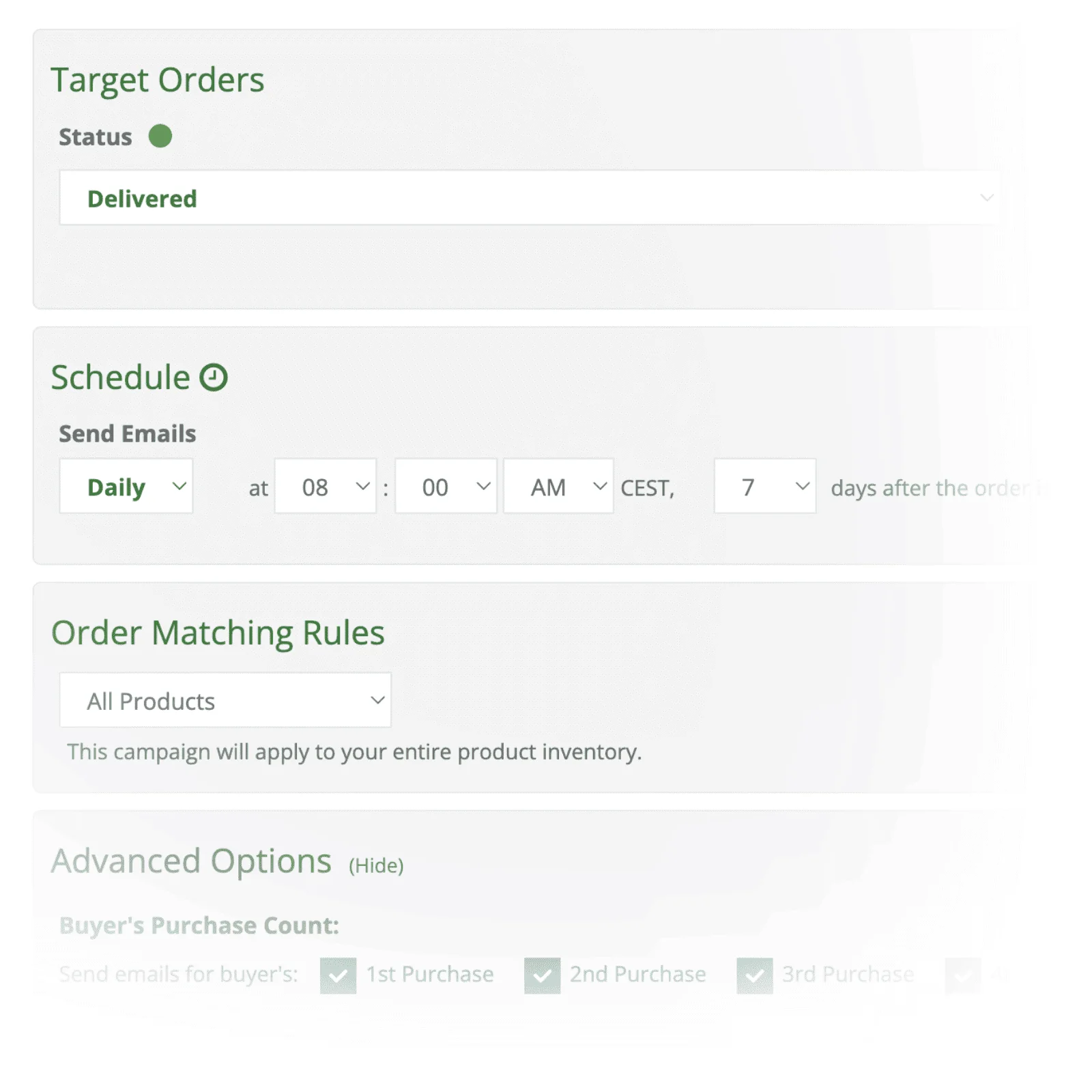
| Timing Control | No | Advanced (Day/Time/Event) | Basic |
| Language Support | Automatic Translation | Manual Template Creation | Static |
| Cost | Free | Monthly Subscription | Low-cost/Freemium |
Essential Features to Look For
When evaluating a third-party service, ensure it offers Order Filtering. You should be able to exclude orders that have been refunded, returned, or delayed. Sending a review request to a customer who just returned a broken item is a guaranteed way to receive a 1-star review. Furthermore, ensure the tool is an Authorized Amazon Developer. Tools that use "browser scraping" instead of the official API can lead to security flags on your account.
Strategic Timing for Maximum Impact
The "when" is just as important as the "what." An automated email sent too early will be ignored because the customer hasn't used the product. Sent too late, the initial excitement has faded.
- Consumables (Supplements, Beauty): Wait 14–21 days. The customer needs time to see results before they can provide an honest assessment.
- Hard Goods (Kitchenware, Electronics): 5–7 days after delivery. These are usually used immediately upon arrival.
- Gift Items: If your product is frequently purchased as a gift (e.g., jewelry or toys), consider extending the delay to 10–14 days to account for the time it takes to reach the end recipient.
- Fulfillment Type Matters: For Fulfillment by Amazon (FBA), delivery data is precise. For Fulfillment by Merchant (FBM), ensure your tool syncs with carrier tracking so the email isn't triggered before the package actually arrives.
Troubleshooting Common Automation Issues
Even with the best tools, issues can arise. Understanding how to troubleshoot these prevents minor errors from becoming account-level threats.
"Message Not Delivered" Notifications
Amazon allows buyers to opt out of non-essential communications. If your automated tool reports a high failure rate, it is likely because many of your customers have opted out. Do not attempt to bypass this by marking your messages as "Important" or "Additional Information Required" unless the message is genuinely necessary for completing the order. Abuse of the "Important" tag is a fast track to a BSM ban.
Negative Review Spikes Following Automation
If you notice that your automated emails are correlating with an increase in negative reviews, analyze your timing and product quality. Automation acts as a magnifying glass; it scales what is already happening. If your product has a defect, asking every customer for a review will simply accelerate the accumulation of 1-star ratings. In this case, pause automation until the product issue is resolved.
Template Formatting Errors
In 2026, many buyers view emails on dark-mode mobile devices. If your custom BSM templates use static image backgrounds or hard-coded font colors (like black text), they may be unreadable for a significant portion of your audience. Always use clean, HTML-light templates that prioritize readability over complex design.
Best Practices for Custom BSM Templates (When Used Sparingly)
While the "Request a Review" button is the safest route, custom templates still have a place for complex products. If you sell a product that requires assembly or has a steep learning curve, a well-crafted automated email can prevent a negative review by providing help before the customer gets frustrated.
- Lead with Value: Start the email by providing a PDF manual or a link to an instructional video (hosted on Amazon). This shows you care about their success with the product.
- Keep it Brief: Customers in 2026 have short attention spans. Get to the point in under 150 words.
- Use a Clear Subject Line: Include the Order ID and the Product Name so the customer knows exactly what the email is about.
- Proofread for Professionalism: Typos and poor grammar reduce trust and may make your automated email look like a phishing attempt.
Frequently Asked Questions
Can I automate emails to ask for seller feedback and product reviews separately?
While you can, it is generally discouraged. Amazon’s "Request a Review" button asks for both in a single, clean interface. Sending two separate automated emails for feedback and reviews is often seen as "over-communication" and can lead to a negative customer experience or a policy warning for buyer harassment.
Is it legal to use AI to write my automated Amazon emails?
Using AI to draft your templates is perfectly acceptable, provided the final output complies with Amazon's Communication Guidelines. However, do not use AI to "spin" content in a way that attempts to bypass Amazon’s filters (e.g., using symbols to replace letters in the word "Review"). Amazon’s own AI is highly adept at identifying these tactics.
What happens if I violate the Communication Guidelines with an automated email?
Typically, Amazon will first issue a warning or a temporary 30-day suspension of your Buyer-Seller Messaging privileges. During this time, you cannot send any messages, even manually. Repeated violations or severe "review manipulation" can lead to permanent account deactivation and the withholding of funds.
Do automated emails work for international marketplaces?
Yes, but you must be careful with language. If you are using the "Request a Review" API, Amazon handles the translation automatically. If you are using custom BSM templates, you must create a specific, professionally translated template for each locale (e.g., German for Amazon.de, Japanese for Amazon.co.jp). Do not rely on basic machine translation for your customer-facing templates.
How do I stop automated emails for a specific customer who had a bad experience?
Most professional Amazon automation tools allow you to "Blacklist" an order or a customer. If a customer contacts you with a complaint before the automated email is triggered, you should manually go into your software and cancel any scheduled messages for that Order ID to avoid adding insult to injury.
Final Recommendation for Sellers
For the majority of sellers in 2026, the most effective and lowest-risk strategy is to automate the "Request a Review" API using a reputable third-party tool. This ensures 100% compliance with Amazon’s evolving policies while still achieving the primary goal of social proof. Only utilize custom Buyer-Seller Messaging if your product is technically complex and requires proactive support to ensure customer satisfaction. Always monitor your "Account Health" dashboard and "Voice of the Customer" metrics to ensure your communication strategy is helping, not hurting, your brand's reputation.