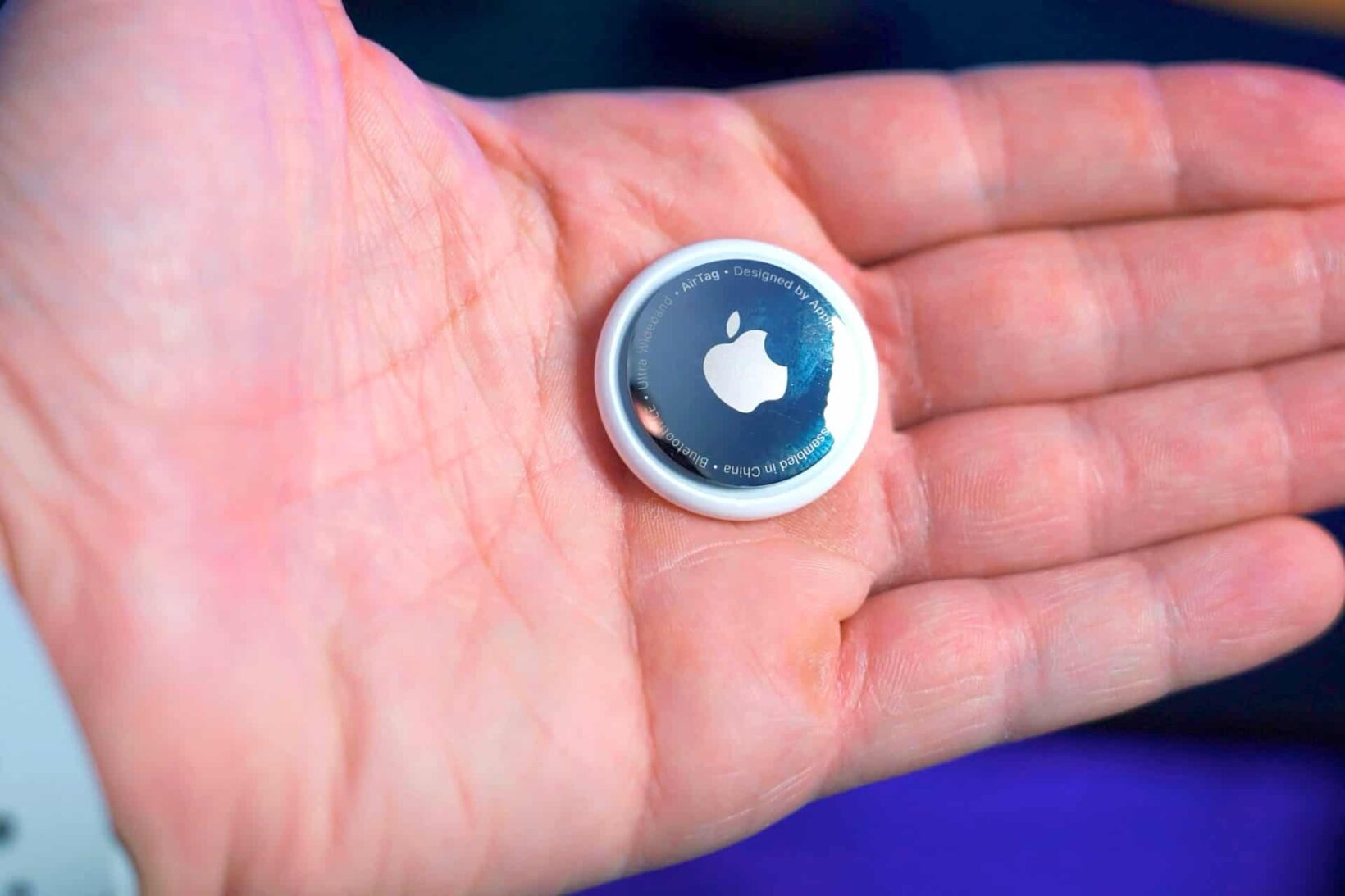
An Apple AirTag is a compact, puck-shaped tracking device designed to help users locate personal items through Apple’s expansive Find My network. By utilizing a combination of Bluetooth Low Energy (BLE) and Ultra-Wideband (UWB) technology, AirTags provide highly accurate location data for misplaced keys, wallets, and luggage while maintaining strict user privacy and end-to-end encryption.
The Apple AirTag has become a ubiquitous accessory within the Apple ecosystem. While it appears to be a simple piece of hardware, it relies on a complex global infrastructure of hundreds of millions of Apple devices to function. In 2026, the AirTag remains the gold standard for personal tracking due to its seamless integration with iOS, iPadOS, and macOS. Understanding how this device works requires looking beyond its stainless steel exterior and into the protocols that power the "Find My" ecosystem.
The Core Technology: How an AirTag Communicates
At its heart, an AirTag is a beacon. Unlike a GPS tracker, which requires a direct line of sight to satellites and a power-hungry cellular connection, the AirTag uses more efficient, short-range signals. This allows it to remain small and operate for an extended period on a single coin-cell battery.
Bluetooth Low Energy (BLE)
The primary method of communication for an AirTag is Bluetooth Low Energy. The device emits a secure Bluetooth signal that can be detected by nearby devices in the Find My network—primarily iPhones, iPads, and Macs owned by people who are simply passing by. These "helper" devices detect the AirTag's signal and then upload its location to Apple's iCloud servers.
The brilliance of this system lies in its passivity. The owner of the helper device is unaware that their phone has helped locate someone else's AirTag. The process happens entirely in the background, consuming negligible battery life and data. Because there are nearly two billion active Apple devices globally, the "Find My" network acts as a massive, crowdsourced mesh network that can locate an AirTag almost anywhere in populated areas.
The U1 Chip and Ultra-Wideband (UWB)
While Bluetooth provides the general location of an AirTag, Ultra-Wideband technology provides the "Precision Finding" feature. The AirTag contains Apple’s U1 (or newer) chip, which uses radio waves to measure the exact distance and direction between the AirTag and a compatible iPhone (iPhone 11 and later).
When you are within approximately 30 feet of your AirTag, your iPhone uses a combination of the camera, ARKit, accelerometer, and gyroscope to guide you. On-screen arrows and haptic feedback lead you directly to the item, with accuracy down to the inch. This is particularly useful for finding keys that have slipped behind couch cushions or a wallet hidden in a jacket pocket.
Hardware Specifications and Design
The physical design of the AirTag is a masterclass in minimalist engineering. It is roughly the size of a large coat button, measuring 1.26 inches (31.9 mm) in diameter and 0.31 inches (8 mm) in thickness. It weighs just 0.39 ounces (11 grams).
Durability and Environmental Resistance
The AirTag is built to withstand everyday mishaps. It features an IP67 rating under IEC standard 60529, which means it is resistant to dust and can survive immersion in water up to a depth of one meter (about three feet) for up to 30 minutes. This makes it suitable for use on items that might be exposed to rain or accidental spills, such as backpacks or umbrellas.
Battery Life and Power Management
One of the most significant advantages of the AirTag is its power source. It uses a standard CR2032 lithium 3V coin-cell battery. Apple designed the device so that users can easily replace the battery themselves by pressing down and rotating the stainless steel back cover.
In 2026, the average battery life remains approximately one year under normal usage conditions (defined as triggering the sound four times and using Precision Finding once per day). Your iPhone will automatically notify you when the battery is running low, giving you ample time to replace it before the device goes offline.
The Setup Process and User Experience
Apple has prioritized "zero-config" setup for the AirTag. To pair a new AirTag, a user simply removes the battery tab to power it on and holds it near their iPhone. A setup card automatically appears on the screen, similar to the pairing process for AirPods.
Naming and Customization
During setup, users can assign a name to the AirTag (e.g., "Keys," "Work Bag," or "Bicycle") and associate it with an emoji. This name is what appears in the "Items" tab of the Find My app. Once paired, the AirTag is locked to the user's Apple ID, preventing anyone else from using it unless it is manually removed from the account.
Lost Mode and NFC
If an AirTag is truly lost and out of Bluetooth range of the owner, it can be placed in Lost Mode. This does three things:
- It notifies the owner as soon as the Find My network detects its location.
- It prevents others from pairing it.
- It allows the owner to leave a phone number or email address.
If a stranger finds the AirTag, they can tap it against any NFC-enabled smartphone (iPhone or Android). This will open a website displaying the owner's contact information and instructions on how to return the item.
Privacy and Anti-Stalking Protections
Since its launch, the AirTag has faced scrutiny regarding its potential for misuse, specifically in stalking or unauthorized tracking. Apple has responded by implementing several industry-leading privacy features that have been further refined through 2026.
Unwanted Tracking Alerts
If an AirTag that does not belong to you is detected moving with you over time, your iPhone will send an alert stating, "AirTag Found Moving With You." This alert allows you to see a map of where the tag has been seen with you and provides instructions on how to disable the device by removing the battery.
In 2024, Apple and Google collaborated on an industry standard (DULT - Detecting Unwanted Location Trackers) to ensure that Android users also receive these alerts natively. This cross-platform compatibility is a crucial safety feature in 2026, ensuring that the tracking network cannot be easily exploited against users outside the Apple ecosystem.
Audible Alerts
If an AirTag is separated from its owner for a period of time and is moved, it will emit a chirping sound to alert anyone nearby of its presence. This is a physical fail-safe for cases where the person being tracked may not have a smartphone or has their notifications turned off.
End-to-End Encryption
Apple does not know the location of your AirTag. The data transmitted through the Find My network is end-to-end encrypted. Only the owner of the AirTag has the private key required to decrypt the location data sent by the "helper" devices. No location history is stored on the AirTag itself.
Comparison: AirTag vs. The Competition
While the AirTag is the dominant player for Apple users, other trackers like Tile and Samsung’s SmartTag2 offer different strengths.
| Feature | Apple AirTag | Tile Pro | Samsung SmartTag2 |
|---|---|---|---|
| Primary Network | Apple Find My | Tile Network | Samsung SmartThings Find |
| Precision Finding | Yes (UWB) | No (Bluetooth Only) | Yes (UWB) |
| Speaker | Built-in | Built-in (Louder) | Built-in |
| Platform | iOS/iPadOS/macOS | iOS & Android | Samsung Galaxy Only |
| Battery Type | CR2032 (User-Replaceable) | CR2032 (User-Replaceable) | CR2032 (User-Replaceable) |
| Form Factor | Round (Requires holder) | Rectangular (Built-in hole) | Oblong (Built-in hole) |
| Anti-Stalking | High (Industry Standard) | Moderate | Moderate |
The primary differentiator in 2026 remains the network size. Because Find My is integrated into the OS level of billions of devices, an AirTag is significantly more likely to be updated in rural or less populated areas compared to a Tile, which requires users to have the Tile app installed.
Practical Use Cases and Limitations
AirTags are versatile, but they are not a universal solution for every tracking need. Understanding their limitations is key to using them effectively.
Ideal Use Cases
- Travel and Luggage: AirTags have revolutionized air travel. Placing one inside a checked bag allows passengers to verify their luggage is on the plane or locate it if the airline misplaces it.
- Daily Essentials: Keys, wallets, and backpacks are the most common items. The Precision Finding feature is specifically designed for these "last-ten-feet" scenarios.
- Bicycles and Scooters: Many manufacturers now build hidden compartments into bike frames or bells specifically to house an AirTag.
Limitations
- The "Anti-Theft" Myth: While AirTags can help recover stolen property, they are not dedicated anti-theft devices. Professional thieves know how to look for tracking alerts on their phones and can easily find and disable a chirping AirTag.
- Pet Tracking: Apple officially advises against using AirTags to track pets. Because the Find My network relies on nearby iPhones, if a dog runs into a remote forest where no one is around, the AirTag will not update its location. Furthermore, the chime can stress animals, and there is a risk of the pet swallowing the small device.
- Moving Targets: AirTags are designed for stationary objects. The location updates are not instantaneous; they occur every few minutes when a helper device passes by. Tracking a moving vehicle in real-time is often laggy and imprecise.
Maintenance and Accessories
Because the AirTag lacks a built-in keyring hole, the market for accessories has exploded. Users typically purchase a keychain, loop, or adhesive mount to attach the tag to their items.
Changing the Battery
To change the battery, you must:
- Press down on the polished stainless steel battery cover and rotate it counterclockwise until it stops.
- Remove the cover and the old CR2032 battery.
- Insert a new battery with the positive (+) side facing up. You should hear a startup chime indicating the battery is connected.
- Replace the cover, ensuring the three tabs align with the slots, and rotate it clockwise until it locks.
Important Note: When purchasing replacement batteries, avoid those with a bitterant coating (often used to prevent children from swallowing them). The coating can interfere with the battery contacts on the AirTag, causing it to fail.
Troubleshooting Common AirTag Issues
Even with Apple’s focus on simplicity, users may encounter issues.
"Signal Weak" or Location Not Updating
If an AirTag's location hasn't updated in hours, it usually means there are no Apple devices nearby to pick up its signal. This is common in remote areas or inside thick metal containers (like some heavy-duty safes). It does not necessarily mean the AirTag is broken.
Precision Finding Not Working
Precision Finding requires a clear path. Large metal objects or thick walls can interfere with the UWB signal. If your iPhone says the signal is too weak, try moving to different areas of the room to pick up the direction. Ensure that "Precise Location" is enabled in your iPhone's Privacy settings for the Find My app.
AirTag Not Showing in Find My
If an AirTag disappears from your list, ensure that your Apple ID is correctly signed in and that Bluetooth is enabled. If the device still doesn't appear, you may need to perform a factory reset. This involves removing and reinserting the battery five times in a row until the chime changes pitch, though this is a last-resort measure.
Frequently Asked Questions
Do AirTags have GPS?
No, AirTags do not have a GPS chip. They determine their location by piggybacking off the GPS coordinates of nearby iPhones and iPads in the Find My network. This allows for a much smaller device with significantly longer battery life than a traditional GPS tracker.
Can I use an AirTag with an Android phone?
You cannot set up or track an AirTag with an Android phone. However, you can use an Android phone's NFC reader to identify a lost AirTag and view the owner's contact information. Additionally, modern Android phones will alert you if an unknown AirTag is following you.
Is there a monthly fee for AirTags?
No. Unlike many cellular-based GPS trackers that require a monthly data plan, AirTags have no subscription fees. The only recurring cost is the price of a replacement CR2032 battery roughly once a year.
How many AirTags can I have on one Apple ID?
You can associate up to 16 AirTags with a single Apple ID. This limit is designed to prevent network congestion while allowing a single user to track all their essential belongings.
Can I share an AirTag with another person?
Yes. As of iOS 17, Apple introduced the ability to share AirTags with up to five other people. This is ideal for shared items like car keys or a family pet's collar (despite Apple's pet-tracking caveats), as it prevents other family members from receiving "Unwanted Tracking" alerts for the shared item.
Recommendation for New Users
If you are already within the Apple ecosystem, the AirTag is an essential tool for peace of mind. For those starting out, the four-pack is generally the best value, as most users find they have more items to track than they initially realized (keys, car, laptop bag, and luggage). When setting them up, take the time to enable "Notify When Left Behind" for your most critical items; this feature alerts your iPhone the moment you walk away from your keys or wallet, often preventing the loss before it even happens.