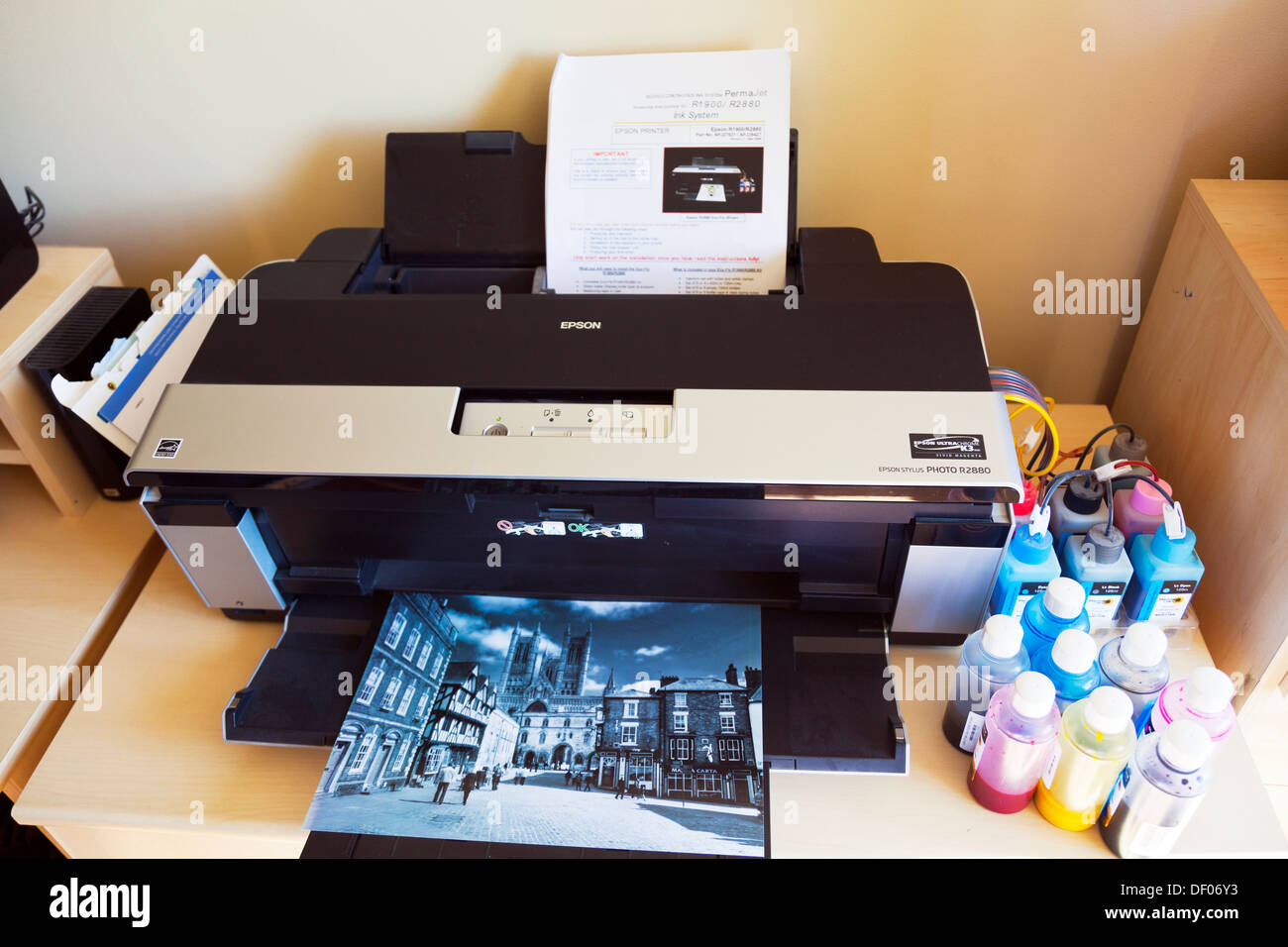
The Epson Stylus Photo R2880 is a professional-grade A3+ (13-inch wide) desktop photo printer utilizing the eight-color UltraChrome K3 with Vivid Magenta pigment ink system. It is renowned for producing gallery-quality archival prints and exceptional black-and-white photography, catering to professionals who require wide-format output within a relatively compact desktop footprint.
The Legacy of the Epson R2880 in Professional Photography
The Epson Stylus Photo R2880 represents a significant milestone in the evolution of desktop inkjet printing. When it was introduced as the successor to the highly acclaimed R2400, it aimed to bridge the gap between consumer-level photo printers and large-format gallery machines. In 2026, despite the emergence of newer models with wireless connectivity and larger ink tanks, the R2880 remains a respected "workhorse" among fine-art photographers and digital artists who prioritize specific ink chemistry and mechanical reliability.
The term "compact" is often used in the context of the R2880 to differentiate it from floor-standing commercial printers. While it is substantial compared to a standard home office printer, its ability to handle 13-inch wide media and roll paper while sitting on a standard executive desk is a core part of its design philosophy. This printer was engineered for the "prosumer"—users who need uncompromising image quality without the space requirements of a dedicated print studio.
The hardware architecture of the R2880 is built around the MicroPiezo print head, a technology that uses electrical pulses to vibrate a piezo element, precisely ejecting ink droplets without the use of heat. This cold-press process is vital for maintaining the chemical stability of pigment inks, ensuring that the colors remain consistent from the first print to the hundredth.
Key Technical Specifications and Hardware Architecture
Understanding the internal capabilities of the R2880 requires a look at its core specifications. The printer is designed to handle high-resolution files, offering a maximum resolution of 5760 x 1440 optimized dpi. This level of detail is achieved through Epson’s Advanced Meniscus Control (AMC), which ensures that every droplet is perfectly spherical and placed with extreme accuracy.
| Feature | Specification Details |
|---|---|
| Ink Technology | UltraChrome K3 with Vivid Magenta (Pigment-based) |
| Number of Colors | 8-color (9 slots, including Photo/Matte Black swap) |
| Max Print Resolution | 5760 x 1440 optimized dpi |
| Min Droplet Size | 3 picoliters (Variable Droplet Technology) |
| Max Paper Width | 13 inches (A3+ / Super B) |
| Media Handling | Sheet feed, Roll paper, Front-loading fine art path, CD/DVD |
| Connectivity | Dual USB 2.0 (High Speed) |
| Dimensions (WxDxH) | 24.3" x 12.7" x 8.4" |
| Weight | Approx. 26.5 lbs (excluding ink and media) |
The R2880 uses a 9-slot ink carriage, though it only uses eight colors at any given time. The printer includes Photo Black and Matte Black slots, but users must manually swap these cartridges depending on the media being used (e.g., Photo Black for glossy/luster papers and Matte Black for velvet or rag papers). This "black swap" is one of the few manual maintenance tasks that identifies the printer’s era, yet it remains a necessary trade-off for those seeking the deepest possible Dmax (density of black) on different substrates.
UltraChrome K3 with Vivid Magenta: The Science of Color
The heart of the R2880’s output quality is the UltraChrome K3 ink set. Pigment inks, unlike dye-based inks, consist of solid particles of color suspended in a liquid carrier. This results in prints that are significantly more resistant to fading, moisture, and atmospheric gases.
The Vivid Magenta Advantage
The "Vivid Magenta" and "Vivid Light Magenta" inks were a major advancement over previous generations. By reformulating the magenta pigments, Epson was able to significantly expand the color gamut in the blues and purples. This allows photographers to capture vibrant sunsets, deep oceans, and high-fashion textiles with a level of accuracy that was previously difficult to achieve with standard pigment sets.
Three-Level Black Technology
The R2880 utilizes three levels of black ink: Black (Photo or Matte), Light Black, and Light Light Black. This trio is essential for high-end grayscale printing. By using varying dilutions of gray instead of relying on composite colors (cyan, magenta, and yellow) to create grays, the printer eliminates "metamerism"—a phenomenon where a black-and-white print appears to have a color cast under different lighting conditions. The result is a neutral, silver-halide-like quality that rivals traditional darkroom prints.
Media Versatility and Handling
One of the reasons the R2880 has maintained its relevance into 2026 is its robust media handling. It is not limited to standard photo paper; it is a true multi-media machine.
- Sheet Feeding: The top-loading friction feed is designed for standard photo papers, including glossy, luster, and matte finishes.
- Fine Art Path: For thicker media, such as Epson Velvet Fine Art or 1.3mm thick poster board, the R2880 features a straight-through manual front-loading path. This prevents the paper from bending, which is crucial for preserving the integrity of heavy cotton-rag stocks.
- Roll Paper: The inclusion of roll paper holders allows for panoramic prints up to 44 inches long. This is a favorite feature for landscape photographers who want to produce wide-format vistas without the need for a 24-inch wide commercial printer.
- Optical Media: The printer includes a specialized tray for printing directly onto inkjet-printable CDs and DVDs. While optical media use has declined, this remains a niche requirement for wedding photographers and archivists.
Operational Maintenance and Longevity in 2026
Operating a legacy machine like the Epson R2880 in 2026 requires a proactive approach to maintenance. Because the printer uses pigment inks, which contain solid particles, the risk of "clogging" is higher than with dye-based consumer printers, especially if the machine sits idle for long periods.
Print Head Care
The MicroPiezo head is a permanent fixture of the printer, meaning it is not designed to be replaced by the user. To maintain its health, it is recommended to run a nozzle check at least once a week. If clogs occur, the R2880 has a built-in cleaning cycle. In 2026, many enthusiasts use specialized cleaning solutions or "PiezoFlush" kits to revive older heads that have been stored improperly.
Ink Availability and Economics
As an older model, finding original Epson T096 ink cartridges can occasionally be a challenge or come at a premium price. Many users in the current year have transitioned to high-quality third-party ink systems or refillable cartridges to keep operating costs manageable. However, for gallery-bound work, the precision-matched colors of the original UltraChrome K3 pigments are still the gold standard for color consistency and archival ratings.
Waste Ink Management
Like all inkjet printers, the R2880 deposits excess ink into an internal waste ink pad during cleaning cycles. Once this pad is saturated, the printer will "lock" for safety. In 2026, third-party software utilities are commonly used to reset the internal counter, and many users install external waste ink bottles to bypass the internal pads, extending the mechanical life of the device indefinitely.
Color Accuracy and Workflow Integration
The R2880 was designed for a color-managed workflow. To get the best results, users should utilize ICC (International Color Consortium) profiles specific to the printer and the paper being used.
Epson provides a wide array of profiles for their own papers, but the R2880’s popularity ensures that almost every major paper manufacturer (such as Hahnemühle, Canson, and Red River Paper) continues to offer downloadable profiles for this specific model. When the correct profile is applied through software like Adobe Lightroom or Photoshop, the R2880 can produce a "Soft Proof" on the screen that very closely matches the final physical output, reducing the need for expensive test prints.
The Advanced Black and White (ABW) driver mode is another standout feature. This dedicated interface allows users to fine-tune the tone of their monochrome prints—adjusting from "Cool" to "Warm" or "Sepia" without altering the original digital file. This hardware-level processing ensures the smoothest possible gradients and the highest level of detail in the shadows.
Common Troubleshooting and Challenges
While the R2880 is a robust machine, it is not without its quirks. Prospective owners or current users often encounter the following:
- Paper Feed Issues: Over time, the rubber rollers in the sheet feeder can become slick or dusty. Cleaning them with a small amount of isopropyl alcohol or using a "tacky" cleaning sheet can resolve most double-feeding or "no-feed" errors.
- Ink Switching Waste: Swapping between Photo Black and Matte Black requires the printer to purge a small amount of ink from the lines. To save money, users should plan their print jobs to group all matte prints together and all glossy prints together, minimizing the frequency of these swaps.
- Connectivity: The R2880 relies on a USB 2.0 connection. In 2026, where USB-C is the standard, a high-quality adapter or a dedicated print server may be necessary to connect the printer to modern workstations. It does not have native Wi-Fi, so it must be physically tethered to a computer or a network router with a USB port.
FAQs About the Epson Stylus Photo R2880
Can the Epson R2880 print on canvas?
Yes, the R2880 is highly capable of printing on inkjet-compatible canvas. Due to the thickness of canvas media, it is best to use the front-loading manual feed path. The UltraChrome K3 pigment inks are particularly well-suited for canvas, as they offer the durability and UV resistance required for "gallery wrap" displays that are often not protected by glass.
Is the Epson R2880 compatible with Windows 11 and modern macOS versions?
As of 2026, drivers for the R2880 are generally maintained through "legacy support" packages. While Epson may not release a new standalone driver for every OS update, the printer often works using the "Epson Universal Print Driver" or through the Gutenprint driver project on macOS and Linux. Users should verify driver availability on the official Epson support site before upgrading their operating system.
How do I know if I should use Photo Black or Matte Black?
The choice depends entirely on the paper's coating. Photo Black (PK) is designed for papers with a "sheen," such as Glossy, Luster, Semi-gloss, or Metallic papers. It is formulated to sit on the surface of the paper. Matte Black (MK) is designed for absorbent, "toothy" papers like Velvet Fine Art, Exhibition Fiber, or standard Matte paper. Using Photo Black on matte paper will result in "grayed-out" blacks, while using Matte Black on glossy paper will result in ink that smudges and never fully dries.
What is the maximum thickness of paper the R2880 can handle?
The R2880 can handle media up to 1.3 mm thick via its front-loading manual path. This allows for printing on heavy cardstock, poster board, and extra-thick fine art papers. Always ensure the "thick paper" setting is selected in the printer driver to prevent the print head from striking the surface of the media.
Does the R2880 support borderless printing?
Yes, the R2880 supports borderless printing on many standard paper sizes, including 4x6, 5x7, 8x10, 8.5x11, 11x14, 12x12, and 13x19 (A3+). However, borderless printing is typically not available when using the manual front-loading path or for certain custom sizes, as the printer requires a small margin to hold the paper securely at the end of the print cycle.
Practical Recommendation for 2026
For those seeking a "compact" color printer that delivers professional results, the Epson Stylus Photo R2880 remains a viable choice in 2026, provided you are comfortable with its legacy requirements. It is an ideal secondary printer for a photography studio or a primary machine for a dedicated hobbyist who prefers the archival stability of pigment inks over the "pop" and shorter lifespan of dye-based alternatives.
If you are considering purchasing a used R2880, ensure that you see a successful "Nozzle Check" pattern before committing. A machine that has been used regularly is often in better condition than one that has been sitting in a box for years. For the best longevity, pair the R2880 with a high-quality Uninterruptible Power Supply (UPS) to protect its sensitive electronics and keep it in a climate-controlled environment to prevent ink evaporation in the print head.