Securing a single private SOCKS5 proxy involves purchasing or configuring an isolated, dedicated IP address that communicates over the SOCKS5 protocol, routing your application traffic through a remote server without modifying or inspecting the data packet headers. This setup provides a reliable way to mask your real IP address, bypass basic network blocks, and handle various types of TCP or UDP traffic securely and efficiently.
When managing specific automation tasks, web scraping projects, or secure remote connections, relying on shared infrastructure often leads to bottlenecks, blocks, and compromised data integrity. A dedicated setup removes the noise associated with public pools by ensuring that all bandwidth, uptime, and connection slots belong exclusively to one user. Understanding how to acquire, configure, and maintain this single proxy instance requires evaluating technical prerequisites, authentication methods, network latency, and protocol capabilities.
Understanding the SOCKS5 Protocol and Private Infrastructure
To appreciate why a single private proxy configuration is valuable, one must first understand how the SOCKS5 protocol operates compared to other proxy standards like HTTP or HTTPS. SOCKS5 (Socket Secure version 5) operates at layer 5 of the OSI model (the session layer), working independently of the upper-layer protocols that govern web traffic. Unlike HTTP proxies that can only interpret and manipulate Hypertext Transfer Protocol requests, SOCKS5 can handle any type of TCP (Transmission Control Protocol) and UDP (User Datagram Protocol) traffic.
This architectural flexibility means that a SOCKS5 proxy can seamlessly route DNS queries, file transfers, peer-to-peer connections, and standard web browsing without altering the underlying data packets. Furthermore, SOCKS5 supports robust authentication methods, ensuring that unauthorized third parties cannot hijack the tunnel.
When you configure a private SOCKS5 proxy—meaning a dedicated, single-user instance—you eliminate the noisy neighbor effect inherent in shared proxy pools. In shared environments, multiple users utilize the same IP address simultaneously, leading to rapid rate-limiting, CAPTCHA triggers, and service bans on target websites or networks. A dedicated proxy assigns a unique IP address to a single account or port, ensuring that your digital footprint remains untangled from the actions of strangers.
Core Technical Features of Private SOCKS5 Proxies
Evaluating a single private proxy requires a close look at its technical specifications and performance characteristics. Because the quality of your connection depends heavily on the host infrastructure, examining protocol support and operational features is essential.
TCP and UDP Support
Standard HTTP proxies are strictly limited to TCP traffic. SOCKS5, however, natively supports UDP, which is critical for real-time applications such as DNS resolution, streaming media, online gaming, and VoIP communication. The ability to proxy UDP traffic through a remote server ensures that DNS lookups do not leak your actual location from your local machine.
Authentication Mechanisms
Security is paramount when routing traffic through a remote node. Private SOCKS5 proxies typically support two primary authentication methods:
- IP Whitelisting: The proxy server is configured to accept incoming connections exclusively from your specific local IP address. Any connection attempt from an unlisted IP is rejected outright.
- Username and Password: A unique credential pair is required to establish the tunnel. This method allows you to connect from dynamic IP locations, such as mobile networks or varying public Wi-Fi access points, without needing to update server-side whitelist rules.
Encryption and Tunneling Layers
By default, the SOCKS5 protocol itself does not encrypt the data payload passing between your client application and the proxy server; it merely transports it. However, because it establishes a clean TCP/UDP socket, it can be paired easily with upper-layer encryption standards (such as SSH tunneling or TLS wrappers) to ensure complete data confidentiality across untrusted public networks.
Comparison of Proxy Protocols
Choosing the right protocol depends on your specific operational requirements. The following table highlights the functional differences between SOCKS5, HTTP, and HTTPS proxies.
| Feature / Protocol | SOCKS5 Proxy | HTTP Proxy | HTTPS Proxy |
|---|---|---|---|
| OSI Layer | Layer 5 (Session Layer) | Layer 7 (Application Layer) | Layer 7 (Application Layer) |
| Traffic Types Handled | TCP and UDP | TCP only | TCP only (with TLS encryption) |
| DNS Resolution | Remote (resolved by proxy) or Local | Local (usually) | Local (usually) |
| Authentication | Username/Password, IP Whitelisting | Basic HTTP Auth | Basic HTTP Auth |
| Data Packet Modification | None (transparent transport) | Can modify headers | Encrypted payload |
| Primary Use Cases | General routing, gaming, scraping, DNS handling | Web browsing, HTTP traffic filtering | Secure web browsing, sensitive data transmission |
Prerequisites for Setting Up a Private SOCKS5 Proxy
Before deploying or purchasing a single private SOCKS5 proxy, you must define your infrastructure requirements and ensure your client environment is properly prepared.
- Define the Use Case: Determine whether your application requires static residential IP space, high-speed data center IP space, or mobile network allocation. Data center IPs offer maximum speed and uptime, while residential IPs provide greater anonymity against strict anti-bot systems.
- Verify Client Compatibility: Ensure that the software, browser, or scripting framework you intend to use natively supports SOCKS5 configuration. While tools like cURL, Python's
requests(via libraries likepysocks), and modern operating systems support SOCKS5 out of the box, some legacy applications require third-party tunneling software (such as Proxifier) to route traffic successfully. - Determine Geolocation Needs: Select a server location geographically close to your target endpoints to minimize latency and packet round-trip time (RTT).
- Establish Credential Management: Securely store your proxy host address, port number, and authentication credentials (username/password or authorized IP list) in an environment file or secure configuration manager rather than hardcoding them into public scripts.
Step-by-Step Configuration Guide
Deploying a single private SOCKS5 proxy involves securing the service from a provider and implementing the connection parameters on your local machine or server instance.
Step 1: Procurement and Initial Setup
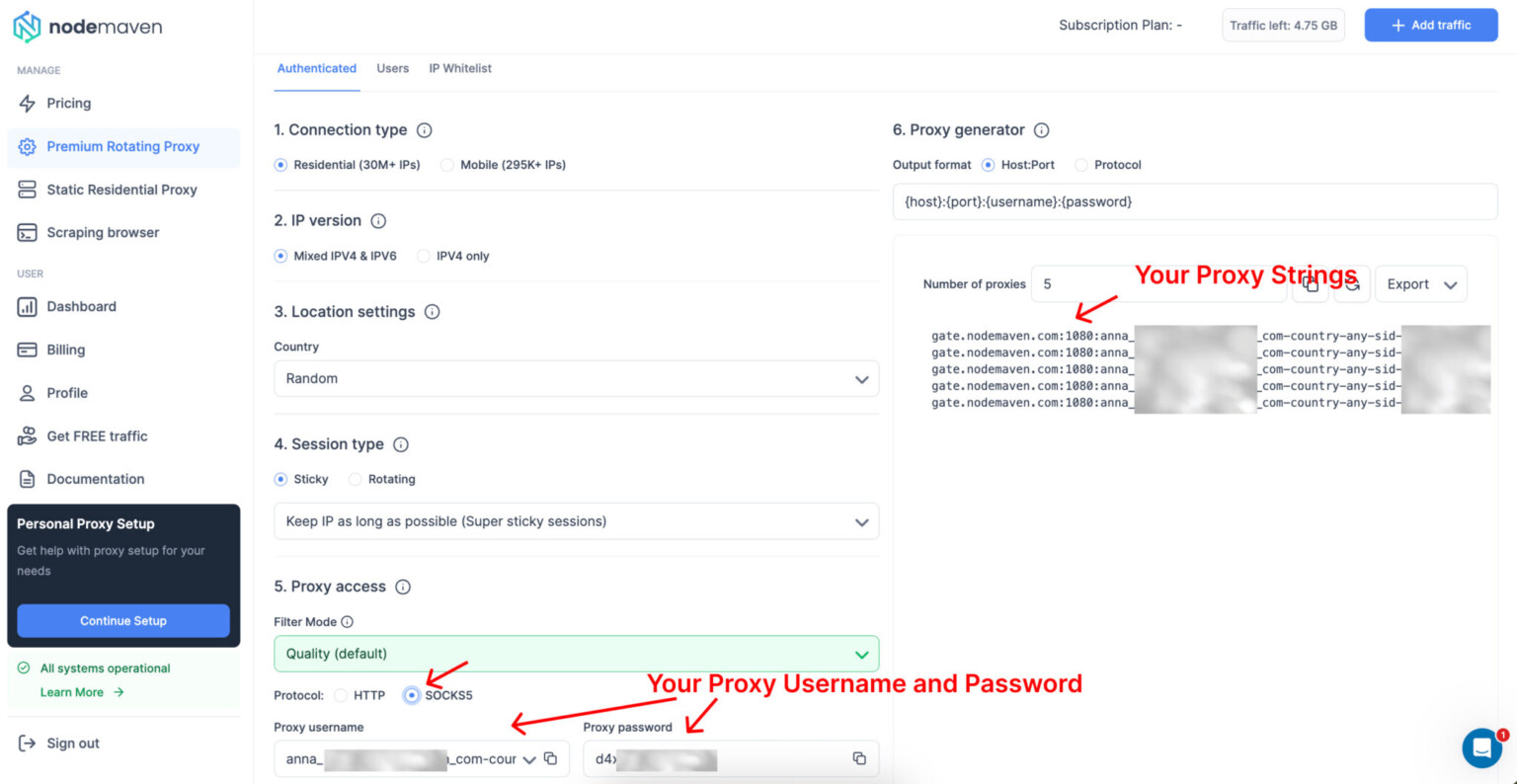
Purchase a dedicated SOCKS5 proxy from a reputable provider. Upon completion, you will receive an access dashboard displaying your connection parameters, typically formatted as:
- Host / IP Address:
192.0.2.1(example) - Port:
1080(standard SOCKS5 port) - Username:
user_abc123 - Password:
secure_password_xyz
Step 2: Testing Connection Parameters
Before integrating the proxy into production workflows, test the connection via a command-line interface to verify that traffic routes correctly and that your IP address updates. Using a tool like cURL, execute the following command structure:
curl --socks5 user_abc123:secure_password_xyz@192.0.2.1:1080 https://httpbin.org/ip
Review the JSON output returned by the command. The origin field should display the IP address of your private proxy server rather than your local internet service provider's IP address. If the command fails or times out, verify your firewall settings or confirm whether IP whitelisting is required by your provider.
Step 3: Configuring Client Applications
Integrate the proxy settings into your specific application environment. For example, if you are configuring a custom Python script using the requests library with PySocks installed, initialize the session with the proxy parameters:
import requests proxies = { 'http': 'socks5://user_abc123:secure_password_xyz@192.0.2.1:1080', 'https': 'socks5://user_abc123:secure_password_xyz@192.0.2.1:1080' } response = requests.get('https://httpbin.org/ip', proxies=proxies) print(response.json())
Ensure that both HTTP and HTTPS dictionary keys point to the SOCKS5 URI scheme to guarantee that all outbound requests utilize the tunnel.
Common Operational Challenges and Troubleshooting
Managing a dedicated proxy instance requires vigilance regarding connection stability, authentication errors, and performance degradation.
Connection Timeouts and Latency Spikes
If your application experiences sudden timeouts, the remote proxy server may be experiencing high CPU utilization, bandwidth saturation, or network routing loops. Test the baseline latency using standard diagnostic utilities like ping or traceroute to the proxy host IP. If latency is consistently high, request a server node migration or port rotation from your provider.
Authentication Failures
Authentication errors typically manifest as 407 Proxy Authentication Required or connection refusal states. Verify that:
- Your username and password do not contain special characters that might break URI parsing in your configuration string.
- If your provider uses IP whitelisting, your current public IP address has not changed (common with dynamic residential ISP connections). Update the whitelist in your provider control panel immediately if a change occurred.
DNS Leaks
A common oversight when configuring proxy tunnels is failing to route DNS queries through the proxy server, resulting in local DNS leaks that expose your real network location. Ensure your configuration explicitly enforces remote DNS resolution (often designated as socks5h:// in URI strings) so that domain name lookups travel through the proxy tunnel rather than your local ISP resolver.
Frequently Asked Questions
What is the primary difference between a shared proxy and a private SOCKS5 proxy?
A shared proxy allows multiple users to route traffic through the same IP address simultaneously, increasing the likelihood of blocklists, CAPTCHAs, and bandwidth throttling. A private SOCKS5 proxy assigns a dedicated IP address and port exclusively to a single user, ensuring maximum reliability, speed, and privacy.
Does SOCKS5 encrypt my internet traffic automatically?
No. The SOCKS5 protocol is responsible only for establishing a connection and routing TCP/UDP packets between client and server. It does not encrypt the data payload by itself. To ensure privacy across public networks, sensitive data should be encrypted at the application layer or tunneled over an encrypted connection like SSH or TLS.
Can I use a single SOCKS5 proxy for both web browsing and application scripting?
Yes. SOCKS5 handles generic TCP and UDP traffic, making it compatible with web browsers (via extensions or native system settings), command-line tools, automation frameworks, and specialized software applications, provided the client supports SOCKS5 configurations.
How do I check if my private proxy is leaking my real IP address?
You can verify your proxy setup by running an IP leak test using command-line utilities like cURL or visiting online auditing tools while connected through the proxy. Check both the displayed IP address and the active DNS servers to ensure neither reveals your local network details.
What should I do if my proxy connection suddenly stops working?
First, verify your local internet connection and confirm that your proxy authentication credentials have not expired. Next, check if your provider requires periodic IP re-whitelisting due to a dynamic local IP change. If connectivity issues persist, contact your proxy provider's support team to check for upstream network outages or server maintenance.
Practical Next Actions
To successfully implement a private SOCKS5 infrastructure for your project, begin by assessing your exact bandwidth, geolocation, and protocol requirements. Partner with a verified, reputable infrastructure provider that offers transparent uptime guarantees and robust authentication controls. Test your connection parameters thoroughly using command-line diagnostic tools before deploying the proxy into production environments, and establish monitoring routines to track connection latency and stability over time.