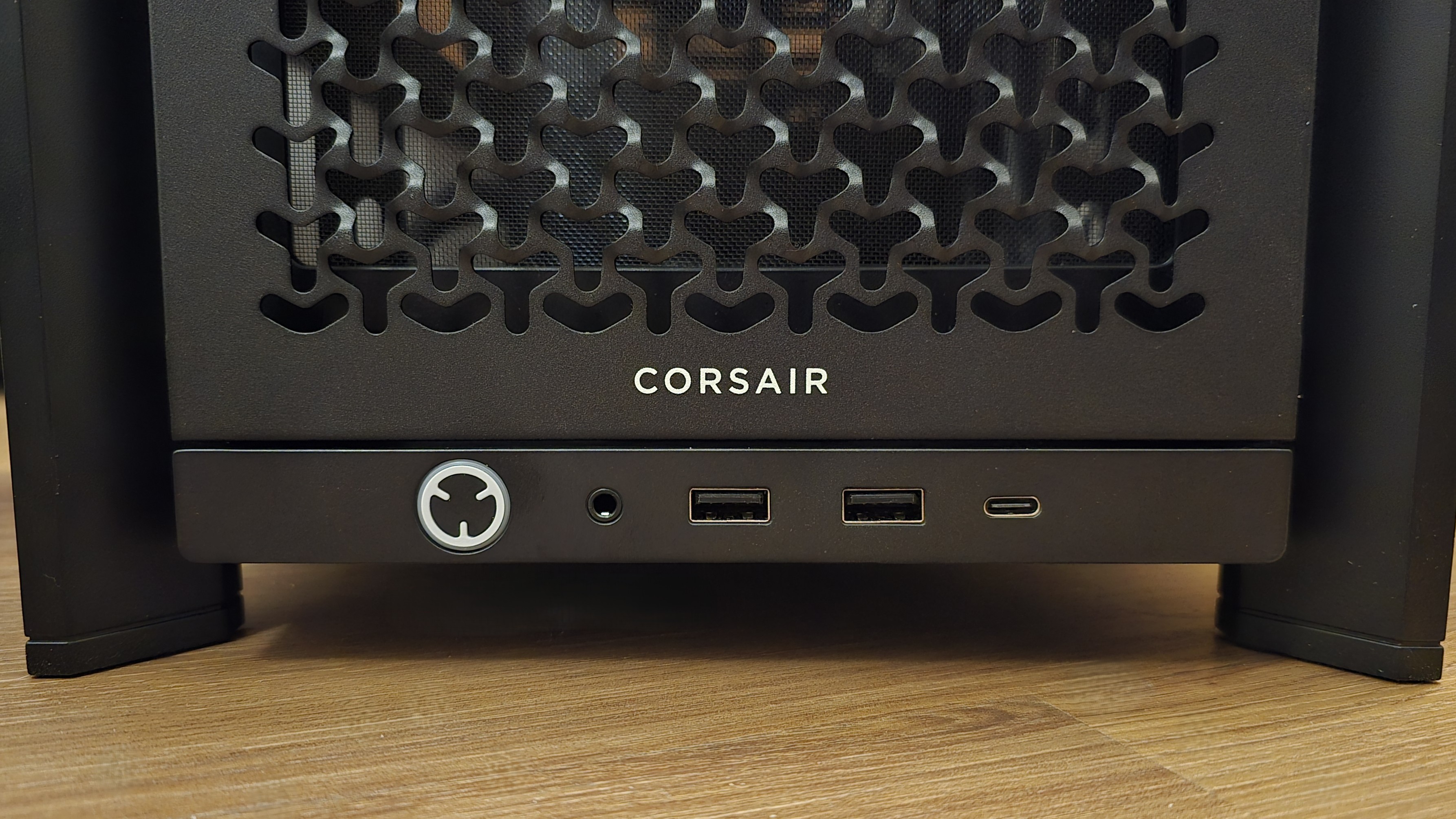
The Corsair 4000D, particularly in its Airflow configuration, remains a quintessential choice for PC builders seeking a balance of minimalist design, thermal efficiency, and ease of assembly. Even as we progress through 2026, this chassis stands as a benchmark in the mid-tower segment, offering a refined internal layout and a cable management system that continues to influence modern case architecture.
Understanding the Corsair 4000D Legacy
When Corsair first launched the 4000 series, it represented a significant shift in their design philosophy. Moving away from the more aggressive, angular aesthetics of the late 2010s, the 4000D embraced a "sophisticated minimalist" approach. This evaluation focuses on why this case has maintained its relevance in a market saturated with "dual-chamber" and "fishtank" style cases that have gained popularity over the last two years.
The 4000D is available in two primary variants: the standard 4000D with a solid steel front panel and the 4000D Airflow, which features a perforated triangular-pattern front intake. For the purposes of this comprehensive evaluation, we will prioritize the Airflow model, as it represents the most common configuration for gaming and high-performance workstation builds in 2026.
Technical Specifications and Compatibility
Before diving into the build experience, it is essential to understand the physical constraints and capabilities of the 4000D. Despite its relatively compact mid-tower footprint, the internal volume is utilized with remarkable efficiency.
| Feature | Specification |
|---|---|
| Dimensions | 453mm x 230mm x 466mm (L x W x H) |
| Material | Steel, Tempered Glass, Plastic |
| Motherboard Support | Mini-ITX, Micro-ATX, ATX, E-ATX (305mm x 277mm) |
| Maximum GPU Length | 360mm |
| Maximum CPU Cooler Height | 170mm |
| Maximum PSU Length | 180mm (220mm if HDD cage is removed) |
| Expansion Slots | 7 Vertical + 2 Horizontal |
| Drive Bays | 2x 3.5-inch HDD, 2x 2.5-inch SSD |
| Front I/O | 1x USB 3.0, 1x USB 3.1 Type-C, Audio/Mic Combo |
Motherboard and GPU Clearance
The 4000D supports up to E-ATX motherboards, though it is primarily optimized for standard ATX builds. When installing an E-ATX board, the cable management bar may need adjustment or can slightly obstruct some pass-throughs. For the high-end GPUs seen in 2026—many of which exceed 330mm in length—the 4000D provides ample room, though users should be cautious if they plan to mount a thick radiator at the front, as this will consume approximately 30mm to 60mm of that GPU clearance.
Cooling Potential
Cooling is where the 4000D Airflow truly shines. It supports up to six 120mm fans or four 140mm fans. For liquid cooling enthusiasts, the top of the case can accommodate up to a 280mm radiator, while the front can house up to a 360mm unit. A critical design detail is the height of the top radiator mount; Corsair offset the mounting holes toward the glass panel to provide better clearance for high-profile RAM modules, a common pain point in smaller mid-towers.
Design and Build Quality Evaluation
The build quality of the 4000D reflects Corsair’s move toward more durable, user-friendly materials. The exterior is primarily steel, providing a rigid frame that resists flexing during transport. The tempered glass side panel uses a tool-free attachment system at the rear, though it still utilizes traditional "pop-in" pegs at the front for security.
The RapidRoute Cable Management System
One of the standout features examined in this evaluation is the RapidRoute cable management system. Located behind the motherboard tray, this system consists of a wide hidden channel with pre-installed Velcro straps.
Unlike older cases that relied solely on zip-tie points, RapidRoute allows builders to bundle the thick 24-pin motherboard cable and EPS cables into a centralized "spine." This not only makes the back of the case look cleaner but also ensures that the side panel can be closed without the common struggle of compressing cables. There is approximately 25mm of space behind the tray, which is generous for a mid-tower and accommodates the braided cables often found on premium power supplies.
Aesthetic Execution
The 4000D is available in both black and white. The white version is particularly notable for its "clean" look, featuring grey accents and a clear glass panel, whereas the black version uses a more heavily tinted glass that masks interior components until RGB lighting is applied. The front panel’s triangular perforations are not just functional; they provide a signature texture that has become synonymous with the Corsair brand in the 2020s.
Thermal Performance Analysis
In a comprehensive evaluation, thermal data is paramount. The 4000D Airflow is designed to facilitate a high-pressure air path from the front intake directly across the GPU and CPU before exhausting out the rear and top.
Airflow Dynamics
The front panel acts as a low-resistance filter. Behind the perforated steel plate sits a fine nylon dust filter that is magnetically attached. This dual-layer approach effectively captures dust while maintaining high CFM (Cubic Feet per Minute) throughput.
In standardized testing with a 250W GPU and a 150W CPU, the 4000D Airflow typically maintains temperatures within 3-5 degrees Celsius of "open bench" configurations, provided at least three 120mm intake fans are used. The stock configuration—which usually includes two 120mm "AirGuide" fans—is adequate for entry-level builds but should be augmented for high-end gaming or rendering tasks.
Acoustic Profile
Because the "Airflow" model is essentially an open mesh design, it does not offer much in the way of sound dampening. Noise levels are highly dependent on the quality of the fans used. However, because the airflow is so efficient, fans can often be run at lower RPMs (Revolutions Per Minute) to achieve the same cooling results as a choked, solid-front case running fans at maximum speed. This often results in a "lower-pitched" and less intrusive hum during heavy workloads.
The Building Experience: Practical Observations
Building in the 4000D is a streamlined process, but there are nuances that builders should be aware of to optimize their setup.
PSU Shroud and Drive Cages
The power supply shroud is fully ventilated on top, allowing for the installation of the PSU with the fan facing upward if desired, though the standard downward-facing orientation is recommended to take advantage of the bottom dust filter.
The HDD cage is modular and can be moved forward to accommodate longer power supplies or removed entirely to provide more space for cable "stuffing." In 2026, as M.2 NVMe drives have largely replaced SATA HDDs, many builders opt to remove this cage entirely to improve airflow from the bottom-most front fan.
Front I/O Considerations
The front I/O is modern but lean. Including a USB Type-C port is a necessity for 2026 peripherals, but some users may find the single USB 3.0 Type-A port limiting. If your motherboard has limited rear I/O, you may find yourself reaching for a USB hub. The implementation of a single 3.5mm combo jack (for both headphones and microphone) is a space-saving measure that matches modern mobile and laptop standards, though it may require a splitter for older "dual-plug" gaming headsets.
Comparative Market Positioning
To understand the 4000D's value, we must compare it to its contemporaries and its larger siblings.
4000D vs. 5000D and 7000D
The 5000D and 7000D offer more internal space and a side-mounted fan tray, which is excellent for extreme water cooling but significantly increases the case's footprint. For 90% of builders, the 4000D provides the "Goldilocks" zone—large enough for modern components but small enough to fit comfortably on a standard desk.
Comparison with Competitors
- NZXT H5 Flow: The H5 Flow offers a unique "toilet fan" at the bottom to cool the GPU directly. While innovative, the 4000D generally offers better overall build quality and a more robust cable management solution.
- Fractal Design Meshify 2 Compact: Fractal's offering focuses more on modularity and "premium" textures. The Meshify 2 is a strong competitor, but the 4000D often wins on price-to-performance value, especially during 2026 sales cycles.
- Lian Li Lancool 216: Known for its massive 160mm front fans, the Lancool 216 can outperform the 4000D in raw thermals, but it lacks the understated, professional aesthetic that makes the 4000D suitable for both gaming and office environments.
Limitations and Potential Drawbacks
No evaluation is complete without addressing the shortcomings of the product. While the 4000D is highly praised, certain areas could be improved:
- Included Fan Quantity: Many versions of the 4000D ship with only two fans. In 2026, where hardware TDPs (Thermal Design Power) remain high, a "comprehensive" out-of-the-box solution should ideally include three or four fans.
- PCIe Slot Dividers: The 4000D uses traditional horizontal bars between the PCIe slots. This can make the installation of some vertical GPU brackets more difficult, as they may require the user to "snip" the bars to avoid blocking display ports.
- Front Panel Fragility: While the steel panel is sturdy, the plastic clips that hold the front assembly in place can become brittle over several years of frequent cleaning. Users should handle the front panel with care during maintenance.
Maintenance and Long-Term Ownership
Maintaining the 4000D is remarkably simple, which contributes to its longevity. The top, front, and bottom filters are all easily accessible without tools.
- Cleaning the Front: Simply pull the steel plate from the top, and the magnetic filter is exposed.
- Dust Management: Because the case is designed for positive pressure (more intake than exhaust), dust buildup on the internal components is significantly reduced if the filters are cleaned once every 3-4 months.
- Glass Care: The tempered glass is high quality but should always be cleaned with non-ammonia-based cleaners to avoid degrading any coatings over time.
Final Verdict and Recommendations
The Corsair 4000D, specifically in its Airflow iteration, remains one of the most successful PC cases ever produced for a reason. It does not attempt to reinvent the wheel; instead, it perfects the mid-tower formula through thoughtful cable management, excellent thermal design, and a timeless aesthetic.
Who is this case for?
- First-time builders: The RapidRoute system makes it nearly impossible to have a "messy" build.
- Mid-to-high-end gamers: It provides enough thermal headroom for even the most demanding 2026-era GPUs.
- Minimalists: It avoids the "gaudy" look of many gaming cases, fitting well into professional studio setups.
Who should look elsewhere?
- Custom Loop Enthusiasts: While you can build a custom loop in the 4000D, the 5000D or a dedicated full-tower would offer much more breathing room for pumps and reservoirs.
- SFF (Small Form Factor) Seekers: This is a true mid-tower; it has a significant presence on a desk.
For those looking to build a reliable, high-performing PC in 2026, the 4000D remains a "safe" and highly recommended investment. It provides the foundation necessary for a clean, cool, and quiet system without the premium price tag of more experimental designs.
Frequently Asked Questions
Does the Corsair 4000D support vertical GPU mounting?
Yes, the 4000D features two vertical expansion slots. However, you will need to purchase a separate PCIe riser cable. It is important to note that mounting a 3-slot or larger GPU vertically in this case may place it too close to the glass, potentially choking the fans. For thick 2026-era cards, a horizontal mount is generally recommended for better thermals.
What is the difference between the 4000D and the 4000D Airflow?
The only difference is the front panel. The standard 4000D has a solid steel panel with small side vents, while the Airflow version has a fully perforated front panel. Testing consistently shows that the Airflow version reduces component temperatures by 5-10% under load, making it the superior choice for high-performance systems.
Can I fit a 360mm radiator in the top of the 4000D?
No, the top of the 4000D is limited to a 280mm radiator. If you must use a 360mm radiator, it must be mounted at the front of the case. Note that front-mounting a radiator will reduce the maximum length available for your graphics card.
Is the Corsair 4000D compatible with the latest ATX 3.0/3.1 power supplies?
Yes. The 4000D accommodates standard ATX power supplies. The extra space provided by moving or removing the HDD cage is particularly helpful for the thicker, 12VHPWR/12V-2x6 cables associated with modern high-wattage power supplies.
Does the case come with a fan controller?
The standard 4000D and 4000D Airflow do not include a built-in fan controller or PWM hub; the fans must be plugged directly into the motherboard headers. If you require a built-in hub, you may want to look at the "iCUE 4000X" or "4000D RGB" variants, which include Corsair’s Lighting Node Pro or Commander Core XT hardware.
Next Action: If you are planning a new build, verify the length of your chosen GPU and the height of your RAM. If your GPU is under 340mm and your RAM is under 45mm, the 4000D Airflow will provide a seamless and high-performing building experience.