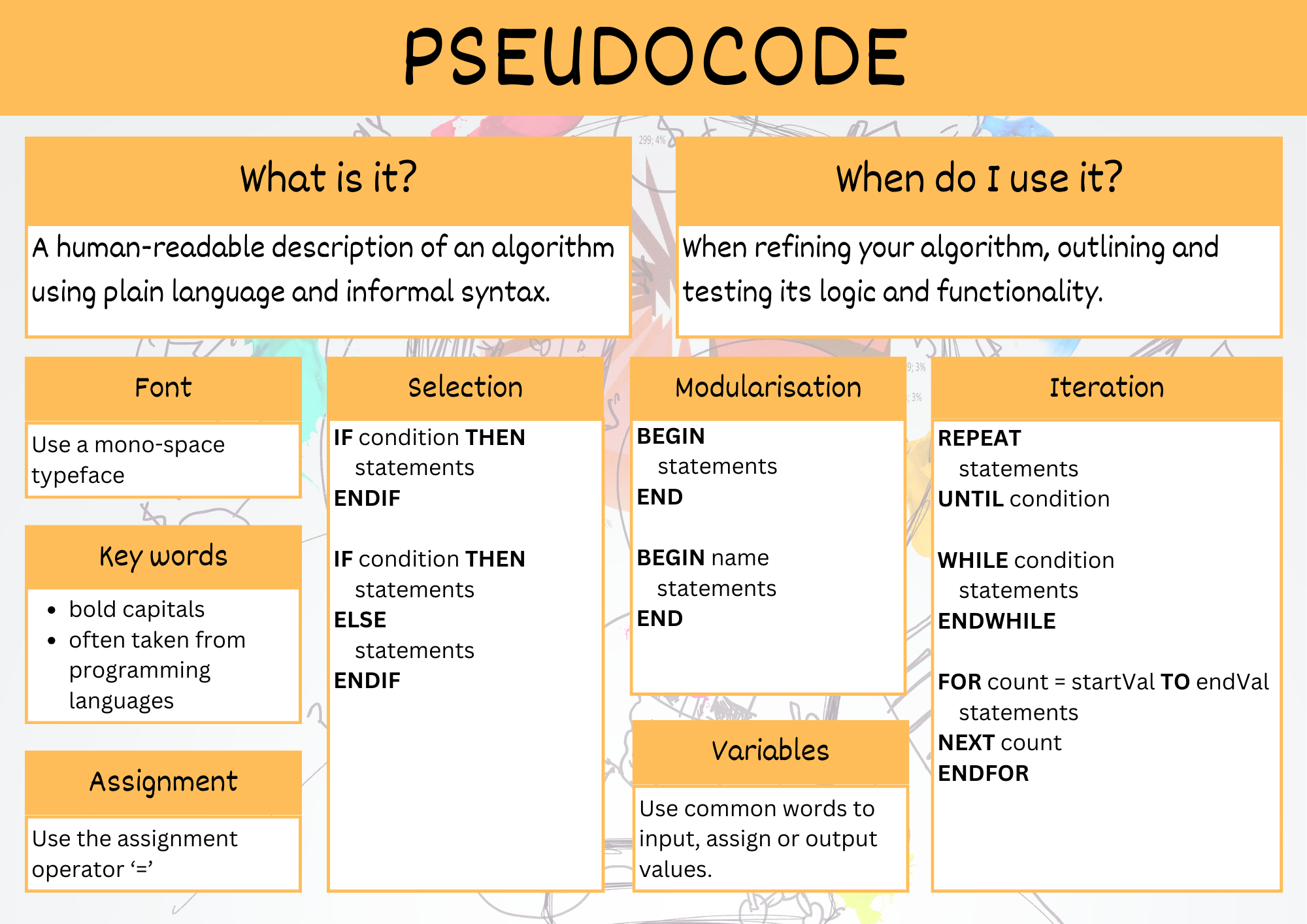
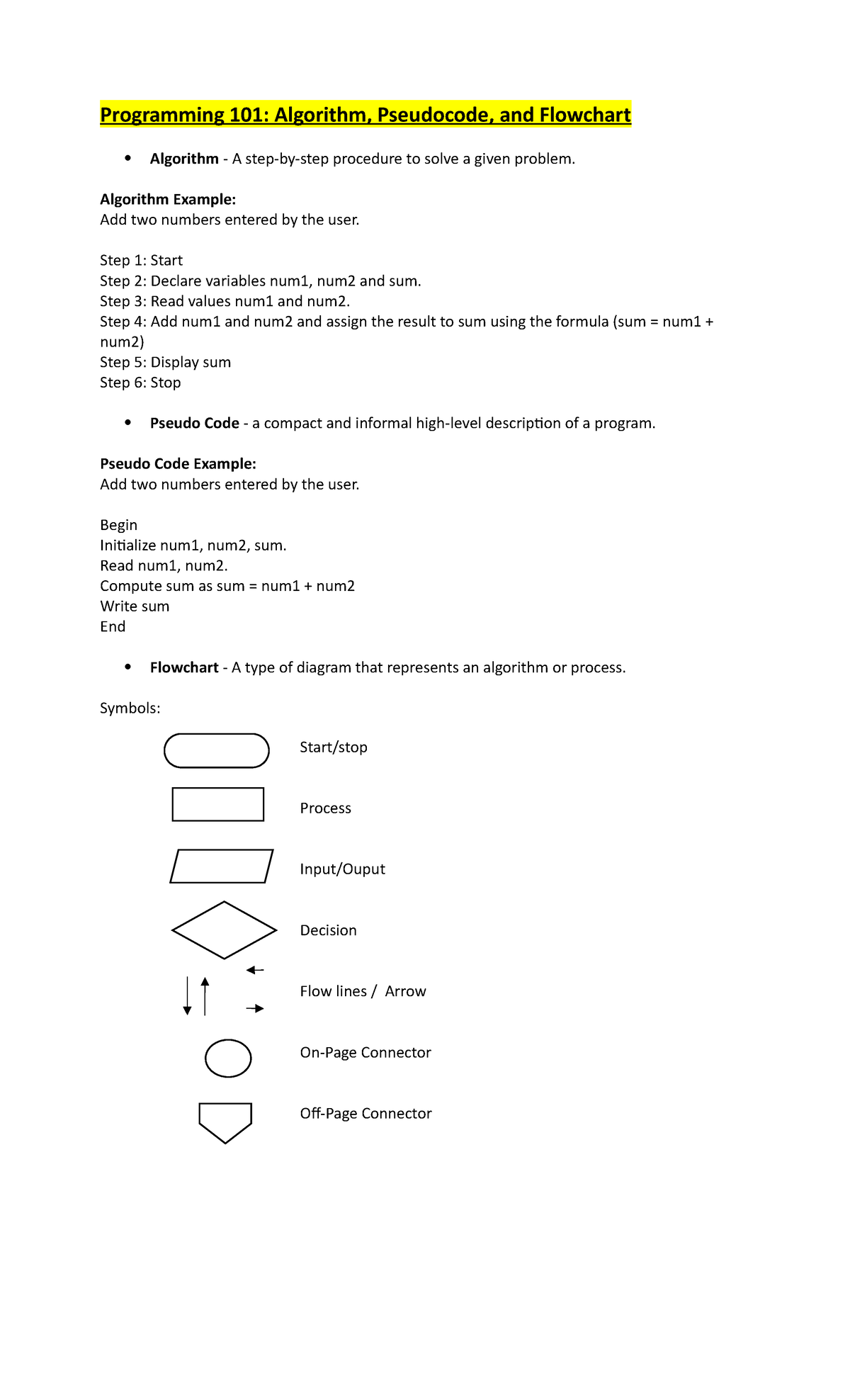
Pseudocode is a high-level, human-readable description of an algorithm that bridges the gap between conceptual problem-solving and formal programming syntax. By stripping away the rigid rules of specific languages like Python, C++, or Java, pseudocode allows developers to focus entirely on the logic, structure, and flow of an operation before writing a single line of executable code.
Effective pseudocode uses plain language to outline steps such as loops, conditional branches, and variable assignments. It is not intended for execution by a computer but is a vital tool for software architects, students, and engineers to document intent, debug complex processes, and communicate requirements across technical teams. The following ten examples illustrate common programming patterns translated into clear, structural pseudocode.
1. Finding the Maximum Value in an Array
This algorithm determines the largest number in a collection. It is a fundamental exercise for understanding iterative data processing.
INITIALIZE max_value to the first element of the array FOR each element in the array: IF current_element is greater than max_value: SET max_value to current_element END IF END FOR RETURN max_value
2. Calculating Factorial of a Number
Factorials illustrate recursion and iterative multiplication, showing how state is maintained throughout a loop.
READ integer n IF n is less than 0: RETURN error message ELSE IF n is 0 or 1: RETURN 1 ELSE: SET result to 1 FOR i from 2 to n: result = result * i END FOR RETURN result END IF
3. Implementing a Login Authentication Gate
Authentication logic requires conditional checking against stored credentials, demonstrating simple Boolean decision-making.
GET input_username, input_password FETCH stored_password for input_username IF input_password matches stored_password: GRANT access to dashboard LOG user activity ELSE: DISPLAY "Invalid credentials" INCREMENT attempt_counter IF attempt_counter equals 3: LOCK account END IF END IF
4. Checking if a Number is Prime
This involves modular arithmetic and a loop that terminates early if a divisor is found, optimizing performance for large inputs.
READ number n IF n <= 1: RETURN false FOR i from 2 to square root of n: IF n modulo i is 0: RETURN false END IF END FOR RETURN true
5. Sorting an Array (Bubble Sort)
Bubble sort is a classic example of nested iteration used to organize data in ascending or descending order.
FOR i from 0 to length of array - 1: FOR j from 0 to length of array - i - 1: IF array[j] > array[j+1]: SWAP array[j] and array[j+1] END IF END FOR END FOR
6. Calculating the Average of a List
This is a standard procedure for data aggregation, emphasizing the importance of managing running totals.
INITIALIZE total_sum to 0 INITIALIZE count to length of list IF count is 0: RETURN 0 FOR each number in list: total_sum = total_sum + number END FOR RETURN total_sum divided by count
7. Converting Temperature Scales
This demonstrates basic arithmetic operations and function-based transformations.
FUNCTION convert_fahrenheit_to_celsius(f_temp): c_temp = (f_temp - 32) * 5/9 RETURN c_temp
8. Fibonacci Sequence Generation
The Fibonacci sequence demonstrates how to manage two changing variables within a single loop to build a series.
READ number_of_terms INITIALIZE a to 0, b to 1 PRINT a, b FOR i from 3 to number_of_terms: next_term = a + b PRINT next_term SET a to b SET b to next_term END FOR
9. Searching for a Value (Linear Search)
This approach iterates through a list until a specific target is identified, highlighting early exit conditions.
READ list, target_value FOR index from 0 to length of list - 1: IF list[index] matches target_value: RETURN "Found at index" index END IF END FOR RETURN "Not found"
10. Counting Vowels in a String
String manipulation and character iteration are essential skills in data parsing.
READ input_string INITIALIZE vowel_count to 0 FOR each character in input_string: IF character is in [a, e, i, o, u]: vowel_count = vowel_count + 1 END IF END FOR RETURN vowel_count
Best Practices for Writing Pseudocode
While pseudocode is intentionally informal, maintaining a consistent style makes it far more useful for documentation and collaborative design.
Adopt a Standard Vocabulary
Avoid switching between "SET," "ASSIGN," "STORE," or "LET" arbitrarily. Pick a set of keywords—such as IF/THEN/ELSE, FOR/WHILE, and RETURN—and stick to them throughout your project. This reduces the cognitive load for team members reviewing your logic.
Maintain Proper Indentation
Indentation is the primary visual indicator of control flow blocks. Just like in Python, indentation levels should clarify which lines belong to which loop or conditional statement. This ensures that even without curly braces or END keywords, the nesting of the logic remains immediately clear.
Keep It Language-Agnostic
Avoid using syntax unique to specific languages. For example, instead of writing array.append() (Python) or vector.push_back() (C++), use "ADD item TO list." This ensures your pseudocode remains a tool for architectural planning rather than a draft for a specific implementation.
| Feature | Pseudocode | Formal Code |
|---|---|---|
| Purpose | Design and logic clarity | Execution and performance |
| Syntax | Informal, human-readable | Strict, compiler-dependent |
| Errors | Conceptual only | Syntax, logical, and runtime |
| Flexibility | High (can be written by anyone) | Low (must follow language rules) |
Frequently Asked Questions
Is there a standard format for pseudocode?
There is no universal standard, but most professionals follow a style similar to Pascal or Python. The most important aspect is readability and consistency within your own team or documentation.
Can pseudocode be automatically converted to code?
While some generative AI tools can assist in converting pseudocode to functional code in 2026, pseudocode is primarily for human communication. It serves as the blueprint, whereas the conversion to code still requires a developer to account for memory management, library imports, and hardware constraints.
Should I comment my pseudocode?
Yes. Although pseudocode is inherently readable, complex logic or business rules that aren't immediately obvious should be documented using comments to explain the "why" behind the specific approach.
How detailed should pseudocode be?
It should be detailed enough that someone could implement the algorithm without needing to ask you how it works, but not so detailed that it mirrors every minor variable initialization required by a specific machine language.
Can I use pseudocode for non-coding tasks?
Absolutely. Pseudocode is excellent for mapping out business processes, workflow automations, or physical procedures. Using "if-then" logic to describe how a warehouse handles a return shipment, for example, helps ensure all stakeholders understand the protocol.
Next Actions
To start utilizing pseudocode in your own workflow, identify a complex function you plan to implement this week. Before you open your IDE, grab a piece of paper or a blank text document and write out the logic using the structure provided in the examples above. By separating the logic design from the syntax implementation, you will likely find that you spend significantly less time debugging and more time writing high-quality, maintainable code.