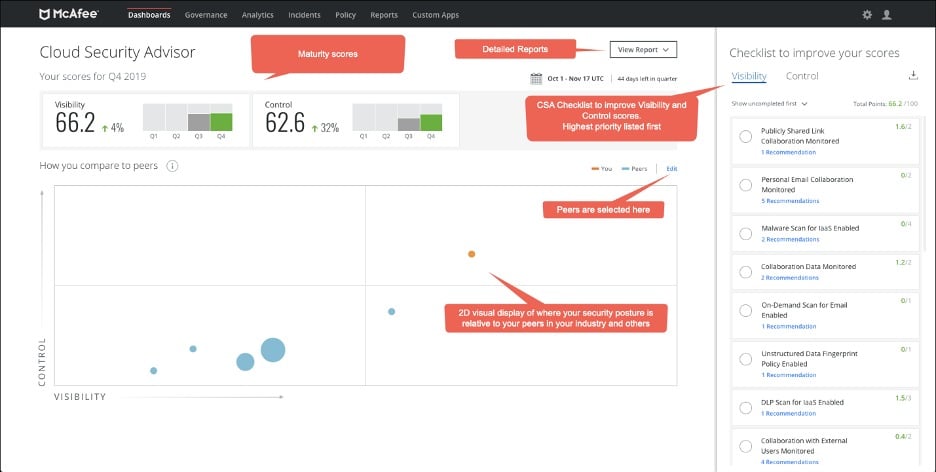
The McAfee Cloud Workload Security (CWS) review serves as a critical evaluation for organizations managing complex hybrid and multi-cloud environments. By assessing visibility, security posture, and compliance automation across dynamic infrastructure, this review process helps security teams determine how effectively the platform defends against threats while maintaining operational agility in distributed cloud ecosystems.
Understanding McAfee Cloud Workload Security
In the landscape of modern enterprise architecture, "cloud workload security" refers to the specific practice of securing the applications, containers, and serverless functions that operate within cloud environments. As organizations have shifted away from static, on-premises data centers toward ephemeral, scalable infrastructure, the perimeter-based security model has become obsolete. McAfee Cloud Workload Security was developed to bridge the gap between traditional data center security and the rapid, often unmanaged expansion of public clouds such as Amazon Web Services (AWS), Microsoft Azure, and Google Cloud Platform (GCP).
The primary objective of this security suite is to provide a single, unified view of workloads regardless of where they reside. This is particularly important for security operations center (SOC) analysts who must prevent unauthorized access, mitigate configuration drift, and ensure that security policies are applied consistently to every instance, whether it is a long-standing virtual machine or a short-lived containerized application.
Core Features and Capabilities
When evaluating the platform, the review process focuses on the functional components that define its efficacy. These capabilities are designed to address the specific vulnerabilities associated with cloud-native development.
Unified Visibility
One of the most touted aspects of this solution is its ability to aggregate data from disparate cloud providers. In an environment where different teams might utilize various cloud services, having a centralized dashboard is essential. The review of this feature typically examines how quickly the system discovers new instances and whether the automated tagging mechanisms accurately categorize workloads based on sensitivity and function.
Compliance and Governance
Compliance automation is a significant pillar of the platform. With the increasing number of regulatory frameworks—such as GDPR, HIPAA, and PCI-DSS—that mandate strict data handling and access control, security teams face immense pressure to prove compliance. The solution provides pre-configured templates that map cloud configurations to these regulatory requirements. An effective review looks at how frequently these templates are updated to reflect the evolving language of industry standards and whether the system can generate audit-ready reports without manual intervention.
Micro-segmentation and Threat Protection
At the heart of workload security is the prevention of lateral movement. Micro-segmentation allows administrators to isolate workloads, ensuring that even if one application is compromised, the threat cannot propagate across the entire network. This review evaluates the granularity of the policy engine and the ease of implementation. Furthermore, the platform integrates anti-malware and file integrity monitoring (FIM), which are critical for detecting unauthorized modifications to sensitive system files.
Technical Performance and Deployment Prerequisites
Deploying McAfee Cloud Workload Security requires a structured approach to ensure compatibility with existing cloud architecture. Before implementation, organizations must verify their environment against specific prerequisites.
| Requirement Area | Technical Detail |
|---|---|
| Cloud Provider | Support for AWS, Azure, GCP, and private cloud environments. |
| Orchestration | Integration with Kubernetes and container orchestration platforms. |
| Permissions | Requires IAM roles with sufficient read/write privileges for API integration. |
| Latency | Minimal overhead impact on application performance (usually <3%). |
| Agent Deployment | Supported via native cloud provider APIs or lightweight agent installation. |
The performance impact of security agents is a major point of discussion in any workload security review. Because cloud instances are often resource-constrained to optimize costs, an agent that consumes excessive CPU or memory can degrade application performance. Users typically assess the "performance hit" during heavy compute cycles to ensure that the security layer does not become a bottleneck for production operations.
Assessing Practical Value in Modern Environments
The value proposition of McAfee Cloud Workload Security lies in its capacity to reduce "security toil." Security professionals often report that manual management of cloud security groups and firewall rules is prone to human error—a leading cause of data breaches. By automating these tasks, the platform reduces the risk of misconfiguration, which is often cited as the most common vulnerability in cloud computing.
However, the review process must also account for the learning curve. While the centralized management console provides clarity, the complexity of setting up custom policies can be high for teams that lack deep cloud security expertise. Organizations often find that the initial phase of deployment—specifically the mapping of existing workloads and defining the security posture—requires significant cross-departmental collaboration between DevOps and Security teams.
Addressing Common Implementation Mistakes
A frequent pitfall during the adoption of this platform is the failure to clean up legacy policies. As cloud resources are decommissioned, security teams often leave orphaned policies in place, which complicates the auditing process and creates potential security gaps. A robust review process emphasizes the need for lifecycle management, ensuring that when an application is retired, its associated security policy is removed or archived.
Another common mistake involves over-provisioning security permissions. In an effort to "secure everything," teams sometimes apply overly restrictive policies that break application dependencies. Effective troubleshooting involves utilizing the platform’s "audit mode" or "monitoring mode" first, where policies are simulated to observe their impact on traffic patterns before they are enforced in a production environment.
Comparative Analysis: A Strategic View
When evaluating McAfee Cloud Workload Security against alternatives, users often focus on the breadth of the integration ecosystem. While some point-solution tools may offer deeper features for specific container types, McAfee's strength is its ability to handle a hybrid mix of legacy virtual machines and modern containers simultaneously.
For organizations already embedded in the broader McAfee portfolio, the integration with existing endpoint detection and response (EDR) solutions often makes the workload security suite the logical choice. The interoperability allows for a "single pane of glass" view, where data from endpoint threats can be correlated with workload-specific alerts, providing a more holistic picture of a potential attack chain.
Frequently Asked Questions
Does McAfee Cloud Workload Security impact cloud instance costs? Generally, the platform itself is licensed on a per-workload basis, but users must also consider the cost of cloud-native logging services required for the platform to function. While the software does not inherently change your cloud provider instance pricing, optimizing the security agents to reduce resource consumption can help keep compute costs stable.
How does this solution handle serverless workloads? The platform focuses on monitoring and securing the environment surrounding serverless functions, such as API gateways and identity permissions. It emphasizes identifying misconfigurations in function triggers and data access, which are the primary vectors for exploiting serverless architecture.
Is it suitable for multi-cloud strategies? Yes, the platform is designed specifically for multi-cloud deployments. It abstracts the differences between cloud-specific security models, providing a consistent policy framework that applies across AWS, Azure, and GCP simultaneously.
What is the role of automation in this security suite? Automation is used to enforce compliance and perform continuous configuration checks. It allows for "policy-as-code," where security rules are integrated into the CI/CD pipeline, ensuring that workloads are secure from the moment they are provisioned.
How does the platform address zero-day threats? The solution combines signature-based detection with behavioral analysis. While signatures identify known threats, the behavioral component monitors for anomalous activity, such as unexpected outbound traffic or unauthorized system call patterns, which are often indicative of zero-day exploits.
Can it replace a traditional firewall? It acts as a complement to, rather than a total replacement for, perimeter firewalls. While it manages internal workload-to-workload traffic (east-west traffic) exceptionally well, it is typically used in conjunction with cloud-native network security groups and edge firewalls to secure incoming traffic (north-south traffic).
Final Recommendation for Security Teams
For organizations operating at scale, the primary recommendation is to initiate a phased deployment. Start by focusing on visibility—gaining a clear, accurate inventory of all cloud workloads across your accounts. Once visibility is established, prioritize the automation of compliance checks for the most critical workloads. Avoid the temptation to apply blanket policies to the entire environment on day one. Instead, iterate through your server environments, testing policies in monitoring mode to ensure operational continuity.
By focusing on clear policy lifecycle management and leveraging the platform's orchestration integrations, teams can significantly improve their security posture while reducing the manual burden of cloud defense. As you evaluate the specific version relevant to your current infrastructure, ensure your team is trained not just on the tool, but on the principles of cloud-native security that the platform is designed to uphold.