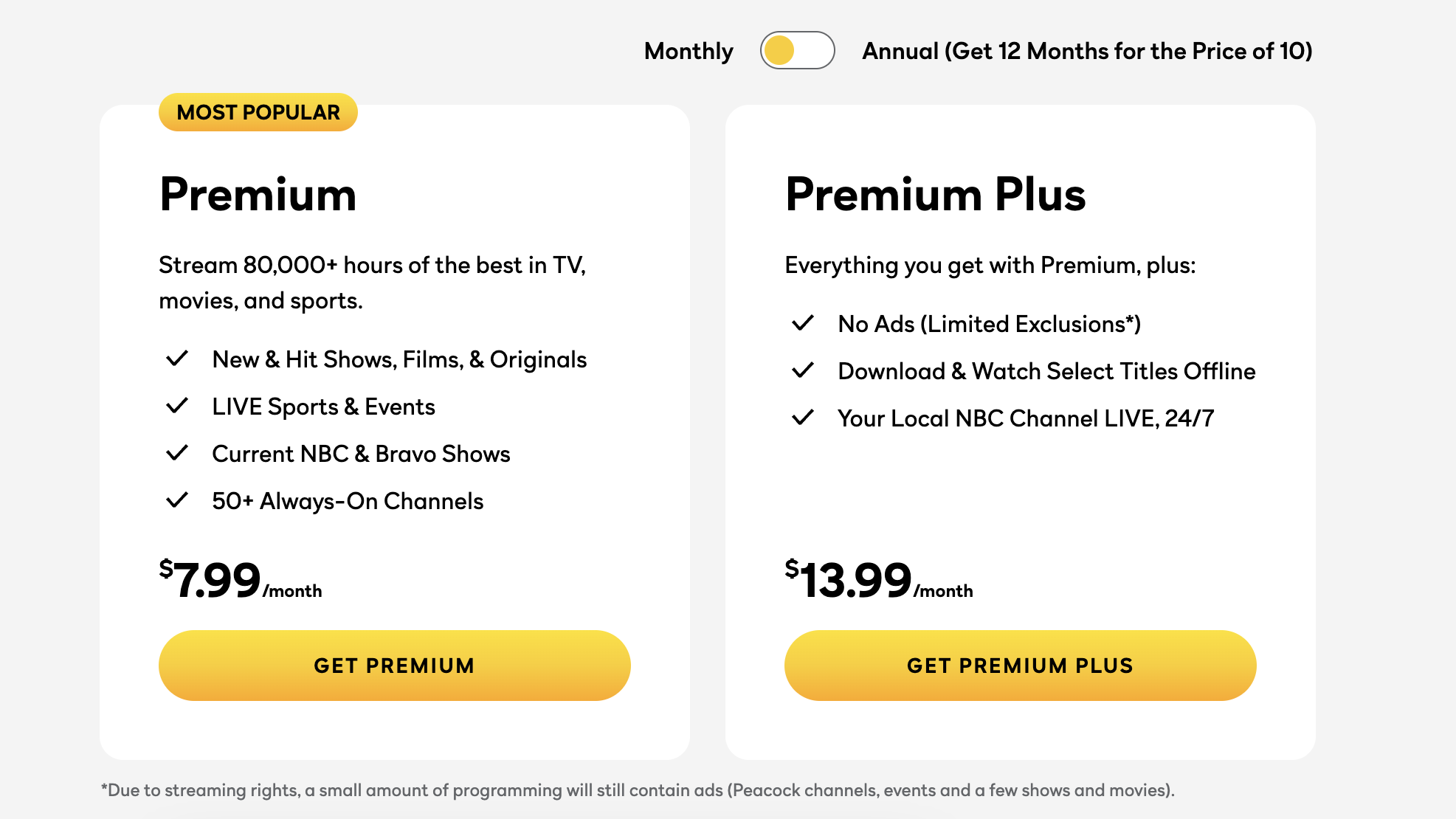
Amazon Prime Video members can now subscribe to Peacock Premium Plus directly through Prime Video Channels, allowing users to access NBCUniversal’s ad-free tier without leaving the Amazon ecosystem. This integration simplifies billing and content discovery, offering the full Peacock library—including live local NBC stations and offline downloads—integrated within the Prime Video interface for a monthly fee of $13.99 as of 2026.
The streaming landscape in 2026 has shifted heavily toward consolidation and convenience. For many viewers, the biggest challenge is no longer finding content, but managing the sheer number of applications and billing cycles required to access it. By adding Peacock Premium Plus to its "Channels" lineup, Amazon addresses a significant pain point for cord-cutters who want the premium, uninterrupted experience of Peacock alongside their Prime Video library.
Understanding the Integration: Peacock on Prime Video Channels
Prime Video Channels is an internal marketplace where Amazon Prime members can add third-party subscriptions like Paramount+, Max, and now, the full suite of Peacock tiers. Previously, Amazon users were often limited to the ad-supported version of Peacock, but the addition of Premium Plus marks a significant expansion of the partnership between Amazon and NBCUniversal.
When you subscribe to Peacock Premium Plus via Prime Video, you are not just getting a link to another app. The content is ingested into the Amazon interface. This means that Peacock’s "Must-See TV," Universal Pictures film releases, and live sports appear in your "Continue Watching" row and search results on Fire TV and the Prime Video app.
The Technical Evolution of Streaming Aggregation
The move to include Peacock Premium Plus is part of a broader industry trend known as "aggregation." In the early 2020s, the streaming market was highly fragmented, with every media company launching its own standalone app. By 2026, consumer fatigue has led to the resurgence of the "hub" model.
Amazon’s infrastructure provides a unified playback engine. For users, this often means a more stable streaming experience. If you have ever experienced lag or UI glitches in a standalone app, you might find that watching the same content through Prime Video’s native player offers better optimization, especially on Amazon-branded hardware like Fire Sticks or Fire TVs.
Peacock Premium vs. Peacock Premium Plus: What is the Difference?
Before clicking the subscribe button, it is essential to distinguish between the two primary tiers available on Prime Video Channels. While both offer the same massive library of content, the user experience differs significantly.
Peacock Premium (Ad-Supported)
This is the entry-level paid tier. It includes the full catalog of NBC shows, Bravo reality hits, and live sports. However, it is punctuated by advertisements. In 2026, the standard price for this tier remains a popular choice for budget-conscious viewers, but it lacks the "Plus" features like offline viewing and the live local NBC feed.
Peacock Premium Plus (Ad-Free)
The "Plus" tier, now fully integrated into Prime Video, is designed for power users. Its primary selling point is the removal of most advertisements. While some "live" content and a small handful of shows still contain brief promotional clips due to licensing agreements, the vast majority of on-demand movies and series are uninterrupted. Crucially, this tier includes access to your local 24/7 NBC channel, which is a major draw for users who want local news and weather without a cable subscription.
Financial Breakdown: Costs and Billing in 2026
Subscribing to Peacock Premium Plus through Amazon does not usually result in a discount on the subscription price itself, but it does offer "efficiency equity."
| Feature | Peacock Premium (via Prime) | Peacock Premium Plus (via Prime) |
|---|---|---|
| Monthly Price (2026) | $7.99 | $13.99 |
| Ad Experience | Limited Ads | Virtually Ad-Free |
| Live Local NBC | Not Included | Included 24/7 |
| Offline Downloads | No | Yes (Select Titles) |
| 4K Streaming | Limited | Full Support (Select Titles) |
| Billing Entity | Amazon.com | Amazon.com |
Unified Billing Benefits
When you subscribe via Prime Video Channels, your Peacock subscription is billed directly to the credit card associated with your Amazon account. This eliminates the need to manage a separate username, password, and payment method on the PeacockTV website. For families managing multiple subscriptions, having a single "Amazon Digital" line item on a bank statement simplifies monthly budgeting.
Content Library: What You Can Watch
Peacock has solidified its position in 2026 as the exclusive home for some of the most-watched franchises in television history. By accessing these through Prime Video, you gain access to several distinct "hubs" of content.
The Bravo Hub
For fans of reality television, Peacock is the definitive source for the Real Housewives franchise, Vanderpump Rules, and Below Deck. Subscribing to the Premium Plus tier via Amazon allows you to watch new episodes the day after they air on cable, completely ad-free.
Universal Pictures and Focus Features
New theatrical releases from Universal Pictures typically land on Peacock as their first streaming home. This includes major blockbusters and award-winning films from Focus Features. On the Premium Plus tier, these films can be watched in 4K Ultra HD (where available) with HDR10 or Dolby Vision support, provided your hardware is compatible.
Live Sports and Sunday Night Football
Peacock is a heavy hitter in the sports world. It remains the exclusive home for many Premier League matches, WWE Premium Live Events (like WrestleMania), and Big Ten college sports. It is also the digital home for Sunday Night Football. Through the Prime Video interface, these live events are integrated into the "Live" tab, making it easy to channel surf between Amazon’s Thursday Night Football and Peacock’s sporting events.
How to Add Peacock Premium Plus to Your Prime Account
The process of adding the channel is straightforward, but there are a few prerequisites to keep in mind.
- Active Amazon Prime Membership: You must have an active Prime membership ($14.99/month or $139/year) or a standalone Prime Video subscription to add "Channels."
- Navigation: Open the Prime Video app on your device or go to the Amazon website. Navigate to the "Channels" or "Store" tab.
- Search and Select: Search for "Peacock." You will see options for both the Premium and Premium Plus tiers.
- Verification: Select Premium Plus. Amazon will show a confirmation screen detailing the monthly price and the "auto-renew" terms.
- One-Click Sign Up: Confirm the purchase. The Peacock content will immediately populate within your Prime Video home screen.
Managing Your Subscription
If you decide that you no longer need the ad-free experience, managing the subscription is done through the "Memberships & Subscriptions" section of your Amazon account settings. You can cancel or downgrade your tier here without needing to contact NBCUniversal directly.
Technical Specifications and Requirements
To get the most out of Peacock Premium Plus on Prime Video, your technical setup matters. Because you are using the Amazon player, you benefit from Amazon’s global Content Delivery Network (CDN).
- Resolution: Premium Plus supports up to 4K UHD. To view content in this resolution, you need a 4K-capable device (like a Fire TV Stick 4K, Apple TV 4K, or a compatible Smart TV) and a steady internet connection of at least 25 Mbps.
- Audio: Many titles on the Premium Plus tier support 5.1 surround sound and, in some cases, Dolby Atmos.
- Offline Viewing: One of the key "Plus" features is the ability to download content to a mobile device. When using the Prime Video app on iOS or Android, you can download eligible Peacock titles to watch during flights or commutes where internet access is unavailable.
Potential Drawbacks: Is There a Catch?
While the integration is seamless for most, there are a few nuances to consider before switching from a standalone Peacock account to an Amazon-billed account.
Account Linking Limitations
If you already have a standalone Peacock account with a long history of "Watchlists" and "Profiles," that data does not automatically migrate to Amazon. When you subscribe via Prime Video Channels, you are essentially creating a new "sub-account" managed by Amazon. While there are often ways to link the accounts on the Peacock website to preserve your history, it is an extra step that some users find cumbersome.
Feature Disparity
Occasionally, the standalone Peacock app may receive niche UI features or interactive "bonus content" (such as specific sports stats overlays) before they are implemented into the Prime Video Channels API. For the average viewer who just wants to watch a movie or show, this is rarely an issue, but hardcore sports fans might prefer the native Peacock app experience.
Local Channel Variance
The "Live Local NBC" feature included in Premium Plus is based on your physical location (determined by your IP address or device GPS). If you use a VPN or live in a region with complex licensing rights, your local NBC affiliate might occasionally be substituted with a national feed.
Why the "Ad-Free" Choice Matters in 2026
In 2026, the "ad-supported" model has become increasingly aggressive across all platforms. Mid-roll ads have become longer and more frequent in standard tiers. For many, the $6.00 difference between the Premium and Premium Plus tiers is a small price to pay for the "gift of time."
Watching a standard 42-minute drama on an ad-supported tier can take upwards of 50 minutes once commercials are factored in. Over the course of a season, the ad-free experience saves the viewer hours of time. Furthermore, the inclusion of the local NBC station makes Premium Plus a viable "cable replacement" for news and local programming, which often costs significantly more through services like YouTube TV or Fubo.
Frequently Asked Questions
Can I use my Prime Video Peacock subscription on the Peacock app?
Yes. Typically, once you have subscribed through Amazon, you can use your Amazon credentials to "Link a Provider" on the Peacock TV website or app. This allows you to use the standalone Peacock app on devices that might not support the full Prime Video interface, or simply if you prefer the Peacock UI for certain features.
Does Peacock Premium Plus on Prime Video include a free trial?
Free trials are subject to change based on current promotions. In 2026, Amazon and NBCUniversal frequently offer 7-day trials for new subscribers to the Peacock Channel. Always check the "Channel" landing page on Amazon for the most current promotional offer before committing.
Is the content exactly the same as the standalone app?
Yes, the library is identical. Every movie, original series (like Poker Face or The Traitors), and live sporting event available on the standalone Peacock Premium Plus tier is available through the Prime Video Channel version.
How do I cancel my Peacock subscription on Amazon?
To cancel, go to "Account & Settings" on the Amazon website, select the "Channels" tab, find Peacock, and select "Cancel Channel." You will continue to have access until the end of your current billing cycle.
Does this subscription share my Amazon Prime profiles?
Yes. When you watch Peacock through Prime Video, it uses your Amazon profiles. This is particularly useful for parents, as you can apply Amazon’s "Parental Controls" to the Peacock channel content, ensuring that children only see age-appropriate material based on your Prime Video settings.
Final Recommendation: Should You Get It?
If you are an existing Amazon Prime member who values a streamlined digital life, adding Peacock Premium Plus to your Prime Video Channels is a logical move. The $13.99 monthly investment (at 2026 rates) provides a massive influx of high-quality content, ranging from the latest Universal films to live local news, all without the interruption of advertisements.
The decision ultimately comes down to your preference for "aggregation" versus "specialization." If you want one bill, one search bar, and one app to rule your living room, the Prime Video integration is the gold standard. However, if you are someone who frequently hunts for the most obscure features or specific "app-only" promotions, you may still find value in the standalone Peacock application. For most users, the convenience of having the "Plus" tier within Prime Video is well worth the upgrade.