Active Directory Domain Services (AD DS) is a foundational Microsoft directory service that organizes, secures, and manages users, computers, and network resources within a Windows domain environment. It provides a centralized database for authentication and authorization, enabling administrators to enforce security policies and deploy software across enterprise networks efficiently.
Introduction to Active Directory Domain Services
Managing a modern enterprise network requires balancing user convenience with stringent security controls. When organizations scale beyond a few dozen computers, tracking user credentials, shared printers, file permissions, and application access locally on every machine becomes unsustainable. This operational friction creates security vulnerabilities, administrative overhead, and fragmented policies.
Active Directory Domain Services solves this challenge by serving as the centralized source of truth for identity and access management (IAM) within Windows-based networks. Introduced with Windows 2000 Server as the evolution of Windows NT domains, AD DS stores directory data and makes it available to network users and administrators through a structured, hierarchical framework.
Whether an organization operates a traditional on-premises infrastructure, a hybrid model linking local hardware to cloud environments, or relies on managed directory services, understanding the core architecture, logical components, and operational mechanics of AD DS remains essential for systems administrators and IT security professionals alike.
Core Components and Logical Structure
To understand how AD DS functions, it is necessary to examine its logical structure. Active Directory organizes network resources hierarchically, separating physical network topology from the logical grouping of objects. This design allows administrators to structure their directory to match organizational needs rather than physical office locations.
Objects, Attributes, and the Schema
At its most fundamental level, the Active Directory database consists of objects. An object is a distinct, named collection of characteristics that represent a physical entity (such as a user, computer, or printer) or a logical entity (such as a security group or permission).
Every object is defined by its attributes. For example, a user object contains attributes such as givenName, surName, mail, and sAMAccountName. The types of objects that can be created and the attributes they can possess are strictly defined by the Schema. The schema acts as a blueprint for the directory, ensuring consistency and preventing the creation of malformed or unauthorized data structures.
Domains, Trees, and Forests
Objects are grouped into logical containers that scale from small administrative units to massive enterprise structures:
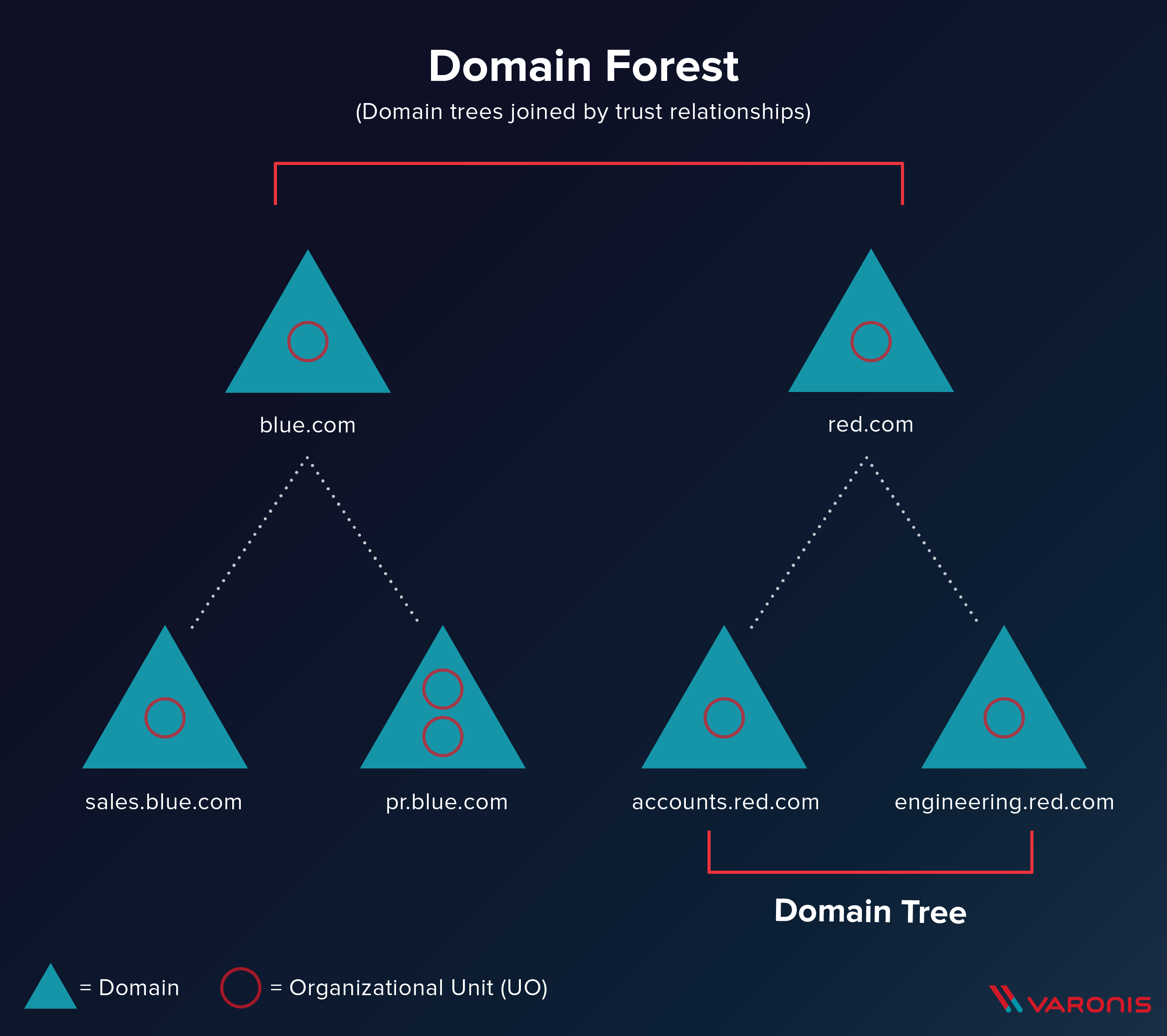
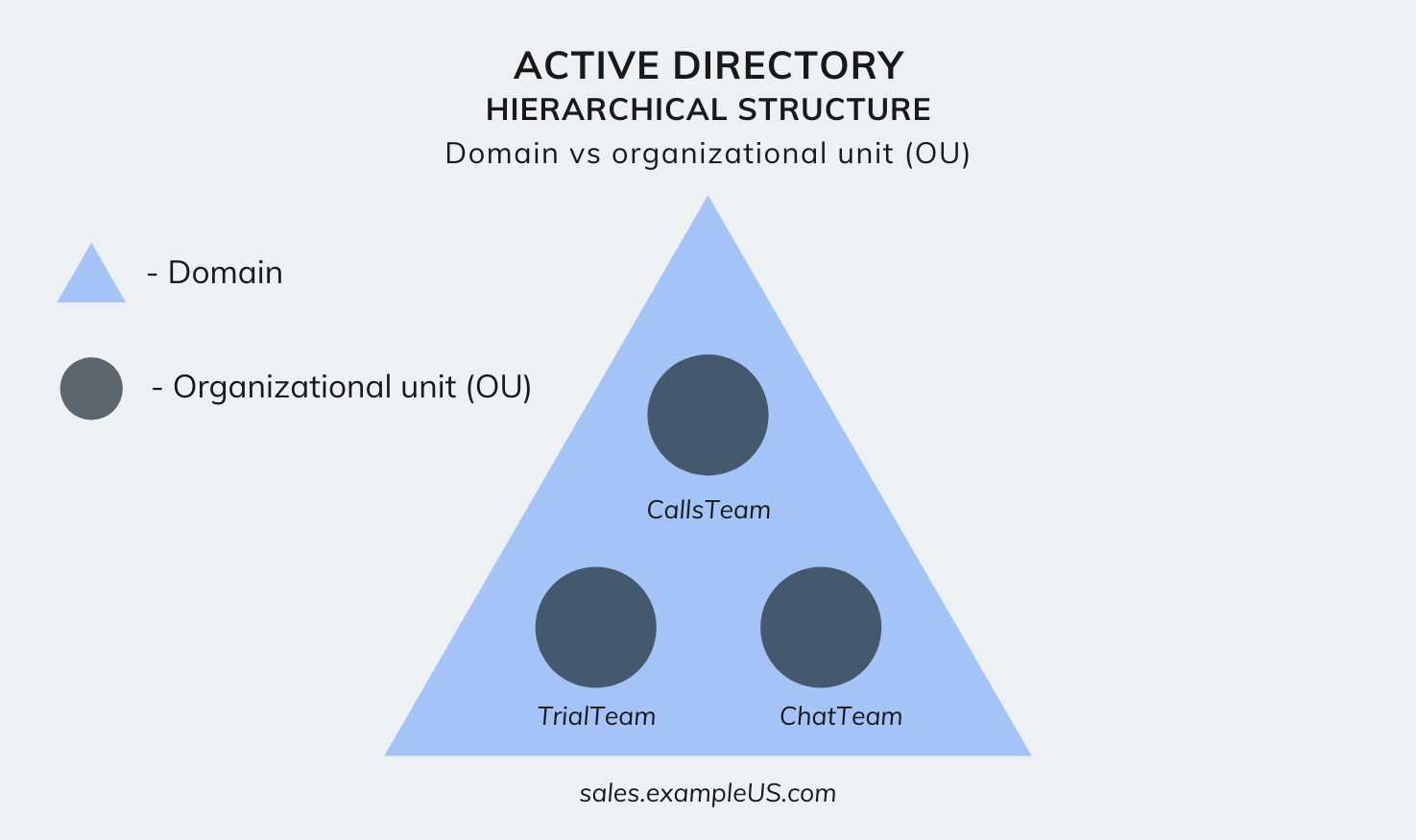
- Domains: A domain is the administrative core of AD DS. It represents a partition of the directory database, sharing a common security boundary, database, and replication policy. All objects within a domain share the same security policies and user accounts.
- Trees: When an organization creates multiple domains that share a continuous namespace (e.g.,
parent.comandchild.parent.com), they form a domain tree. Domains within a tree maintain a two-way transitive trust relationship automatically. - Forests: A forest is the highest logical container in Active Directory. It consists of one or more domain trees that share a single schema, configuration partition, and global catalog. Even if two trees have entirely different domain names (e.g.,
corp-a.comandcorp-b.net), they belong to the same forest if they share these underlying structures.
Organizational Units (OUs)
Within a single domain, administrators use Organizational Units (OUs) to organize objects into a manageable hierarchy that mirrors departments, geographic locations, or business units. OUs are vital for delegation and policy enforcement; administrators can delegate control over specific OUs to subordinate staff without granting full domain administrative privileges. Furthermore, Group Policy Objects (GPOs) can be linked directly to OUs to target configurations precisely.
Physical Architecture and Replication
While logical structures define how users and administrators view the directory, the physical architecture determines how data is stored, processed, and replicated across hardware infrastructure.
Domain Controllers
A Domain Controller (DC) is a physical or virtual server running Windows Server that hosts a copy of the Active Directory database (ntds.dit). Domain controllers process authentication requests, handle directory searches, and synchronize updates across the network.
Every domain must have at least one DC, but enterprise environments deploy multiple DCs to ensure high availability and load balancing. If one DC fails, authentication and directory services continue uninterrupted through surviving controllers.
The Global Catalog
The Global Catalog (GC) is a specialized domain controller that stores a partial, read-only replica of every object in every domain within a forest. Its primary purpose is to facilitate efficient searches across multiple domains without requiring queries to every individual domain controller. For example, when a user attempts to log into a forest with multiple domains, the Global Catalog helps resolve universal group memberships.
Multi-Master Replication
Unlike traditional database systems that rely on a single primary write node and multiple read-only replicas, Active Directory utilizes a multi-master replication model. This means that directory updates—such as password changes, new user accounts, or modified group policies—can be written to any writable domain controller.
That controller then propagates the changes to all other domain controllers through replication. AD DS handles potential update conflicts using mechanisms such as invocation IDs, USNs (Update Sequence Numbers), and vector timestamps to ensure eventual consistency across the entire directory.
Authentication Protocols and Security Mechanisms
Security is the primary driver behind Active Directory deployment. AD DS relies on robust authentication protocols to verify user identity and enforce access permissions across resources.
Kerberos v5 Protocol
By default, Active Directory uses the Kerberos version 5 protocol as its primary authentication mechanism. Kerberos relies on symmetric key cryptography and a trusted third party known as the Key Distribution Center (KDC), which runs natively on every domain controller.
The Kerberos authentication process follows a secure, multi-step handshake:
- Authentication Service (AS) Exchange: The client sends a request to the KDC's AS component. The KDC verifies the user's credentials and returns a Ticket Granting Ticket (TGT).
- Ticket Granting Service (TGS) Exchange: When the user attempts to access a network resource (such as a file share), the client presents the TGT to the KDC's TGS component. The TGS issues a service ticket for that specific resource.
- Client-to-Server Exchange: The client presents the service ticket directly to the target server, which verifies the ticket and grants access without needing to re-authenticate against the central database.
NTLM Protocol
Although Kerberos is the modern standard, AD DS retains support for the legacy NTLM (New Technology LAN Manager) challenge-response protocol for backward compatibility with older operating systems and applications that do not support Kerberos. NTLM is cryptographically weaker than Kerberos and more vulnerable to pass-the-hash attacks, prompting most modern organizations to restrict or disable its use wherever possible.
Group Policy Objects (GPOs)
Administrators enforce system configurations and security settings using Group Policy Objects (GPOs). A GPO is a collection of settings that define registry entries, security templates, script executions, and software installation rules. GPOs are linked to sites, domains, or organizational units and are applied to client machines during startup and user logon, ensuring a consistent security posture across the enterprise.
Comparison: On-Premises AD DS vs. Azure AD / Microsoft Entra ID
As organizations transition workloads to the cloud, understanding the distinction between traditional Active Directory Domain Services and cloud identity platforms is critical.
| Feature | Active Directory Domain Services (AD DS) | Microsoft Entra ID (formerly Azure AD) |
|---|---|---|
| Architecture | On-premises / IaaS virtual machines | Cloud-native, multi-tenant SaaS |
| Primary Protocols | Kerberos, NTLM, LDAP, DNS | OAuth 2.0, OpenID Connect, SAML |
| Management Interface | Active Directory Users and Computers (ADUC), PowerShell | Microsoft Entra admin center, Graph API |
| Hardware Dependency | Requires physical or virtual servers (DCs) | Fully managed cloud service with no servers to patch |
| Group Policy | Native Group Policy Objects (GPOs) | Cloud-based Device Management and Intune policies |
| Primary Use Case | Legacy Windows domains, file shares, local apps | Modern web apps, cloud services, mobile device management |
Many organizations utilize a hybrid identity model. Using tools like Microsoft Entra Connect, enterprises synchronize their on-premises AD DS accounts and passwords to the cloud, allowing users to access both local legacy applications and modern cloud services using a single set of credentials.
Frequently Asked Questions
What is the difference between Active Directory and Active Directory Domain Services?
Active Directory is the overarching umbrella term for a suite of directory services provided by Microsoft. Active Directory Domain Services (AD DS) is the specific core service responsible for managing domains, users, computers, and authentication. Other services under the AD umbrella include Active Directory Federation Services (AD FS), Active Directory Certificate Services (AD CS), and Active Directory Lightweight Directory Services (AD LDS).
Do I still need physical servers for Active Directory in a modern cloud environment?
Not necessarily. While traditional deployments require physical or virtual domain controllers running Windows Server, organizations migrating to the cloud can utilize managed services like Microsoft Entra Domain Services, which provides domain join, Kerberos, and LDAP capabilities without requiring the deployment or maintenance of underlying domain controller infrastructure.
How does Active Directory handle data replication across multiple sites?
Active Directory uses an internal topology generator to create replication routes between domain controllers. Administrators can configure Sites and Services to define physical network boundaries, ensuring that replication traffic across slow WAN links is compressed and scheduled during off-peak hours, while intra-site replication occurs almost instantaneously over high-speed local networks.
What happens if all Domain Controllers in a domain fail?
If all domain controllers in a domain fail and no backups are available, the domain is effectively non-functional. Users will be unable to log in, applications relying on integrated authentication will fail, and security policies will stop enforcing. This is why enterprise disaster recovery plans always mandate multiple redundant domain controllers and regular, tested system-state backups of the ntds.dit database.
Practical Recommendations and Next Actions
When designing, auditing, or maintaining an Active Directory Domain Services environment, administrators should prioritize the following engineering practices:
- Enforce the Principle of Least Privilege: Restrict Domain Administrator access to a strictly audited group of accounts. Use tiered administration models to prevent credential theft across workstation, server, and domain levels.
- Secure Domain Controllers: Treat DCs as Tier 0 assets. Isolate them physically or virtually, apply security updates promptly, and disable unnecessary services and network ports.
- Monitor for Lateral Movement: Implement continuous auditing using security information and event management (SIEM) tools to detect suspicious directory enumeration, unusual ticket requests, or unauthorized group modifications.
- Plan for Hybrid Integration: If adopting cloud infrastructure, design a clean synchronization pipeline with Microsoft Entra ID while securing legacy authentication pathways through multi-factor authentication (MFA) integration.