An RJ45 cable is identified by its 8P8C (8 Position, 8 Contact) connector, which is wider than a standard telephone jack and contains eight color-coded copper wires. To verify an RJ45 cable, look for the modular plastic plug, the Category rating (such as Cat6 or Cat6a) printed on the jacket, and its compatibility with Ethernet ports on routers and computers.
In the networking landscape of 2026, the RJ45 remains the most critical physical interface for local area networks (LANs). While wireless technologies have advanced, the reliability and speed of a physical connection—facilitated by the Registered Jack 45—remain indispensable for high-bandwidth tasks. Understanding how to identify these cables involves looking beyond the plastic tip and examining the internal architecture, standards, and performance capabilities that define modern wired connectivity.
1. Inspect the Physical Connector Structure (8P8C)
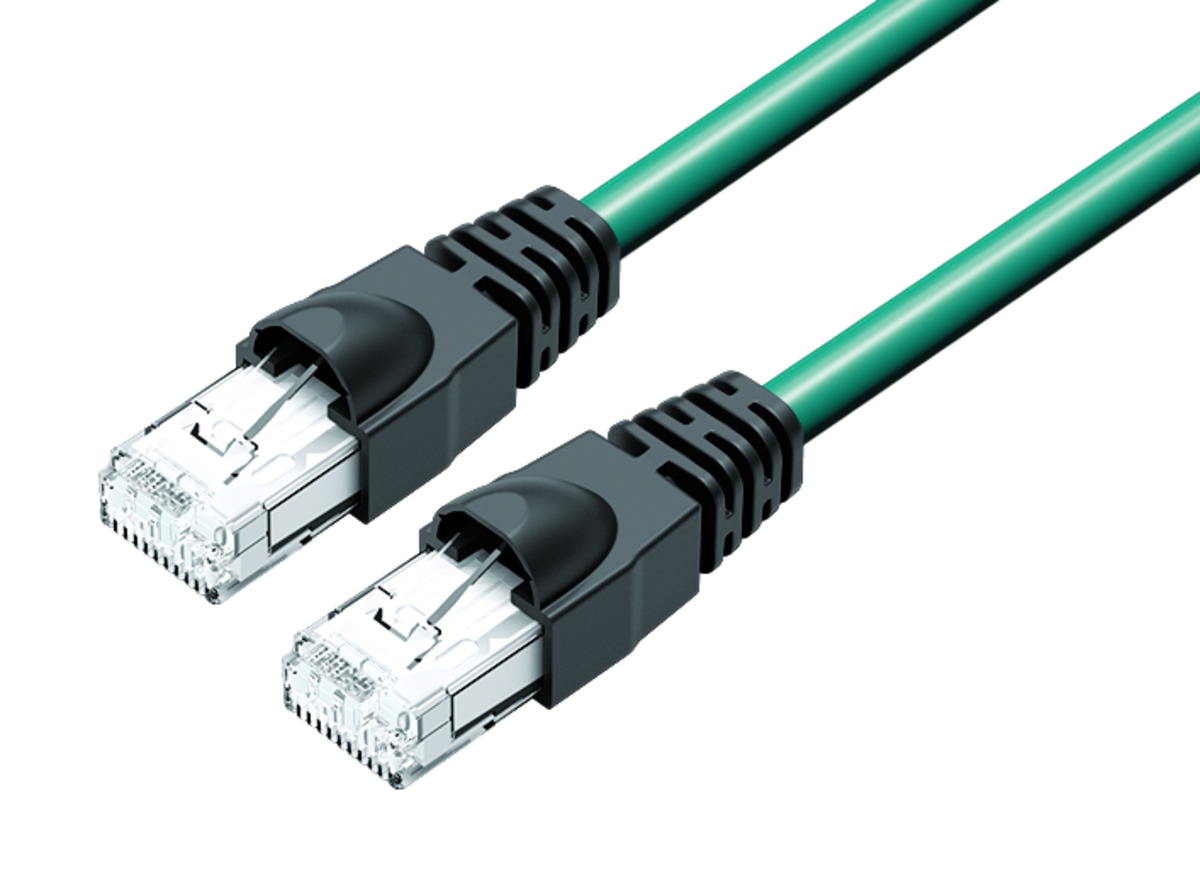
The most immediate way to know if a cable is an RJ45 is to examine the connector head. Historically and technically referred to as an 8P8C (8 Position, 8 Contact) modular connector, the RJ45 plug is designed to terminate twisted-pair cables.
When you look at the end of the connector, you will see eight small gold-plated metal channels. These are the "contacts" that make physical and electrical connection with the pins inside a female RJ45 port. Unlike the smaller RJ11 connectors used for landline telephones—which typically only have four or six positions—the RJ45 is significantly wider to accommodate the full eight-wire array required for Ethernet data transmission.
The connector body is typically made of clear or colored polycarbonate. A key identifying feature is the flexible plastic locking tab (or "clip") on the top or bottom. This tab ensures the cable remains securely seated in the port, producing a distinct "click" when fully inserted. In 2026, many high-quality RJ45 cables feature "snagless" boots—molded plastic covers over the tab that prevent it from breaking or getting caught on other cables during installation.
2. Verify the Internal Wiring and Color Codes
If you can see through the clear plastic of the connector, the internal wiring provides an absolute confirmation of an RJ45 cable. These cables contain four pairs of insulated copper wires, for a total of eight individual conductors. These wires are twisted together in pairs to reduce electromagnetic interference (EMI) and crosstalk between the channels.
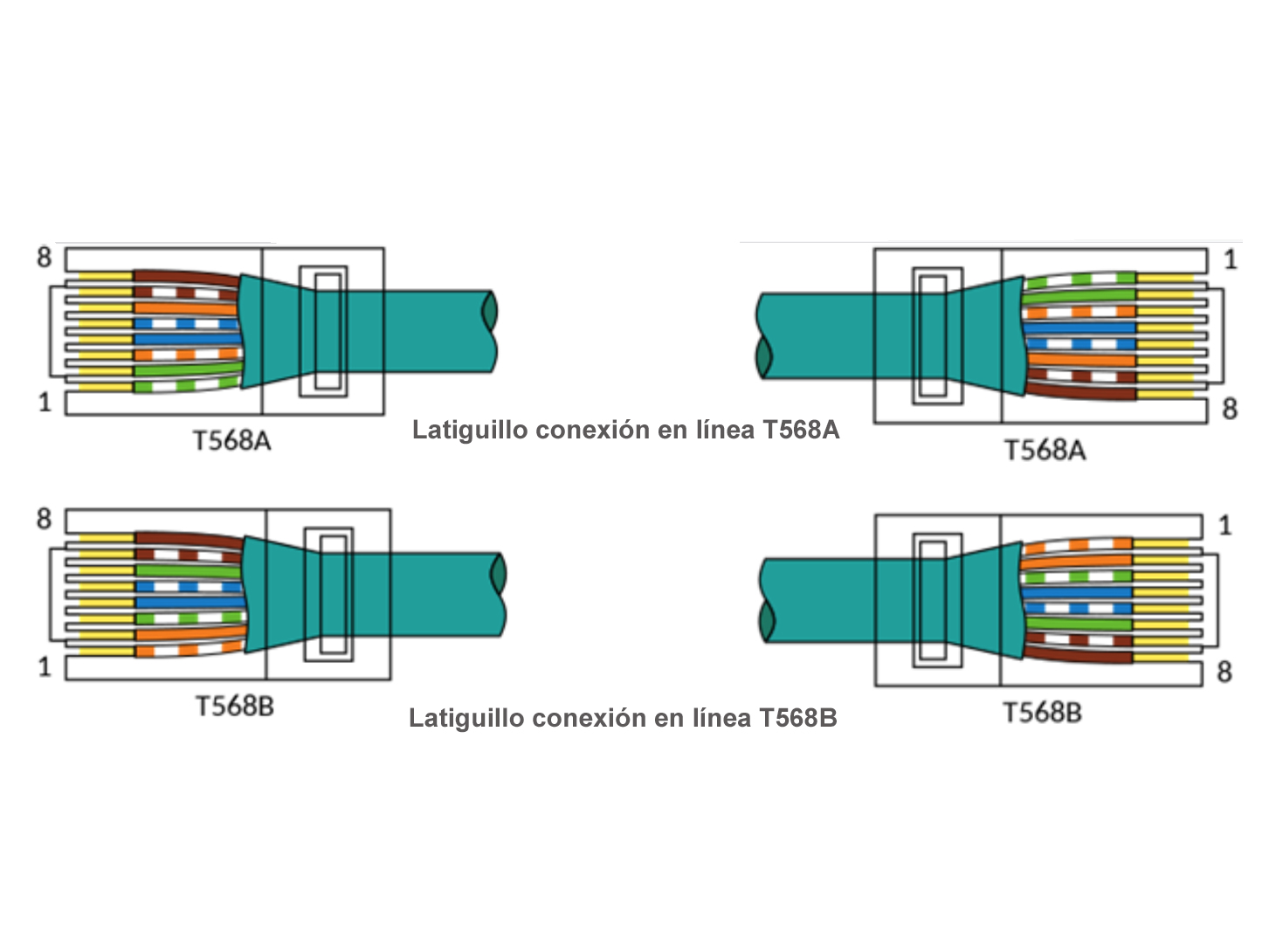
To know you are looking at a standard RJ45 Ethernet cable, check for the specific color-coding defined by the TIA/EIA-568 standards. You will observe the following colors:
- Orange/White stripe and Solid Orange
- Green/White stripe and Solid Green
- Blue/White stripe and Solid Blue
- Brown/White stripe and Solid Brown
The order in which these wires are arranged determines the wiring standard (T568A or T568B). In most modern commercial and residential installations, the T568B standard is the default. If the colors do not match this specific eight-wire palette, you may be looking at a proprietary serial cable or a different type of modular connector entirely.
3. Read the Category Rating on the Cable Jacket
The cable jacket (the outer insulation) is a goldmine of technical information. Manufacturers print specific details along the length of the cord that tell you exactly what the cable is capable of and what standard it meets. This is often the most reliable way to differentiate between various generations of Ethernet technology.
Look for text that includes the word "Category" or the abbreviation "Cat." As of 2026, the following ratings are the most common:
- Cat5e: An older standard still found in many homes, capable of 1 Gbps speeds.
- Cat6: Supports up to 10 Gbps over shorter distances (up to 55 meters) and features a "spline" (a plastic separator) inside to reduce interference.
- Cat6a: The current "gold standard" for residential and office builds, supporting 10 Gbps at a full 100-meter range with improved shielding.
- Cat8: Designed for data centers, supporting speeds up to 40 Gbps over very short distances.
In addition to the Category rating, the jacket may indicate whether the cable is UTP (Unshielded Twisted Pair) or STP/FTP (Shielded/Foiled Twisted Pair). Shielded cables are thicker and stiffer because they include a layer of foil or braided mesh to protect the data signal from high-interference environments, such as those near heavy machinery or large power lines.
4. Compare the Width to Other Registered Jacks
Because "RJ" stands for Registered Jack, many people confuse different types of modular connectors. A definitive way to know an RJ45 cable is to perform a visual size comparison.
The RJ45 is the largest of the common modular connectors used in consumer electronics.
- RJ11/RJ12: These are the small jacks used for standard telephones or fax machines. They are much narrower and contain only 4 to 6 positions. An RJ11 plug will physically fit into an RJ45 port, but it will be loose and will not function for networking. An RJ45 plug is too wide to ever fit into an RJ11 port.
- RJ48: This is physically identical in size to an RJ45 but is used for T1 data lines. While they look the same, they use different pinouts and are rarely encountered in home or standard office environments.
If the connector is approximately 11.6mm wide and designed for a rectangular port found on the back of a router, it is almost certainly an RJ45.
5. Identify the Port Compatibility
You can identify an RJ45 cable by the equipment it connects. Unlike USB-C or HDMI, which serve peripheral and video roles, the RJ45 cable is the universal language of the Ethernet Port.
Check the devices you are using. RJ45 cables are designed for:
- Network Switches and Hubs: The backbone of any wired network.
- Routers and Modems: Specifically the "LAN" and "WAN" ports.
- Computers and Laptops: Desktop motherboards almost always include a dedicated RJ45 port; thinner laptops in 2026 often require a USB-C to RJ45 adapter.
- Smart TVs and Gaming Consoles: Used for low-latency gaming and 8K streaming.
- Network Attached Storage (NAS): High-speed data storage devices.
If the cable is intended to provide a hardwired internet or local network connection to any of these devices, it is an RJ45 cable.
6. Analyze the Twisted Pair Construction
The "magic" of an RJ45 cable lies in its internal geometry. If you were to strip back the outer jacket, you would find the four pairs of wires mentioned earlier. However, the way they are twisted is a key identifier.
In higher-rated cables like Cat6 and Cat6a, the twists are much tighter (more twists per inch) than in Cat5e. This physical characteristic is not just for show; it is a mathematical requirement to cancel out magnetic fields and allow for higher frequency signaling. Furthermore, many RJ45 cables (specifically Cat6 and above) include a longitudinal separator (often called a cross-web or spline). This plastic core keeps the four pairs separated from each other throughout the length of the cable, further reducing crosstalk. If you see this internal cross-shaped structure when the cable is cut, you are looking at a high-performance RJ45 Ethernet cable.
7. Evaluate Power Delivery (PoE) Capabilities
In 2026, one of the most significant ways to "know" an RJ45 cable is by its ability to carry electricity alongside data. This technology is known as Power over Ethernet (PoE).
If you have a cable that is powering a Security Camera (IP Camera), a VoIP phone, or a Wi-Fi Access Point without a separate power brick plugged into a wall outlet, that cable is an RJ45. The IEEE 802.3 standards (such as 802.3bt) allow RJ45 cables to deliver up to 90-100 watts of power. While the cable looks the same as a non-PoE cable, the fact that it is transmitting both a 10Gbps signal and enough electricity to run a device confirms it is a high-spec RJ45 cable.
Comparison of RJ45 Cable Categories (Standards as of 2026)
| Category | Max Data Rate | Bandwidth (Frequency) | Max Distance | Common Use Case |
|---|---|---|---|---|
| Cat5e | 1 Gbps | 100 MHz | 100 Meters | Basic home internet |
| Cat6 | 10 Gbps | 250 MHz | 37-55 Meters | Home offices, gaming |
| Cat6a | 10 Gbps | 500 MHz | 100 Meters | Modern smart homes, Enterprise |
| Cat7 | 10 Gbps | 600 MHz | 100 Meters | Industrial (Shielded only) |
| Cat8 | 40 Gbps | 2000 MHz | 30 Meters | Data centers, short-run server links |
Technical Specifications and Standards
To truly understand what an RJ45 cable is, one must look at the standards bodies that govern them. The Telecommunications Industry Association (TIA) and the Electronic Industries Alliance (EIA) maintain the TIA/EIA-568-D standards, which dictate everything from the thickness of the copper (usually 23 or 24 AWG) to the precise timing of the electrical pulses.
The "Registered Jack" designation itself comes from the FCC's old registration program, which was intended to ensure that equipment from different manufacturers could work together on the public telephone network. Over decades, the "45" variant evolved from a simple telephone interface into the primary vehicle for the Ethernet protocol (IEEE 802.3).
In the context of 2026, high-quality RJ45 cables often utilize Oxygen-Free Copper (OFC). You may encounter "CCA" (Copper Clad Aluminum) cables, which are cheaper but significantly less reliable and can be a fire hazard when used for PoE. Knowing how to identify genuine copper versus CCA—usually by the weight of the cable or by scraping the tip of a wire to see if it's silver (aluminum) underneath—is a critical skill for any IT professional or home enthusiast.
Common Mistakes in Identification
It is easy to misidentify an RJ45 cable if you are only looking at the connector superficially. Here are three common traps:
- Confusing it with RJ11: As mentioned, the RJ11 is smaller. If you try to plug an RJ11 into your computer, it will wiggle and the internet will not work.
- Assuming all RJ45s are the same: A Cat5e cable and a Cat6a cable look nearly identical at a glance. However, using a Cat5e cable on a 10-Gigabit internet connection will create a massive bottleneck. Always check the jacket printing.
- Crossover vs. Straight-Through: In the past, "crossover" RJ45 cables were needed to connect two computers directly. Modern hardware in 2026 uses Auto-MDIX, which means the port automatically adjusts. You rarely need to worry about this anymore, but it's a historical nuance of the RJ45 world.
Practical Troubleshooting for RJ45 Cables
If you have identified an RJ45 cable but your connection is failing, the problem often lies at the termination point.
- The "Wiggle" Test: If the cable is plugged in but the link light on your router isn't blinking, check the locking tab. If the tab is broken, the pins may not be making contact.
- Pin Alignment: Look through the clear plastic of the connector. All eight gold pins should be pressed down firmly and evenly. If one pin is higher than the others, it will cause intermittent connectivity or "packet loss."
- Cable Testers: For a definitive answer, professional technicians use a continuity tester. You plug both ends of the RJ45 cable into the device, and it cycles through lights 1 through 8. If any light fails to turn on, a wire is broken inside the cable.
Frequently Asked Questions
Can I use an RJ45 cable for my phone line?
While an RJ45 port is physically compatible with an RJ11/RJ12 phone plug, the reverse is generally not true. You can technically run telephone signals over an RJ45 cable (since it has more wires than needed), but standard phone equipment uses the smaller RJ11 jacks. Using an RJ45 cable for a phone usually requires a specific adapter or custom wiring at the wall jack.
What is the difference between a patch cable and an Ethernet cable?
In most cases, they are the same thing. "Ethernet cable" is the general term for the medium. A "patch cable" specifically refers to a shorter RJ45 cable (usually 1 to 10 feet) used to connect a device to a wall outlet or to connect two devices within a server rack.
How do I know if my RJ45 cable is "Shielded"?
Check the jacket for the letters STP, FTP, or SFTP. If the connector itself has a metal metal "shroud" or casing around the plastic, it is a shielded cable. Shielded cables require shielded ports and proper grounding to be effective; otherwise, they can actually attract more interference than standard UTP cables.
Is Cat8 overkill for home use in 2026?
For most users, yes. Cat8 is designed for extremely high speeds over short distances. For a standard home network, Cat6a provides all the bandwidth necessary for 10 Gbps speeds over 100 meters, which covers almost any residential floor plan. Cat8 is also much stiffer and harder to route through walls.
Does the length of the RJ45 cable affect speed?
For standard Ethernet (Cat5e through Cat6a), the maximum certified length is 100 meters (328 feet). If you exceed this length, the signal begins to degrade, leading to slower speeds or a complete loss of connection. If you need to go further, you must use a network switch as a repeater or switch to fiber optics.
Next Actions and Recommendations
To ensure your network is performing at its peak in 2026, start by auditing the RJ45 cables currently in your home or office. Locate the text on the cable jackets; if you find any labeled "Cat5" (without the 'e') or cables with no labels at all, these should be the first candidates for replacement.
For new installations, the recommendation is to use Cat6a as your baseline. It provides the best balance of speed, future-proofing for 10Gbps internet tiers, and resistance to interference. When purchasing, always ensure you are buying 100% Solid Copper cables rather than Copper Clad Aluminum (CCA) to ensure safety and long-term reliability. If you are crimping your own cables, invest in a high-quality ratcheting crimp tool and "pass-through" RJ45 connectors, which make it much easier to verify that the eight color-coded wires are in the correct order before you finalize the connection.