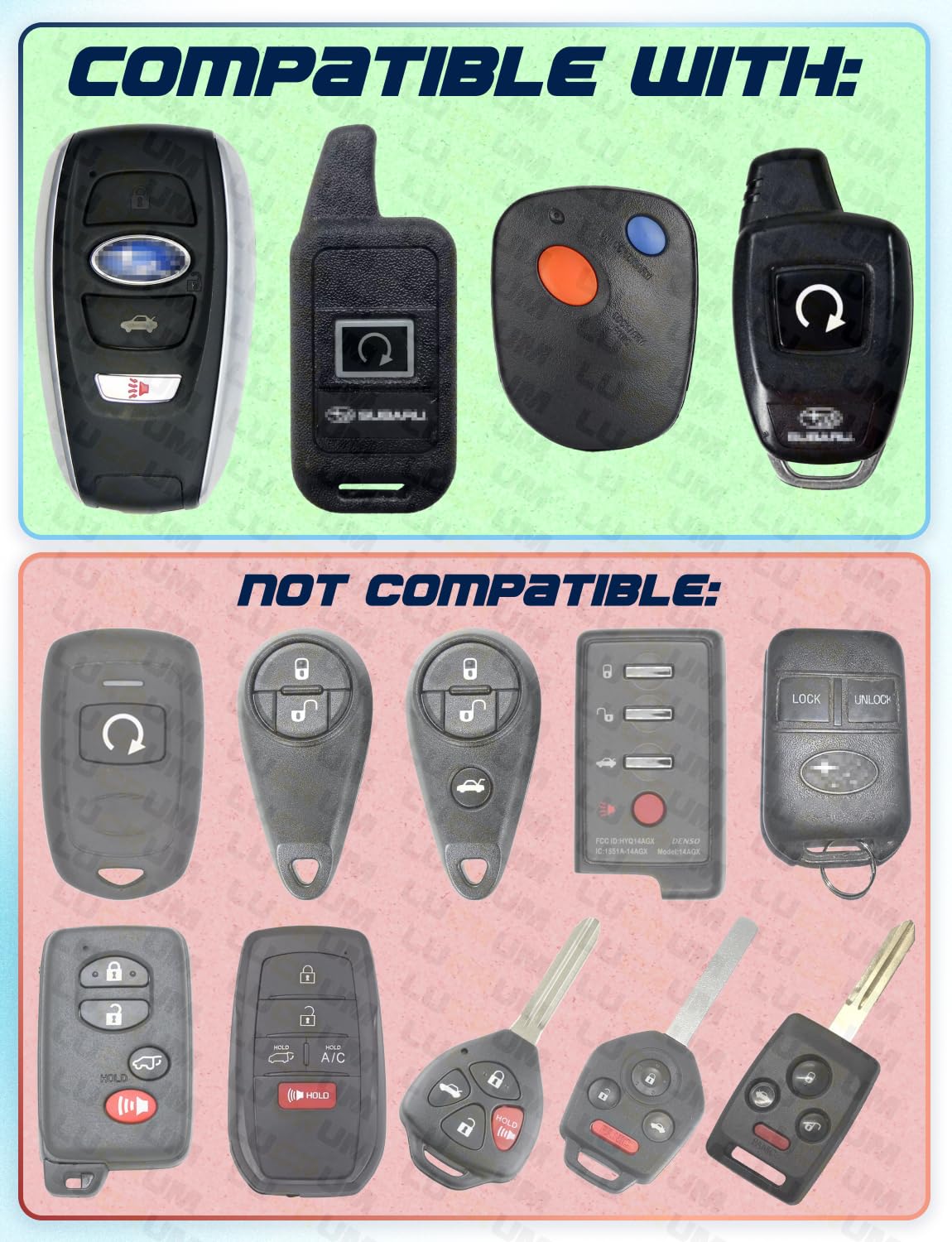
To replace the battery in a 2016 Subaru key fob, you must first identify your fob type: the "Smart" push-button start fob (CR2032 battery) or the integrated "Turn-Key" remote (CR1620 battery). Open the casing using a flathead screwdriver, swap the battery while maintaining correct polarity, and snap the housing back together.
The 2016 model year represents a significant period for Subaru, as it saw the widespread adoption of advanced Keyless Access systems across popular models like the Outback, Legacy, Forester, and Crosstrek. For owners in 2026, these vehicles have likely reached a point where the key fob has undergone two or three battery cycles. Understanding the nuances of this simple maintenance task can prevent the inconvenience of being locked out or unable to start your vehicle.
Identifying Your 2016 Subaru Key Fob Type
Before purchasing a replacement battery, you must distinguish between the two primary fob designs Subaru utilized in 2016. Because Subaru often offers different ignition systems based on trim levels (e.g., Premium vs. Limited), two identical-looking 2016 Foresters might use completely different key fobs.
The Keyless Access Fob (Push-Button Start)
This fob is typically found on higher trim levels (Limited, Touring, or EyeSight-equipped models). It is a teardrop or rectangular-shaped "brick" that does not have a visible metal key protruding from it. Instead, a physical emergency key is tucked inside the housing. This unit relies on a constant proximity signal to allow for door unlocking and push-button ignition.
- Primary Battery: CR2032 3V Lithium Coin Cell.
- Vehicles: Often found in 2016 Outback, Legacy, and higher-trim Crosstrek or Forester models.
The Integrated Key Remote (Turn-Key Ignition)
This is a traditional physical key with a plastic head containing buttons for lock, unlock, and panic functions. It is used in "standard" or "Premium" trims that require you to insert the key into the steering column to start the engine.
- Primary Battery: CR1620 3V Lithium Coin Cell.
- Vehicles: Common in 2016 Forester (Base/Premium), Crosstrek (Base), and WRX/STI models without the push-start option.
Required Tools and Prerequisites
Performing a 2016 Subaru key fob battery replacement requires minimal tools, but using the correct ones ensures you do not damage the plastic housing or the delicate internal circuitry.
- Replacement Battery: Ensure you have the exact model required (CR2032 or CR1620). As of 2026, it is highly recommended to use name-brand lithium cells like Panasonic (Subaru's OEM choice), Duracell, or Energizer. Generic batteries often have lower voltage consistency, which can lead to "Low Key Fob Battery" warnings appearing on your dashboard prematurely.
- Small Flathead Screwdriver: A jeweler's screwdriver or a small precision flathead is ideal.
- Microfiber Cloth: Placing the cloth over the tip of your screwdriver prevents the metal from marring or scratching the plastic seams of the fob.
- Clean Workspace: The internal components of the fob, particularly the transponder chip and the rubber button membrane, are sensitive to dust and moisture.
Step-by-Step Guide: Keyless Access Smart Fob (CR2032)
The 2016 Keyless Access fob is designed to be user-serviceable, but the internal circuit board is exposed once the case is opened, so proceed with caution.
1. Remove the Emergency Mechanical Key
On the back of the fob, there is a small silver or black release button. Press this button while pulling on the silver keychain loop at the top. The mechanical emergency key will slide out. This key is what you would use to manually unlock the driver’s door if the fob battery dies completely.
2. Pry Open the Case
Look into the slot where the mechanical key was just removed. You will see a small indentation or a seam designed to act as a leverage point. Insert your flathead screwdriver (wrapped in a microfiber cloth) into this gap. Gently twist the screwdriver. You should hear a light "pop" as the two halves of the plastic shell begin to separate. Work your way around the edge of the fob until the back cover can be lifted off.
3. Access the Battery
Inside, you will find a circular battery held in place by small plastic or metal tabs. In some 2016 variants, the battery may be hidden behind a secondary circular plastic cap. If so, lift that cap gently. Use your precision screwdriver to pop the old CR2032 battery out of its housing.
4. Install the New Battery
Slide the new CR2032 battery into the slot. The positive (+) side must face upward (towards you). You should be able to see the text and the "+" sign on the battery once it is installed. Press down firmly to ensure it is seated under the retaining clips.
5. Reassemble and Test
Align the back cover with the front housing and press them together firmly. You should hear several clicks as the perimeter seals. Reinsert the emergency mechanical key. Once assembled, stand near your vehicle and press the lock/unlock buttons to verify the signal is reaching the car.
Step-by-Step Guide: Integrated Key Remote (CR1620)
The integrated key used in 2016 Subaru models is slightly more rugged but uses a smaller battery that tends to have a shorter lifespan than the CR2032.
1. Locate the Access Point
On the side of the plastic key head, there is a small notch along the seam. Unlike the smart fob, there is no emergency key to remove first.
2. Open the Housing
Insert your small flathead screwdriver into the notch and twist gently. The key head is composed of two plastic halves. Once they separate, a small, independent electronic module (usually a black or translucent box) will be visible inside.
3. Open the Electronic Module
Lift the electronic module out of the plastic key head. This module contains the buttons and the battery. Use your fingernail or a very small flathead to pop the cover off this module. This reveals the CR1620 battery.
4. Replace the Battery
Remove the old CR1620. When inserting the new one, ensure the positive (+) side is facing down toward the bottom of the module (or as indicated by the small "+" engraving on the plastic). This is the opposite orientation of many smart fobs, so pay close attention to the markings.
5. Re-sealing the Key
Snap the module cover back on, place the module back into the key head, and snap the two halves of the key head together. Test the buttons; a small red LED on the face of the key should flash when a button is pressed, indicating power is flowing correctly.
Comparison of 2016 Subaru Fob Specifications
| Feature | Keyless Access (Smart Fob) | Integrated Key (Standard) |
|---|---|---|
| Battery Type | CR2032 (3V Lithium) | CR1620 (3V Lithium) |
| Average Lifespan | 2–4 Years | 3–5 Years |
| Typical Range | 30–50 Feet | 20–40 Feet |
| Key Extraction | Internal Emergency Key | Fixed Metal Blade |
| Primary Failure Sign | "Key Not Detected" Warning | Reduced Remote Range |
Troubleshooting Common Issues After Replacement
Even with a fresh battery, you may encounter issues. In 2026, as these components age, mechanical wear becomes more common.
The Fob Still Doesn't Work
If the battery is new and the fob is non-functional, check the contact tabs inside the fob. Over time, these small metal prongs can become flattened. Use your screwdriver to very gently bend them upward so they make firm contact with the surface of the battery. Additionally, ensure there is no corrosion. If you see white or green powder, clean it off with a Q-tip dipped in a tiny amount of isopropyl alcohol.
"Key Not Detected" Warning (Smart Fobs Only)
If your 2016 Subaru (like an Outback or Legacy) displays "Key Not Detected" even after a battery change, the fob may have lost its "handshake" with the car's computer. This rarely requires professional reprogramming for a simple battery swap. Instead, try starting the car by holding the Subaru logo on the back of the fob directly against the Start/Stop button while pressing the brake. This uses an induction chip that doesn't require battery power to authenticate the key, often "resetting" the connection.
Short Range or Delayed Response
If you find you have to be standing right next to the door for the fob to work, you may have received a "dud" battery or one that has been sitting on a shelf too long. Use a multimeter to check the voltage; a "new" 3V lithium battery should actually read between 3.1V and 3.3V. Anything below 3.0V is technically depleted for the purposes of a high-draw smart fob.
Maintaining Your Subaru Key Fob
To maximize the interval between battery replacements, consider how you store your keys. For 2016 Subaru models with Keyless Access, the fob is constantly "listening" for a signal from the car. If you store your keys within 15 feet of the vehicle (such as on a hook near the garage), the fob and the car may stay in a high-power communication state, draining the battery in months rather than years.
Additionally, avoid exposing the fob to extreme temperatures. Leaving your keys in a frozen car overnight or on a hot dashboard in the summer can significantly degrade the lithium chemistry of the coin cell.
Frequently Asked Questions
Do I need to reprogram my 2016 Subaru fob after changing the battery?
No, replacing the battery does not erase the fob's programming. The pairing between the fob's transponder and the vehicle's ECU is stored in non-volatile memory. As long as you replace the battery correctly and do not damage the circuit board, the car will recognize the fob immediately.
Why does my 2016 Subaru use a CR1620 instead of the common CR2032?
The integrated key remotes are designed to be slim to fit comfortably in a pocket with a metal blade. The CR1620 is significantly thinner (2.0mm) than the CR2032 (3.2mm), allowing for the compact design of the "Turn-Key" style remote.
Can I use a CR2025 battery if I don't have a CR2032?
While both are 3V lithium batteries, a CR2025 is thinner than a CR2032. While it might technically power the fob, it will likely be loose in the housing, leading to intermittent connection issues and potential damage to the contact tabs. Always use the specific battery model designated for your fob.
My fob buttons work, but the car won't start. Is the battery dead?
If the buttons unlock the doors but the car won't start, the issue is likely not the fob battery. For turn-key models, the immobilizer chip (which allows the car to start) is passive and does not require the battery. For push-button models, if the battery were dead, the buttons wouldn't work either. This suggests a deeper issue with the vehicle's immobilizer system or the car battery itself.
How do I know when the battery is getting low?
Subaru vehicles from 2016 usually provide a warning on the Multi-Function Display (the screen between the gauges) that says "Access Key Battery Low." For models without this display, you will notice a significant decrease in the distance from which you can lock or unlock the doors.
Final Recommendation
When replacing your 2016 Subaru key fob battery, the most important step is identifying the correct battery size—CR2032 for push-start and CR1620 for turn-key. Always keep a spare battery in your glovebox or at home, as these lithium cells have a long shelf life. If a battery replacement does not resolve your issues, and you have verified the battery is inserted with the correct polarity, your next step should be a professional diagnostic at a Subaru dealership or an automotive locksmith to check for circuit board failure.