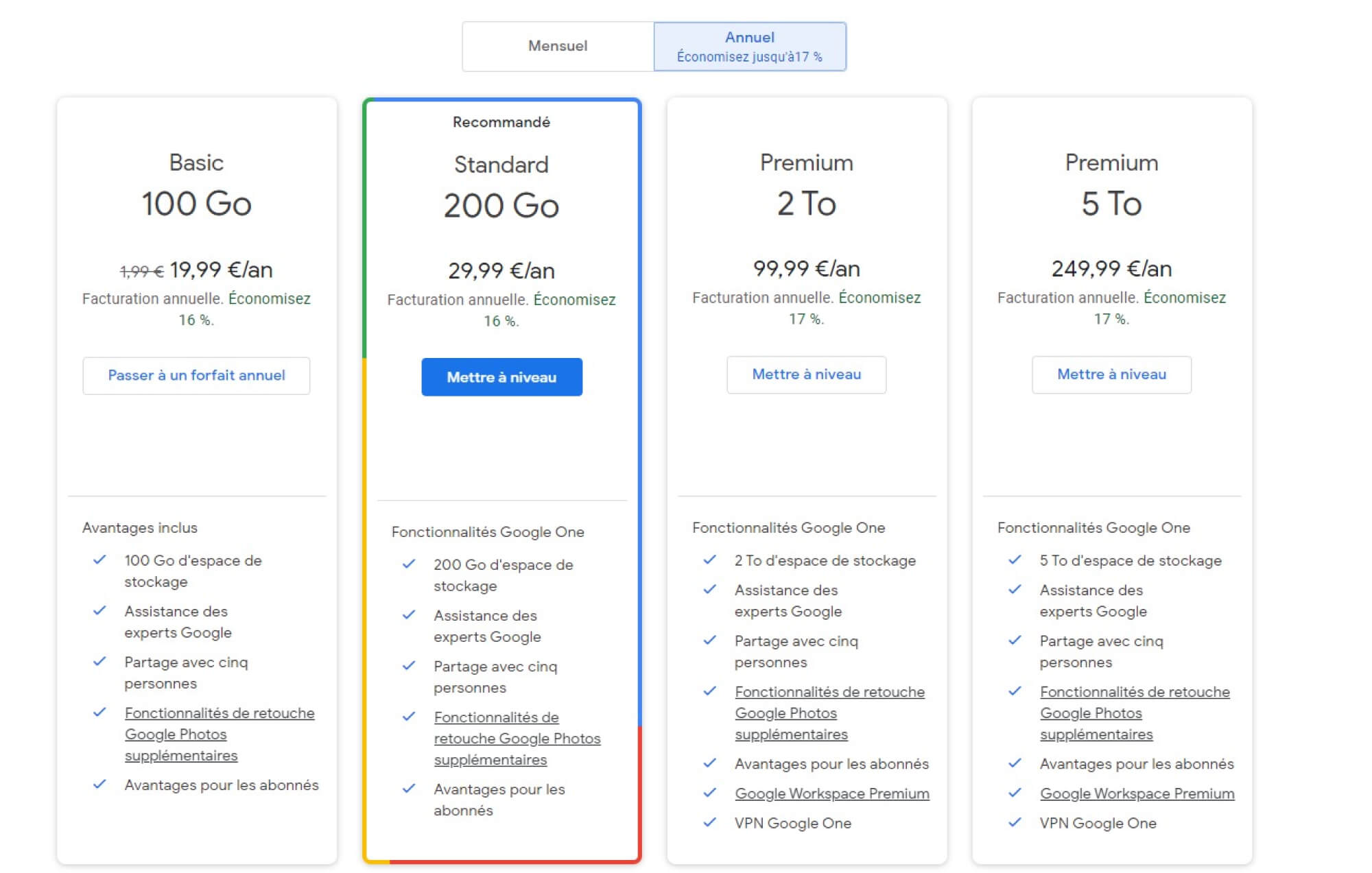
The Google One 100 GB plan is the entry-level paid subscription service designed to expand your storage capacity across Google Drive, Gmail, and Google Photos. Priced at approximately $1.99 per month (or $19.99 annually), it increases your total account limit from the standard 15 GB to 100 GB, while adding benefits like family sharing, expert support, and advanced photo editing features.
Understanding the Google One 100 GB Ecosystem
In 2026, the digital landscape requires more storage than ever. High-resolution photography, 4K video recording, and large email attachments quickly exhaust the standard 15 GB of free storage provided to every Google Account. The 100 GB Google Drive plan, officially part of the Google One brand, serves as the first "bridge" for users who have outgrown the free tier but do not yet require the massive terabyte-scale storage used by professionals or video editors.
Google One is not merely a "Drive" upgrade. It is an umbrella subscription that manages storage across three primary pillars: Google Drive (files and documents), Google Photos (images and videos), and Gmail (emails and attachments). When you subscribe to the 100 GB plan, this pool of data is shared among these services. If you have 40 GB of photos and 10 GB of emails, you still have 50 GB remaining for Drive files.
The transition from "Google Drive Storage" to "Google One" marked a shift in how the company treats its users. Instead of just selling bits and bytes, Google One offers a suite of management tools. Subscribers gain access to a dedicated app and web interface that helps them visualize exactly what is taking up space, offering suggestions for deleting large files, spam emails, or blurry photos that may be cluttering the account.
Core Features and Benefits of the 100 GB Tier
While the primary draw of the plan is the 85 GB of additional space (on top of the 15 GB base), the 100 GB tier includes several "quality of life" features that add significant value to the $1.99 monthly investment.
Enhanced Google Photos Editing Tools
As of 2026, Google has integrated advanced AI-driven editing tools into the Google One subscription. While basic editing is available to everyone, 100 GB subscribers get access to premium features such as Magic Eraser, Camouflage, and Portrait Light. These tools allow users to remove unwanted background objects or adjust the lighting on a subject's face after the photo has been taken. These features, previously restricted to Pixel device owners, are unlocked for any device—including iPhones and older Android models—provided the user has a Google One subscription.
Family Sharing Capabilities
One of the most cost-effective aspects of the 100 GB plan is the ability to share the storage with up to five additional family members. When you invite a family member, they do not see your files, and you do not see theirs. Instead, everyone continues to use their own 15 GB free allocation first. Once a member exceeds their personal 15 GB, they begin drawing from the "communal" pool of 100 GB. This makes the plan an excellent choice for households where several people are slightly over their free limit but don't need individual paid plans.
Direct Access to Google Experts
Free users typically rely on help forums and automated documentation for troubleshooting. Google One subscribers at the 100 GB level gain access to "Google Experts." This is a support tier where you can chat or email with actual technicians regarding Google products. Whether you are having trouble syncing a folder on your desktop or can't figure out why a specific email isn't sending, this direct line of communication provides peace of mind.
Dark Web Monitoring
In an era of frequent data breaches, Google includes a "Dark Web Report" feature for its 100 GB subscribers. Google monitors the dark web for your personal information—such as your email address, phone number, or date of birth—and notifies you if your data is found in a known breach. This proactive security measure is a significant value-add for users concerned about identity theft.
Pricing and Value Analysis
Deciding between a monthly and an annual subscription is the first financial choice a user must make. In 2026, the pricing remains structured to reward long-term commitment.
| Feature | Monthly Plan | Annual Plan |
|---|---|---|
| Cost | ~$1.99 | ~$19.99 |
| Total Storage | 100 GB | 100 GB |
| Effective Monthly Rate | $1.99 | ~$1.66 |
| Savings | 0% | ~16% |
| Commitment | Month-to-month | 12 Months |
| Family Sharing | Included | Included |
For most users, the annual plan is the superior choice. The $19.99 yearly fee is roughly equivalent to the cost of a few cups of coffee, providing a full year of digital "breathing room." The monthly plan is better suited for individuals who may only need temporary storage for a specific project or those who prefer to keep their monthly overhead as low as possible without an upfront lump sum.
Technical Specifications and Requirements
To utilize the 100 GB plan effectively, users must understand the technical environment in which Google One operates.
- Platform Compatibility: Google One works across Android, iOS, Windows, and macOS. On mobile, the Google One app serves as the hub for managing storage and backups. On desktop, the "Google Drive for Desktop" application handles the synchronization of local files to the 100 GB cloud pool.
- File Size Limits: Even with a paid plan, Google Drive maintains certain file size limits. Most individual files can be up to 5 TB in size (provided you have the storage space), but for the 100 GB plan, your limit is effectively your remaining quota.
- Synchronization Logic: Google Drive offers two modes: "Stream files" and "Mirror files." Streaming keeps files in the cloud and only downloads them when you open them, saving local hard drive space. Mirroring keeps a copy on both your computer and the cloud. 100 GB users often prefer streaming to keep their physical devices from cluttering up.
- Backup Integration: The 100 GB plan allows for full phone backups. This includes SMS messages, contacts, and app data. If you lose your phone or upgrade to a new one, your Google One 100 GB subscription ensures that your "digital life" can be restored seamlessly.
How to Upgrade to the 100 GB Plan
The process of upgrading is designed to be frictionless. Users can initiate the upgrade through several touchpoints:
Through the Google One Website
- Navigate to the official Google One landing page.
- Ensure you are logged into the correct Google Account.
- Select the 100 GB plan.
- Choose your billing cycle (Monthly or Yearly).
- Enter your payment details through Google Pay. The storage is usually applied to your account instantly.
Through the Google Drive or Photos App
If you are approaching your 15 GB limit, Google will often display a "Storage full" or "Storage low" banner. Clicking "Increase Storage" will take you directly to the plan selection screen within the app. On iOS, this transaction is typically handled via the Apple App Store billing system, while on Android, it uses the Google Play Store billing.
Regional Variations
It is important to note that pricing may vary based on your local currency and regional tax laws. In the European Union, prices may include VAT, while in the United States, sales tax may be added at the time of checkout depending on your state of residence.
Comparison with Alternatives: Why Choose 100 GB?
When looking at the "1 100 gb google drive plan," it is helpful to compare it against its closest competitors in 2026.
- Apple iCloud+ (50 GB or 200 GB): Apple does not offer a 100 GB tier. Their entry tier is 50 GB for $0.99, and the next jump is 200 GB for $2.99. If you find 50 GB too small but 200 GB too large, Google’s 100 GB plan sits in the "Goldilocks" zone.
- Microsoft OneDrive (100 GB): Microsoft offers a standalone 100 GB plan for a similar price point. However, the value of the Google plan often wins out for users who are already heavily invested in the Android ecosystem or use Gmail as their primary communication tool.
- Dropbox: Dropbox historically focuses on larger storage tiers (2 TB+), making them much more expensive for casual users who only need 100 GB of space.
The primary reason users choose the Google 100 GB plan is integration. Since Android phones automatically back up photos to Google Photos and documents to Drive, staying within the same ecosystem eliminates the need for third-party sync apps that can drain battery life and complicate the user experience.
Common Pitfalls and Storage Management
Simply buying 100 GB of storage does not solve the problem of "digital hoarding." Without proper management, even 100 GB can be filled within a year.
Identifying Storage Hogs
Gmail is often an overlooked storage consumer. Years of newsletters with images and large PDF attachments can consume 10-20 GB easily. Before upgrading, or as part of your 100 GB maintenance, use the Google One Storage Manager to filter emails by size. Deleting attachments larger than 10 MB can often reclaim significant space.
WhatsApp Backups
On Android devices, WhatsApp backups are stored in Google Drive. If you are in many active groups with high-frequency video sharing, your WhatsApp backup can easily grow to 20 GB or more. Users on the 100 GB plan should periodically clear out old WhatsApp media to ensure the "1 100 gb google drive plan" lasts as long as possible.
High-Quality vs. Original Quality
In Google Photos, you can choose to store images in "Original Quality" or "Storage Saver" (formerly High Quality). Original Quality consumes the full file size of the photo, which is essential for professional photographers. However, for everyday snapshots, "Storage Saver" compresses the file slightly while maintaining excellent visual quality. Using Storage Saver can make your 100 GB limit feel like 200 GB.
Troubleshooting Subscription Issues
Occasionally, users encounter issues where their storage doesn't update immediately after payment.
- Propagation Delay: It can sometimes take up to 24 hours for the new storage limit to reflect across all services (especially Gmail).
- Payment Failures: If your credit card expires, Google provides a grace period. If the payment isn't resolved, your account will eventually be locked for uploading. You will still be able to download your files and receive emails for a limited time, but you won't be able to add anything new.
- Account Mismatch: Ensure that the account you used to purchase the storage is the same one you are using on your mobile devices. Many users have multiple Gmail accounts and accidentally upgrade the wrong one.
Frequently Asked Questions
What happens to my files if I cancel the 100 GB plan?
If you cancel your subscription, your files are not immediately deleted. However, your storage limit will revert to the free 15 GB. If you are using more than 15 GB at that time, you will be unable to upload new files to Drive, back up new photos, or receive new emails until you either delete enough data to get below the 15 GB limit or resubscribe.
Can I upgrade from 100 GB to a higher plan later?
Yes. Google makes it very easy to move to the 200 GB or 2 TB tiers. When you upgrade, the price you paid for your current billing cycle is usually prorated, so you only pay the difference for the remainder of the month or year.
Does the 100 GB plan include a VPN?
As of 2024, Google discontinued the Google One VPN feature for most subscribers. In 2026, the 100 GB plan focuses primarily on storage, support, and photo editing features rather than network privacy tools.
Is the 100 GB shared with my Google Workspace account?
No. Google One is intended for personal Google Accounts (@gmail.com). If you use a Google Workspace account for business or school, storage is managed by your organization’s administrator through different pricing tiers and structures.
Does my 100 GB subscription remove ads from Gmail?
No. The Google One 100 GB plan is a storage and features subscription. It does not remove the advertisements found in the "Promotions" or "Social" tabs of Gmail.
Summary of Next Actions
If you are currently seeing "Storage almost full" warnings, the 100 GB Google One plan is the most logical and affordable next step. To get the most value out of your subscription, start by:
- Enrolling in the Annual Plan: Save 16% over the monthly cost.
- Setting up Family Sharing: Even if you don't use the full 100 GB, your spouse or children can benefit from the extra space.
- Running the Storage Manager: Clean out your "trash" and "spam" folders to ensure every gigabyte you pay for is being used for meaningful data.
- Enabling Phone Backups: Ensure your mobile device is set to back up to your new 100 GB pool so that your photos and messages are safe in the event of hardware failure.
The 1 100 gb google drive plan remains the industry standard for personal cloud storage in 2026, offering a balanced mix of capacity, security features, and ecosystem integration for a nominal cost.