Gran Turismo 7 offers a dedicated local multiplayer mode that allows two players to compete against each other on a single PlayStation console using a split-screen configuration. This feature provides a classic couch-co-op racing experience, enabling users to test their driving skills against friends or family members in real-time without the need for an active PlayStation Plus subscription or complex online lobby configurations.
Understanding the Split-Screen Architecture in Gran Turismo 7
The local multiplayer component, often referred to as "2P Split Screen," serves as the primary gateway for offline head-to-head racing in Gran Turismo 7. Designed for simplicity and accessibility, this mode bypasses the intricate server-side requirements of the game’s online Sport mode. When engaging in split-screen, the console handles all rendering, physics calculations, and input processing locally, ensuring that the gameplay remains fluid even if the player does not have a stable internet connection.
Unlike many modern racing titles that prioritize cloud-based synchronization, the split-screen architecture in Gran Turismo 7 is built on a "Plug-and-Play" philosophy. The system requires two functional controllers—either DualSense controllers or compatible racing wheels—to be connected to the console. Once both controllers are recognized, the game allocates a portion of the system’s graphical processing power to each half of the screen, providing a mirrored experience that retains the high-fidelity vehicle physics associated with the Gran Turismo franchise.
Prerequisites and Setup Requirements
To successfully initiate a local multiplayer session, players must satisfy a few technical and account-based requirements. Because Gran Turismo 7 is a feature-rich simulation, the game requires the base application to be fully installed and updated to the latest version before split-screen mode becomes accessible.
Hardware Requirements
- Controllers: Two PlayStation 5 DualSense controllers or two compatible racing wheels. It is common for players to mix one controller and one wheel, which the game supports seamlessly.
- Console: A PlayStation 4 or PlayStation 5 unit.
- Display: A television or monitor capable of handling split-screen output. While resolution is automatically adjusted, playing on a larger screen is recommended to compensate for the reduction in screen real estate per player.
User Account Configuration
The game requires two distinct user profiles on the console to track progress and assign inputs. When you enter the 2P Split Screen mode, the game will prompt for the second controller to be assigned to a specific user account. While you do not need two separate PlayStation Network accounts to play locally, creating a guest account or a secondary local profile is necessary for the game to distinguish between Player 1 and Player 2 for input mapping and settings.
Navigating the 2P Split Screen Menu
Accessing the split-screen feature is straightforward. Players must navigate to the "World Map" screen within the game, which serves as the central hub for all activities. From there, locate the "Multiplayer" pavilion, which is typically found toward the bottom-right section of the map. Once inside, you will see an icon specifically designated for "2P Split Screen."
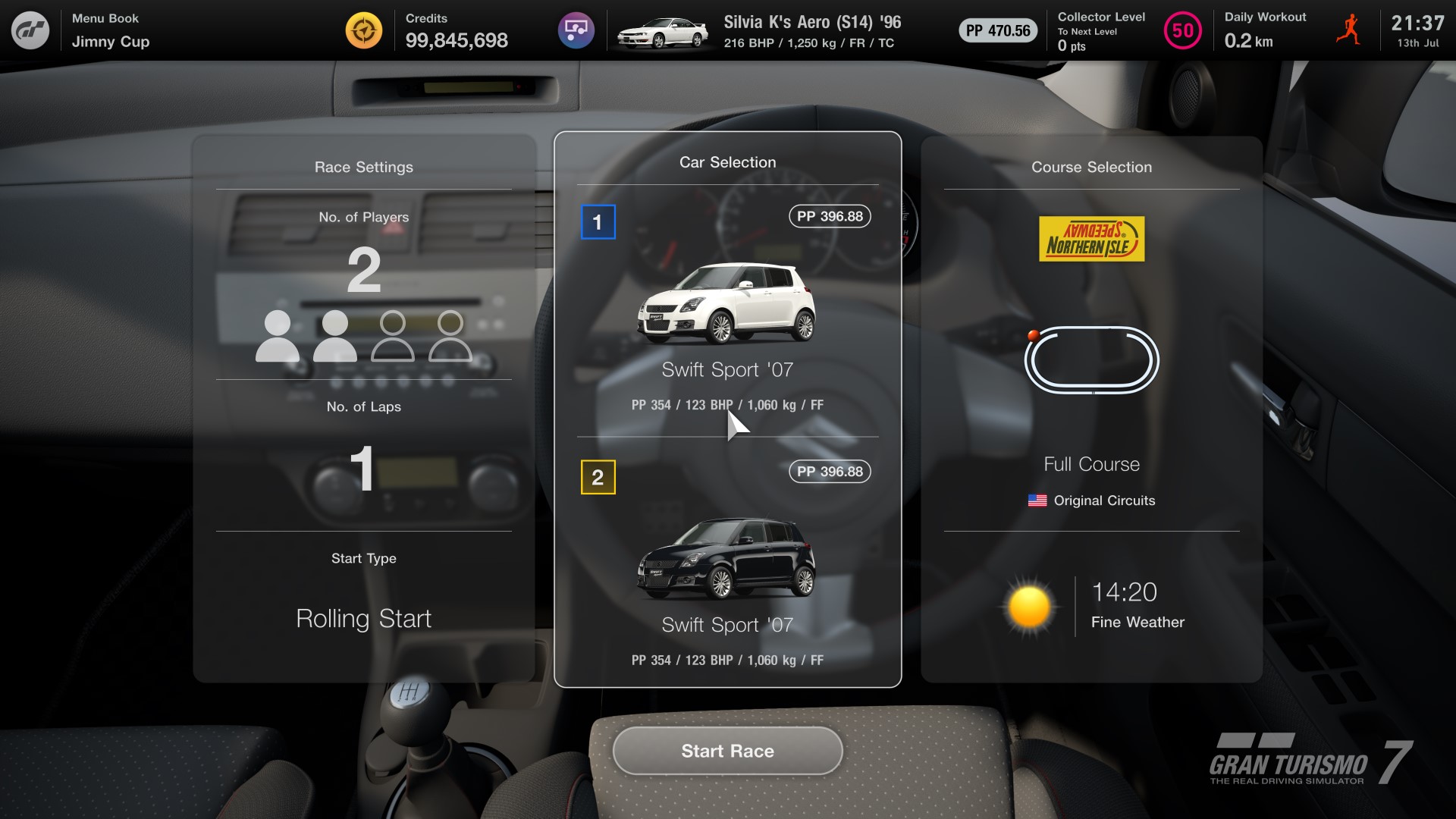
Upon selecting this, the game will transition to the car selection screen. A vital aspect of this interface is the customization of the race parameters. Players have the ability to select their preferred vehicle, adjust assist settings, and choose the track. It is important to note that the selection of cars is limited to those currently present in your personal Garage. Unlike some arcade-style racers that provide a pre-set list of cars, Gran Turismo 7 requires players to have acquired the desired vehicles through the game’s campaign (Café Menus) or the Brand Central shop prior to starting a local session.
Feature Comparisons: Local Multiplayer vs. Sport Mode
It is essential to understand the functional differences between the local split-screen experience and the online Sport mode. While both allow for competitive racing, they serve different purposes within the game's ecosystem.
| Feature | 2P Split Screen | Sport Mode (Online) |
|---|---|---|
| Connectivity | Offline compatible | Requires Internet |
| Vehicle Access | User’s own Garage | Limited to available pool/loaners |
| Matchmaking | Manual selection | Skill-based matchmaking |
| Progression | Credits earned are limited | Full career progression |
| Player Count | Exactly two | Up to 16-20 players |
The primary constraint of the split-screen mode is the omission of certain advanced AI features and complex race regulations that are present in online events. The local mode is designed for casual competition, focusing on driver ability rather than comprehensive team management or long-form endurance strategy.
Managing Performance and Limitations
While Gran Turismo 7 is highly optimized for the PlayStation platform, running two independent views of the game environment simultaneously requires significant hardware resources. Players may notice subtle adjustments in graphical fidelity when entering split-screen mode. This is a standard optimization measure to ensure that the frame rate remains stable and that input latency—the delay between pressing a button and the car reacting—is minimized.
To maximize the performance during your session, ensure that both controllers are fully charged and updated. If using a wireless connection, minimize interference from other devices in the room to prevent signal drops. If one player is using a wheel and the other a controller, the game will automatically adjust the vibration settings and input sensitivity for each device independently, but you can further fine-tune these in the "Options" menu before the race begins.
Troubleshooting Common Issues
Despite the straightforward nature of the mode, users may occasionally encounter issues related to input or display. Below are the most common scenarios and how to resolve them:
- Controller Not Detected: If the second controller is not appearing in the menu, ensure it is powered on and assigned to a local user profile. If using a wired connection, ensure the USB cable is data-capable, not just power-charging.
- Missing Car Options: If a specific car is not appearing in the selection menu, verify that it is in your Garage. If the car has been damaged or is currently being tuned, you may need to visit the Tuning Shop to finalize changes before it becomes eligible for selection.
- Screen Distortion: In rare instances, the display ratio may look stretched. Ensure that your PlayStation console’s video output settings are correctly configured for your TV’s aspect ratio (usually 16:9).
- Assists Overlap: Players can have different "Assist" settings (such as Traction Control or ABS). Ensure each player reviews their specific settings in the "Assist Settings" menu before starting the race, as these are saved per-account and not globally for the session.
Maximizing the Competitive Experience
To get the most out of local multiplayer, consider setting up "Custom Race" parameters that emphasize equality. Gran Turismo 7 allows for "Balance of Performance" (BoP) adjustments in many modes, but in local split-screen, fairness is best achieved by selecting cars from the same category or using the same model with identical modifications.
Another way to enhance the experience is through the use of external peripherals. Using high-quality racing wheels for both players creates an immersive "simulator" feel, which is the hallmark of the Gran Turismo series. If you are playing on a smaller monitor, consider using headphones to help each player focus on their engine audio and tire feedback, which provides valuable cues for braking and shifting points without the distraction of the other player's sound.
Addressing Frequent Questions
Can I use any car from the game in local multiplayer? You can only use cars that you have personally purchased or unlocked and added to your in-game Garage. You cannot use cars that you have not yet acquired.
Do both players need their own PlayStation Plus account? No. Split-screen local multiplayer does not require an active PlayStation Plus subscription because the race occurs entirely on your local console.
Is there a way to add AI opponents to split-screen? In the current version of Gran Turismo 7, the standard split-screen mode is limited to the two human players. The game does not support adding AI drivers into a split-screen match.
Can progress made in split-screen count toward my license tests? No, the 2P Split Screen mode is a standalone feature. The results of these races do not influence your Driver Rating (DR) or Sportsmanship Rating (SR), nor do they count toward completing Café Menu books or obtaining license certifications.
Why does the game feel different than in single-player? The game adjusts graphical output and certain processing parameters to maintain smooth performance while rendering two separate screens. This may result in minor visual differences compared to the full-screen single-player mode.
Final Recommendations for Players
For those looking to host a high-stakes local racing session, the best approach is to prepare your list of cars beforehand. Spend time in the Garage, ensuring your favorite vehicles are tuned and ready for the track. Before your guest arrives, confirm that both controllers are updated via the PlayStation system settings to avoid unexpected disconnects mid-race.
If you find that split-screen racing is your preferred way to play, consider investing in a dedicated racing rig or a stable, wide-angle display to minimize physical fatigue. Remember that Gran Turismo 7 is designed primarily as a simulation; encouraging your local opponents to experiment with different cars and assist settings will significantly increase the replayability of your local sessions. By focusing on setting up balanced, fair matchups, you can recreate the professional touring car experience right in your living room.