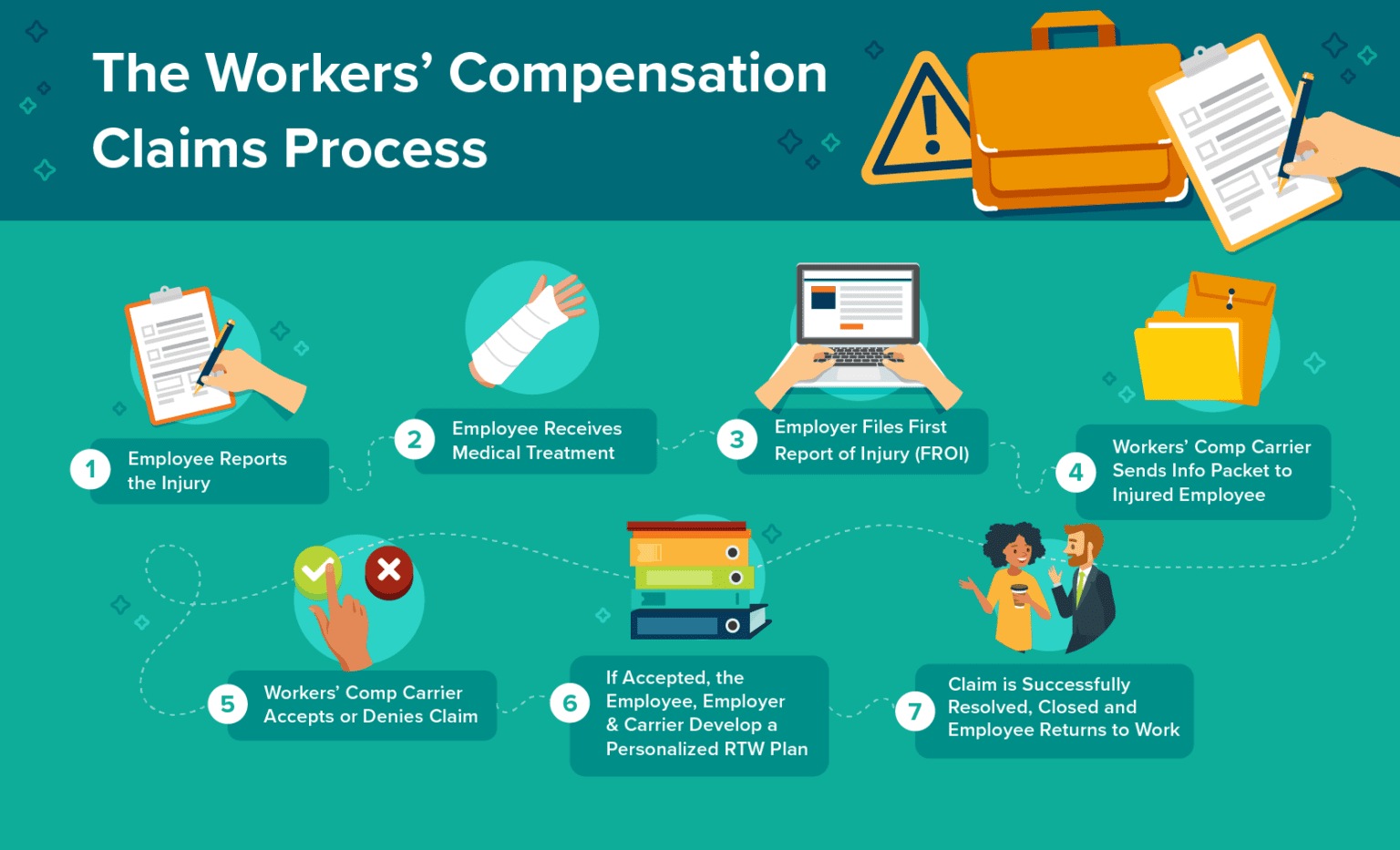
To report a workers' compensation claim to AmTrust Financial, employers must immediately secure medical care for the injured worker and collect crucial accident details. Submit the claim to AmTrust through the AmTrust Online portal, by calling the toll-free claims reporting line at (866) 272-9209, or by emailing the state-appropriate First Report of Injury form to amtrustclaims@amtrustgroup.com.
The Strategic Importance of Prompt Workers' Compensation Claims Reporting
Filing a workers' compensation claim promptly is both a statutory requirement and a cornerstone of effective commercial risk management. When an employee suffers a job-related injury or occupational illness, the window between the incident occurrence and official claim submission directly impacts medical outcomes, administrative expenses, and premium adjustments.
AmTrust Financial is one of the largest writers of workers' compensation insurance for small to mid-sized businesses in the United States. Their claims intake infrastructure relies on standardized reporting procedures designed to comply with state-specific regulations. Delayed reporting—often defined as waiting more than 24 to 48 hours post-incident—can result in statutory fines from state workers' compensation boards, compromised workplace accident investigations, and significantly elevated claim costs.
Data across the property and casualty insurance industry consistently demonstrate that claims reported within the first 24 hours carry substantially lower total costs than those delayed by several weeks. Early intervention allows AmTrust claim adjusters to establish immediate contact with the injured worker, coordinate care through preferred medical provider networks, and guard against unnecessary litigation or fraudulent claims.
- WORKPLACE INJURY OCCURS
- STEP 1: Provide Immediate First Aid / Emergency Medical Treatment
- STEP 2: Secure the Incident Scene & Collect Details (Witnesses, Incident Narrative)
- STEP 3: Complete State First Report of Injury (FROI) Form
- STEP 4: Submit Claim to AmTrust via Portal, Phone (866-272-9209), or Email
- STEP 5: Receive Claim Number & Adjuster Assignment; Begin Return-to-Work Tracking
Information Required Before Filing an AmTrust Workers' Comp Claim
Before initiating a claim report online, over the phone, or via email, supervisors or HR administrators should assemble a complete informational packet. Submitting incomplete intake data can delay adjuster assignment, authorization of medical care, and wage-replacement payments.
1. Policy and Employer Information
- AmTrust Policy Number: Found on your policy declaration page or certificate of insurance.
- Federal Employer Identification Number (FEIN): The legal tax identifier for the insured entity.
- Insured Business Name & Physical Location: The specific operating location or worksite where the employee is assigned.
- Designated Employer Contact: Name, title, direct telephone number, and email address of the person handling workers' compensation administration for the company.
2. Injured Employee Information
- Personal Identifiers: Full legal name, Social Security Number (SSN), date of birth, home address, and primary telephone number.
- Employment Background: Job title, department, date of hire, employment status (full-time, part-time, seasonal, or temporary), and standard work schedule.
- Payroll Details: Average weekly wage, hourly rate, or regular gross pay prior to the injury date (required for calculating indemnity benefits).
3. Incident and Medical Details
- Date and Exact Time of Incident: Time of injury and time the worker reported it to management.
- Exact Incident Location: Street address, building number, specific department, or off-site location where the event occurred.
- Detailed Injury Narrative: Clear, factual explanation of how the injury occurred (e.g., "Employee slipped on wet tile floor while carrying boxes, landing on right wrist").
- Body Parts Affected: Specific identification of injured body parts and side of body (e.g., left knee, lower lumbar back, right index finger).
- Initial Medical Treatment Info: Facility name, treating physician, facility address, and whether treatment involved first aid, urgent care, emergency room, or overnight hospitalization.
- Witness Information: Names, job titles, and contact details for any coworkers or third parties who observed the accident.
Official Channels for Filing a Claim with AmTrust
AmTrust provides multiple submission channels to accommodate different operational structures and urgency levels.
Channel 1: AmTrust Online Policyholder Portal
The AmTrust Online policy portal is the fastest and most efficient submission method. It enables employers to enter injury details directly into AmTrust's central intake database, generating an immediate claim reference number.
- Best For: Routine reporting, uploading supporting electronic files (e.g., witness statements, internal accident reports, medical slips), and maintaining a digital audit trail.
- Access: Policyholders log into their account on the official AmTrust Financial Website and navigate to the "Claims" or "Report a Claim" section.
- Key Advantage: Automated state-form population based on the state of operation, reducing paperwork errors.
Channel 2: Toll-Free Claims Call Center
For immediate verbal reporting or complex incidents involving severe traumatic injury, fatality, or hospitalization, direct phone contact is recommended.
- Primary Claims Reporting Phone: (866) 272-9209
- Availability: 24 hours a day, 7 days a week, 365 days a year.
- Best For: Critical workplace injuries, catastrophic incidents, or employers without immediate portal access.
- Process: An intake specialist records the details, fills out the internal First Report of Injury, and provides an immediate claim number along with initial instructions.
Channel 3: Email and Electronic Document Submission
Employers who prefer preparing standard paper state forms—such as state-mandated First Report of Injury (FROI) documents—can transmit completed files electronically.
- Central Claims Email: amtrustclaims@amtrustgroup.com
- Best For: Regional HR teams processing batch forms or submitting scanned physical state documents.
- Requirement: State-specific FROI forms must be accurately completed, scanned clearly, and emailed with the policy number in the subject line.
Step-by-Step Process for Reporting an Injury to AmTrust
Following a structured, repeatable protocol ensures compliance with state law and contractual insurance policy provisions.
WORKPLACE INJURY REPORTING LIFECYCLE
- Emergency Medical / Care First
- Supervisor Incident Investigation
- Complete State FROI Form
- Submit to AmTrust (Portal/Phone/Email)
- Adjuster Review & Care Coordination
- Return-to-Work & Claim Closure
Step 1: Ensure Immediate Medical Care and Secure the Worksite
Prioritize human safety over administrative tasks. If the injury is life-threatening, call 911 immediately. For non-emergent care, direct the employee to an authorized occupational medical clinic or panel provider, as governed by your state's workers' compensation regulations. Secure the incident area to prevent secondary accidents and preserve physical evidence or video footage.
Step 2: Conduct an Immediate Supervisor Investigation
Interview the injured worker (if able to speak) and any witnesses while facts are fresh. Take photographs of the equipment, workspace conditions, weather factors, and protective gear involved. Avoid assigning fault or writing subjective opinions on official documents; record only objective, observable facts.
Step 3: Complete the State-Specific First Report of Injury
Every state requires a standardized form for workers' compensation intake (e.g., Form Form 5012 in California, Form C-2F in New York, Form DWC-001 in Texas). Access your state's worker compensation board site or download the correct template from the AmTrust document library.
Step 4: Transmit the Claim to AmTrust
Submit the gathered information through the AmTrust Online portal, by calling (866) 272-9209, or by emailing amtrustclaims@amtrustgroup.com. Submit within 24 hours of notice, regardless of whether all secondary information (such as final medical notes) is available. Additional records can be attached to the claim file later.
Step 5: Secure Claim Number and Partner with the Adjuster
Once the intake process finishes, AmTrust issues a unique Claim Number and assigns a dedicated Claims Adjuster. Record this claim number on all workplace files and supply it to the treating medical facility and injured employee. The adjuster will contact both the employer and employee to verify facts, evaluate medical plans, and establish compensability.
Step 6: Implement Light-Duty and Return-to-Work Protocols
Maintain active contact with the assigned adjuster and the treating medical provider. If the doctor clears the employee for modified duty, offer temporary, light-duty work aligned with their physical restrictions to promote recovery and control indemnity payouts.
State Statutory Deadlines vs. Carrier Best Practices
While state laws establish the absolute legal outer limit for reporting injuries, AmTrust policy requirements emphasize immediate reporting. Failing to meet state deadlines can jeopardize coverage and lead to regulatory fines.
Disclaimer: Insurance regulations and statutory filing deadlines vary significantly by jurisdiction and are subject to legislative amendment. Business operators should verify specific statutes with their state workers' compensation board or legal counsel.
| State | Statutory Employee Notification Window | Statutory Employer FROI Filing Deadline | Recommended AmTrust Reporting Timeframe |
|---|---|---|---|
| California | 30 Days from date of injury | 5 Days after employer knowledge | Within 24 Hours |
| Florida | 30 Days from date of injury | 7 Days after employer knowledge | Within 24 Hours |
| Illinois | 45 Days from date of injury | Immediate / Up to 30 Days | Within 24 Hours |
| New York | 30 Days from date of injury | 10 Days after employer knowledge | Within 24 Hours |
| Pennsylvania | 21 Days (120 Days max limit) | 7 Days after notice (48 hrs for death) | Within 24 Hours |
| Texas | 30 Days from date of injury | 8 Days after employer notice | Within 24 Hours |
The Legal and Financial Consequences of Late Reporting
- Statutory Fines: State labor boards can impose monetary sanctions on employers who miss FROI submission deadlines.
- Loss of Investigation Quality: Evidence degrades, memories fade, and accident scenes change over time, making it harder to disprove fraudulent or non-occupational claims.
- Escalated Claim Costs: Unmanaged injuries often result in unnecessary emergency department visits, excessive time off work, and higher legal representation rates.
- Policy Defense Impairment: Excessively late reporting without reasonable cause can compromise the carrier's ability to defend the claim, potentially leading to conditional reservation of rights or policy disputes.
AmTrust Claims Contact Methods & Submission Summary
The table below outlines the primary channels for claims intake, inquiries, and document submission with AmTrust Financial.
| Channel / Purpose | Contact / Target Detail | Availability / Turnaround | Key Use Case |
|---|---|---|---|
| Online Policyholder Portal | AmTrust Financial Portal | 24/7 Access; Instant Claim # | General claim reporting, document uploads, status tracking |
| 24/7 Intake Hotline | (866) 272-9209 | 24/7/365 Phone Intake | Urgent claims, severe injuries, immediate verbal reporting |
| General Claims Email | amtrustclaims@amtrustgroup.com |
Processed within 1 Business Day | Submitting completed state FROI forms, medical reports |
| Claims Customer Service | (800) 553-8894 | Mon–Fri Business Hours | Billing, ongoing claim inquiry, adjuster contact lookup |
| AmTrust Mobile App | Mobile App Store (iOS / Android) | 24/7 Mobile Access | On-the-go reporting, fast document photo submissions |
| Agent / Broker Assistance | Designated Agency Contact | Varies by Brokerage | Specialized risk advice, complex policy coordination |
Common Pitfalls to Avoid in AmTrust Claims Reporting
1. Delaying Submission Pending Medical Documentation
A frequent mistake by supervisors is waiting for the employee to return from an urgent care clinic with a formal doctor's note before filing the claim. AmTrust does not require complete medical documentation to open a claim file. Submit the report immediately; medical records can be uploaded as they become available.
2. Presuming Non-Compensability Without Reporting
Supervisors sometimes refrain from reporting an injury because they doubt its authenticity or suspect the injury occurred outside of work. Employers should not unilaterally adjudicate claims. Always file the First Report of Injury with AmTrust and share any concerns or evidence of non-occupational origin directly with the assigned adjuster during the initial investigation phase.
3. Miscalculating Average Weekly Wage (AWW)
Failing to include overtime earnings, bonuses, or secondary wages (where required by state law) when completing gross pay fields leads to inaccurate wage-replacement payments. This can trigger regulatory audits, penalties, or retroactive adjustments. Ensure accounting departments verify payroll data before submitting state forms.
4. Poor Internal Communication & Omission of Return-to-Work Capabilities
Reporting a claim is not a one-time administrative event. If an employee's work status changes—such as being released to light duty or taken off work entirely—failure to promptly notify the AmTrust adjuster can result in overpaid or underpaid indemnity benefits, directly affecting your business's Experience Modification Rate (EMR).
Frequently Asked Questions
How fast must an employer report a work injury to AmTrust?
Employers should report any work-related injury to AmTrust within 24 hours of receiving notice. Although state statutes provide longer windows for filing formal paperwork (ranging from 5 to 30 days), immediate carrier notification facilitates prompt medical authorization, mitigates litigation risk, and lowers total claim expenses.
Can an employee file a claim directly with AmTrust?
In most jurisdictions, workers' compensation claims are initiated by the employer submitting the First Report of Injury. However, if an employer refuses or fails to report an incident, an injured employee or their representative can contact AmTrust directly at (866) 272-9209 or file a claim application directly with their state's workers' compensation board.
Where do I find the required First Report of Injury (FROI) form for my state?
State-specific FROI forms are available within the claims document library on the official AmTrust Financial website. Alternatively, employers can access these forms directly through their state labor department or workers' compensation board website. Submitting via the AmTrust Online portal automatically selects the correct digital intake form for your jurisdiction.
What happens if an injury claim is disputed or suspected to be fraudulent?
If an employer suspects a claim is non-compensable or fraudulent, they should still file the claim to satisfy legal requirements. Add a note stating "Reported for Informational Purposes Only" or attach a detailed statement outlining why the claim is questioned. The assigned AmTrust claims adjuster will conduct a formal investigation, gather witness statements, evaluate medical findings, and issue a formal approval or denial.
How can employers track the status of an active AmTrust claim?
Employers can monitor active claims by logging into the AmTrust Online policy portal. The dashboard provides real-time access to assigned adjuster contact details, medical payment logs, indemnity reserves, claim status changes, and return-to-work restrictions. You can also contact customer support at (800) 553-8894 for updates.
Actionable Next Steps for Businesses
To build an efficient, compliant workers' compensation reporting workflow, risk managers and business owners should execute the following operational steps:
- Establish a Standardized Incident Response Kit: Keep state-specific First Report of Injury forms, panel physician lists, and AmTrust claims reporting instructions in every supervisor's office and on company intranet portals.
- Train Frontline Management: Ensure all managers, supervisors, and HR staff understand that all workplace injuries—no matter how minor—must be reported internally on the day they occur.
- Register for AmTrust Online Access: Set up administrator and manager accounts on the AmTrust portal before an incident occurs to eliminate delay during an emergency.
- Develop a Structured Return-to-Work (RTW) Program: Coordinate pre-approved light-duty job descriptions with your AmTrust risk management representative to streamline employee re-entry following an injury.