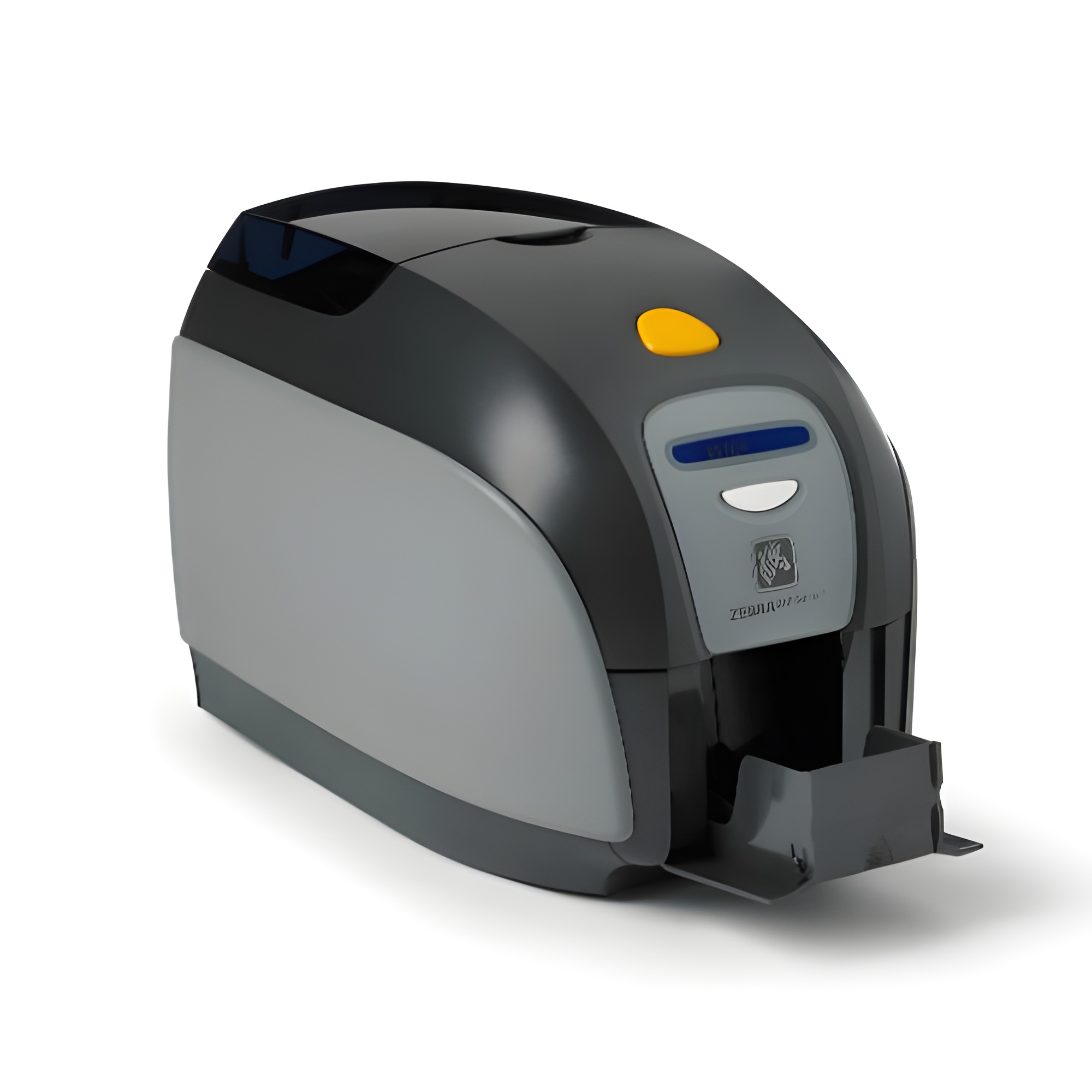
The Zebra ZXP Series 3 is a direct-to-card desktop printer designed for secure ID card issuance, access control, and membership management. It balances high-performance printing speeds with a compact footprint, supporting both single-sided and dual-sided full-color or monochrome printing via advanced dye-sublimation and thermal transfer technology.
Introduction to the Zebra ZXP Series 3
The Zebra ZXP Series 3 card printer represents a reliable, cost-effective hardware solution for organizations needing to produce identification cards, access badges, gift cards, and financial cards on demand. Introduced as a workhorse desktop device, this printer bridges the gap between entry-level badge makers and high-end industrial systems. By leveraging Zebra's Load-N-Go ribbon cartridges and intelligent image processing technology, it minimizes setup times and simplifies day-to-day operations for users in corporate, educational, hospitality, and retail environments.
Understanding the operational profile, technical architecture, and integration capabilities of this device requires a detailed look at its core components, consumable options, and software ecosystem. While newer generations have since entered the market, the ZXP Series 3 remains widely deployed across numerous facilities, making maintenance, troubleshooting, and configuration knowledge essential for administrators managing legacy or active badge-printing infrastructure.
Core Technical Specifications and Architecture
The physical and internal architecture of the Zebra ZXP Series 3 is engineered to maximize throughput while maintaining a small footprint suitable for crowded office desks, reception counters, and security gates.
Printing Technology and Resolution
The printer utilizes direct-to-card (DTC) dye-sublimation for vibrant, continuous-tone color printing, alongside thermal transfer for sharp, durable monochrome text and barcodes. It operates at a standard resolution of 300 dots per inch (dpi), which ensures that fine text, intricate logos, and complex barcoding elements remain crisp and easily scannable by optical or laser readers.
Performance and Speed Ratings
Throughput is a critical factor in high-traffic environments where visitors or employees require immediate credential issuance. The ZXP Series 3 achieves impressive speeds relative to its desktop class:
- Color Printing (YMCKO): Up to 180 cards per hour single-sided.
- Monochrome Printing (K): Up to 700 cards per hour single-sided.
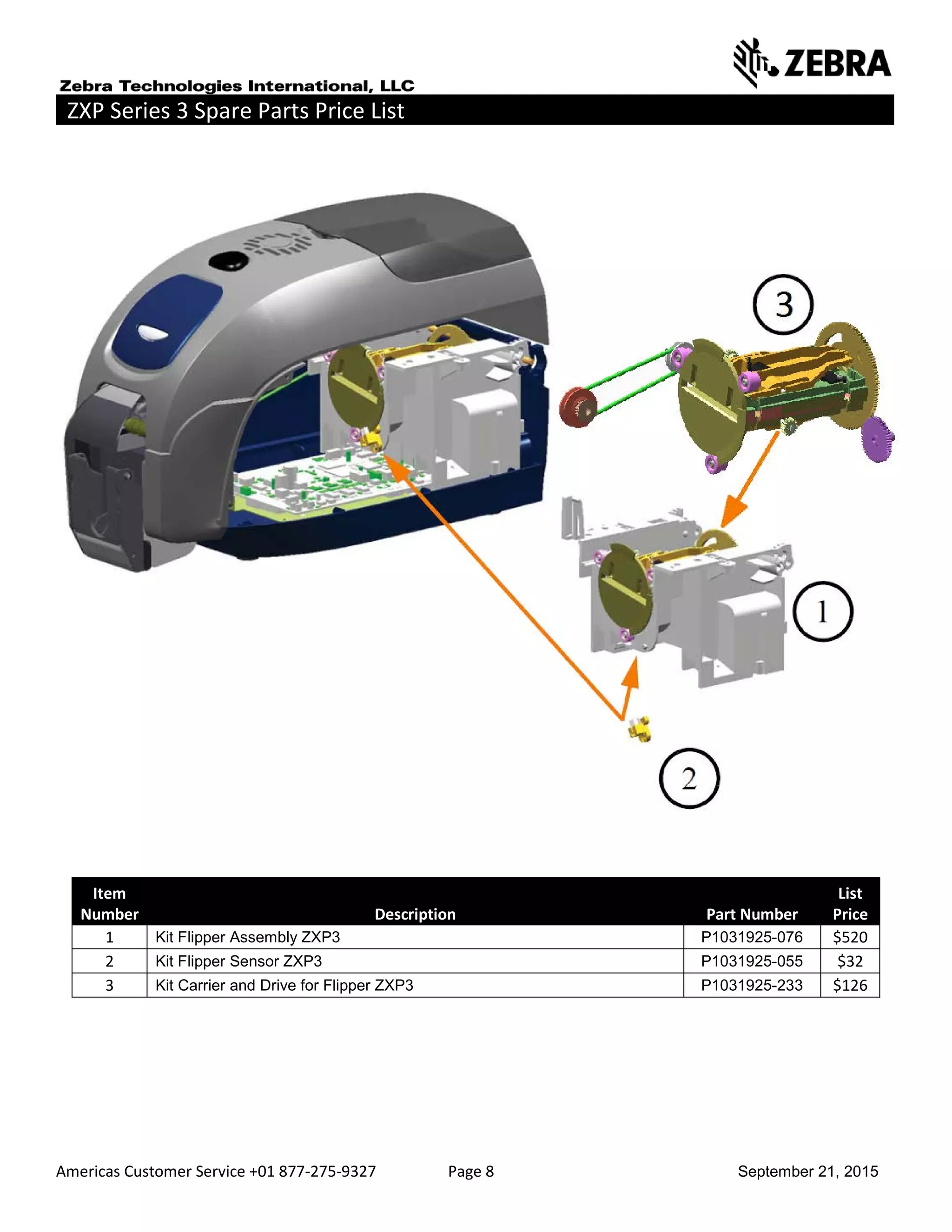
- Dual-Sided Printing (YMCKOK): Up to 140 cards per hour (when equipped with the optional dual-sided flipper module).
Connectivity Options
To integrate seamlessly into existing network topologies, the printer supports multiple interface options. Standard configurations typically include a high-speed USB 2.0 port, while upgraded models feature built-in 10/100 Ethernet connectivity for networked environments. This allows multiple workstations to queue print jobs to a centralized badge printer securely.
Consumables, Ribbons, and Media Handling
Effective management of ribbons and card stock is vital for maintaining print quality and preventing hardware jams. The ZXP Series 3 introduced several proprietary media innovations designed to streamline the user experience.
Load-N-Go Ribbon Cartridges
Unlike older generation printers that required manual threading of delicate ribbon spools, the ZXP Series 3 utilizes eco-friendly Zebra Load-N-Go drop-in cartridge ribbons. These cartridges feature integrated cleaning rollers that automatically sweep dust and debris from incoming cards before printing, reducing the risk of white spots or printhead damage. Common ribbon formulations include:
- YMCKO: Full-color printing with a clear protective overlay.
- YMCKOK: Full-color printing on the front and black-only printing on the back, ideal for dual-sided ID cards.
- KdO / KrO: Specialized ribbons for printing monochrome text or barcodes over pre-printed card surfaces.
- Monochrome Resins: Available in black, white, red, blue, green, silver, and gold for high-speed monochrome text and line art.
Card Specifications and Hopper Capacities
The printer accepts standard CR-80 ISO ID cards, ranging from thin 10-mil proxies up to durable 40-mil thickness, made of PVC, PVC composite, or ABS materials.
- Input Hopper: Accommodates up to 100 cards (30-mil thickness).
- Output Hopper: Holds up to 45 cards (30-mil thickness), with a manual front-feed slot available for single-card encoding or ad-hoc badge printing.
| Feature / Specification | Zebra ZXP Series 3 Details |
|---|---|
| Print Technology | Direct-to-Card Dye-Sublimation / Thermal Transfer |
| Print Resolution | 300 dpi (12 dots/mm) |
| Max Print Speed (Color) | Up to 180 cards/hour (YMCKO) |
| Max Print Speed (Mono) | Up to 700 cards/hour (K) |
| Accepted Card Sizes | CR-80 (ISO 7810, 2.12" x 3.38") |
| Accepted Card Thickness | 10 mil to 40 mil |
| Standard Interfaces | USB 2.0; Optional 10/100 Ethernet |
| Driver Support | Microsoft Windows, Linux, and Apple macOS via CUPS |
Software Integration and Encoding Capabilities
A card printer is only as effective as the software ecosystem supporting it. The ZXP Series 3 interfaces with standard card design applications through robust, certified printer drivers.
Driver Architecture and SDKs
Zebra provides advanced ZMotif drivers that offer intuitive user interfaces for adjusting color profiles, ribbon optimization, black panel tracking, and cleaning schedules. For enterprise environments requiring custom software integration, developers can utilize the ZMotif Software Development Kit (SDK) to embed print commands directly into proprietary access control or HR management systems.
Encoding Options
Security credentials often require data storage beyond visual text and photos. The ZXP Series 3 supports modular field upgrades for data encoding:
- Magnetic Stripe Encoding: ISO 7811 compliance (HiCo and LoCo tracks 1, 2, and 3).
- Smart Card Contact Station: ISO 7816 for contact-based microchip cards.
- Contactless Encoding: Support for MIFARE, DESFire, and other RFID/NFC protocols depending on factory configuration or third-party encoder integration.
Advantages and Operational Limitations
Evaluating the Zebra ZXP Series 3 requires balancing its proven reliability against the constraints of its hardware generation.
Key Advantages
- Compact Footprint: Easily fits on narrow reception desks and tight security check-in stations.
- Ease of Use: Drop-in ribbon cartridges and straightforward maintenance alerts reduce operator training time.
- Host-Device Authentication: Built-in security features help protect printer data and prevent unauthorized badge generation in sensitive corporate or government settings.
- Print Quality: High-resolution 300 dpi output ensures crisp photographs and readable micro-text.
Limitations and Considerations
- Discontinued Status: As newer generations (such as the ZC series) have superseded the ZXP line, sourcing brand-new units directly from authorized distributors may be difficult, requiring reliance on secondary markets or refurbished stock.
- Driver Compatibility: Operating system updates on modern platforms (such as Windows 11 or recent Linux distributions) may require specific driver workarounds or legacy configuration settings.
- Speed vs. Security: While fast for basic color printing, adding dual-sided printing and smart card encoding simultaneously reduces overall hourly output.
Common Troubleshooting and Maintenance Practices
Proper upkeep extends the operational lifespan of the printhead and mechanical rollers. Neglecting maintenance frequently leads to ribbon breaks, card jams, and degraded print quality.
Routine Cleaning Procedures
Administrators should run a cleaning cycle using authorized Zebra cleaning cards and swab kits after every ribbon change (typically every 1,000 to 2,000 prints). This removes microscopic PVC dust and adhesive residue from the thermal printhead, platen roller, and card transport paths.
Resolving Frequent Errors
- Card Jams: Usually caused by incorrect card thickness settings in the driver or warped card stock stored in humid environments. Adjust the thickness lever inside the input hopper to match the media used.
- Ribbon Breaks: Often triggered by incorrect driver color calibration settings, excessive printhead heat, or using expired, degraded media ribbons. Verify that the media matches the ribbon type selected in the software.
- Communication Errors: If the printer drops off the network, verify IP address assignments, check physical Ethernet connections, or restart the print spooler service on the host workstation.
Frequently Asked Questions
What type of cards can I use with the Zebra ZXP Series 3?
The printer is designed for standard CR-80 size cards. You can use PVC, PVC composite, and ABS cards ranging from 10 mil to 40 mil in thickness. Specialized adhesive-backed cards or rewritable media can also be used if configured correctly in the driver settings.
Does the ZXP Series 3 support dual-sided printing?
Dual-sided printing depends on the specific hardware configuration. Some units were shipped as single-sided only, while others included a factory-installed or field-upgradeable flipper module that automatically flips the card to print on both sides.
How often does the printer require cleaning?
To maintain optimal print quality and prevent premature printhead failure, it is recommended to run a cleaning card through the system every time you replace the ribbon cartridge, or approximately every 1,000 prints.
Is the Zebra ZXP Series 3 still supported by the manufacturer?
While the printer model has been succeeded by newer product lines, driver downloads, firmware updates, and consumable ribbons remain widely available through authorized supply channels.
Can I encode smart cards with this printer?
Yes, depending on the internal modules installed, the printer can be configured with magnetic stripe encoders, contact smart card stations, or contactless RFID encoding capabilities to support multi-technology security badges.
Conclusion and Recommendations
The Zebra ZXP Series 3 remains a capable and dependable desktop card printer for organizations seeking straightforward, high-resolution badge issuance. While evaluating deployment or maintenance strategies for this hardware, administrators should ensure proper cleaning protocols are followed, use genuine Zebra Load-N-Go consumables to prevent mechanical jams, and verify operating system driver compatibility. For facilities upgrading legacy hardware or establishing new credential programs, assessing both the printer's modular encoding capabilities and ongoing consumable availability will ensure long-term operational success.