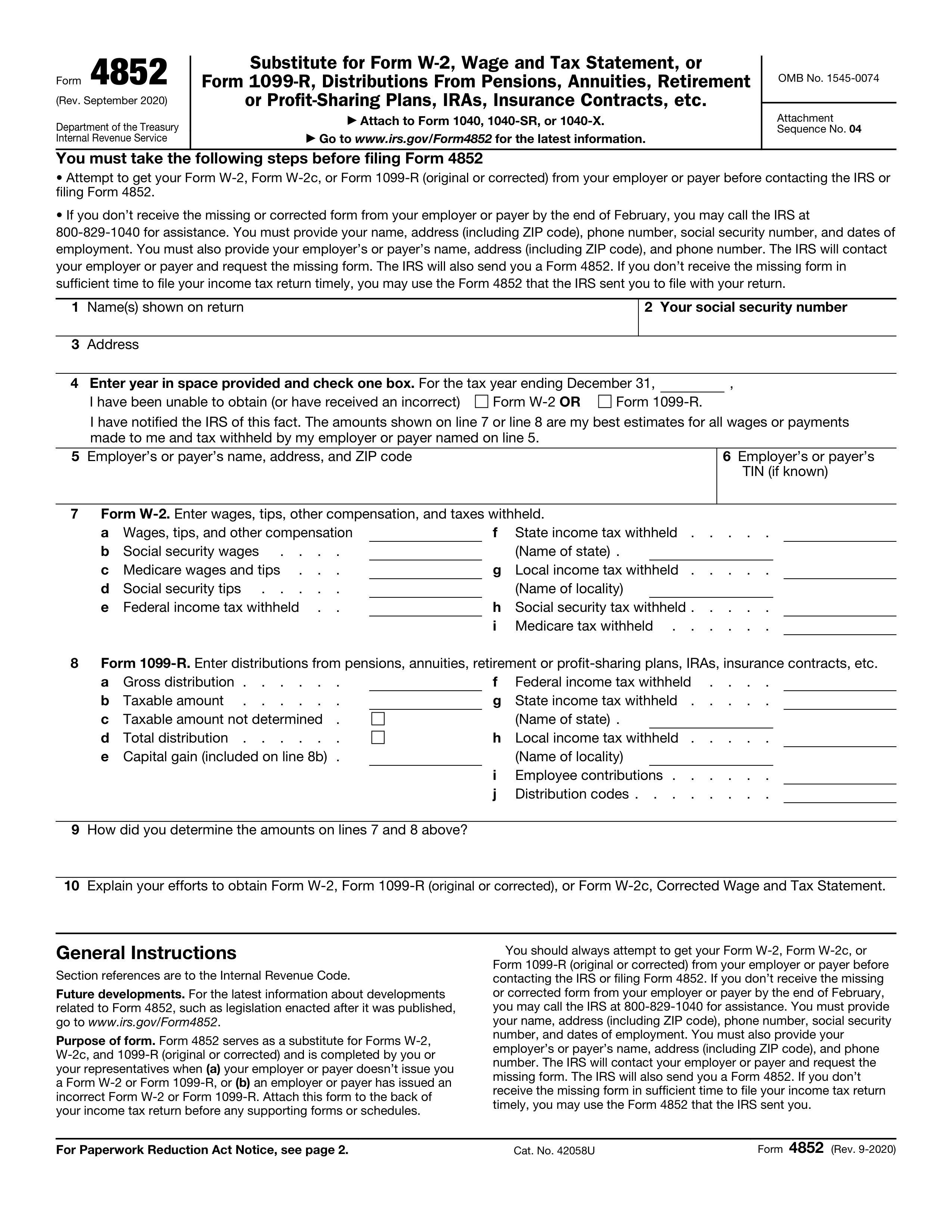
IRS Form 4852, Substitute for Form W-2, Wage and Tax Statement, or Form 1099-R, Distributions From Pensions, Annuities, Retirement or Profit-Sharing Plans, IRAs, Insurance Contracts, etc., serves as a critical alternative document when a payer fails to provide or issues an incorrect tax form. Completing the Form 4852 PDF involves gathering your personal employment or distribution data, calculating your wages and tax withholdings using independent records like final pay stubs, and formally certifying these figures to the Internal Revenue Service while providing a detailed explanation of your efforts to secure the original document.
Understanding IRS Form 4852 and Its Purpose
Navigating the tax season can present unexpected hurdles, particularly when employers, plan administrators, or payers fail to furnish essential tax reporting documents. When an individual prepares to file a federal income tax return but lacks a Form W-2 or Form 1099-R, the Internal Revenue Service provides a specific mechanism to bridge this gap: Form 4852. This document acts as a statutory substitute, allowing taxpayers to report wages, nonemployee compensation, or retirement distributions alongside associated federal, state, and local income tax withholdings.
The primary objective of Form 4852 is to prevent tax filing delays while ensuring that the federal government maintains an accurate record of income and tax credits. Without this form, taxpayers cannot legally reconcile their withholdings or claim refunds derived from taxes withheld at the source. However, because this form relies on taxpayer estimation and secondary records rather than official reporting from a payer, the IRS subjects it to rigorous scrutiny. Submitting Form 4852 requires absolute transparency, verifiable calculations, and documentation of all attempts made to obtain the correct document directly from the delinquent payer.
Taxpayers must recognize that utilizing Form 4852 is not a casual alternative to waiting for a standard W-2 or 1099-R. The IRS mandates specific procedural prerequisites before a substitute form is accepted. Attempting to bypass these requirements or filing inaccurate estimations can trigger automated compliance flags, correspondence audits, or substantial delays in processing tax refunds. Therefore, approaching the completion of the Form 4852 PDF requires meticulous record-keeping, a thorough understanding of tax accounting, and strict adherence to IRS instructions.
Prerequisites Before Accessing the Form 4852 PDF
Before downloading and filling out the Form 4852 PDF, taxpayers must fulfill specific preliminary requirements and exhaust alternative resolution channels. The IRS does not permit individuals to substitute Form 4852 simply out of impatience; specific conditions must be met to justify its submission.
1. Exhausting Payer Communication Channels
Federal regulations require taxpayers to make a reasonable effort to secure the missing Form W-2 or Form 1099-R directly from the employer or payer. This generally involves:
- Confirming that the payer has your correct, current mailing address.
- Contacting the human resources or payroll department to request a reissue of the missing document.
- Waiting until after February 14 of the tax year before taking further escalation steps, as employers are legally required to furnish W-2 forms by January 31.
2. Utilizing IRS Assistance
If a payer remains unresponsive or refuses to provide the required tax form by late February, the taxpayer must contact the IRS directly for assistance. Calling the IRS customer service line or visiting a local Taxpayer Assistance Center allows an agent to initiate contact with the employer on the taxpayer's behalf. The IRS will issue a formal request to the employer reminding them of their statutory obligations.
3. Gathering Independent Wage and Tax Records
Because Form 4852 requires precise numerical entries, you must assemble all available personal documentation that proves earnings and withholdings for the relevant tax year. Acceptable secondary records include:
- The final pay stub or earnings statement from the calendar year in question, which typically provides cumulative year-to-date (YTD) gross pay and tax withholdings.
- Bank statements reflecting direct deposits of net pay, combined with calculations to reconstruct gross wages and deductions.
- Personal budgeting logs, employment contracts, or ledger books detailing compensation.
- Quarterly state unemployment benefit statements or union records where applicable.
Step-by-Step Guide to Completing the Form 4852 PDF
Successfully filling out the official Form 4852 PDF requires careful data entry across multiple distinct sections. The process can be broken down into three core phases: identifying information and reason for substitution, wage and withholding calculations, and effort documentation with certification.
- Step 1: Payer & Personal Data
- Enter SSN, employer details, and filing tax year.
- Step 2: Wage & Withholding Math
- Calculate gross income and tax deductions from pay stubs.
- Step 3: Efforts & Certification
- Detail contact attempts and sign under penalty of perjury.
Step 1: Provide Identifying Information and Form Details
The top section of the Form 4852 PDF establishes who is filing, which tax year is being reported, and the identity of the withholding agent or employer.
- Personal Details: Enter your full legal name, current mailing address, and Social Security Number (SSN) precisely as they appear on your tax return. If filing a joint return, use the primary taxpayer's SSN in alignment with the specific income source being reported.
- Tax Year: Clearly state the calendar tax year for which the substitute form is being generated.
- Payer Information: Input the employer's or payer's correct name, complete address, and federal Employer Identification Number (EIN). If you do not know the EIN, you can often find it on previous years' tax returns, state tax documents, or through corporate registry databases, though leaving it blank when entirely unknown is acceptable if explained in the remarks.
Step 2: Calculate and Enter Wages, Tips, and Tax Withholdings
This is the most critical and mathematically intensive portion of the form. You must translate your final year-end pay stub or independent financial records into standard tax line items.
- Line 7 (W-2 or 1099-R Details): Enter the specific form type you are substituting (e.g., Form W-2 or Form 1099-R).
- Income Calculation: On the designated lines for wages, tips, and other compensation, enter your total gross earnings for the year. This figure must represent total taxable compensation before pre-tax deductions like health insurance or retirement contributions, unless those deductions specifically alter taxable gross income under IRS guidelines.
- Withholding Calculations: Carefully extract and record federal income tax withheld, Social Security tax withheld, Medicare tax withheld, and any state or local income taxes withheld.
- Methodology Explanation: Form 4852 requires you to explicitly state how you calculated these figures. You must check the appropriate box or write a brief statement indicating whether the amounts are based on a final pay stub, bank records, or reasonable estimation.
Step 3: Document Efforts and Sign Under Penalty of Perjury
The final section verifies that you exhausted all standard remedies before resorting to a substitute form and binds you legally to the accuracy of the submission.
- Effort Documentation: Answer the specific questions regarding your attempts to secure the missing document. You must state the dates you contacted the employer, the specific methods used (phone, email, mail), and the response received or lack thereof. Vague statements such as "employer refused" are insufficient; provide context regarding the breakdown in communication.
- Reason for Missing Form: Explain why the form was not furnished (e.g., business closure, bankruptcy, payroll dispute, or unreturned phone calls).
- Signature and Verification: Sign and date the document. Form 4852 must be signed under penalty of perjury. Submitting intentionally false or fraudulent estimations can result in severe federal penalties, audit triggers, and civil or criminal liabilities.
Comparison of Tax Document Substitution Options
When encountering missing tax documents, taxpayers generally have three operational paths. Understanding how Form 4852 compares to waiting or requesting IRS transcripts helps contextualize its appropriate use.
| Feature / Aspect | Form 4852 (Substitute Form) | Waiting for Original Payer | IRS Wage and Income Transcript |
|---|---|---|---|
| Timeframe | Immediate (filed with return) | Delayed until payer complies | Available typically by late May |
| Accuracy Risk | Higher (relies on personal math) | Low (generated by employer) | Low (official government record) |
| Audit Probability | Moderate to High | Low | Low |
| Prerequisites | Must document contact attempts | None | Account access via IRS.gov |
| Processing Speed | May slow down refund processing | Normal processing | Delays return until transcript arrives |
Common Mistakes to Avoid When Completing Form 4852
Filing an inaccurate or improperly completed Form 4852 is one of the leading causes of correspondence audits and frozen tax refunds. Taxpayers should remain vigilant against several recurring pitfalls:
- Failing to Retain Pay Stubs: Estimating figures entirely from memory without anchoring them to a final pay stub or bank statement creates indefensible numbers that fail IRS verification checks.
- Skipping the Effort Log: Leaving the section detailing contact attempts blank or writing generic dismissals guarantees that the IRS will reject the substitute form and halt refund issuance.
- Confusing Gross and Net Pay: Entering net take-home pay instead of gross taxable compensation results in a significant understatement of income, which triggers discrepancies against matching records submitted later by financial institutions or state agencies.
- Ignoring Subsequent Corrections: If an employer eventually issues the official W-2 or 1099-R after you have already filed your return using Form 4852, and the figures differ from your estimations, you must file an amended tax return (Form 1040-X) immediately to reconcile the discrepancy.
Frequently Asked Questions
Can I file my electronic tax return using Form 4852?
Yes, modern commercial tax preparation software and electronic filing protocols support the inclusion of Form 4852. However, some tax software packages may require you to print and mail your return if specific fields or explanations regarding employer contact attempts exceed standard data entry limits. Always check the software's specific diagnostic messages before transmitting an electronic return.
What happens if the figures on my Form 4852 do not match the employer's eventual W-2?
If the official W-2 or 1099-R eventually arrives or is reported to the IRS by the payer with different numbers than those you estimated on Form 4852, the IRS automated matching system will flag the discrepancy. This typically results in a CP2000 notice proposing additional tax due or adjustments. To resolve this, you must file Form 1040-X to amend your return, substituting the estimated figures with the actual verified data from the official document.
Is Form 4852 applicable for missing 1099-NEC or 1099-MISC forms?
Form 4852 is specifically designed to substitute for Form W-2 or Form 1099-R. For missing nonemployee compensation (Form 1099-NEC) or miscellaneous income (Form 1099-MISC), taxpayers are still required to report all self-employment or business income accurately on Schedule C (Form 1040) or other appropriate schedules, relying on business accounting books, invoices, and bank deposits rather than Form 4852.
How long does the IRS take to process a return containing Form 4852?
Tax returns that include Form 4852 frequently require manual review by IRS personnel to verify the adequacy of the explanation and the validity of the substitute figures. Consequently, processing times can extend significantly beyond the standard 21-day window for electronic returns, often taking several weeks or months before any associated tax refund is released.
What should I do if my employer went out of business and cannot be contacted?
If the company has dissolved, filed for bankruptcy, or ceased operations entirely, you cannot contact them to request a W-2. In this scenario, complete Form 4852 by checking the appropriate box indicating that the employer is out of business, attach your final pay stub or bank deposit records, and provide a brief explanatory note in the remarks section detailing the business closure.
Final Recommendation and Next Actions
Completing the Form 4852 PDF is a formal, legally binding process that requires precision, honesty, and verifiable documentation. Before submitting your tax return with this substitute form, audit your calculations against your final pay stub, ensure every question regarding your attempts to contact the employer is answered thoroughly, and retain copies of all supporting records for at least three years. If you encounter complex income structures, multi-state tax withholdings, or disputes that threaten to compromise your filing accuracy, consult a certified public accountant (CPA) or enrolled agent to ensure full compliance with federal tax laws.