Adding extended family members, such as your in-laws, to your USAA auto insurance policy is a process defined strictly by the organization’s eligibility requirements and the specific underwriting guidelines governing auto coverage. Because USAA is a member-owned association serving military members, veterans, and their eligible family members, the ability to add in-laws depends on whether they qualify for membership or if they are simply residents of your household who require coverage due to their driving habits.
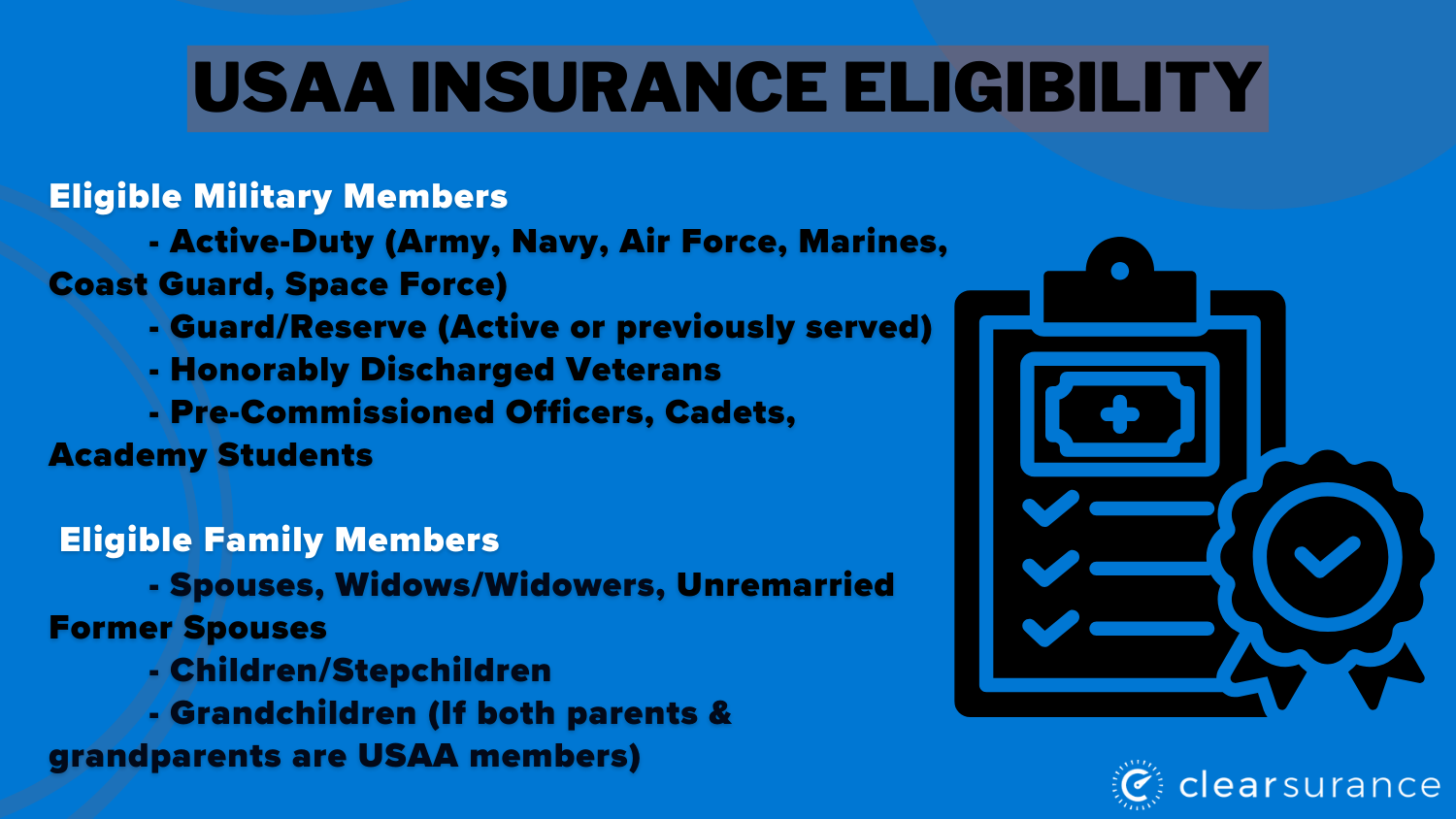
In most cases, USAA restricts primary policyholders to the military member, their spouse, and dependent children. Because in-laws are typically considered "extended family," they do not automatically qualify for your policy unless they meet specific criteria regarding residency or shared vehicle ownership. Understanding these constraints is the first step in determining whether you can include them or if they need to secure their own independent coverage.
Understanding USAA Membership and Eligibility Rules
Before attempting to modify your policy, it is essential to distinguish between "household members" and "USAA members." USAA auto insurance is primarily designed for individuals who have a direct affiliation with the U.S. military. While you may have the authority to add a driver to your policy if they reside with you, this does not grant that individual USAA membership status, nor does it guarantee they will be accepted under your current policy terms.
For your in-laws to be added to your policy, they generally must live in your home. Insurance companies require that all licensed drivers living in a household be listed on an auto policy. This is because the risk associated with a vehicle is calculated based on the driving history, age, and experience of everyone who has access to the keys. If your in-laws live with you, you are legally and contractually obligated to disclose their presence to USAA. Failure to do so could result in a denied claim or policy cancellation if an accident occurs while an undisclosed household member is operating your vehicle.
Distinguishing Between Adding a Driver and Adding a Member
There is a significant difference between adding an in-law as a "rated driver" on your policy and adding them as a "policyholder."
- Adding as a Rated Driver: This occurs when an in-law moves into your home and will have regular access to your insured vehicles. You are adding them to the policy so that the insurance company can assess the risk. This does not grant them ownership of the policy or the ability to manage it.
- Adding as an Insured/Member: USAA generally restricts membership to the military service member, their spouse, and their children. In-laws usually do not qualify for their own USAA accounts based on your service record. If your in-law needs their own policy, they will likely need to seek insurance through another provider unless they have their own independent military affiliation that qualifies them for USAA membership.
Steps to Evaluate and Update Your Coverage
If you have determined that your in-laws are moving in or will be driving your vehicle regularly, you must contact USAA to adjust your policy. Follow these steps to ensure you remain compliant with your contract:
1. Gather Necessary Information
Before you call USAA or log into your account, prepare the documentation required for underwriting. This includes the full legal names, dates of birth, and driver’s license numbers for each in-law. You will also need their driving history, including any accidents or traffic violations from the past three to five years. USAA will pull reports from the Department of Motor Vehicles (DMV) and claims databases, so providing accurate information upfront is vital to avoiding premium discrepancies later.
2. Verify Residency Requirements
USAA defines a household member as someone who permanently resides at your address. If your in-laws are staying with you temporarily—such as for a short vacation or a brief transition period—you may not need to add them as permanent drivers. However, "temporary" is subject to interpretation; if they are staying for more than 30 days, most insurance carriers, including USAA, consider them residents. Consult with a USAA representative to determine if your specific situation requires a formal policy amendment.
3. Review the Impact on Premiums
Adding another driver to your policy will almost certainly change your premium. Factors that influence this cost increase include:
- Driving Record: If your in-laws have a history of accidents or speeding tickets, your premium will likely increase to reflect the higher risk profile.
- Age: Younger drivers or senior drivers may be categorized into different risk brackets.
- Vehicle Type: If you are adding an in-law who will primarily drive a high-performance or high-value vehicle on your policy, the risk assessment will shift accordingly.
4. Initiate the Policy Update
You can initiate this process through the USAA mobile app, the official website, or by speaking with a customer service representative. Speaking with a representative is often the most effective method, as they can explain exactly how the addition affects your coverage limits and whether any specific exclusions apply to your in-laws.
Comparison of Coverage Scenarios
| Situation | Requirement | Action |
|---|---|---|
| In-law lives with you permanently | Must be listed as a driver | Add to policy via USAA portal/agent |
| In-law visits for < 30 days | Usually not required | Check policy for "permissive use" rules |
| In-law drives your car infrequently | Must disclose | Ask agent if they qualify for permissive use |
| In-law owns their own vehicle | Separate policy usually required | Ensure they have their own insurance |
Permissive Use: The Alternative to Adding a Driver
USAA, like many insurers, includes "permissive use" clauses in many of their policies. This means that if someone who does not live in your household borrows your car occasionally—with your permission—they may be covered under your policy.
However, you must exercise extreme caution here. Permissive use is generally intended for occasional, infrequent usage. If your in-laws drive your car to work every day, they are not "occasional" drivers, and you must add them to your policy. Relying on permissive use when a household member is a regular driver is considered material misrepresentation, which can lead to severe consequences during the claims process.
Frequently Asked Questions (FAQ)
Can I add my in-laws to my policy if they don't live with me?
Generally, no. USAA, like most insurance companies, requires that listed drivers reside at the insured address. If your in-laws live at a different residence, they are expected to maintain their own auto insurance policy for their vehicles.
Will adding my in-laws to my USAA policy increase my rates?
Yes, in almost all scenarios. Adding a driver increases the actuarial risk of the policy. The extent of the increase depends on the in-law's driving history, age, and location.
Does USAA offer a "family discount" for adding in-laws?
USAA offers various discounts, such as those for safe driving or bundling, but there is no specific "in-law discount." Premium adjustments are calculated based on the combined risk of all listed drivers.
What happens if I don't report that my in-laws are living with me?
Failure to disclose a resident driver is a breach of your insurance contract. If your in-law is involved in an accident while driving your vehicle, USAA may deny the claim, refuse to pay for vehicle repairs, or cancel your policy entirely for non-disclosure.
Can my in-laws become USAA members because I am a member?
USAA membership is generally restricted to the military member, their spouse, and their children. In-laws usually do not qualify for membership through the primary member's service. They would need their own military service or an independent affiliation to join.
Practical Next Actions
If you are currently facing a situation where your in-laws have moved into your household, take the following steps today:
- Check Your Current Policy: Log in to your USAA dashboard to view your "Declarations Page." Look for the list of currently rated drivers.
- Contact a USAA Representative: Call the official USAA insurance support line. Do not rely solely on online chat for complex household changes. Ask specifically: "If my in-laws are living with me, am I required to list them as rated drivers, or does your permissive use policy apply?"
- Compare Costs: Ask the representative for a quote estimate before finalizing the change. If the cost increase is significant, compare it against the cost of your in-laws maintaining their own separate policy if they have their own vehicle.
- Formalize the Update: Once you have the information, proceed with the official addition if required to ensure you remain fully protected under your current terms.
By following these procedures, you maintain the integrity of your policy and ensure that all drivers in your household are properly covered, preventing potential financial or legal complications in the event of an accident.