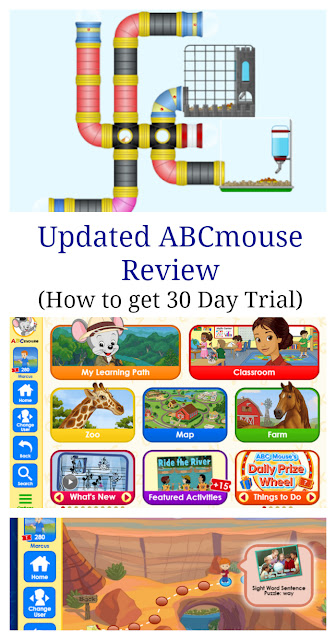
ABCmouse.com is a subscription-based educational platform designed for children aged two to eight, offering a comprehensive digital curriculum covering reading, mathematics, science, and art. The platform utilizes a "Step-by-Step Learning Path" to guide students through various levels, employing interactive games, puzzles, books, and songs to maintain engagement while meeting core educational benchmarks.
Understanding the Scope of ABCmouse.com
ABCmouse.com, developed by Age of Learning, Inc., is one of the most widely recognized digital learning resources for early childhood education. As of 2026, the platform continues to position itself as a supplemental tool for preschool, pre-k, kindergarten, and early elementary students. It is important to note that the service is intended to function as an enrichment tool rather than a replacement for traditional classroom instruction or professional homeschooling curricula.
The platform is structured into a modular, multi-level system. When a child logs in, they are placed on a "Learning Path" tailored to their age and skill level. This pathway is designed to be sequential, ensuring that learners do not progress to more difficult concepts before mastering the fundamentals. The curriculum spans several core subject areas, including:
- Reading and Language Arts: Featuring a heavy emphasis on phonics, sight words, and reading comprehension.
- Mathematics: Introducing foundational concepts like counting, addition, subtraction, and basic geometry through gamified activities.
- Science and Social Studies: Focusing on basic biology, environmental science, and fundamental geography.
- Art and Colors: Providing creative outlets through virtual painting, tracing, and coloring tools.
Analyzing the User Experience: What Reviews Tell Us
Reviews of ABCmouse.com often highlight a consistent dichotomy between the engagement level of the children and the administrative concerns of the parents. To understand the value proposition of the service, it is helpful to categorize feedback based on the primary aspects of the user experience.
Engagement and Gamification
One of the most praised aspects of the platform is its high level of interactivity. Reviews frequently note that children remain engaged for longer periods compared to static educational apps. The use of a "Ticket and Reward" system—where children earn virtual currency for completing lessons, which can then be used to purchase virtual items for their avatar or room—acts as a powerful motivational tool for younger learners. Parents often report that the system encourages independent play, allowing them to attend to other tasks while their child interacts with the curriculum.
Curricular Depth
From an educational standpoint, the feedback is generally positive regarding the breadth of the content. Users appreciate the sheer volume of activities; with thousands of individual learning modules, the risk of "content fatigue" is low for the average user. However, some educators and parents have noted that while the quantity is high, the depth of certain advanced subjects for older children (ages 7-8) may be limited compared to more specialized homeschooling platforms.
Subscription and Billing
A significant portion of user criticism involves the billing process. Historically, the platform has used a recurring subscription model. Many negative reviews focus on difficulties with the cancellation process or concerns regarding automatic renewals. It is essential for prospective users to maintain records of their subscription status and understand the specific cancellation deadlines associated with their billing cycle.
Comparative Overview: ABCmouse.com vs. Alternatives
Choosing an educational platform requires an understanding of how ABCmouse.com fits into the broader digital learning market. The following table provides a comparison based on features, target age, and primary utility.
| Feature | ABCmouse.com | Khan Academy Kids | Adventure Academy |
|---|---|---|---|
| Primary Age | 2–8 Years | 2–8 Years | 8–13 Years |
| Curriculum Type | Comprehensive | Core Subjects | Advanced/Gamified |
| Cost Model | Subscription | Free | Subscription |
| Offline Access | Limited | Partial | Limited |
| Customization | High | Low | Medium |
This table illustrates that while ABCmouse.com occupies a specific niche for early childhood development, other tools may be better suited for different stages of learning or specific budgetary requirements.
Navigating Technical Requirements and Accessibility
For the best experience, users must consider the hardware and software prerequisites for running the platform. In 2026, the platform is compatible with most modern web browsers, as well as dedicated mobile applications for iOS and Android tablets.
Device Compatibility
While the web-based version is functional on desktop computers, the tablet experience is often cited in reviews as being superior for younger children. The touch-screen interface is more intuitive for toddlers and preschoolers who may not yet have mastered mouse control. Before subscribing, it is advisable to test the platform on the specific device your child intends to use to ensure the interface responsiveness meets your expectations.
Troubleshooting Common Issues
- Connectivity: Because the platform relies on cloud-based content, a stable internet connection is required. Frequent buffering or loading errors are usually indicative of network instability rather than a failure of the platform itself.
- Account Syncing: If a child is using multiple devices, progress should sync automatically. If it does not, ensure the application is updated to the latest version and that the account is correctly synced to the server before exiting the app.
- Accessibility Settings: The platform offers adjustable settings to control the volume, difficulty, and duration of sessions. Parents should spend time in the "Parent Dashboard" to tailor these settings to their child’s specific needs before beginning the lessons.
The Role of the Parent Dashboard
The effectiveness of ABCmouse.com is largely dependent on the active involvement of the parent via the Parent Dashboard. This portal is not merely for managing billing; it is the control center for monitoring student progress.
Within the dashboard, parents can view reports that detail:
- Lessons Completed: A historical log of what the child has finished.
- Time Spent: An overview of how much time is being dedicated to specific subjects.
- Assessment Results: Performance data on quizzes and exercises.
Expert reviewers often emphasize that parents who ignore the dashboard frequently miss out on the platform's primary benefit: the ability to identify specific learning gaps. If a child repeatedly fails a math module, the dashboard will highlight this, allowing the parent to provide targeted supplemental support or to focus on that area during off-screen reading or play.
Limitations and Practical Considerations
No educational platform is a panacea for learning challenges. Potential users should be aware of several limitations:
- Screen Time Management: While the content is educational, it is still screen-based. Many experts recommend balancing digital learning with physical, tactile activities (such as writing on paper or using physical manipulatives) to ensure holistic development.
- Passive vs. Active Learning: There is a risk that a child might engage in "mindless clicking" to earn virtual rewards without actually absorbing the material. Parental observation is necessary to ensure the child is actually engaging with the curriculum rather than just speed-running through tasks.
- Financial Commitment: Before committing to a long-term plan, users should look for trial offers to ensure the platform’s pacing matches their child's learning speed. Evaluating the service during a trial period is the most effective way to determine if it provides sufficient value for your specific household.
Frequently Asked Questions
Is ABCmouse.com suitable for children with learning disabilities?
The platform’s self-paced nature can be beneficial for some, but it lacks specific therapeutic features. It is best used as a supplement under the guidance of a professional who can determine if the interface supports the child’s specific learning requirements.
Can multiple children use one account?
Yes, the platform allows for multiple profiles under a single subscription. This is a significant cost-saving feature for families with multiple children within the target age range. Each child will have their own distinct Learning Path and progress tracking.
Does the curriculum align with state standards?
The curriculum is designed to reflect common educational standards for early childhood development in the United States. However, it should be viewed as an alignment with developmental milestones rather than a rigid match for any specific state's K-12 public school requirements.
How do I cancel my subscription to avoid future charges?
Cancellation must be performed through the Parent Dashboard or via the specific payment processor (such as the Apple App Store or Google Play Store) used at the time of purchase. Ensure you receive a confirmation email once the cancellation process is finalized.
Is the content updated regularly?
Yes, the development team periodically adds new activities, books, and interactive games to keep the content fresh. While the foundational curriculum remains consistent, the library of supplemental activities continues to grow.
Final Recommendation
ABCmouse.com remains a robust, well-structured resource for families seeking to supplement early childhood education with a digital, gamified component. Its primary strength lies in its ability to keep young children motivated through consistent, age-appropriate challenges.
For the best results, treat the platform as a collaborative tool rather than a passive babysitting service. By actively monitoring the Parent Dashboard, setting realistic screen-time boundaries, and integrating the digital lessons with real-world practice, parents can maximize the educational value provided by the service. If you are uncertain whether the platform is the right fit for your child’s learning style, utilize the available introductory trial periods to assess the interface and content quality firsthand before committing to a long-term plan.