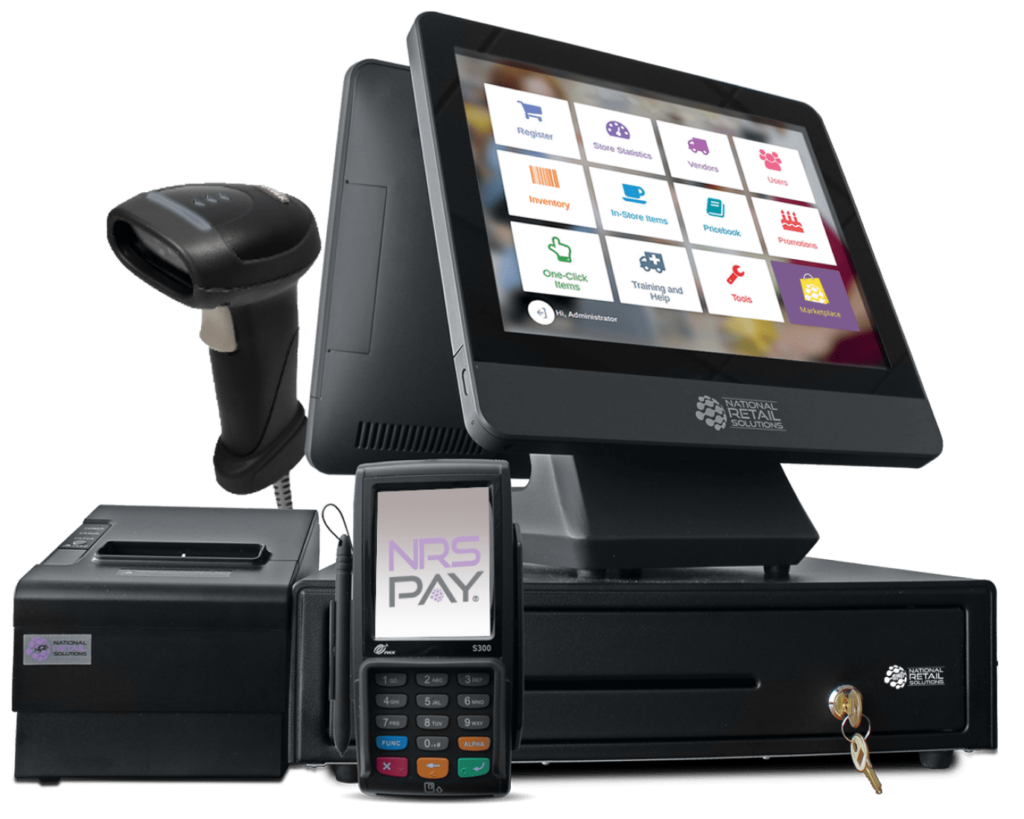
Selecting the right point-of-sale (POS) system requires balancing hardware integration, software capabilities, and the specific transactional needs of your business model. Whether you operate a high-volume retail storefront, a fast-paced dining establishment, or a service-based enterprise, the modern POS landscape in 2026 offers diverse solutions ranging from mobile-first cloud platforms to robust, on-premise legacy infrastructures designed for complex inventory management.
Understanding Point-of-Sale Architecture
At its core, a POS system is the central nervous system of a business. It encompasses the hardware—such as card terminals, receipt printers, barcode scanners, and cash drawers—and the software that processes payments, tracks inventory, manages customer relationships, and generates financial reporting.
The primary distinction in today’s market lies between cloud-based (SaaS) systems and on-premise (legacy) systems. Cloud-based systems store data on remote servers, offering real-time access from anywhere with an internet connection, which is essential for businesses with multiple locations or a mobile workforce. Conversely, on-premise systems host data locally on in-house servers. While this offers greater independence from internet connectivity, it often requires more significant upfront hardware investments and manual software updates.
Categorizing POS Solutions by Business Type
Different industries demand different workflows. A restaurant POS system prioritizes kitchen display systems (KDS), table management, and order modifiers. A retail system focuses on SKU management, stock alerts, and multi-channel synchronization.
1. Retail-Focused Systems
Retail environments require high-speed barcode scanning, sophisticated inventory tracking, and loyalty program integration. Systems like Shopify POS and Lightspeed Retail excel here by bridging the gap between physical storefronts and e-commerce platforms. These systems provide unified stock levels, ensuring that a sale made online is immediately reflected in the physical store’s count.
2. Food and Beverage (Hospitality) Systems
Hospitality POS solutions, such as Toast or TouchBistro, are engineered for the rapid pace of dining. These systems handle complex order workflows, such as "course firing," seat-number tracking, and split-check functionality. They often integrate directly with online ordering apps and third-party delivery aggregators to consolidate incoming orders onto a single screen.
3. Service and Appointment-Based Systems
Businesses like salons, spas, or consultancy firms require POS solutions that integrate seamlessly with booking engines. Square Appointments or GlossGenius allow the POS to act as both a checkout terminal and a scheduling coordinator, automatically syncing client history with service payments to streamline the customer experience.
Key Factors for Evaluating POS Providers
When reviewing a list of potential providers, focus on more than just the monthly subscription fee. Total Cost of Ownership (TCO) is a more accurate metric for long-term financial planning.
| Feature Area | Why It Matters | Evaluation Criteria |
|---|---|---|
| Payment Processing | Determines transaction fees and settlement speed. | Check for flat-rate vs. interchange-plus pricing. |
| Hardware Compatibility | Ensures existing peripherals work with new software. | Confirm if the software is hardware-agnostic. |
| Inventory Management | Prevents stockouts and over-ordering. | Look for real-time tracking and automated reorder points. |
| Integration Capability | Allows the POS to connect to accounting/CRM tools. | Verify API availability for third-party software. |
| Offline Functionality | Maintains operations during network outages. | Test how transactions sync once back online. |
Prerequisites for Implementation
Before committing to a POS provider, your business must meet several prerequisites to ensure a smooth transition. First, audit your current data: are your product catalogs, customer databases, and employee permissions digitized? Moving from paper-based records to a digital system is significantly more challenging than migrating between two digital platforms.
Second, verify your network infrastructure. Cloud-based systems rely heavily on high-speed, stable internet. In regions where connectivity is inconsistent, you may need a system that supports "offline mode," allowing the POS to function locally and sync data once the connection is restored. Failure to ensure network stability can lead to downtime during peak business hours, directly impacting revenue.
Steps to Selecting and Deploying a System
- Define Your Requirements: Write down the "must-have" features versus "nice-to-have" features. Do you need offline mode? Do you sell internationally, requiring multi-currency support?
- Review Hardware Kits: Most providers offer bundles that include a tablet stand, card reader, and printer. Verify if these are proprietary (locked to one provider) or if they use standard interfaces like Bluetooth or USB-C.
- Request a Sandbox Demo: Never sign a contract based solely on marketing materials. Request access to a test version or a live demo to simulate your most common transaction types.
- Data Migration: Ensure the provider has a clear path for importing your existing CSV or Excel files. Poor data migration is the leading cause of setup delays.
- Staff Training: Create a "cheat sheet" for your employees. Many systems include comprehensive video training modules; mandate completion before the go-live date.
Operational Limitations and Common Pitfalls
One common mistake businesses make is ignoring the contract lock-in periods. Some POS providers offer "free" or heavily discounted hardware if you sign a multi-year exclusive processing agreement. While this reduces upfront costs, it limits your ability to switch payment processors if their rates increase or if your transaction volume grows enough to justify a more competitive interchange-plus deal.
Additionally, pay close attention to the "support tier." In 2026, many entry-level subscriptions offer support only via email or AI-driven chatbots. For a business that operates 12+ hours a day, the lack of 24/7 phone support can be a catastrophic bottleneck during a hardware failure or payment processing outage. Always weigh the cost of a higher-tier support plan against the potential revenue loss of one hour of downtime.
Legal and Financial Considerations
POS systems process sensitive financial data, which falls under PCI-DSS (Payment Card Industry Data Security Standard) compliance. Ensure your chosen system is PCI-compliant out of the box. You are responsible for how you handle this data, but using a reputable provider shifts the burden of technical security updates to them.
Furthermore, consult your local tax authorities regarding sales tax automation. Many modern POS systems have built-in tax engines that automatically update rates based on your physical location and the specific items being sold. Relying on automated tax calculation reduces the margin for human error during filing, though it does not replace the need for professional accounting oversight.
Note: This information is for educational purposes. POS systems involve complex financial and data security regulations. Consult with a qualified accountant or legal advisor regarding your specific business requirements and tax obligations.
Frequently Asked Questions
How does internet downtime affect a cloud-based POS? Most modern cloud POS systems include an offline mode. Transactions are captured locally on the hardware and synced with the cloud as soon as the internet connection is re-established. However, you cannot process online payments or verify gift card balances while offline.
Are tablet-based POS systems durable enough for busy restaurants? Yes, but hardware selection is key. Using consumer-grade tablets without heavy-duty enclosures is a common mistake. Most restaurants use commercial-grade mounting systems and spill-proof covers to protect hardware from the kitchen and bar environments.
Can I switch POS systems after I start? Yes, but it is technically intensive. The most difficult part of switching is exporting your inventory history and customer data from the old system and cleaning it for import into the new one. Always back up your data locally before initiating a migration.
Do I need a separate payment processor? Some POS providers are "integrated" (providing both the software and the payment processing), while others are "agnostic" (allowing you to connect to a processor of your choice). Integrated systems are generally easier to set up, but agnostic systems often provide more flexibility regarding transaction fees.
What is the difference between an SKU and a PLU? An SKU (Stock Keeping Unit) is a unique alphanumeric code assigned by the retailer to track inventory. A PLU (Price Look-Up) code is a standardized number used primarily in grocery and produce to identify bulk items that do not have barcodes.
Recommendation for Next Actions
If you are currently evaluating options, start by creating an inventory spreadsheet of your current SKUs, their costs, and their sale prices. This document is the foundation of any POS setup. Once you have this data, contact the top three providers that match your specific business segment (e.g., retail, dining, or services) and ask specifically about their data migration process and the duration of their standard service agreement. Prioritize a system that offers a clear, transparent exit strategy and robust, human-led technical support.